Sketchup and Kerkythea
-
Been a lurker on here for a while, just been collecting SU plugins and mopping up information like a sponge

I have created a Formula One car model for the Khamsin Virtual Racecar Challenge and ow want to produce some realistic looking renders to show off my car, the only problem is that when I have used Kerkythea and various materials I am getting patchy renders.To explain better here are some screenshots:

This was my first attempt, I used the basic plastic vol 2 mat pack for the body work.
The main bodywork in blue has developed some light patches. I cannot remember which preset I used for rendering but it wasnt a highly detailed one as it was processed in 30mins.Next up I tried a render using the car pain vol 2 mat pack and then preset 20:

As you can see I am still getting the light patches on the nose, sidepods and around the head protection.This is what the model looks like in Kerkythea before rendering:

...and this is what it is like in Sketchup:
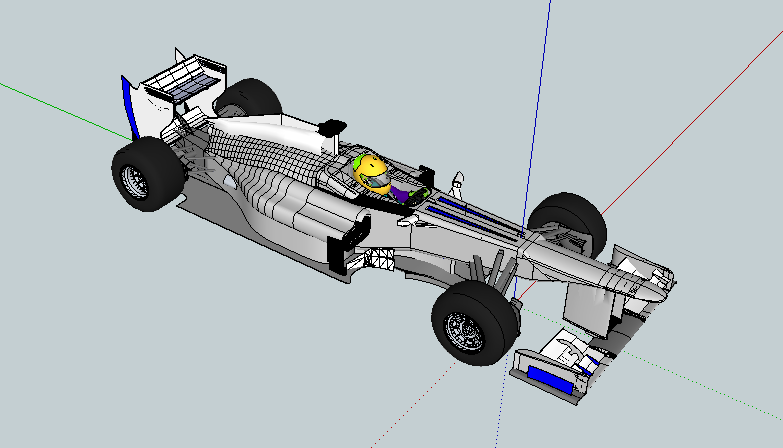
I have used minimal colours in Sketchup so that I could change areas easier in Kerkythea when adding better materials.
Does anyone have any idea as to why I am getting this light patches? -
not sure but look at it in monochrome- are there back faces where those patches are? thanks for posting -- belated welcome!
-
Thank you, a quick test on a single part shows that seems to have fixed things


Hello! It looks like you're interested in this conversation, but you don't have an account yet.
Getting fed up of having to scroll through the same posts each visit? When you register for an account, you'll always come back to exactly where you were before, and choose to be notified of new replies (either via email, or push notification). You'll also be able to save bookmarks and upvote posts to show your appreciation to other community members.
With your input, this post could be even better 💗
Register Login


Advertisement