WoodGrain Direction in Materials
-
Hello SUsers,
Is there a kind of plugin or other manner to automaticly align a material to the longest side of a face?
It should be very handy when you give a "wood"material to let's say a table or chair, and the direction of the wood-grain is automaticaly oriented so to follow the length of "the piece of wood".
If no plugin exists, maybe an idea for a new one? Or with a shortcut? Or a simple tool to click on a face of a material and makes its oriëntation turn for 90 degrees?jorisbert
belgium
on mac
-
You can already adjust the grain direction if you have applied the material to the faces. Simply right click on the face and choose Texture. You'll get some push pins you can move around to adjust the material. The green one will allow you to rotate the material. If you are going to do a simple 90° rotation, just right click again and choose Rotate>90°.
Once you've got a vertical and a horizontal texture in the model, get the Paint Buck and hold command to sample those materials before applying them to other faces with the same orientation. Make sure you are applying the material to the faces. Also, you'll find wood grain materials easier to apply correctly if you adjust the bounding box to fit the geometry tightly. You'll want to be making components for that, though.
-
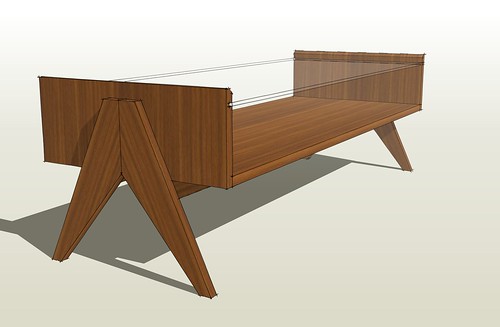
yeah but what he's talking about would be frickin awesome... something that aligned materials long way... but how would it know what long way was? I guess every texture you used in conjunction with the plugin would have to be a certain direction from default. I could like that.


-
I've wanted a plugin that just turns the pattern 90 deg on a click. (sort of--I've done nothing towards that goal....) I dislike the native texture orienting tool for this-tedious. ThroughPaint is pretty good though it is a bit overkill just for this, and I am finding it glitchy.
Also with the native tool--use right click a second time. Right click the face, choose the Texture / Position, then right click again press on the texture, and the context menu contains "rotate 90 deg." etc.
-
True that the texture positioning tools are a bit awkward but once you adjusted the material on one face, you can always sample it from there and apply the same positioning to the other faces. That part is already faster.
-
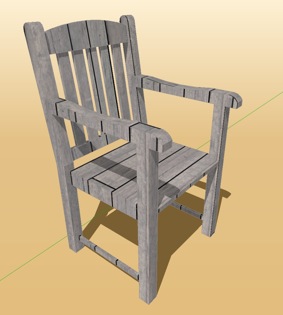
Yes, it would be nice if there was a way for the texture to be applied automatically and be correctly oriented. Although most of the time the grain runs the long way, it doesn't always. My example shows that.
Since most of the time for wood grain images the grain runs one of two directions, I find the method I mentioned of right clicking a second time and using Rotate>90° works fine and then sampling from similarly oriented areas makes applying the materials to other surfaces very fast.
-
Any new development in 2020?

-
What kind of new development are you expecting?




Hello! It looks like you're interested in this conversation, but you don't have an account yet.
Getting fed up of having to scroll through the same posts each visit? When you register for an account, you'll always come back to exactly where you were before, and choose to be notified of new replies (either via email, or push notification). You'll also be able to save bookmarks and upvote posts to show your appreciation to other community members.
With your input, this post could be even better 💗
Register Login


Advertisement