Turning a selection into a face?
-
You should not really have that method.
You should have written an additional method to do a multi-face offset.What do you want the selection to hold at the end of the multi-face offset ?
(Also.. ALWAYS check
if resultsfrom an inputbox, in case the user cancels the dialog.) -
@dan rathbun said:
You should not really have that method.
What do you want the selection to hold at the end of the multi-face offset ?I wanted all selected faces to be offset and revealed
I was unaware that I would have to write a muiti-face offset routine
-
TIG's ....TIG-Smart_offset.rb does a great job offsetting multiple faces.

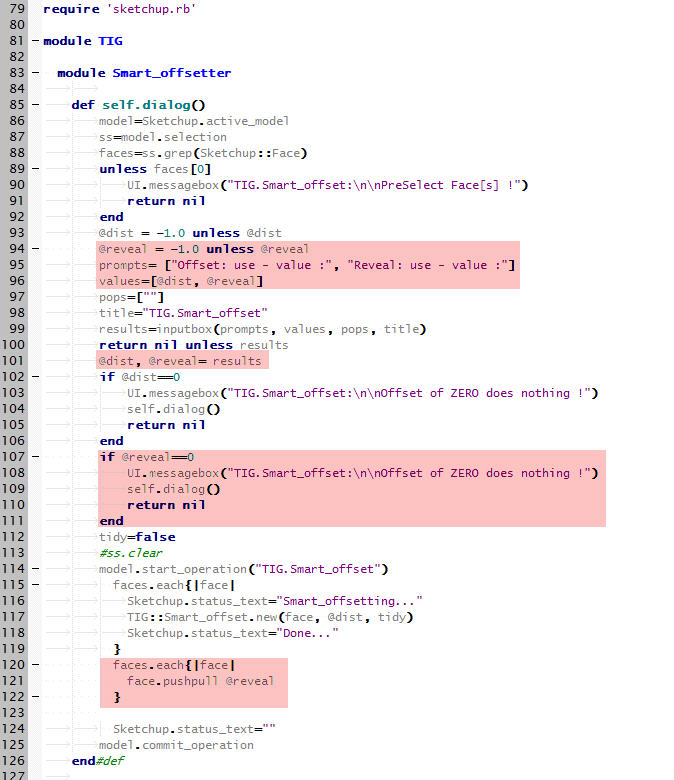
I hope he does not mind me learning more about Ruby using his script.I added the following highlighted code to his script incorporating a reveal option.
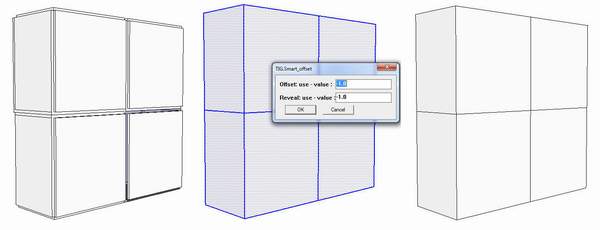
Unfortunately this added complexity causes faces which share a common edge not to work well, with the reveal option, when pushpull is used.
-
When you make a change like that.. you need to change the top level namespace from
TIGtoTomot.. also I do not understand your use of the word "reveal" (which means "to show" or "to make visible".)
Can you post an image from the model of the final result you wish to achieve ?
-
@Tomot
Yes, please use your own Tomot namespace to avoid confusion with my TIG one...@Dan
A 'reveal' [noun not a verb] is an architectural term for the 'sides' of the hole into which something like a window will be fitted... The window's 'reveals' are typically just the two vertical sides of its opening, which are arranged at [or near] right-angles to the main wall-face; the top 'side' is called the 'head' and the bottom one the 'sill': the use of 'reveal' for all four is correct, but somewhat unspecific and perhaps brings to mind a simple 'recess' in a wall with nothing inserted into it [e.g. 'the four reveals of that recess']. So I think Tomot is using the term 'reveal' to refer to all of the new face-parts that are created perpendicular to the main face: which will only be true 'reveals' if the pushpull were 'inwards', forming a 'recess' with 'reveals'; if it were 'outwards' the new form makes an upstanding 'plateau', and so it will technically not have 'reveals', but just 'sides' [cliffs!]...
-
-
@tig said:
@Tomot
Yes, please use your own Tomot namespace to avoid confusion with my TIG one...TIG, I'm simply looking a your script and adding additional functonality, naturally and without question this is your script. This might turnout to be a good architectural addition and I would hope you could add it to your list of accomplished rubies

However as I already stated, while the Offset portion of the script has no problems, because the offset faces does not interfere with any adjoining face. The added "Reveal option" does have problems, because it introduces the problem of how "pushpull" can't effectively deal with push pulling shared faces. I recall there had been discussion about shared faces and pushpull but I could not find any solutions.

-
@tomot said:
TIG is right, If you were working in an architectural office and did not know what a reveal was, your peers would wonder how you got the job.
Which, of course tells you correctly that I have not yet worked in architectural engineering. (Only mechanical, electrical, electronic and systems with a combination of those [ie, railway, vehicles, aircraft, and commercial broadcasting.])
-
Referring to my previous code posting: HERE
To get multiple faces rather than the first face (which is not may not work, as the selection's order may not be returned in the order the user picked,) ...
      UI.add_context_menu_handler {|popup|
        unless Sketchup.active_model.selection.empty?
          sel = Sketchup.active_model.selection
          if sel.single_object? && sel[0].is_a?(Sketchup;;Face)
            face = sel[0]
            popup.add_item('Offset Face',10) { get_dist(face) }
          else
            faces = sel.grep(Sketchup;;Face)
            unless faces.empty? # (empty array if no face was selected)
              popup.add_item('Offset Selected Faces',11) {
                if get_values()
                  offset_multi_faces(faces)
                end
             }
            end
          end
        end
      }
The
get_values()dialog method would need changing (fromget_dist,) to just set the variables (as you did,) and returntrueto continue the command, orfalseif the user canceled the dialog, meaning they wished to cancel the command.Then a new method
offset_multi_faces(faces)would iterate thefacesarray, callingoffset_a_face()for each face member in the array. -
My Smart_offset method should return an array of the face[s] made by the offset [excluding the original face], which in your example will be just the inner new rectangular face.
So if you move the pushpull code into the block that is offsetting each face in turn to be something like:faces.each{|face| newfaces=TIG;;Smart_offset.new(face, @dist, tidy) newfaces.each{|newface|newface.pushpull(@reveal)}if newfaces }it might work ???
-
@dan rathbun said:
selection's order may not be returned in the order the user picked,) ...
That is an entire new can of worms!....I don't know how SU implements a user select all picking order. I also see different results each time I use select all If you copy and paste each of the 4 attached cubes and run the script on each of the 4 cubes separate, sometimes the script gets the reveal right, most of the time it does not.
-
If you want to find the newly made reveal faces after the pushpull then here are the steps...
Before you pushpull make an array of all active faces:
facesIn=@model.active_entities.grep(Sketchup::Face)
Now do the pushpull and then find all new faces....
facesOut=@model.active_entities.grep(Sketchup::Face)-facesIn
Next remove all faces that share the same normal as the original 'face'
reveals=[]; facesOut.each{|f|reveals << f unless f.normal==face.normal}
Now the array 'reveals' contains all of the new reveal-faces that were made by that pushpull...
If there's a chance that the offsetting or pushpulling might delete the original 'face' then setnorm=face.normalearlier in the code so that you have a record of it for use later on in ...f.normal==norm... -
@tig said:
reveals=[]; facesOut.each{|f|reveals << f unless f.normal==face.normal}Can be written as one statement:
reveals = facesOut.select{ |f| f.normal != face.normal } -
I know... but I thought it was a bit clearer what was happening the way I presented t
-
With thanks again to the 3 Ruby Amigos
I will work on implementing your suggestions this weekend.






Advertisement