sketchucation logo sketchucation
    • 登入
    Oops, your profile's looking a bit empty! To help us tailor your experience, please fill in key details like your SketchUp version, skill level, operating system, and more. Update and save your info on your profile page today!
    ⚠️ Important | Libfredo 15.6b introduces important bugfixes for Fredo's Extensions Update

    Turning a selection into a face?

    已排程 已置頂 已鎖定 已移動 Developers' Forum
    40 貼文 4 Posters 1.3k 瀏覽 4 Watching
    正在載入更多貼文
    • 從舊到新
    • 從新到舊
    • 最多點贊
    回覆
    • 在新貼文中回覆
    登入後回覆
    此主題已被刪除。只有擁有主題管理權限的使用者可以查看。
    • Dan RathbunD 離線
      Dan Rathbun
      最後由 編輯

      @Tomot ... you have no profile information showing.

      (1) What SketchUp version ?

      (2) What SketchUp edition (Free or Pro) ?

      (3) What Platform & Operating System ?

      Lastly... if you are using an old version that does not support the 2nd ordinal position argument for add_item(), then remove that argument, and the menu items will just be at the end of the popup menu.

      The popup menu items are really just for testing... you can directly call the methods just as the menu items do, and remove the popup menu code.

      The code is an example.

      I'm not here much anymore.

      1 條回覆 最後回覆 回覆 引用 0
      • T 離線
        tomot
        最後由 編輯

        @dan rathbun said:

        @Tomot ... you have no profile information showing.

        (2) What SketchUp edition (Free or Pro) ?

        Pro, My bad its working, after update!

        [my plugins](http://thingsvirtual.blogspot.ca/)
        tomot

        1 條回覆 最後回覆 回覆 引用 0
        • Dan RathbunD 離線
          Dan Rathbun
          最後由 編輯

          @tomot said:

          Pro, My bad its working, after update!

          You may also be interested in this from TIG:

          [Plugin] TIG-Smart_offset v2.1

          I have not tried it, so I do not know if it sets the new offset face as the selection.

          TIG ?

          I'm not here much anymore.

          1 條回覆 最後回覆 回覆 引用 0
          • TIGT 離線
            TIG Moderator
            最後由 編輯

            @dan rathbun said:

            @tomot said:

            Pro, My bad its working, after update!

            You may also be interested in this from TIG:

            [Plugin] TIG-Smart_offset v2.1

            I have not tried it, so I do not know if it sets the new offset face as the selection.

            TIG ?
            The originally selected face remains selected, but it should 'return' an array of the new face[s] formed when run via code...

            TIG

            1 條回覆 最後回覆 回覆 引用 0
            • T 離線
              tomot
              最後由 編輯

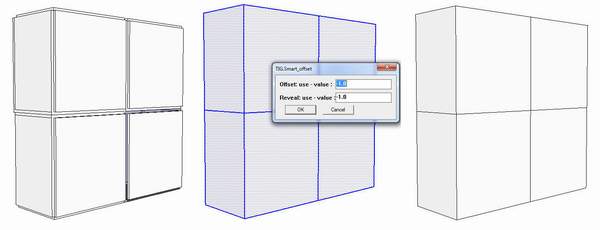
              I would like to take offset 1 step further: namely allowing the selection of more than one face.
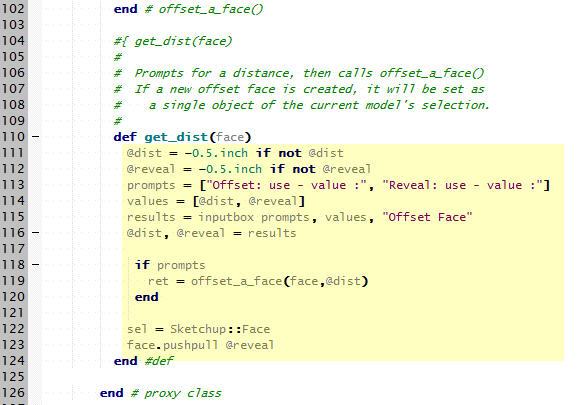
              I revised Dan's script and added a secondary Reveal offset to the menu. The Reveal menu item represents the depth of the reveal.

              The reason behind my initial interest in RickW's offset.rb was to use it to provide reveals
              of selected faces, using SketchUp, for proposed concrete faces, be they cast-in-place or precast.

              Dan correctly identified users selecting more than 1 face, before the offset professing occurs.
              I need a hint 🎉 so I can I change the code to allow selecting more than 1 face?
              The attached pic shows my added revised code, the revised code is also attached.

              offset1.jpg


              offset.rb

              [my plugins](http://thingsvirtual.blogspot.ca/)
              tomot

              1 條回覆 最後回覆 回覆 引用 0
              • Dan RathbunD 離線
                Dan Rathbun
                最後由 編輯

                You should not really have that method.
                You should have written an additional method to do a multi-face offset.

                What do you want the selection to hold at the end of the multi-face offset ?

                (Also.. ALWAYS check if results from an inputbox, in case the user cancels the dialog.)

                I'm not here much anymore.

                1 條回覆 最後回覆 回覆 引用 0
                • T 離線
                  tomot
                  最後由 編輯

                  @dan rathbun said:

                  You should not really have that method.
                  What do you want the selection to hold at the end of the multi-face offset ?

                  I wanted all selected faces to be offset and revealed
                  I was unaware that I would have to write a muiti-face offset routine 😞

                  [my plugins](http://thingsvirtual.blogspot.ca/)
                  tomot

                  1 條回覆 最後回覆 回覆 引用 0
                  • T 離線
                    tomot
                    最後由 編輯

                    TIG's ....TIG-Smart_offset.rb does a great job offsetting multiple faces. 🎉
                    I hope he does not mind me learning more about Ruby using his script.

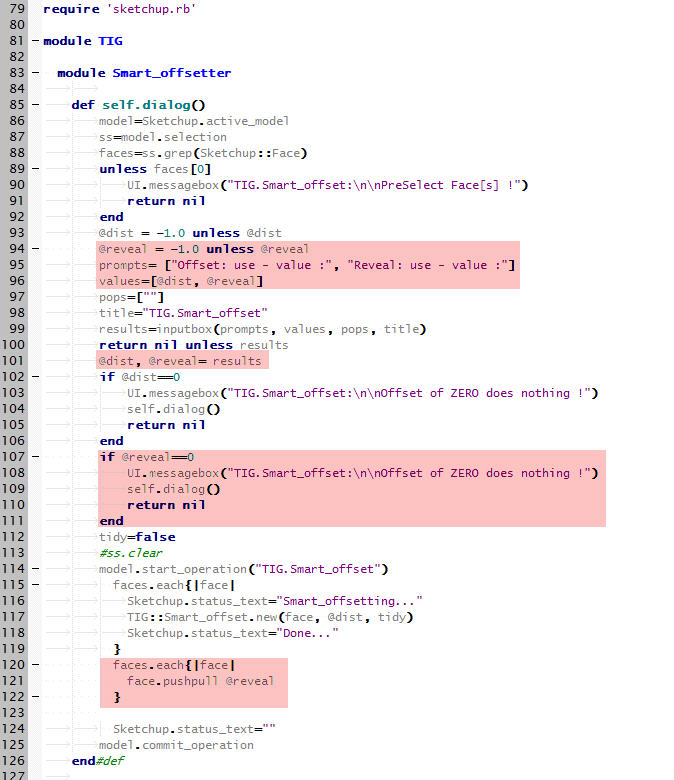
                    I added the following highlighted code to his script incorporating a reveal option.
                    Unfortunately this added complexity causes faces which share a common edge not to work well, with the reveal option, when pushpull is used.

                    offset1.jpg

                    [my plugins](http://thingsvirtual.blogspot.ca/)
                    tomot

                    1 條回覆 最後回覆 回覆 引用 0
                    • Dan RathbunD 離線
                      Dan Rathbun
                      最後由 編輯

                      When you make a change like that.. you need to change the top level namespace from TIG to Tomot

                      .. also I do not understand your use of the word "reveal" (which means "to show" or "to make visible".)

                      Can you post an image from the model of the final result you wish to achieve ?

                      I'm not here much anymore.

                      1 條回覆 最後回覆 回覆 引用 0
                      • TIGT 離線
                        TIG Moderator
                        最後由 編輯

                        @Tomot
                        Yes, please use your own Tomot namespace to avoid confusion with my TIG one...

                        @Dan
                        A 'reveal' [noun not a verb] is an architectural term for the 'sides' of the hole into which something like a window will be fitted... The window's 'reveals' are typically just the two vertical sides of its opening, which are arranged at [or near] right-angles to the main wall-face; the top 'side' is called the 'head' and the bottom one the 'sill': the use of 'reveal' for all four is correct, but somewhat unspecific and perhaps brings to mind a simple 'recess' in a wall with nothing inserted into it [e.g. 'the four reveals of that recess']. So I think Tomot is using the term 'reveal' to refer to all of the new face-parts that are created perpendicular to the main face: which will only be true 'reveals' if the pushpull were 'inwards', forming a 'recess' with 'reveals'; if it were 'outwards' the new form makes an upstanding 'plateau', and so it will technically not have 'reveals', but just 'sides' [cliffs!]... 😒

                        TIG

                        1 條回覆 最後回覆 回覆 引用 0
                        • T 離線
                          tomot
                          最後由 編輯

                          @tig said:

                          @Tomot
                          Yes, please use your own Tomot namespace to avoid confusion with mt TIG one...

                          TIG is right, If you were working in an architectural office and did not know what a reveal was, your peers would wonder how you got the job. 🤣


                          box3.JPG

                          [my plugins](http://thingsvirtual.blogspot.ca/)
                          tomot

                          1 條回覆 最後回覆 回覆 引用 0
                          • T 離線
                            tomot
                            最後由 編輯

                            @tig said:

                            @Tomot
                            Yes, please use your own Tomot namespace to avoid confusion with my TIG one...

                            TIG, I'm simply looking a your script and adding additional functonality, naturally and without question this is your script. This might turnout to be a good architectural addition and I would hope you could add it to your list of accomplished rubies 😄

                            However as I already stated, while the Offset portion of the script has no problems, because the offset faces does not interfere with any adjoining face. The added "Reveal option" does have problems, because it introduces the problem of how "pushpull" can't effectively deal with push pulling shared faces. I recall there had been discussion about shared faces and pushpull but I could not find any solutions. 😢

                            [my plugins](http://thingsvirtual.blogspot.ca/)
                            tomot

                            1 條回覆 最後回覆 回覆 引用 0
                            • Dan RathbunD 離線
                              Dan Rathbun
                              最後由 編輯

                              @tomot said:

                              TIG is right, If you were working in an architectural office and did not know what a reveal was, your peers would wonder how you got the job.

                              Which, of course tells you correctly that I have not yet worked in architectural engineering. (Only mechanical, electrical, electronic and systems with a combination of those [ie, railway, vehicles, aircraft, and commercial broadcasting.])

                              I'm not here much anymore.

                              1 條回覆 最後回覆 回覆 引用 0
                              • Dan RathbunD 離線
                                Dan Rathbun
                                最後由 編輯

                                Referring to my previous code posting: HERE

                                To get multiple faces rather than the first face (which is not may not work, as the selection's order may not be returned in the order the user picked,) ...

                                      UI.add_context_menu_handler {|popup|
                                        unless Sketchup.active_model.selection.empty?
                                          sel = Sketchup.active_model.selection
                                          if sel.single_object? && sel[0].is_a?(Sketchup;;Face)
                                            face = sel[0]
                                            popup.add_item('Offset Face',10) { get_dist(face) }
                                          else
                                            faces = sel.grep(Sketchup;;Face)
                                            unless faces.empty? # (empty array if no face was selected)
                                              popup.add_item('Offset Selected Faces',11) {
                                                if get_values()
                                                  offset_multi_faces(faces)
                                                end
                                             }
                                            end
                                          end
                                        end
                                      }


                                The get_values() dialog method would need changing (from get_dist,) to just set the variables (as you did,) and return true to continue the command, or false if the user canceled the dialog, meaning they wished to cancel the command.

                                Then a new method offset_multi_faces(faces) would iterate the faces array, calling offset_a_face() for each face member in the array.

                                I'm not here much anymore.

                                1 條回覆 最後回覆 回覆 引用 0
                                • TIGT 離線
                                  TIG Moderator
                                  最後由 編輯

                                  My Smart_offset method should return an array of the face[s] made by the offset [excluding the original face], which in your example will be just the inner new rectangular face.
                                  So if you move the pushpull code into the block that is offsetting each face in turn to be something like:

                                  faces.each{|face|
                                    newfaces=TIG;;Smart_offset.new(face, @dist, tidy)
                                    newfaces.each{|newface|newface.pushpull(@reveal)}if newfaces
                                  }
                                  

                                  it might work ???

                                  TIG

                                  1 條回覆 最後回覆 回覆 引用 0
                                  • T 離線
                                    tomot
                                    最後由 編輯

                                    @dan rathbun said:

                                    selection's order may not be returned in the order the user picked,) ...

                                    That is an entire new can of worms!....I don't know how SU implements a user select all picking order. I also see different results each time I use select all If you copy and paste each of the 4 attached cubes and run the script on each of the 4 cubes separate, sometimes the script gets the reveal right, most of the time it does not.

                                    [my plugins](http://thingsvirtual.blogspot.ca/)
                                    tomot

                                    1 條回覆 最後回覆 回覆 引用 0
                                    • TIGT 離線
                                      TIG Moderator
                                      最後由 編輯

                                      If you want to find the newly made reveal faces after the pushpull then here are the steps...
                                      Before you pushpull make an array of all active faces:
                                      facesIn=@model.active_entities.grep(Sketchup::Face)
                                      Now do the pushpull and then find all new faces....
                                      facesOut=@model.active_entities.grep(Sketchup::Face)-facesIn
                                      Next remove all faces that share the same normal as the original ' face'
                                      reveals=[]; facesOut.each{|f|reveals << f unless f.normal==face.normal}
                                      Now the array ' reveals' contains all of the new reveal-faces that were made by that pushpull...
                                      If there's a chance that the offsetting or pushpulling might delete the original ' face' then set norm=face.normal earlier in the code so that you have a record of it for use later on in ... f.normal==norm...

                                      TIG

                                      1 條回覆 最後回覆 回覆 引用 0
                                      • thomthomT 離線
                                        thomthom
                                        最後由 編輯

                                        @tig said:

                                        reveals=[]; facesOut.each{|f|reveals << f unless f.normal==face.normal}

                                        Can be written as one statement:
                                        reveals = facesOut.select{ |f| f.normal != face.normal }

                                        Thomas Thomassen — SketchUp Monkey & Coding addict
                                        List of my plugins and link to the CookieWare fund

                                        1 條回覆 最後回覆 回覆 引用 0
                                        • TIGT 離線
                                          TIG Moderator
                                          最後由 編輯

                                          I know... but I thought it was a bit clearer what was happening the way I presented t 😒

                                          TIG

                                          1 條回覆 最後回覆 回覆 引用 0
                                          • T 離線
                                            tomot
                                            最後由 編輯

                                            With thanks again to the 3 Ruby Amigos 😄 I will work on implementing your suggestions this weekend.

                                            [my plugins](http://thingsvirtual.blogspot.ca/)
                                            tomot

                                            1 條回覆 最後回覆 回覆 引用 0
                                            • 1
                                            • 2
                                            • 2 / 2
                                            • 第一個貼文
                                              最後的貼文
                                            Buy SketchPlus
                                            Buy SUbD
                                            Buy WrapR
                                            Buy eBook
                                            Buy Modelur
                                            Buy Vertex Tools
                                            Buy SketchCuisine
                                            Buy FormFonts

                                            Advertisement