sketchucation logo sketchucation
    • Login
    Oops, your profile's looking a bit empty! To help us tailor your experience, please fill in key details like your SketchUp version, skill level, operating system, and more. Update and save your info on your profile page today!
    ⚠️ Important | Libfredo 15.6b introduces important bugfixes for Fredo's Extensions Update

    [Plugin] Stepped Extrude [Updated 20121106]

    Scheduled Pinned Locked Moved Plugins
    28 Posts 18 Posters 30.7k Views 18 Watching
    Loading More Posts
    • Oldest to Newest
    • Newest to Oldest
    • Most Votes
    Reply
    • Reply as topic
    Log in to reply
    This topic has been deleted. Only users with topic management privileges can see it.
    • srxS Offline
      srx
      last edited by

      Thanks! It could be useful for making stairs also... or SU logo πŸ˜„

      www.saurus.rs

      1 Reply Last reply Reply Quote 0
      • B Offline
        Ben Ritter
        last edited by

        Thank you Ramiro.

        1 Reply Last reply Reply Quote 0
        • pilouP Offline
          pilou
          last edited by

          Cool! 😎
          Works fine with the Multiple Offset by Sdmitch πŸ˜‰

          sol.jpg

          Frenchy Pilou
          Is beautiful that please without concept!
          My Little site :)

          1 Reply Last reply Reply Quote 0
          • pilouP Offline
            pilou
            last edited by

            Have you the same but only for lines ? ( with no PushPull of faces )
            Like this
            only lines are moving with Stepped Extrude , and there is no creation of faces !

            like a creation of levels of terrain for example πŸ˜„

            Frenchy Pilou
            Is beautiful that please without concept!
            My Little site :)

            1 Reply Last reply Reply Quote 0
            • pbacotP Offline
              pbacot
              last edited by

              Pilou, The first post claims this is possible. I haven't tried. Peter

              MacOSX MojaveSketchUp Pro v19 Twilight v2 Thea v3 PowerCADD

              1 Reply Last reply Reply Quote 0
              • pilouP Offline
                pilou
                last edited by

                No it's draw also a face when you click a line like when you click on a face! πŸ˜‰

                I just want stepp the lines ! πŸ˜„

                Frenchy Pilou
                Is beautiful that please without concept!
                My Little site :)

                1 Reply Last reply Reply Quote 0
                • sumasterS Offline
                  sumaster
                  last edited by

                  Hi rami_lpm AND sdmitch,

                  a Need of previous history Amount/Distance . . . .

                  means create 2 face and use this tool and 1st face extrude 1 m. and 2nd face extrude the same amount . . .

                  now its not working . . . . .

                  thanks . . . .

                  Thank you,
                  SUmaster

                  1 Reply Last reply Reply Quote 0
                  • bsintzelB Offline
                    bsintzel
                    last edited by

                    Simple, functional, useful and free...what more can one ask for. Well done πŸ‘

                    I've taken obfuscating to a whole new level!

                    1 Reply Last reply Reply Quote 0
                    • R Offline
                      rv1974
                      last edited by

                      The perfect fuse of simplicity and effectiveness.
                      Salute to the authors.

                      1 Reply Last reply Reply Quote 0
                      • I Offline
                        icepam
                        last edited by

                        Thanks for a much useful plugin. I had coded something similar in AutoLisp a few years ago to do this in Autocad, precisely for stairs and contours.

                        @rami_lpm said:

                        @pbacot said:

                        ... interpret the height of contours in plan by the user drawing a section line.

                        This sounds very complicated, I'll see what I can do.

                        I think this could be simpler than it sounds, maybe one of the forum's rubymasters could help out with the code. Here's how i would imagine it:
                        Method 1, should work with lines:
                        -User draws a line across the contours he wishes to raise and sets H=riser height.
                        -Plugin figures if it's a generally horizontal or vertical line (is that necessary?)
                        -Plugin finds all intersection points and makes an array ordered based on their X (or Y?) coordinate
                        -Plugin traverses array raising each line by H x its index in the array.

                        Method 2, perhaps this is the solution for faces?
                        -User selects all faces that need to be raised (by window or select all or whatever... if one by one, it's just the current method)
                        -User draws a line L through all said faces
                        -Plugin filters out non-faces from selection and makes an array as above, ordered by X or Y coordinate of mid-point of segment created by intersection between line L and each face.
                        -Plugin traverses and raises as above.

                        Hope this makes sense!

                        1 Reply Last reply Reply Quote 0
                        • pilouP Offline
                          pilou
                          last edited by

                          No possibility to add the other options? As asked in my old request here πŸ˜‰

                          Now we have a =a + x πŸ˜‰

                          http://sketchucation.com/forums/download/file.php?id=83670

                          Frenchy Pilou
                          Is beautiful that please without concept!
                          My Little site :)

                          1 Reply Last reply Reply Quote 0
                          • C Offline
                            caronte01
                            last edited by

                            Great simple tool, perfect for stairs. Will try it as soon as I have a chance!

                            Thanks!

                            santiago

                            1 Reply Last reply Reply Quote 0
                            • rami_lpmR Offline
                              rami_lpm
                              last edited by

                              icepam: I'm a bit math-challenged, so it will take some time.
                              pilou: It really should work with lines. About your request, what does the 'list' option do?
                              Thanks everyone for the comments

                              1 Reply Last reply Reply Quote 0
                              • pilouP Offline
                                pilou
                                last edited by

                                @unknownuser said:

                                what does the 'list' option do?

                                Like in this Multiple Offsets by Sdmitch πŸ˜‰

                                You enter a list in a dialog box like 5,17,22,10 etc...
                                At each click the PushPush take a nomber in the list
                                so first click is 5
                                second click 17
                                etc...
                                and then after the 10 that will be the 5
                                etc...

                                PS You can also have a random option one in a list given or out of a list (Mini-maxi)! πŸ˜‰

                                here the list was 10,20,30,50* (the * indicated the last number)
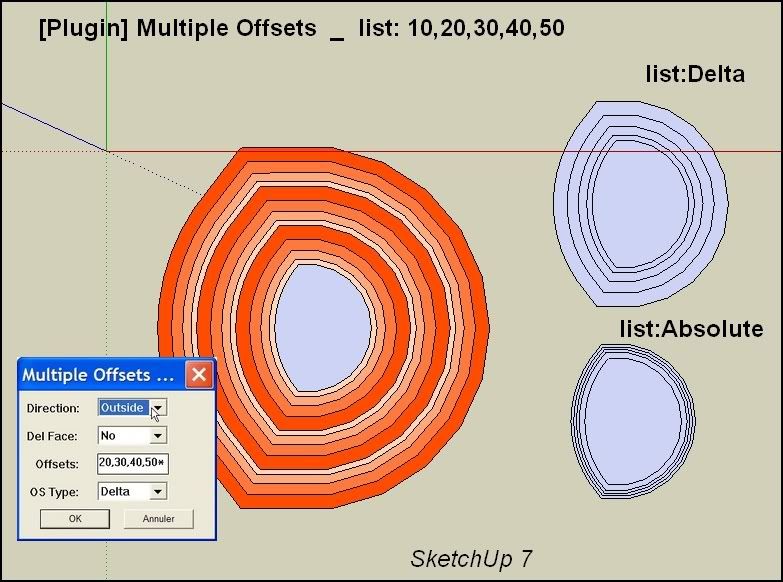
                                http://i274.photobucket.com/albums/jj245/Spendauballet/SketchUp/MultipleOffsets001.jpg

                                Frenchy Pilou
                                Is beautiful that please without concept!
                                My Little site :)

                                1 Reply Last reply Reply Quote 0
                                • qingtongQ Offline
                                  qingtong
                                  last edited by

                                  thanks very much!

                                  1 Reply Last reply Reply Quote 0
                                  • greenskpG Offline
                                    greenskp
                                    last edited by

                                    Thank you very much rami_lpm. Very usefull and saved my life in actual job.
                                    It's possible that commit_operation undo all steps instead one by one?

                                    1 Reply Last reply Reply Quote 0
                                    • E Offline
                                      Emad12
                                      last edited by

                                      Thanks

                                      1 Reply Last reply Reply Quote 0
                                      • 1
                                      • 2
                                      • 2 / 2
                                      • First post
                                        Last post
                                      Buy SketchPlus
                                      Buy SUbD
                                      Buy WrapR
                                      Buy eBook
                                      Buy Modelur
                                      Buy Vertex Tools
                                      Buy SketchCuisine
                                      Buy FormFonts

                                      Advertisement