Autofold bug
-
-
Reminds me of this...
-
Yes, but I don't understand why half of the folding is good and not the other one.
-
Hi, gilles:
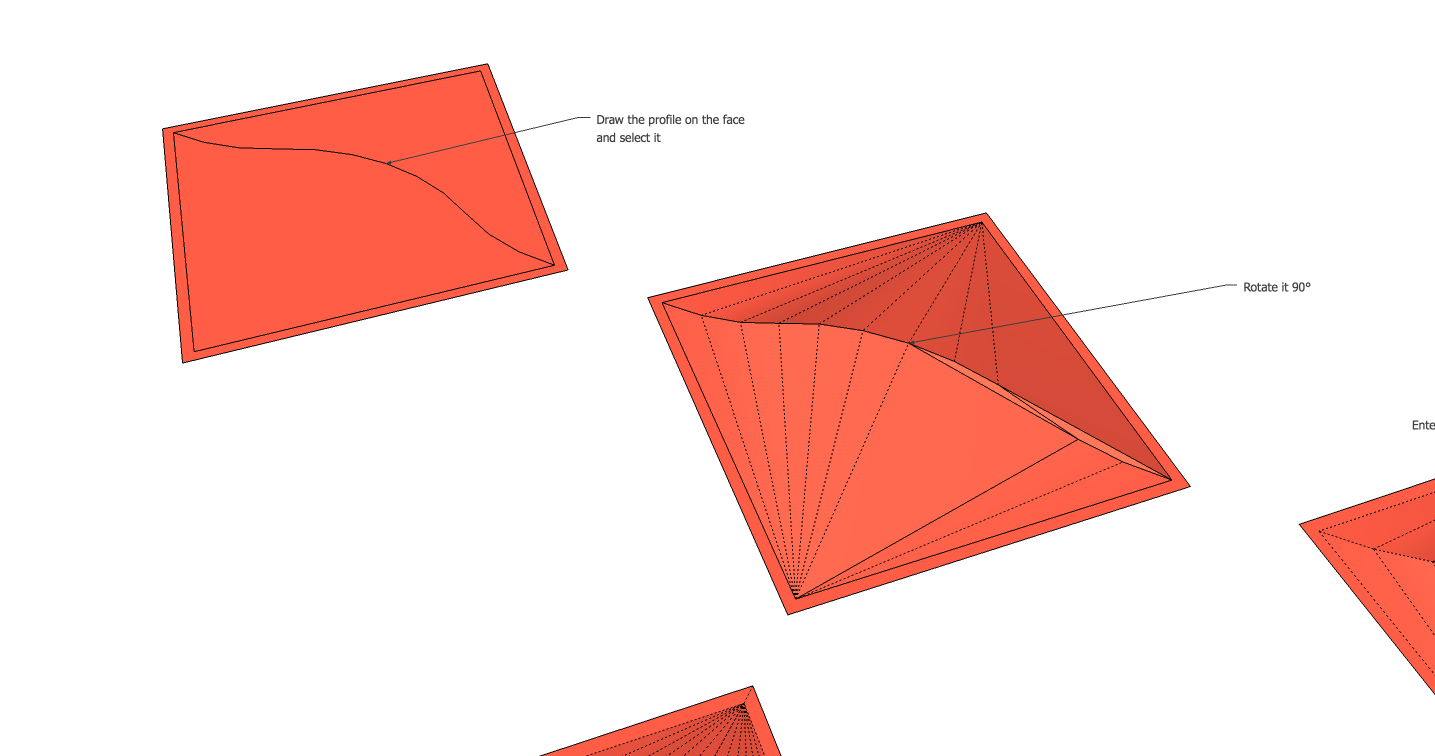
I tried to replicate your example, and noticed when I used a bezier curve approximately in the shape you show, and then delete the large face "under" the curve, erect it 90d, I get a similar effect. It looks as if one half of the curve stays welded and one half is subdivided into two other curves and sort of duplicated. (Is Sketchup creating temporary subgroups as part of its operation, and then not making the final corrections?)
I did another little exercise where I bisected the full curve and deleted everything but the half curve and the area "above" it, erected it then mirrored and mirrored again. This completed the surfaces. Of course, this is not what you want, but may be a viable solution. -
That's exactly what I do to get good shape, just a makeshi(f)t.

-
Auto-fold, or SketchUp even, isn't aware of what your shape looks like. It just performs a generic triangulation. That's why you need to guide it when it doesn't fold as you want it to.
-
As you ca see on the image the triangulation is far from correct.
-
You know, if it split the curve into two connected curves, could it be that there is a deeper level of triangulation across the rectangular starting face, that happens to affect the curve? Maybe not.




Hello! It looks like you're interested in this conversation, but you don't have an account yet.
Getting fed up of having to scroll through the same posts each visit? When you register for an account, you'll always come back to exactly where you were before, and choose to be notified of new replies (either via email, or push notification). You'll also be able to save bookmarks and upvote posts to show your appreciation to other community members.
With your input, this post could be even better 💗
Register Login


Advertisement