Moving vertices and snapping
-
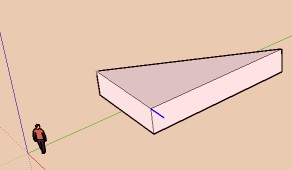
If you are interested in looking at a problem I am having moving vertices to snap to another vertex, please see attached file, which is self-explanatory. It is related to this thread: http://forums.sketchucation.com/viewtopic.php?f=15&t=47990&p=430465#p430460
[Edit: I should say, with other similar triangular shapes, there was no problem. Then I ran across this case. IDK what makes the difference yet.]
-
The same with me, I would have bet on the opposite

Or my computer is now infected with the first SketchUp virus?
-
Possible to see it in V6 ?
-
-
Hi pbacot,
Only a to b doesn't work for me.
Rest is fine. I'm using auto-fold.
I have noticed that you have snapping ON under Model Info -> Units - Sometimes it doesn't help.
-
@beginner said:
Hi pbacot,
Only a to b doesn't work for me.
Rest is fine. I'm using auto-fold.
I have noticed that you have snapping ON under Model Info -> Units - It doesn't help.Yep, just a to b is a problem for me too.
-
Draw the required line

-
Seems difficult to move alone vertex with the Autofold (some capricious

For move some vertex without plugin
I draw an helper little segment and that is it that I move along inferanced lines + Autofold!
That avoid some headaches




Hello! It looks like you're interested in this conversation, but you don't have an account yet.
Getting fed up of having to scroll through the same posts each visit? When you register for an account, you'll always come back to exactly where you were before, and choose to be notified of new replies (either via email, or push notification). You'll also be able to save bookmarks and upvote posts to show your appreciation to other community members.
With your input, this post could be even better 💗
Register Login


Advertisement