The Color of Shadows
-
Hi All- I downloaded the sketchup style DRAUGHTSMAN by Eramirez from the styles collection 2011 at the 'sketchup artists' website.
http://www.sketchupartists.org/2011/02/styles-2011/
The shadows for his style shown on the webpage are a beige color but when I downloaded this style my shadows are the standard grey color.
Any idea how to change this?Thanks
-
Hi Steve,
You'll have to edit the image in an image editor after export. There's no way in SketchUp to change the color of the shadows so you have to do it in post processing. You can export the shadows independently of the lines and faces you you can edit the shadow color without changing the rest of the model.
Like so:

To this:

Plus this:

To get this:

Of course the sample accompanying the style might have be warmed up a bit as the whole image so the lines were colored a bit, too.
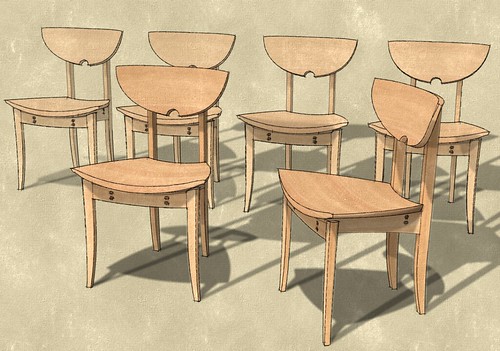
You can do a lot of other things to enhance the image such as soften the shadows and create the appearance of more than one light source.
-
maybe you can use that

But seem it's only outline shadows you can colorize the ground


Hello! It looks like you're interested in this conversation, but you don't have an account yet.
Getting fed up of having to scroll through the same posts each visit? When you register for an account, you'll always come back to exactly where you were before, and choose to be notified of new replies (either via email, or push notification). You'll also be able to save bookmarks and upvote posts to show your appreciation to other community members.
With your input, this post could be even better 💗
Register Login


Advertisement