sketchucation logo sketchucation
    • 登入
    Oops, your profile's looking a bit empty! To help us tailor your experience, please fill in key details like your SketchUp version, skill level, operating system, and more. Update and save your info on your profile page today!
    🔌 Smart Spline | Fluid way to handle splines for furniture design and complex structures. Download

    [Plugin] SPGears

    已排程 已置頂 已鎖定 已移動 Plugins
    93 貼文 41 Posters 186.2k 瀏覽 41 Watching
    正在載入更多貼文
    • 從舊到新
    • 從新到舊
    • 最多點贊
    回覆
    • 在新貼文中回覆
    登入後回覆
    此主題已被刪除。只有擁有主題管理權限的使用者可以查看。
    • J 離線
      jumpjack
      最後由 編輯

      In case this amazing plugin is still maintained, I'd have a couple of suggestions to improve it, in order of implementation difficulty:

      • add an option to add a line representing the axis of the gear: it makes it easier to align them (easy?)
      • add an option to keep the teeth size constant while changing the teeth number, else gears with different number of teeth will not match; for example, if I create a 200t gear and a 20t gear, I then must manually reduce size of 20t to 1/10 to make teeth match (complex)
      • add worm+gear support (hard)
      1 條回覆 最後回覆 回覆 引用 0
      • Dave RD 離線
        Dave R
        最後由 編輯

        @jumpjack said:

        In case this amazing plugin is still maintained ...

        It doesn't appear to be but who knows? In the meantime at least your first request can easily be dealt with.

        @jumpjack said:

        • add an option to add a line representing the axis of the gear: it makes it easier to align them (easy?)

        As it is now the group is created with the origin and blue axis centered on the gear. Simple enough to open the group for editing and draw an edge for the gear axis. Or convert the group to a component. When you drag the component in from the Components panel you'll have hold of it by its origin making it simple enough to place. You could quickly set the component to glue to a face if you want to determine its orientation, too.

        FWIW there are better options for modeling gears and worms if you need more than a simple representation of the gear. Maybe for 3D printing, for example.

        Are you still using SketchUp 2013 Make as your profile indicates?

        Etaoin Shrdlu

        %

        (THERE'S NO PLACE LIKE)

        G28 X0.0 Y0.0 Z0.0

        M30

        %

        1 條回覆 最後回覆 回覆 引用 0
        • J 離線
          jumpjack
          最後由 編輯

          Yes, man ually creating the axis is easy.... but it's boring if you are building a mechanism with many gears.
          I am still using SU2013, sometimes SU2014... but sometimes also SU8 😄 because it's the only one authorize to run on my office PC, who knows why...

          The keypoint is I need to use MSPhysics, which does not work in 64 bit versions.
          But maybe the situation changed? Does it exist a physics simulator plugin (and a gear generator plugin) for 64 bit versions?

          1 條回覆 最後回覆 回覆 引用 0
          • robertWanR 離線
            robertWan
            最後由 編輯

            The plugin works, but when starting SU8 I get:
            "Error Loading File MJGrundman_SPGears.rb
            uninitialized constant MJGrundman::SPGears::EXTENSION"

            Any conflict with another plugin? I've had it on another computer before with no problems.

            Robert

            1 條回覆 最後回覆 回覆 引用 0
            • robertWanR 離線
              robertWan
              最後由 編輯

              @dave r said:

              It doesn't appear to be but who knows?

              But if... someday. There are a lot of parameters here, but 2D.
              https://evolventdesign.com/pages/spur-gear-generator

              Robert

              1 條回覆 最後回覆 回覆 引用 0
              • Dave RD 離線
                Dave R
                最後由 編輯

                @robertwan said:

                There are a lot of parameters here, but 2D

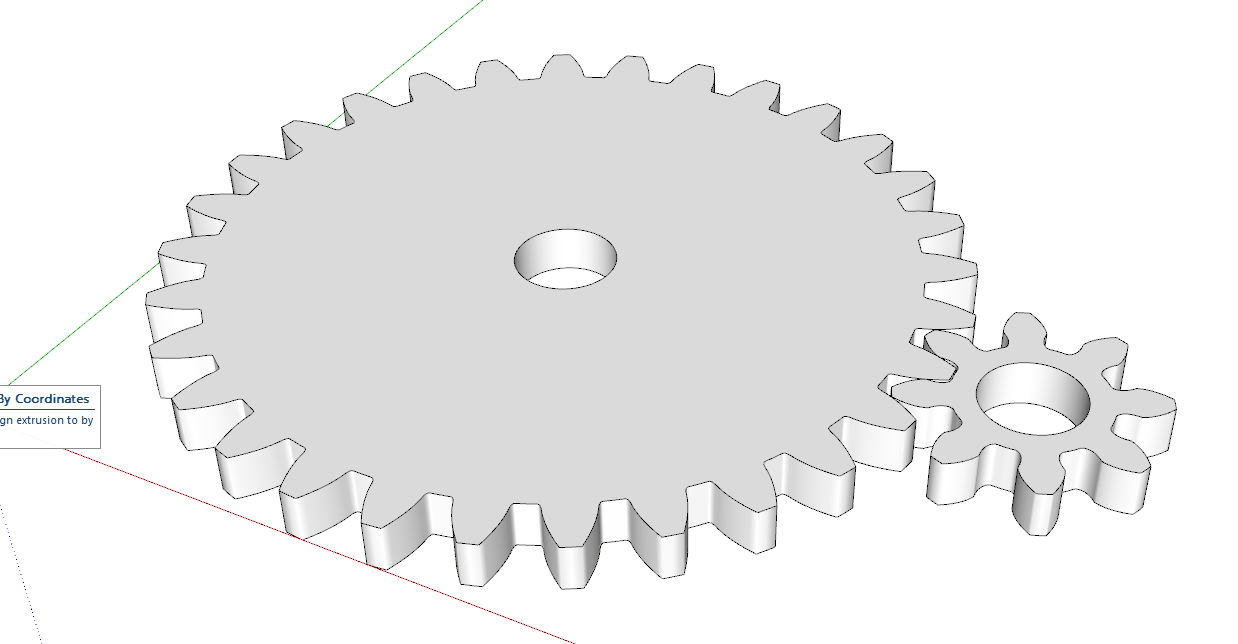
                It's trivial to make them 3D in SketchUp from there, though.
                Screenshot - 5_30_2023 , 1_15_04 PM.png

                Etaoin Shrdlu

                %

                (THERE'S NO PLACE LIKE)

                G28 X0.0 Y0.0 Z0.0

                M30

                %

                1 條回覆 最後回覆 回覆 引用 0
                • J 離線
                  jumpjack
                  最後由 編輯

                  @dave r said:

                  @robertwan said:

                  There are a lot of parameters here, but 2D

                  It's trivial to make them 3D in SketchUp from there, though.
                  [attachment=0:6to2ga5o]<!-- ia0 -->Screenshot - 5_30_2023 , 1_15_04 PM.png<!-- ia0 -->[/attachment:6to2ga5o]

                  How?

                  1 條回覆 最後回覆 回覆 引用 0
                  • Dave RD 離線
                    Dave R
                    最後由 編輯

                    Download and import the .dxf file, make the faces and extrude with Push/Pull. All fundamental parts of using SketchUp.

                    Makes better gear components than SP Gears does, too.

                    Etaoin Shrdlu

                    %

                    (THERE'S NO PLACE LIKE)

                    G28 X0.0 Y0.0 Z0.0

                    M30

                    %

                    1 條回覆 最後回覆 回覆 引用 0
                    • robertWanR 離線
                      robertWan
                      最後由 編輯

                      @dave r said:

                      It's trivial to make them 3D in SketchUp from there, though.

                      Yes I know. That's what I do. I was forced to look for a gear generator because I needed a rack gear.

                      But there is nothing like in the plugin, i.e. HELIX and BEVEL.

                      Robert

                      1 條回覆 最後回覆 回覆 引用 0
                      • O 離線
                        osmanoney Newcomers
                        最後由 編輯

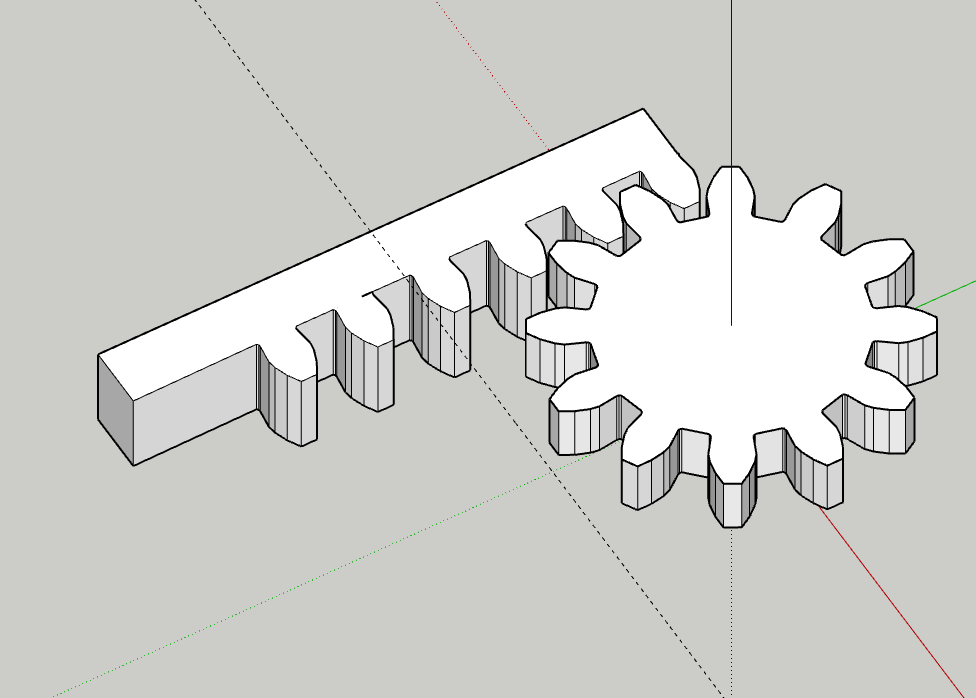
                        sketchup ta kremayer çizmek bu kadar zor olmamalıydı. çok zayıf kaldı

                        Ekran görüntüsü 2023-08-28 021433.png

                        1 條回覆 最後回覆 回覆 引用 0
                        • Dave RD 離線
                          Dave R
                          最後由 編輯

                          Translated by Google:

                          @osmanoney said:

                          Drawing racks in Sketchup shouldn't be this hard. was very weak

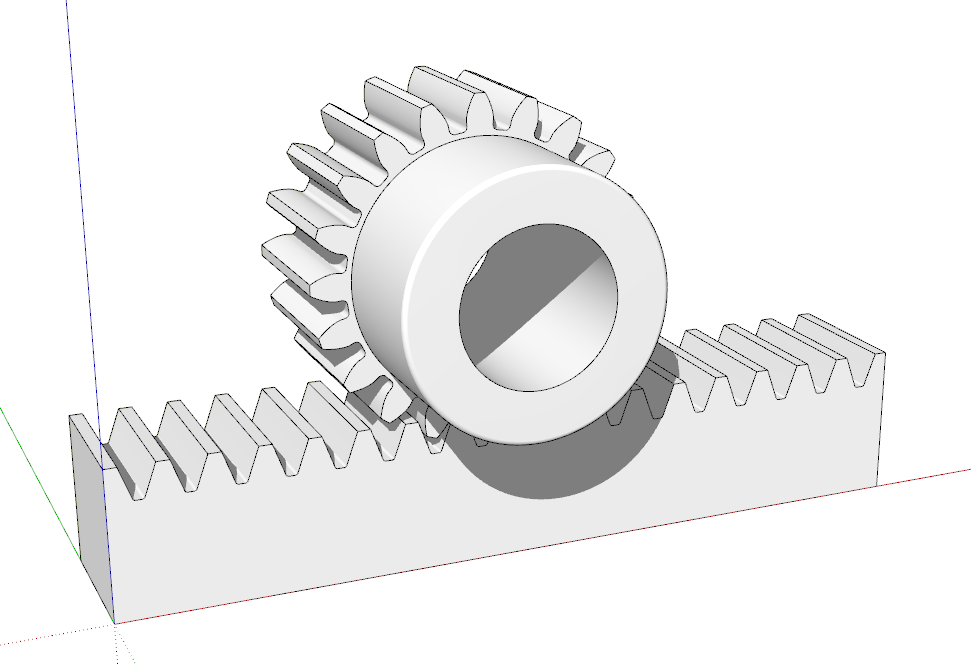
                          It doesn't have to be hard. Depends on what version of SketchUp you are using. Your profile indicates you are using 2023 Free/Make. That version is wed based and that doesn't have any option to use extensions like this. How are you intending to use your rack and pinion? Is it for 3D printing or some other manufacturing process?

                          I made this in SketchUp Pro. Quite simple to model without a plugin.
                          Screenshot - 8_28_2023 , 6_35_44 AM.png

                          Etaoin Shrdlu

                          %

                          (THERE'S NO PLACE LIKE)

                          G28 X0.0 Y0.0 Z0.0

                          M30

                          %

                          1 條回覆 最後回覆 回覆 引用 0
                          • O 離線
                            osmanoney Newcomers
                            最後由 編輯

                            3D print baskı için modelleme yapıyorum. bu arada ben yeni bir sketcup üyesiyim öğrenciyim yeni öğreniyorum. cevabınız için tşk ederim.

                            1 條回覆 最後回覆 回覆 引用 0
                            • Dave RD 離線
                              Dave R
                              最後由 編輯

                              Translated by Google:

                              @osmanoney said:

                              I'm modeling for 3D printing. by the way, i am a new sketcup member, i am a student, i am just learning. thank you for your answer.

                              Since you are new to SketchUp, I would suggest that you spend some time learning to use the basic tools. That will make it easier for you to create the models you want.

                              If you read the first post in this thread you will see the author's warning that the gears drawn with this extension will not be accurate enough for 3D printing.

                              Again, please correct your forum profile. You must be using SketchUp 2023 Pro if you are able to use extensions.

                              Etaoin Shrdlu

                              %

                              (THERE'S NO PLACE LIKE)

                              G28 X0.0 Y0.0 Z0.0

                              M30

                              %

                              1 條回覆 最後回覆 回覆 引用 0
                              • A 離線
                                anciano
                                最後由 編輯

                                Is there any way to change the orientation from horizontal to vertical ? Thanks

                                1 條回覆 最後回覆 回覆 引用 0
                                • Dave RD 離線
                                  Dave R
                                  最後由 編輯

                                  You could probably edit the code but it's simpler to rotate the object after it's created.

                                  Etaoin Shrdlu

                                  %

                                  (THERE'S NO PLACE LIKE)

                                  G28 X0.0 Y0.0 Z0.0

                                  M30

                                  %

                                  1 條回覆 最後回覆 回覆 引用 0
                                  • 1
                                  • 2
                                  • 3
                                  • 4
                                  • 5
                                  • 5 / 5
                                  • 第一個貼文
                                    最後的貼文
                                  Buy SketchPlus
                                  Buy SUbD
                                  Buy WrapR
                                  Buy eBook
                                  Buy Modelur
                                  Buy Vertex Tools
                                  Buy SketchCuisine
                                  Buy FormFonts

                                  Advertisement
