Show/hide a section plane in a scene
-
Hi
In a scene I like to see the active section plane and in another scene not. How do I do this?? Checking the box in attachment does not make any changes I think...
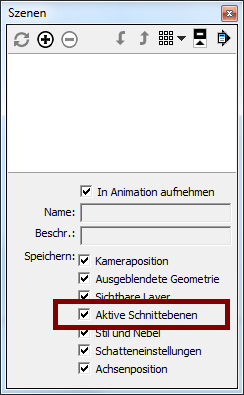
-
Leave the box checked. Go to Window>Preferences>General and make sure the box is ticked for "Warn of style changes when creating scenes."
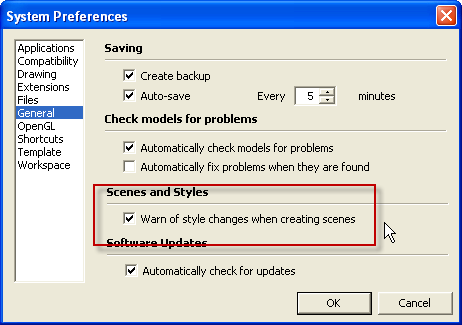
When you create a new scene this box should pop up. Select the first option.
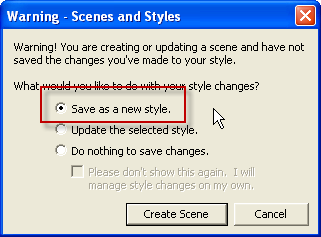
This will add a new style to the In Model Styles library.
-
@zacchia said:
Checking the box in attachment does not make any changes...
This checkbox only controls the active section plane (if there are more than one) and not their visibility.
(edit: see this video for an application of this)
The visibility is controlled by the style dialog: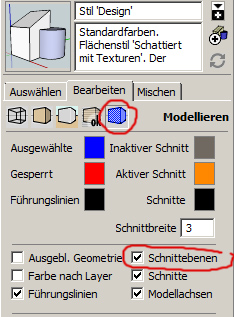
(One way to get two styles is described in Daves answer)
-
Oh, thanky you so much for excellent answers! That helps me a lot!

I just asking myself why the visibility of the section plane is controlled by the style dialog... -
It's controlled by the Styles dialog because it's part of the style as is X-ray, Back Edges, Monochrome, etc.


Hello! It looks like you're interested in this conversation, but you don't have an account yet.
Getting fed up of having to scroll through the same posts each visit? When you register for an account, you'll always come back to exactly where you were before, and choose to be notified of new replies (either via email, or push notification). You'll also be able to save bookmarks and upvote posts to show your appreciation to other community members.
With your input, this post could be even better 💗
Register Login


Advertisement