Window location
-
Hi all
I have a twin monitor set-up on my Dell Vostro laptop and run the main SketchUp window on the 2nd monitor screen. However, any of the windows that I switch on, Layers, Components, Materials, etc open on the main laptop screen. I can move those windows about on the main screen but I cannot get them to move to the 2nd monitor screen, it is like there is a barrier there stopping them from moving over.Can anyone help me with the reason behind this and a solution?
Thanks for your time..
Ben
-
I take it there are no answers to this one? I'll assume it's a trick of the graphics card I guess.......
-
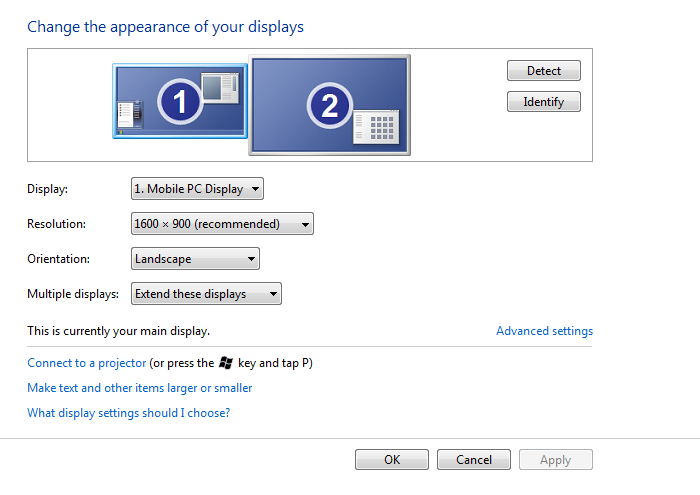
It's probably the way you have the dual monitors setup in Windows. I did the same with an HP laptop. They should be setup in extended mode in display options dialoge window this article explains a little better.
-
The first time I hooked up an external monitor, I had the same trouble, I couldn't drag anything left to right from my lap top to the secondary. Then realized I had my laptop on the left and the secondary on the right, but in the control panel, I didn't notice that I had my secondary monitor on the left side and laptop on the right. Just identify and make sure they are oriented to match the 1--2 on the monitors and the control panel. Sounds elementary but sometimes the best answers to frustrating issues are the most obvious.

Hello! It looks like you're interested in this conversation, but you don't have an account yet.
Getting fed up of having to scroll through the same posts each visit? When you register for an account, you'll always come back to exactly where you were before, and choose to be notified of new replies (either via email, or push notification). You'll also be able to save bookmarks and upvote posts to show your appreciation to other community members.
With your input, this post could be even better 💗
Register Login


Advertisement