sketchucation logo sketchucation
    • 登入
    Oops, your profile's looking a bit empty! To help us tailor your experience, please fill in key details like your SketchUp version, skill level, operating system, and more. Update and save your info on your profile page today!
    🔌 Smart Spline | Fluid way to handle splines for furniture design and complex structures. Download

    Splitting a spiral line into equal segments

    已排程 已置頂 已鎖定 已移動 Newbie Forum
    sketchup
    23 貼文 3 Posters 955 瀏覽 3 Watching
    正在載入更多貼文
    • 從舊到新
    • 從新到舊
    • 最多點贊
    回覆
    • 在新貼文中回覆
    登入後回覆
    此主題已被刪除。只有擁有主題管理權限的使用者可以查看。
    • D 離線
      davecon
      最後由 編輯

      I have a flat surface with a spiral pattern on it that I wish to divide in equal portions. Normally I use the "divide" option on the context-menu but it is not there for a spiral. The spirals are created using both the displaced arc method and the curvemaker plugin. I can do it manually, but it is exceptionally time consuming.

      Any help is much appreciated

      1 條回覆 最後回覆 回覆 引用 0
      • pilouP 離線
        pilou
        最後由 編輯

        Right Click/ Divide by Cpoint

        I must refind the author 😳

        Edit Maybe Didier Bur 😉


        divide_cpoint.rb

        Frenchy Pilou
        Is beautiful that please without concept!
        My Little site :)

        1 條回覆 最後回覆 回覆 引用 0
        • D 離線
          davecon
          最後由 編輯

          Thanks for the quick reply 😄

          I have just tried that and I am getting an "Unsupported Curve, aborting" error.

          1 條回覆 最後回覆 回覆 引用 0
          • pilouP 離線
            pilou
            最後由 編輯

            You have also the Bezier who have some divider/Convert tools inside by Fredo 6

            Frenchy Pilou
            Is beautiful that please without concept!
            My Little site :)

            1 條回覆 最後回覆 回覆 引用 0
            • pilouP 離線
              pilou
              最後由 編輯

              You can also use Curvyloft by Fredo6 (put your curve between 2 other)

              Frenchy Pilou
              Is beautiful that please without concept!
              My Little site :)

              1 條回覆 最後回覆 回覆 引用 0
              • pilouP 離線
                pilou
                最後由 編輯

                But maybe the more simple is Copy a long a path by Rick Wilson at Smustard 😉
                Copy groups or components along a path, at set spacing or node spacing

                Frenchy Pilou
                Is beautiful that please without concept!
                My Little site :)

                1 條回覆 最後回覆 回覆 引用 0
                • pilouP 離線
                  pilou
                  最後由 編輯

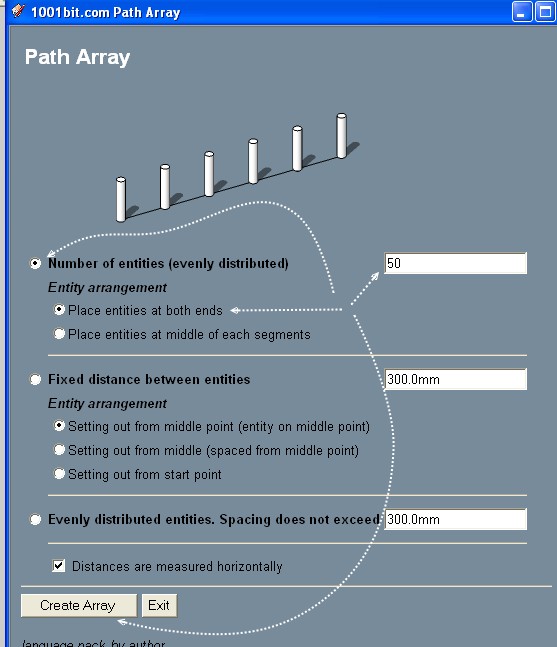
                  Another one inside the 1001 bits tools! 😉
                  Divide by place construction points ! ☀
                  Or Copy Group / Component along a path ! 😉
                  (works much better than the copy along a path above: just enter number of copy ! )
                  No need to put the group on the spline!
                  (So take a vertical line and Menu: Edit / Group it )
                  There is a group at the beginning and a group at the end of the spline!
                  Seems the best 😄
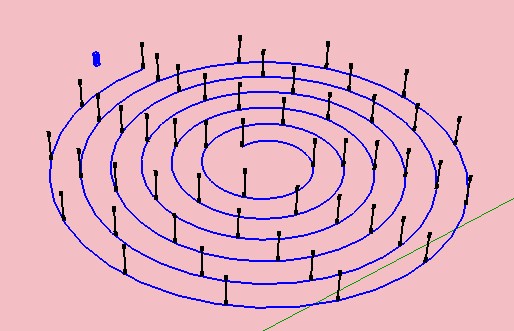
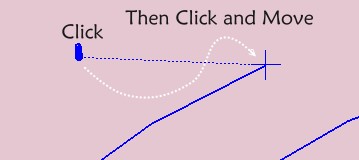
                  Select Spiral + group, Launch the Plug, select that you want, click base of the group, click start of the Spiral
                  Explode all / Intersect = you have your spline splited 😄

                  Click for Zoom
                  spliral1.jpg

                  Frenchy Pilou
                  Is beautiful that please without concept!
                  My Little site :)

                  1 條回覆 最後回覆 回覆 引用 0
                  • D 離線
                    davecon
                    最後由 編輯

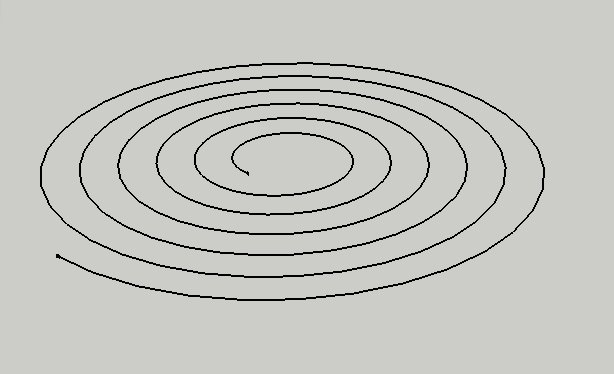
                    I have tried your other suggestions and none of them seem to work for me. Attached is a picture of the spiral I am trying to divide.

                    As you can see in the image, the spiral is just 2D which is why I was hoping for a simple "select and divide" option. The 1001 bits tools just do nothing. I follow the steps and while I get no error, I also get no points appearing anywhere.

                    spiral.jpg

                    1 條回覆 最後回覆 回覆 引用 0
                    • D 離線
                      davecon
                      最後由 編輯

                      here is the file 😄 I think I must be doing something wrong but I just don't know what! 😞


                      spiral.skp

                      1 條回覆 最後回覆 回覆 引用 0
                      • pilouP 離線
                        pilou
                        最後由 編輯

                        Post your skp file in V6 (Menu "save as" and scroll for choose V6)

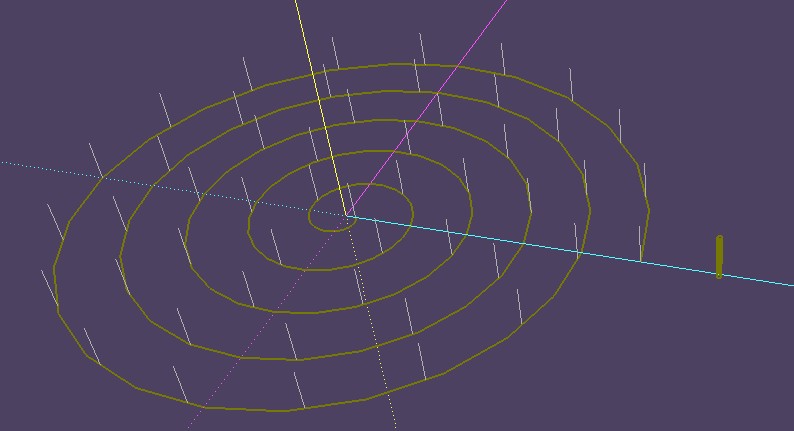
                        I have no problem here 😉
                        As you see as Spiral is "polygonal lines" some of divisions will not on each original vertices!
                        spliral2.jpg

                        Frenchy Pilou
                        Is beautiful that please without concept!
                        My Little site :)

                        1 條回覆 最後回覆 回覆 引用 0
                        • jeff hammondJ 離線
                          jeff hammond
                          最後由 編輯

                          use BezierSpline
                          http://forums.sketchucation.com/viewtopic.php?t=13563

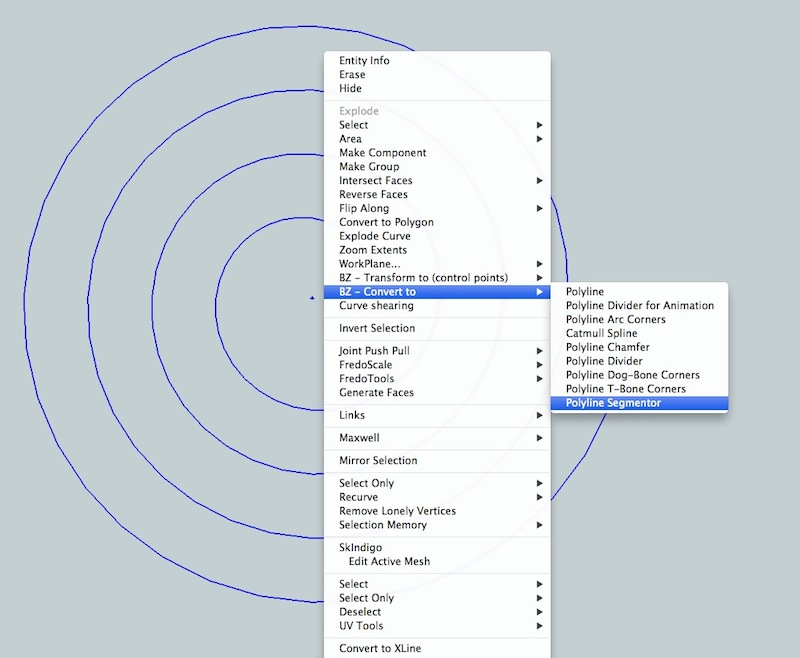
                          once installed, right click on the spiral then go:
                          BZ convert to -> polyline segmentor (to divide by # of segments)

                          or polyline divider to divide by desired segment length

                          dotdotdot

                          1 條回覆 最後回覆 回覆 引用 0
                          • D 離線
                            davecon
                            最後由 編輯

                            @unknownuser said:

                            use BezierSpline
                            http://forums.sketchucation.com/viewtopic.php?t=13563

                            once installed, right click on the spiral then go:
                            BZ convert to -> polyline segmentor (to divide by # of segments)

                            or polyline divider to divide by desired segment length

                            I have that installed but I don't seem to have those options. My only options from "BZ convert to" are "polyline" and "polyline divider for animation". If I try the divider for ani option, it places marks on the spiral but not at the specified intervals and they disappear if I switch to another tool (such as Draw Cpoint)

                            1 條回覆 最後回覆 回覆 引用 0
                            • pilouP 離線
                              pilou
                              最後由 編輯

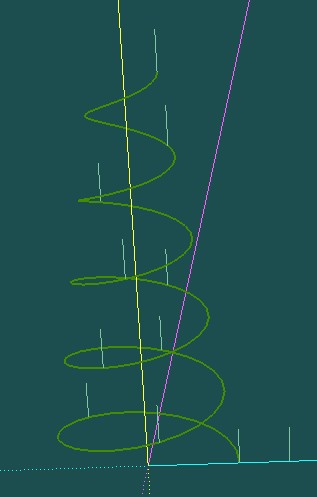
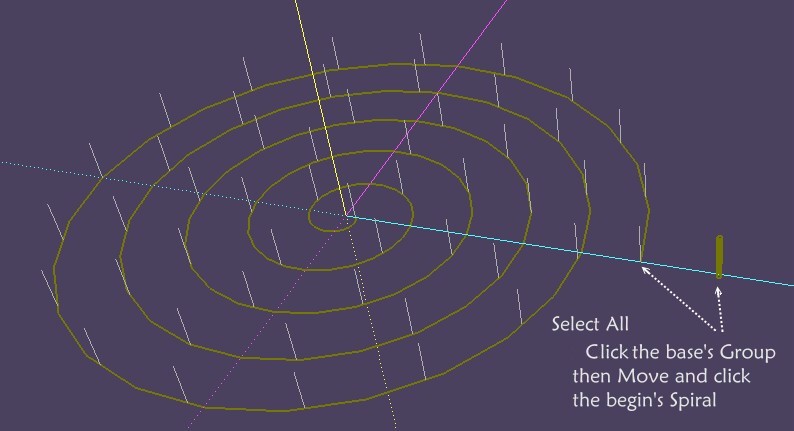
                              Absolutly no problem with your file! ☀

                              spliral4.jpg

                              Siprale5.jpg

                              Then Click the Base of the vertical Group and move without release the Blue cross cursor to the start of the spiral!
                              Siprale6.jpg

                              Frenchy Pilou
                              Is beautiful that please without concept!
                              My Little site :)

                              1 條回覆 最後回覆 回覆 引用 0
                              • jeff hammondJ 離線
                                jeff hammond
                                最後由 編輯

                                @davecon said:

                                I have that installed but I don't seem to have those options. My only options from "BZ convert to" are "polyline" and "polyline divider for animation". If I try the divider for ani option, it places marks on the spiral but not at the specified intervals and they disappear if I switch to another tool (such as Draw Cpoint)

                                hmm.. strange.. in the case of your spiral, first select the curve then right-click -> explode curve.. now, with all the segments selected, right-click again then all the BZ options should be available.

                                dotdotdot

                                1 條回覆 最後回覆 回覆 引用 0
                                • pilouP 離線
                                  pilou
                                  最後由 編輯

                                  Before I have seen your file 😄

                                  spliral3.jpg

                                  Frenchy Pilou
                                  Is beautiful that please without concept!
                                  My Little site :)

                                  1 條回覆 最後回覆 回覆 引用 0
                                  • pilouP 離線
                                    pilou
                                    最後由 編輯

                                    @ Jeff
                                    What is the workflow of the Bezier Polyline Segmenter ?

                                    Seems You must by hand make 50 clicks on the spiral! 😮
                                    Or I miss something 😄

                                    The other polyline Divider by measure is not very accurate and you must make a division and don't end exactly on the end following number of segments! 😒
                                    (and where are the intersections of the divisions ? 😉

                                    Frenchy Pilou
                                    Is beautiful that please without concept!
                                    My Little site :)

                                    1 條回覆 最後回覆 回覆 引用 0
                                    • jeff hammondJ 離線
                                      jeff hammond
                                      最後由 編輯

                                      @unknownuser said:

                                      @ Jeff
                                      What is the workflow of the Bezier Polyline Segmenter ?

                                      Seems You must by hand make 50 clicks on the spiral! 😮
                                      Or I miss something 😄

                                      i think you're missing something 😉
                                      just enter the number segments in the dialog and click 'OK'… then click the mouse in a blank part of the screen (when the green arrow says done/exit tool)

                                      @unknownuser said:

                                      The other polyline Divider by measure is not very accurate and you must make a division and don't end exactly on the end following number of segments! 😒

                                      right.. there are times when that's needed.. for instance, building a stud wall that's 120" long with 16" centers.. dividing with bezierspline will layout at 16" then leave the odd segment at the end.

                                      dotdotdot

                                      1 條回覆 最後回覆 回覆 引用 0
                                      • pilouP 離線
                                        pilou
                                        最後由 編輯

                                        Seems there is a glitch somewhere 😒
                                        I have not that 😄

                                        @unknownuser said:

                                        (when the green arrow says done/exit tool)

                                        Maybe an old version

                                        Curve is redrawn with the numbers of segments asked ?

                                        Frenchy Pilou
                                        Is beautiful that please without concept!
                                        My Little site :)

                                        1 條回覆 最後回覆 回覆 引用 0
                                        • jeff hammondJ 離線
                                          jeff hammond
                                          最後由 編輯

                                          @unknownuser said:

                                          Curve is redrawn with the numbers of segments asked ?

                                          correct.. it's a handy command that i use quite often..
                                          1.jpg

                                          2.jpg

                                          3.jpg

                                          4.jpg

                                          dotdotdot

                                          1 條回覆 最後回覆 回覆 引用 0
                                          • D 離線
                                            davecon
                                            最後由 編輯

                                            @jeff this has solved my issue 😄 My mistake was thinking that it was going to create construction points on the spiral, when it was actually changing the length of each component part to 50mm and so I just had to snap to the endpoint of each short length.

                                            Many thanks to both of you for helping me to get this sorted out.

                                            1 條回覆 最後回覆 回覆 引用 0
                                            • 1
                                            • 2
                                            • 2 / 2
                                            • 第一個貼文
                                              最後的貼文
                                            Buy SketchPlus
                                            Buy SUbD
                                            Buy WrapR
                                            Buy eBook
                                            Buy Modelur
                                            Buy Vertex Tools
                                            Buy SketchCuisine
                                            Buy FormFonts

                                            Advertisement