sketchucation logo sketchucation
    • 登入
    Oops, your profile's looking a bit empty! To help us tailor your experience, please fill in key details like your SketchUp version, skill level, operating system, and more. Update and save your info on your profile page today!
    🔌 Smart Spline | Fluid way to handle splines for furniture design and complex structures. Download

    Full Size Patterns for Templates [Updated]

    已排程 已置頂 已鎖定 已移動 Woodworking
    27 貼文 6 Posters 3.7k 瀏覽 6 Watching
    正在載入更多貼文
    • 從舊到新
    • 從新到舊
    • 最多點贊
    回覆
    • 在新貼文中回覆
    登入後回覆
    此主題已被刪除。只有擁有主題管理權限的使用者可以查看。
    • Dave RD 離線
      Dave R
      最後由 編輯


      http://farm9.staticflickr.com/8002/6985536290_046491a1e9.jpg

      While it is possible to print full size patterns directly from SketchUp, if you've done it, you know it isn't really all that intuitive. If you've got SU Pro, it's easy enough to send the SKP file to LayOut and create the pattern there as a PDF file. Now there's a way to get full size patterns that is easy and works with the free version of SketchUp, too. See my blog post about it, here.


      http://farm8.staticflickr.com/7063/6987273078_a48c462056.jpg


      http://farm9.staticflickr.com/8147/7133356615_8525357b66.jpg

      This plugin was updated on 4 June, 2012. There were some script changes to make it load better and it is now Mac compatible..

      Etaoin Shrdlu

      %

      (THERE'S NO PLACE LIKE)

      G28 X0.0 Y0.0 Z0.0

      M30

      %

      1 條回覆 最後回覆 回覆 引用 0
      • kingsiK 離線
        kingsi
        最後由 編輯

        Something I will probably never use, but I see the application for joiners and carpenters as being really handy.

        Many thanks for uploading this and your blog

        Noobtastic

        1 條回覆 最後回覆 回覆 引用 0
        • HumpmetwiceH 離線
          Humpmetwice
          最後由 編輯

          I couldn't get it to work but thanks anyway.

          1 條回覆 最後回覆 回覆 引用 0
          • Dave RD 離線
            Dave R
            最後由 編輯

            What do you mean you couldn't get it to work?

            Etaoin Shrdlu

            %

            (THERE'S NO PLACE LIKE)

            G28 X0.0 Y0.0 Z0.0

            M30

            %

            1 條回覆 最後回覆 回覆 引用 0
            • HumpmetwiceH 離線
              Humpmetwice
              最後由 編輯

              Once install nothing shows up in the tools menu.

              1 條回覆 最後回覆 回覆 引用 0
              • Dave RD 離線
                Dave R
                最後由 編輯

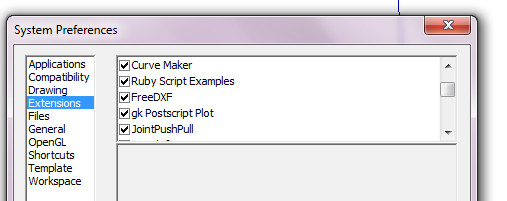
                How did you install it? Did you make sure the box for it is ticked under Preferences>Extensions?

                It will work if installed correctly.

                Etaoin Shrdlu

                %

                (THERE'S NO PLACE LIKE)

                G28 X0.0 Y0.0 Z0.0

                M30

                %

                1 條回覆 最後回覆 回覆 引用 0
                • HumpmetwiceH 離線
                  Humpmetwice
                  最後由 編輯

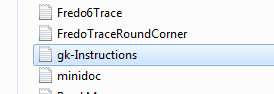
                  This is how everything is set up and still nothing in the tools menu.

                  2012-05-02_163534.jpg


                  2012-05-02_163725.jpg


                  2012-05-02_163743.jpg


                  2012-05-02_163800.jpg

                  1 條回覆 最後回覆 回覆 引用 0
                  • Dave RD 離線
                    Dave R
                    最後由 編輯

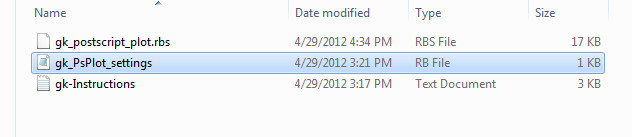
                    What's in the gk_plugins folder?

                    Etaoin Shrdlu

                    %

                    (THERE'S NO PLACE LIKE)

                    G28 X0.0 Y0.0 Z0.0

                    M30

                    %

                    1 條回覆 最後回覆 回覆 引用 0
                    • HumpmetwiceH 離線
                      Humpmetwice
                      最後由 編輯

                      This is whats in the folder


                      2012-05-02_165555.jpg

                      1 條回覆 最後回覆 回覆 引用 0
                      • Dave RD 離線
                        Dave R
                        最後由 編輯

                        So you still don't find anything starting with 'gk' anywhere in the Tools menu?

                        Etaoin Shrdlu

                        %

                        (THERE'S NO PLACE LIKE)

                        G28 X0.0 Y0.0 Z0.0

                        M30

                        %

                        1 條回覆 最後回覆 回覆 引用 0
                        • HumpmetwiceH 離線
                          Humpmetwice
                          最後由 編輯

                          Nothing

                          1 條回覆 最後回覆 回覆 引用 0
                          • Dave RD 離線
                            Dave R
                            最後由 編輯

                            Weird.

                            Did you open SketchUp after installing?

                            Etaoin Shrdlu

                            %

                            (THERE'S NO PLACE LIKE)

                            G28 X0.0 Y0.0 Z0.0

                            M30

                            %

                            1 條回覆 最後回覆 回覆 引用 0
                            • TIGT 離線
                              TIG Moderator
                              最後由 編輯

                              No 'compatibility files...' button on the PC's windows pane ?
                              Perhaps you don't have proper full access-rights and you haven't really installed them where you think they are..... 😕
                              Post their full path... ❗

                              TIG

                              1 條回覆 最後回覆 回覆 引用 0
                              • HumpmetwiceH 離線
                                Humpmetwice
                                最後由 編輯

                                Hope this is what you needed Tig and yes Dave I open Sketch up after installing.


                                2012-05-02_173853.jpg

                                1 條回覆 最後回覆 回覆 引用 0
                                • Dave RD 離線
                                  Dave R
                                  最後由 編輯

                                  Kurt, do you have administrative rights to install plugins to the Plugins folder?

                                  Etaoin Shrdlu

                                  %

                                  (THERE'S NO PLACE LIKE)

                                  G28 X0.0 Y0.0 Z0.0

                                  M30

                                  %

                                  1 條回覆 最後回覆 回覆 引用 0
                                  • HumpmetwiceH 離線
                                    Humpmetwice
                                    最後由 編輯

                                    Yes Dave I have installed many plugins before maybe to many.

                                    1 條回覆 最後回覆 回覆 引用 0
                                    • J 離線
                                      john Msrk Power
                                      最後由 編輯

                                      Dave,
                                      This looks like an extremely useful tool. However, I have installed it correctly I think and what I get is a blank sheet in Ghostview. Actually, I get the template isolated in my screen at the origin of the red and blue axis, I set the camera to parallel projection. Next I scroll down the tools menu until I find "gk Postscript plot" and click on it. The next pop up screen asks me for a paper size. There is no pop up screen explaining the markers. a second screen tells m the directory that the file has been saved in. I then go to that file and open it. It opens up the Ghostview program. I have attached a screen shot to this post of the results. If you or anyone else can help me solve my problem that would be great. Also, how did you get the double shadows seen in the image of the tilt top table? Is that a plugin as well? Thanks in advance for any help. Maybe I should try reinstalling everything. I did install Gk postscript plot first. Perhaps it was the order I installed the software.

                                      Thanks,

                                      John Mark


                                      untitled.JPG

                                      1 條回覆 最後回覆 回覆 引用 0
                                      • Dave RD 離線
                                        Dave R
                                        最後由 編輯

                                        Could you post the SKP file you're using for this?

                                        Etaoin Shrdlu

                                        %

                                        (THERE'S NO PLACE LIKE)

                                        G28 X0.0 Y0.0 Z0.0

                                        M30

                                        %

                                        1 條回覆 最後回覆 回覆 引用 0
                                        • J 離線
                                          john Msrk Power
                                          最後由 編輯

                                          Dave,
                                          Sorry for the delay. I had problems uploading the SKP file using mozilla and had to use explorer instead. I hope this helps and than you for your time and expertise.

                                          -John Mark


                                          John Mount Chair 1 Templates.skp

                                          1 條回覆 最後回覆 回覆 引用 0
                                          • Dave RD 離線
                                            Dave R
                                            最後由 編輯

                                            John, I'm happy to help if I can.

                                            Try exploding the components and see if that helps. If you don't need the rectangles around the edges, you might as well delete them. You could probably also stack the smaller template above the larger one and get them both on the same sheet. Try it with the attached file. I'm on my Mac and don't have access to my PC at the moment so I can't try it.

                                            By the way, you have the components nested although it doesn't appear that there's any reason for the multiple levels of components for each of them.

                                            And you asked about the multiple shadows in my images. Somewhere I did a tutorial on how to do that. It is not a plugin but rather the combination of images. I export the shadows separately from the faces and edges. For the final image of the tables, I have the edges, faces and two different shadows in four images.



                                            John Chair templates.skp

                                            Etaoin Shrdlu

                                            %

                                            (THERE'S NO PLACE LIKE)

                                            G28 X0.0 Y0.0 Z0.0

                                            M30

                                            %

                                            1 條回覆 最後回覆 回覆 引用 0
                                            • 1
                                            • 2
                                            • 1 / 2
                                            • 第一個貼文
                                              最後的貼文
                                            Buy SketchPlus
                                            Buy SUbD
                                            Buy WrapR
                                            Buy eBook
                                            Buy Modelur
                                            Buy Vertex Tools
                                            Buy SketchCuisine
                                            Buy FormFonts

                                            Advertisement