[Plugin] Honeycomber
-
I have found these rb files with "raytest" word in the plugin folder only the simple_rays.rb file contains "def raytest2" this is the text:
def raytest2 ray
hit = false
entities = self.entities
entities.each { |face|
if face.kind_of?(Sketchup::Face) and face.classify_point(ray[0]) > 4
plane = [face.vertices[0].position, face.normal]
intersection = Geom.intersect_line_plane(ray, plane)
if intersection and face.classify_point(intersection) < 8
hit = true
break
end
endI have probed to unistall this file but the Honeycomber plugin does not work.
Some .rb files that include "raytest" word.
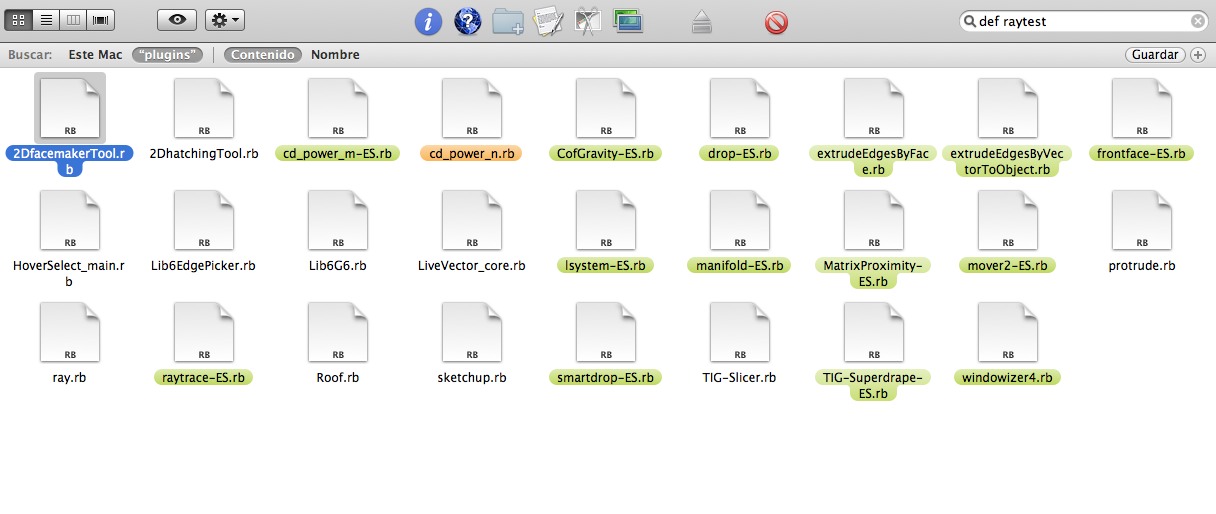
I'll continue search for
-
SUFractal
OK, I misread your post

Some 'search-tools' [like the built-in one on PCs] don't look inside all files and miss .rb ones - so on a PC I'd use 'BareGrep' that looks in ALL files.
Did you include subfolders inside Plugins ?
If you do a 'find' search for say 'module TIG' what do you get?
I know you'll get at least one 'hit' from the above text, as it's in my tool's file [in the subfolder]... If it includes it we know that the 'def raytest' is not defined in readable code [.rb], but it might still be inside an unreadable [compiled] '.rbs' file.If we are sure the problem is not arising from a particular .rb file, we can then use a 'disable/enable-by-halves' approach, to zoom in on the culprit...
I'll walk you both through this if method, if we have to...

-
Oxer
The
def raytest**2**is excluded as we are interested in just 'raytest'.
The listed scripts USE 'raytest', but do not re-define it...Did the search include subfolders ?
My suggested method in the last post will confirm if subfolders are getting searched, if it finds the tool's .rb in its subfolder.Once we have exhausted these possibilities we can consider the 'disabling' options.
-
Yes, i confirm you that the search includes subfolders.
I have found other plugin with "def raytest" it's manifold.rb but i have uninstalled it and Honeycombre continues off.
I don't undestand the code ruby but i think the problem isn't in the conflict with others plugins.
Sorry TIG, i can't help you of the other form. -
@tig said:
Oxer
The
def raytest**2**is excluded as we are interested in just 'raytest'.
The listed scripts USE 'raytest', but do not re-define it...Did the search include subfolders ?
My suggested method in the last post will confirm if subfolders are getting searched, if it finds the tool's .rb in its subfolder.Once we have exhausted these possibilities we can consider the 'disabling' options.
The only plugin/script file (including searching within folders) that contains 'raytest' (or 'def raytest') in its contents that I can find ... is your script 'TIG-Honeycomber.rb'.
Same to be said for 'module TIG' .... only in your script 'TIG-Honeycomber.rb'.
-
It's not a 'conflict'.
Some 'rogue' scripts rewrite native built-in class/methods rather than making a separate process.
Model.raytesttakes an argument consisting of an array of a point and a vector
[point,vector], this determines where the 'ray' starts and the direction it is cast.
There is a second optional argument telling it to ignore/include 'hidden' objects in the testing...
So my code's
rayt=model.raytest([point,vector],true)
should work.The error says it's expecting a 'Float' [number] NOT a 'Point3d' occurs irrespective of how the raytest is run. The Ruby Console method shows this.
If you removed myTIG-Honeycomber_loader.rbits other file won't load and when you restart Sketchup I prepared to bet cash that you'll get the same Ruby Console error when doing a raytest.
So it's NOT my code.
Something else is messing with the correct operation ofmodel.raytest()Here's how to track it down to a specific file.
Make a temporary folder called 'Disabled'.
Sort the files in the Plugins folder by type [i.e. extension name].
Disable around half of those files that end in .rb/.rbs [i.e. move them into 'Disabled' folder] - note how we include the .rb files, because a .rb might be loading a .rbs from a subfolder, although we have eliminated them as the direct culprits.
Restart Sketchup and test for the 'raytest' error again [the SKP with the circle and the one liner in the Console is probably the easiest, and you get the result instantly too].
You'll have one of two results.- There is no error.
- The error recurs.
Let's assume 1. you now know the problem file is in the set left in the 'Disabled' folder.
Move around half of the files from Disabled in to Plugins.
Repeat the 'raytest' testing again.
Once again you have one of the two results - if 1. repeat until you have one file left in 'Disabled'.
That should be the culprit, double check by returning it and seeing if the 'raytest' error recurs. If it's 2. following the reverse procedure outlined below.***
Move it out again if/when it does.
If it's a .rb file it will [probably] be loading a .rbs from a subfolder.
Let me know what it the tool is.
Alternatively let's assume it's initial 2. [error recurs]*** - this time move files in the opposite direction.
Take about half of the .rb/.rbs from Plugins and put them back in Disabled.
When re-tested if the error recurs the problem file is still in Plugins, move half out again until you get the culprit.
If the retest succeeds then the problem file is amongst those have you just moved into Disabled; move half back etc until you zoom-in on the culprit.
The alternative method is this [note that it will on average take the same amount of time, BUT it could give a much faster OR much slower result].
This method is that you move the files one by one from Disabled into Plugins and retest each time.
When it fails the file you just moved in is the culprit.IF we find no culprit inside Plugins or its subfolder, then we could look at files inside Tools BUT it's unlikely.
If the error recurs will ALL plugins disabled then the fault is in Sketchup itself...
A reinstall or repair might fix it, but I really suspect a 'rogue' script is the culprit.

-
@tig said:
It's not a 'conflict'.
Some 'rogue' scripts rewrite native built-in class/methods rather than making a separate process.
Model.raytesttakes an argument consisting of an array of a point and a vector
[point,vector], this determines where the 'ray' starts and the direction it is cast.
There is a second optional argument telling it to ignore/include 'hidden' objects in the testing...
So my code's
rayt=model.raytest([point,vector],true)
should work.The error says it's expecting a 'Float' [number] NOT a 'Point3d' occurs irrespective of how the raytest is run. The Ruby Console method shows this.
If you removed myTIG-Honeycomber_loader.rbits other file won't load and when you restart Sketchup I prepared to bet cash that you'll get the same Ruby Console error when doing a raytest.
So it's NOT my code.
Something else is messing with the correct operation ofmodel.raytest()Here's how to track it down to a specific file.
Make a temporary folder called 'Disabled'.
Sort the files in the Plugins folder by type [i.e. extension name].
Disable around half of those files that end in .rb/.rbs [i.e. move them into 'Disabled' folder] - note how we include the .rb files, because a .rb might be loading a .rbs from a subfolder, although we have eliminated them as the direct culprits.
Restart Sketchup and test for the 'raytest' error again [the SKP with the circle and the one liner in the Console is probably the easiest, and you get the result instantly too].
You'll have one of two results.- There is no error.
- The error recurs.
Let's assume 1. you now know the problem file is in the set left in the 'Disabled' folder.
Move around half of the files from Disabled in to Plugins.
Repeat the 'raytest' testing again.
Once again you have one of the two results - if 1. repeat until you have one file left in 'Disabled'.
That should be the culprit, double check by returning it and seeing if the 'raytest' error recurs. If it's 2. following the reverse procedure outlined below.***
Move it out again if/when it does.
If it's a .rb file it will [probably] be loading a .rbs from a subfolder.
Let me know what it the tool is.
Alternatively let's assume it's initial 2. [error recurs]*** - this time move files in the opposite direction.
Take about half of the .rb/.rbs from Plugins and put them back in Disabled.
When re-tested if the error recurs the problem file is still in Plugins, move half out again until you get the culprit.
If the retest succeeds then the problem file is amongst those have you just moved into Disabled; move half back etc until you zoom-in on the culprit.
The alternative method is this [note that it will on average take the same amount of time, BUT it could give a much faster OR much slower result].
This method is that you move the files one by one from Disabled into Plugins and retest each time.
When it fails the file you just moved in is the culprit.IF we find no culprit inside Plugins or its subfolder, then we could look at files inside Tools BUT it's unlikely.
If the error recurs will ALL plugins disabled then the fault is in Sketchup itself...
A reinstall or repair might fix it, but I really suspect a 'rogue' script is the culprit.
I've removed all plugin scripts to a separate folder (outside of plugins) ... a few at a time ... to leave only the Honeycomber script. Same issues.

-
I have moved all plugins and all tools (except sketchup.rb, extensions.rb & langhandler.rb) to "DISABLED FOLDERS" and i have tested SKP with the circle and the line in the Console, this is the result:
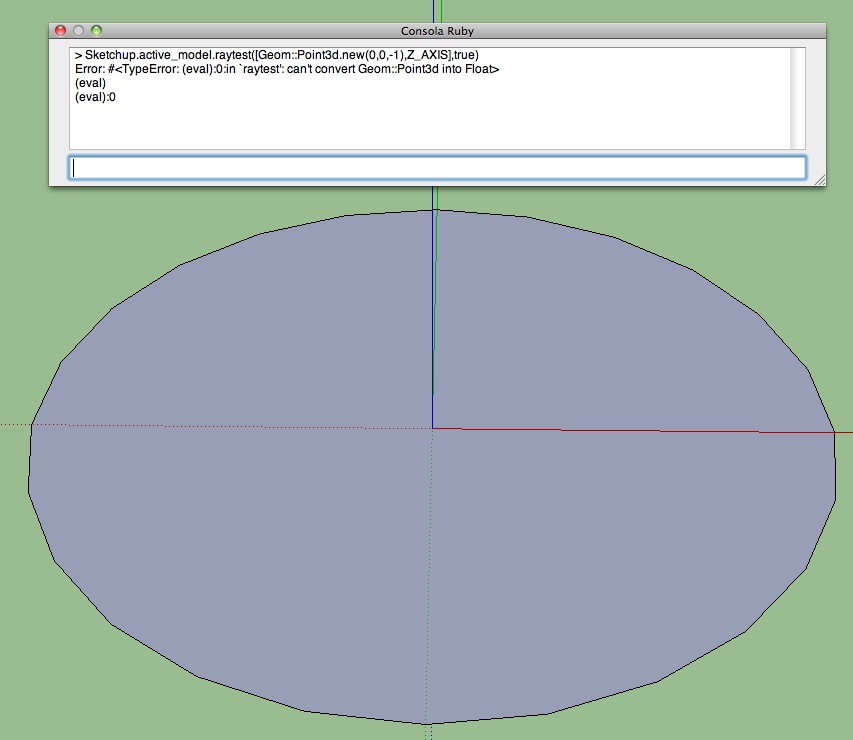
-
OK.
Stop the testing!
Can I have exact details of your Sketchup version and your OS.
[both Oxer AND SUFractal].Something is seriously adrift !!!
I need to speak with the powers-that-be at Google to resolve this - it appears to be a basic error in that specific Sketchup installation...
The
model.raytest()is not working as specified... -
@tig said:
OK.
Stop the testing!
Can I have exact details of your Sketchup version and your OS.
[both Oxer AND SUFractal].Something is seriously adrift !!!
I need to speak with the powers-that-be at Google to resolve this - it appears to be a basic error in that specific Sketchup installation...
The
model.raytest()is not working as specified...SUFractal is using Mac OSX 10.6.8 with SUPro version 8. Anything else?
-
Can you please supply the exact version of Sketchup [found via Help > About...]
I have already logged something with Google and need the exact details... -
@tig said:
Can you please supply the exact version of Sketchup [found via Help > About...]
I have already logged something with Google and need the exact details...Version 8.0.3161
-
Thanks - this issue will affect many tools, so it needs resolving...
-
The best brains are now on to it...
Oxer/SUFractal... if you lift up the circle in the Z/blue axis [just a little] and retest with the Console raytest code do you still get the same error ?
If you use this alternative too ?
Sketchup.active_model.raytest([Geom::Point3d.new(0,0,111),Z_AXIS.reverse])This really is weird ??
Another, perhaps more remote, possibility is that you still have some rogue script loading from elsewhere that is redefining raytest and we have not found it [yet].
Can you type this in the Console$LOAD_PATHand report the list.
If there are folder-paths other than root's Plugins and Tools, then check those for scripts containing 'def raytest' too -
With $LOAD_PATH appears the default paths to the plugins & tools folders but it appears the main path to my user count "/Users/Oxer" i don't know why. I have deleted the rest of the plugins in this path, for example in my downloads folder, etc.
TIG this is the result with the two codes, circle in Z/ blue axis.
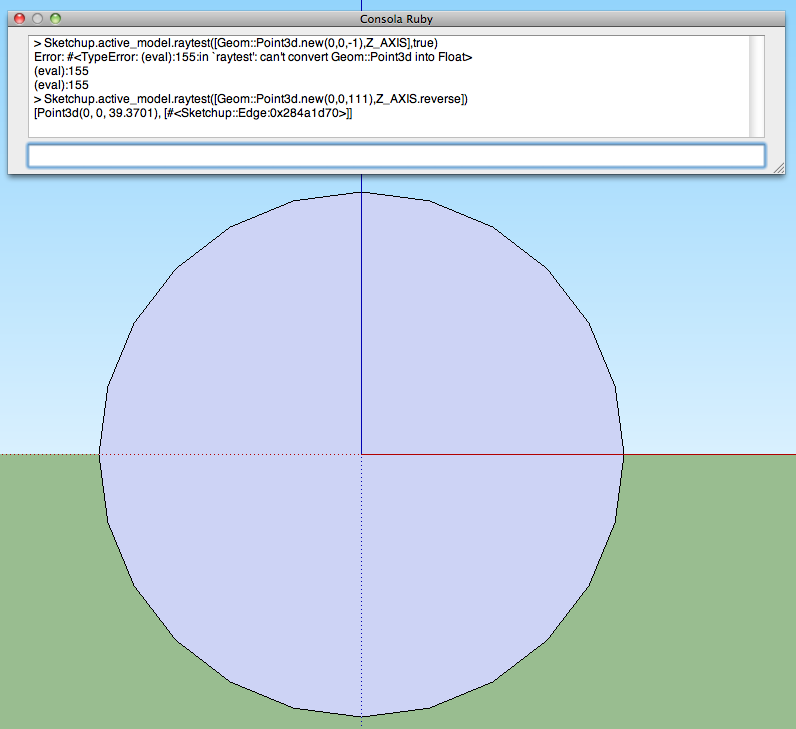
-
Sorry Oxer, to try and get this more logical, here's a set of steps.
Make a ~1m circle flat on the ground, centered on the ORIGIN.
Move it up 11".Open the Ruby Console and run two raytests.
Sketchup.active_model.raytest([Geom::Point3d.new(0,0,-111), Z_AXIS])
then
Sketchup.active_model.raytest([Geom::Point3d.new(0,0,-111), Z_AXIS], true)
Next do two more raytests.
Sketchup.active_model.raytest([Geom::Point3d.new(0,0,111), Z_AXIS.reverse])
then
Sketchup.active_model.raytest([Geom::Point3d.new(0,0,111), Z_AXIS,reverse], true)Now move the circle downwards by 22" so it's below the ORIGIN.
Repeat the 4 tests...
Sketchup.active_model.raytest([Geom::Point3d.new(0,0,-111), Z_AXIS])
then
Sketchup.active_model.raytest([Geom::Point3d.new(0,0,-111), Z_AXIS], true)
then
Sketchup.active_model.raytest([Geom::Point3d.new(0,0,111), Z_AXIS.reverse])
then
Sketchup.active_model.raytest([Geom::Point3d.new(0,0,111), Z_AXIS,reverse], true)Move the circle exactly onto the ORIGIN and repeat the 4 step test...
Post the text results from the Ruby Console...
I suspect that your MAC can't cope with certain permutations of axes and z values, or perhaps the optional wysiwyg flag ??? -
Sorry TIG, in Spain we are in holidays (Saint Week) i'm going to travel when i back i'll continue with the testing.
Bye, best wishes. -
No problems, I am on hols from tonight anyway...

-
Hi TIG,
Is it possible to use this script to create space frames with regular geometry that can be tessellated e.g. a tetrhedron, octahedron, or dodecahedron? -
@oisin.higgins said:
Hi TIG,
Is it possible to use this script to create space frames with regular geometry that can be tessellated e.g. a tetrahedron, octahedron, or dodecahedron?
Yes, theoretically...
This is v1.0
The math would just get extra extra complicated...
I do have '3 sided' [equilateral triangles] on the to-do-list already - which would give 'reinforced hexagonal honeycombs...




Advertisement