Solids from an imported dxf
-
Dunno if this is a newbie topic, but I'm certainly a newbie, so here goes ...
I've succeeded in importing a dxf file (thanks to FreeDXF!) but can't see how to transform the collection of lines into surfaces on which I can use Push/Pull.
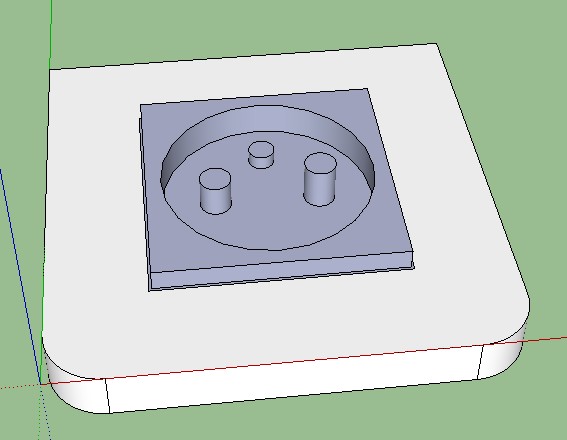
The drawing is of a (French) power outlet, and I need to pull up the fascia, push in the central cavity, and pull up the earth pin, to create a 3D model.
I'll be needing to do the same things on a few similar files (switches, etc.) so need to know how this works.Am attaching the Sketchup file and the original dxf.
Using Sketchup 8 free.
Be very grateful for any help!
Regards,
Steve
-
Explode 2 times or bomb (some time you need to explode more than once)
Then use make face tool or draw a hroz line one side to other side to make faces
push-pull for hight: This jpg is just showing that I push pull it.
-
Dukejazz,
Thanks for that.
I did draft a post saying I'd solved the problem, but I must have forgotten to hit "submit"

For anyone else with the same requirements, here's the procedure that worked for me:
- Download Make Faces from here: http://www.smustard.com/script/MakeFaces and install
- Explode the drawing twice (like you say)
- DON'T group the exploded lines to form shapes (tried that, and it prevented the next step from working)
- Use Tools>Make Faces to create faces from the spaces bounded by the lines
- Push/pull as usual
So I'm a happy bunny
Steve

Hello! It looks like you're interested in this conversation, but you don't have an account yet.
Getting fed up of having to scroll through the same posts each visit? When you register for an account, you'll always come back to exactly where you were before, and choose to be notified of new replies (either via email, or push notification). You'll also be able to save bookmarks and upvote posts to show your appreciation to other community members.
With your input, this post could be even better 💗
Register Login


Advertisement