Components created where Axis is altered
-
Guys, see attached:
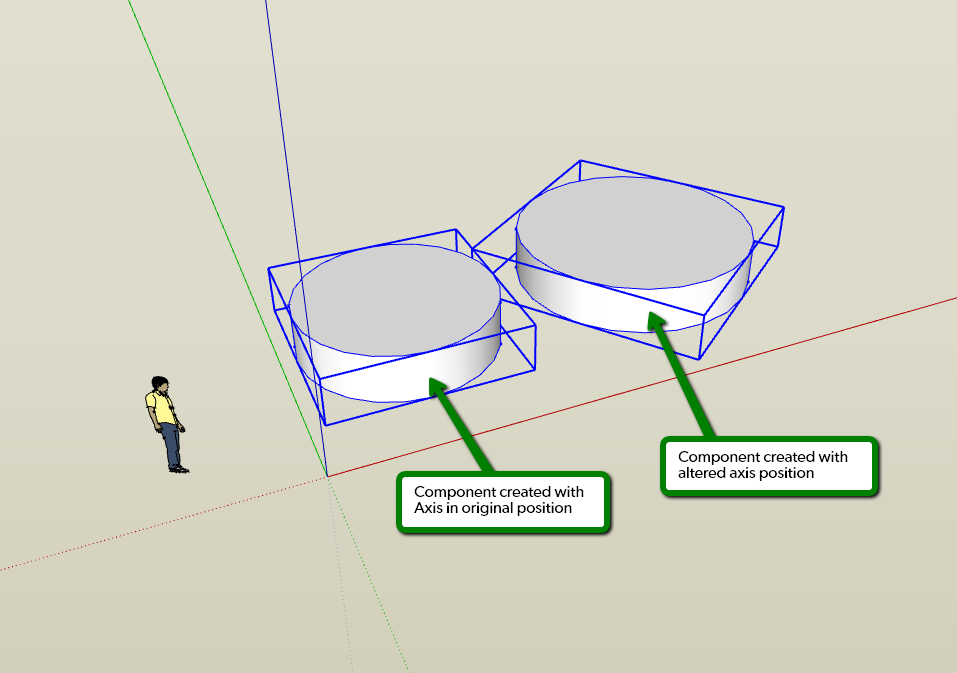
Workflow:
I've created a component where the axis is at the origin. Then I altered the axis and created another which shows its bounding box aligned to the altered axis.
Is there a way to re-set the components axis easily when the axis has been set back to the origin...?
Short video of the workflow attached for clarity.
Cheers,
-
Andrew, yes, you can do this. Use some crossing guidelines to locate there you want the origin. I would align the guidelines to be parallel to the global red and green axes, too. then right click on the component and choose change axes. place the origin, drag out the red followed by the green. Make sure the blue goes up.
-
Cheers Dave, yeah that's what I do to change it back. Sometime when you're churning away you forget you've change the axis orientation which affects groups and components made at this time.... maybe it's something for thomthom's axis tools....
say a context click and maybe a 'reset axis orientation around components axis location'...?
That would be cool.
Thom?



Hello! It looks like you're interested in this conversation, but you don't have an account yet.
Getting fed up of having to scroll through the same posts each visit? When you register for an account, you'll always come back to exactly where you were before, and choose to be notified of new replies (either via email, or push notification). You'll also be able to save bookmarks and upvote posts to show your appreciation to other community members.
With your input, this post could be even better 💗
Register Login


Advertisement