[Plugin] IGES Export - 27 February 2012
-
I have a problem with this tool:
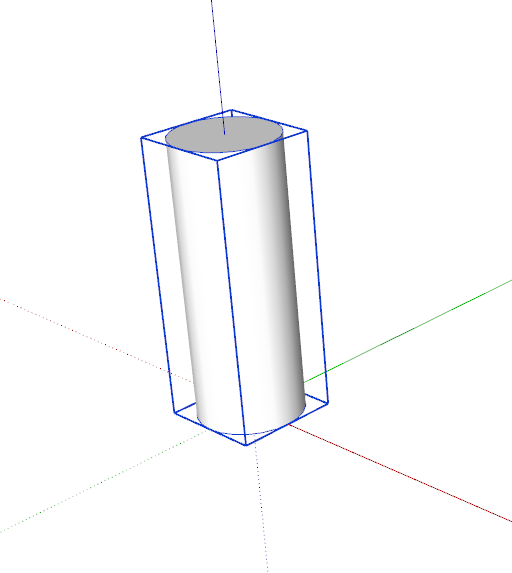
- Create a group (cylinder)
- Export iges format
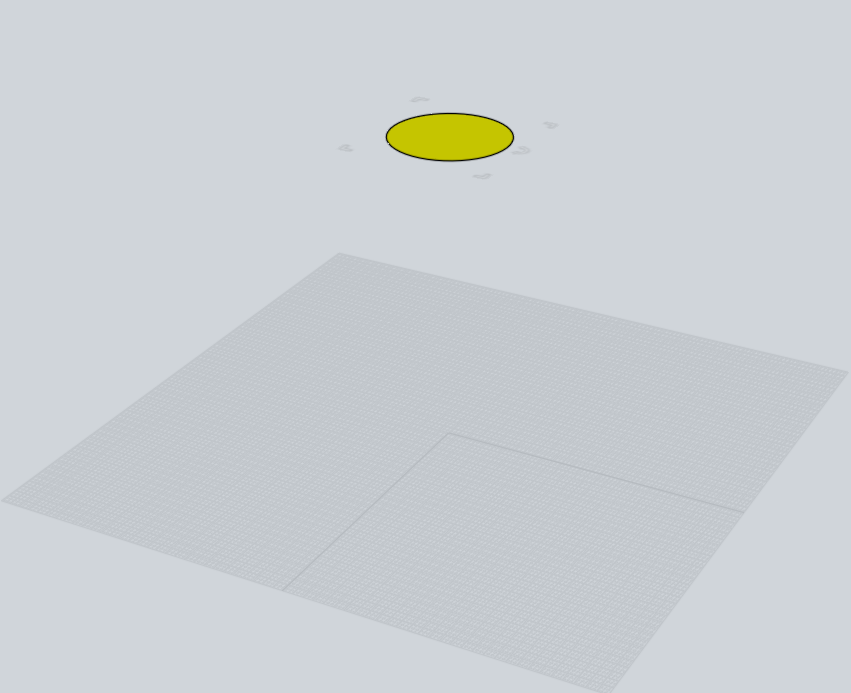
- Open with MOI
only a surface appears.
I do something wrong?
Any help appreciated.
-
@micione said:
- Open with MOI
As already mentioned: Many importers do not import IGES correctly. Try: HeeksCAD and the IGES-Viewer, both work for me. Heeks also allows to save in STEP that is more likely to be imported in other programs.
If your model does not import correctly to HeeksCAD please send me your skp. If it does, the problem is the importer, not the exporter.
Rainer -
Grande. model is clearly visible in in HeeksCAD and IGES-viewer. I save the file to IGES (from SketchUp) as IGES in HeeksCAD. Then export successfully, both in the MOI, both in DoubleCAD. Thank you.
-
 Boy! you guys are reallllly helpful.
I just got a request for my model in STP format. So first thought, look up in my favourite forum. Sure enough ! bingo !
They think I'm the genius.
We know better. -
Wow thank you thank you for this ! you saved me from having to learn Soildworks (for now) which is awesome because I have a dead line and I'm running out of time.
Only question I have is how do I turn of the curved surface translation. On one of my parts its curving lines that should be a series of straight lines.
-
I get an error message that reads: "Model contains non-solid elements, these will not be exported." ... and nothing happens. Any advice? can i attach the file and have someone convert it to IGES for me?
-
@brutter said:
I get an error message that reads: "Model contains non-solid elements, these will not be exported." ... and nothing happens. Any advice? can i attach the file and have someone convert it to IGES for me?
Before attaching the SKP can you first check for its objects' "solidity"...
Non-manifold objects aren't exported.
Try thomthom's SolidInspector plugin to see what is wrong with your model.
There are several forum threads about 'solids' and fixing them already - search for those, they might help you understand the issues and how to fix them... -
Incredible!!!!
According to all I read on the web, exporting skp to IGES was allmost impossible by just clicking a button!
Anyway, I tried it.
My first surprise was not so good as your plugin told that my model contains non solid entities which couldn't be exported. Well, as my model doesn't contain any solid at all, I expected getting a blank file!
But your plugin continued and ask me for a file name !?! Why? As it didn't find anything to convert??
Ok, let's go and...., and...., and........,
Surprise, my model is perfectly converted !!!????!!!! 15Mb instead of 1.3 Mb in skp!
Well quite perfectly as it just generated one more edge, in the espace, not connected to the model.
-
As converting to solid indeed is not so straightforward my plug in first checks if it finds a closed shell. If there are objects that do not fit in that scheme, that is loose faces, edges or internal flaps, it tries to get rid of these - but this may result in undesirable changes to the model.
If after the modification there is still a shell it is exported.
Consider to use TIG's solid checker before.
Please note, that in your model the shapes are not smooth but facetted - thats the limitation here. As made more for MCAD only round shapes are converted to the appropriate shapes in the IGES.
Rainer -
Hi Rainer,
Thanks for your answer.
First, the fact that the faces are facetted is really not a problem.The problem I talked about, and I illustrate again by the next example, is not a problem of interpretation of existing geometry but creation of new geometry.
Or maybe, I don't know if it's possible, that your plugin may find in the skp file, a trace of an erased geometry.
It's more visible on the image below.
It's problem a bit annoying whereas your plugin is very close to be perfect.
Solid tools don't solve these kind of problem.
Regards,
Alain -
If you send me the file I will have a look into.
-
Hello,
I want to get to a STEP file from my skp. I did my model a solid but when I use the IGES export plugin nothing happens on the screen and no igs file is created ... Think you can help me? -
Hello Howaito,
Are you sure that you don't get a STEP file in your directory because if you export a very simple part, the process can be very fast and you should see nothing in the status bar.
-
Rainer,
I just tested this plugin by exporting a model and then importing into SolidWorks 2014. It worked beautifully.
Thanks so much for providing this most useful tool!
Chris
-
Hi Guys,
I'm new to Sketchup and I have been trying to install the Iges exporter but it doesn't seem to work.
I have tried several methods for the plugin install.-
Unzip and moved the "iges_export.rb" to the plugins folder: "C:\Program Files (x86)\Google\Google SketchUp 8\Plugins".
-
Change the extension from "iges_export_V0.7.zip" to "iges_export_V0.7.rbz" and install it with the extension installer withing Sketchup. It says that the install was succesfull but I can't seem to find a way to export to IGES.
I am using Sketchup version 8.0.16846 Pro.
What am I doing wrong? -
-
Hi Rainer,
I just installed your IGES Export plugin and exported a couple of parts. However, I can't see where they exported to. They don't seem to be in the Sketchup folder, or anywhere else. I've searched for IGES and .iges on my computer, but nothing comes up.
Please help!If you can help, please can you email: bren@brendan-power.com
Thanks! Brendan
-
Hi guys, i need your help with this , I am not succeeding in saving my model to IGES file, I am a computer engineer, but i never dealt with these software in my whole life.
I installed the plug in , and I do the save as IGES..but i always get an error saying: can't save file.
Any one can help me by emailing him my file and trying to export it as an IGES FILE? -
If you post the whole error you might get a better response.
Also run it with the 'Ruby Console' open and report any messages that might also appear there...Remember that it only exports manifold solids - so if you have Groups/Components that do NOT include 'Solid' in the top bar when you Select them and use 'Entity Info', then they won't export using this Plugin...
-
Dimension Problems
I have a sketchup model design in centimeter.
When I export the model to igs then the dimensions in the igs model are by the factor 25.4 bigger then in SU.Tests:
--> Open the igs file in FreeCAD then the dimensions are the same as in SU.
--> But when I send the igs model to a metal manufactury they tell me that the dimensions are by the factor 25.4 bigger then it should be.It looks like ther is an conversion problem of inch to centimeter.
Any idee what's wrong? Do I have to make any setup in SU?Regards Peter
-
Dimension Problems
I have a sketchup model design in centimeter.
When I export the model to igs then the dimensions in the igs model are by the factor 25.4 bigger then in SU.Tests:
--> Open the igs file in FreeCAD then the dimensions are the same as in SU.
--> But when I send the igs model to a metal manufactury they tell me that the dimensions are by the factor 25.4 bigger then it should be.It looks like ther is an conversion problem of inch to centimeter.
Any idee what's wrong? Do I have to make any setup in SU?Regards Peter





Advertisement