Now cannot hold shift and zoom in and out with mouse wheel?
-
@caleb said:
I cannot believe how many unhelpful replies there are on this thread.
The reason for this thread- as has been stated- is that you want to hold shift a lot while zooming in and out, not to modify the command (OBVIOUSLY) but to lock on an axis- I do this constantly on my PC at work.
The problem is, on a mac, when you hold shift, the scroll wheel stops zooming-
Has anyone found a solution yet?
-- I have a mac at home and I'd love for my workflow to be the same.
no.. you can't do this on mac.. you can do it on mac if you're using a trackpad..
[off:10j9bm8q](and that's not the real solution anyway.. the real solution is to be able to press a mod key, such as tab, then let go of it but the axis lock is maintained.. and, you should be able to do this on any vector.. not just x,y,z.. but, i'm sure there will be some people to come in and tell me.. "no, sketchup works perfect.. you're stupid" )[/off:10j9bm8q]
-
@unknownuser said:
I am not sure what part you're disagreeing with, it sounds like you're agreeing with me...

you said "The whole trick on the mac is based around the gesture (two finger) scrolling..."
the dude was talking about orbiting.. **(see below)
gestures on mac laptops have nothing to do with orbiting in sketchup..
(they should... they could.. but they dont)anyway.. he's looking for a modifier key(s) on windows that will invoke the temporary orbit feature.. is there one?
(because if there isn't, it sounds basically impossible to draw with any sort of finesse on a pc laptop without a mouse)
EDIT-
here's sketchup 4 quick reference card.. notice the mouse options.. i don't have an old reference card for windows so if anyone does, look for anything like this on there.. (the newer quick ref cards don't show this feature even though they still work)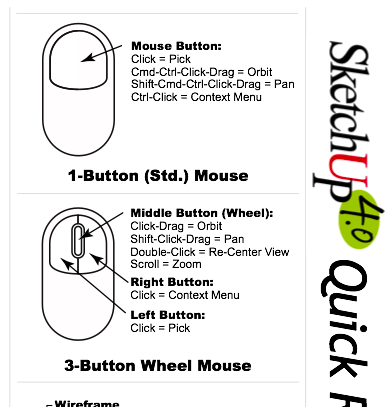
**hmm.. actually, maybe it's me that is confused.. i don't know if youre talking to the OP from a year ago or the dude that recently bumped the thread with an offtopic question.. eric, for sake of keeping me less confused, would you mind using the quote feature of these forums so we can see who you're talking to or give us some more context surrounding your reply? thanks

-
@unknownuser said:
My recommendation, use the arrow keys to lock an inference, not the shift key. Left and right are red and green, and up or down is blue.
oh.. hey.. that's actually a great suggestion.. (one that i definitely wasn't aware of)..
it may take some getting used to (like anything else) but once you got it.. you got it..
[edit].. confusing thread.. two separate conversations/topics woven together lol..
-
oh.. for the trackpad parts of this thread, let's not forget we don't need a laptop to utilize their features.. we have this option as well..
those things are sweet



Advertisement