[Plugin] Slicer5
-
TIG, this is not a plugin that I would use often but it is soooo neat I can't help playing with it!!!
Cheers!!

-
@tig said:
Here's v5.13 http://forums.sketchucation.com/viewtopic.php?p=374969#p374969
The latest Chinese lingvo file is now included in the set.
The RZ solutions have been improved: now less prone to error with complex shapes made when the ORIGIN is within the bounding-box of the sliced-object: useful when making horizontal Z[blue] slotted-ribs with R[amber] radially arranged slotted-spars in the vertical [rotate the slice-object onto its 'nose', if you want to transpose the rib/spar arrangements]...[attachment=0:spns2k8l]<!-- ia0 -->s5-13.PNG<!-- ia0 -->[/attachment:spns2k8l]TIG: very kind of you! Update so fast!
-
XXXXX?
Thank you Sir. -
I am using v5.11. I have been getting a variety of results when trying to slice really complicated geometry. I will slice and get a full crash complete with bug splat error report, sometimes it will look like it has finished but there will only be text in the very far distance, sometimes it will slice and "grey out" with xyz lines no longer visible. I did try making the object bigger x 10 and that seemed to help a lot. Thanks again! I'm working with a laser cutter, and this is really amazing!
-
Without seeing the sliced-object I can't say... is there something more complex in one direction that another ?
Are you doing slotting as well as slicing in one step?
If you omit the slotting what happens ?
It you use Slotter later on the set what happens etc etc ??If you make fewer slices [increased thickness/spacing] what happens ?
Very complex slicing will take time, especially when slotted...
Can you post a screenshot or two ?
-
@erinbanwell said:
currently experiencing a bugsplat when I try to make a x,y slice, but just x or just y works fine and takes about 3 mins to process. what do you think TIG?
I use normal, too much may cause you to slice, long time! Try a small model, sliced

-
As said, slicing large models takes a long time... think before you slice...
-
currently experiencing a bugsplat when I try to make a x,y slice, but just x or just y works fine and takes about 3 mins to process. what do you think TIG?
I also am experiencing an error where the model will suddenly dissappear leaving only the x,y,z red,blue, green lines. The slicer plugin seems to be finished at this point. If I try to use the orbit tool, the x,y,z lines will disappear too. If i close the window at this point it will ask me if I want to save the file. If I save the file, and reopen it, it stays in the exact same state: No model, no xyz reference lines, and none of the tools work. I have tried this probably about 50-60 times. If I leave it alone completely, it never finishes on it's own. My last try was over 12 hours. Any help? I could post the file if that helps. Thanks again. -
Because of this... TIG what do you think about adding a counter or a countdown to your code: Sketchup.status_text=@msg+"Slicing..." + counter


-
Adding a status-bar counter will slow down processing.
It already tells you at which stage it's at, so its changing status-bar does confirm that it is running...
A counter would show progress, but if Sketchup becomes unresponsive and there's a 'white-out' the counter stops changing, which then leads users to incorrectly assume that it's broken, when in fact it's continuing and has just stopped updating the display!
It's a long standing gripe that Sketchup does this, one day we might get a built-in progress-bar method that updates the display and properly prevents 'white-outs'... -
TIG are you sure?..Did you try a normal numeric counter?.. Others Slicing-Plugin do it and it never stops or crashes... I can show you that code, if you want... They use a normal numeric variable-counter.

-
Any changes to the status-bar display and any additional calculations [even like
ctr.next!] will inevitable add a tiny amount to each iteration, which will add up - and there are very many iterations in complex tools like this.
I have many tools with 'counters' [the older Slicer did it!], but they all reach a limit at some point when there is too much to calculate and Sketchup will become unresponsive and appear to stall, although it is continuing in the background! Simple operations will appear OK and display as say '5%' or '1 of 1234' etc incrementing successfully until completion... BUT if you try making the processed objects more and more complex then at some point a 'white-out' will happen... -
ok...then we have to wait for... SU version n.9!


-
Hello TIG, thanks for this plugin - you do some fantastic work!
I was just playing around with it an noticed that the slices for x or y axes always seem to be aligned with the original axis orientations, even if the group is aligned differently. So even if I reset the axes with a group, or for the entire model, to get the alignment I'd like - the slices seem to ignore this. Is this right or am I missing something?
thanks
- Mick
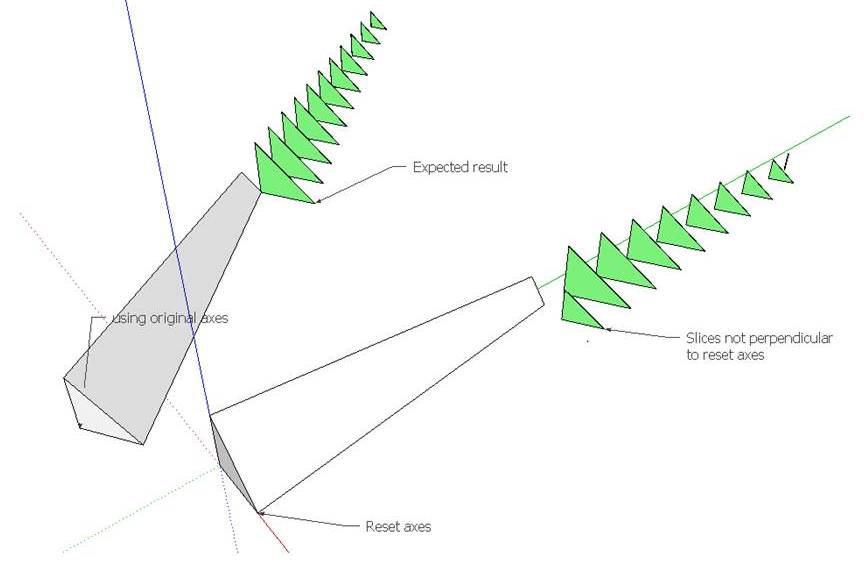
- Mick
-
THE XYZ axes are the model axes - ignoring any temporary resetting of the axes that you might have done.
Any changing of them cannot be found in the API, as far as I know.
The XY 'angled' slice option could be set to the angle of the XY axes if know ? -
@tig said:THE XYZ axes are the model axes - ignoring any temporary resetting of the axes that you might have done.
Any changing of them cannot be found in the API, as far as I know.
The XY 'angled' slice option could be set to the angle of the XY axes if know ?Thankyou TIG, that worked (set axis to 'A' and enter the angle in the 2nd dialog box) - just wasn't sure if I was missing something or not. I can't write rubies, but I'm surprised that the API doesn't provide a way to know the group axis settings?
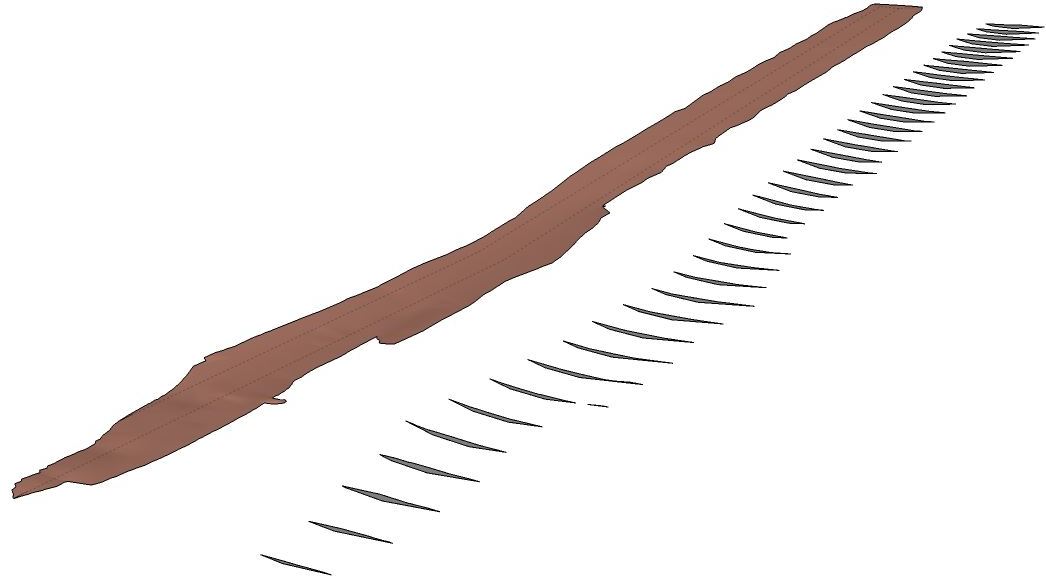
Funny how things work actually, I downloaded your plugin out of curiosity, but almost immediately found a potential application for it - looking at cut and fill cross-sections. I have a idea/suggestion though... what about allowing the user to select a path for which the cross-sections would be aligned? So for my pic below, instead of just following one line, if my shape had a significant bend in it, a central path could be drawn and the cross sections would be aligned along and perpendicular to that path?
In any case thanks for the plugin - nice.
Cheers
- Mick
-
The API can get the 'local axes' used inside a group/definition... BUT not any reset model axes, to which is what I thought you were referring.
The XYZ slicing always follows the models axis [ignoring any reset].
It easiest [but not essential] if the sliced manifold group/instance is in the model's entities... -
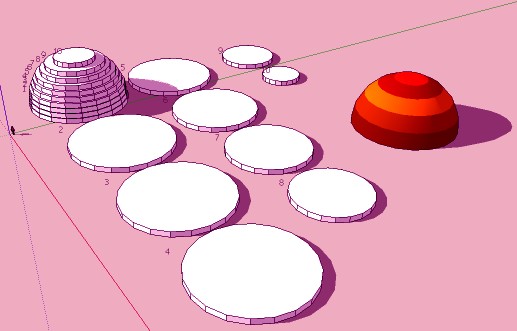
Does it possible to have the Slices of the volume follow the colors (or textures) of the original?
(here with Slicer3 in V6, maybe this exist in the Slicer5? )
-
No.

-
In the future?







Advertisement