[Plugin] FredoTools - v4.6a - 21 Oct 26




-
 OK, I got past this and all appears good. However, the toolbar for Tools On Surface is blank on my screen. In fact, any plugin that uses on-screen options shows as blank. Nvidia driver issue? see attached.
 -
NEW RELEASE: FredoTools v4.5a - 02 Apr 24
Requirement:
- LibFredo6 v14.3b or above
FredoTools 4.5a is a maintenance release for:
- Future compatibility
See FredoTools plugin home page for Download.
See also main post of this thread for User Discussion.
-
@fredo6 Hi I have used Fredo6's tools for manyt years and they are always super useful.
At present, since SU2024 I have had issues with SUClock, which I stopped using whilst it was updated.
I've since started using SUClock since the update and its been working fine.
Today I started up SU2024 with an existing project (double clicking on the skp file itself, incase that is ever relevant how I 'opened up' the file) and I got the following error.
This error hasn't gone away and did not start working up next restart of SU2034, so I wonder if you can help -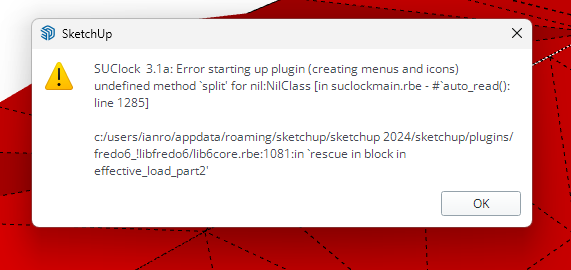
I see the icon of SUClock but it does nothing when clicked on.
Multiple restarts have not fixed anything. There are similar errors with ThruPaint and Toposhaperm unforrtunately. Can anyone help? plugin information as follows:
Fredo6 Plugins Information on 2024-06-04 12:00:59 +0100- Platform: x64-mswin64_140 - Ruby: 3.2.2
- Sketchup: 24.0.484
- LibFredo6: v14.5b
- LibFredo6 Binary loaded
- Sketchucation ExtensionStore: 4.4.0
- SCFLicense: v6.4a - 74
- Fredo6 Plugins
LordOfTheToolbars v2.7b
Curviloft v2.0a - licensed FULL
Curvizard v2.5a
FredoCorner v2.7a - licensed FULL
FredoScale v3.6a - licensed FULL
FredoTools v4.5a
JointPushPull v4.8a - licensed FULL
SUClock v3.1a
ToolsOnSurface v2.6a - licensed FULL
TopoShaper v2.7a - licensed FULL - SCFLicense directory present
Signature File: 2022-03-30 14:03:14 +0100
ClothWorks: 2022-10-27 15:42:55 +0100
Curviloft: 2022-09-03 15:21:17 +0100
FredoCorner: 2024-03-04 13:57:21 +0000
FredoScale: 2022-04-25 11:42:35 +0100
FredoSpline: 2022-11-21 16:26:56 +0000
JointPushPull: 2022-05-08 14:44:25 +0100
ToolsOnSurface: 2022-04-25 13:46:45 +0100
TopoShaper: 2022-09-02 16:10:20 +0100
MrHide_1.8a
AutoInstall Finished.
Using Main Plugins Folder.
C:/Users/<user>/AppData/Roaming/SketchUp/SketchUp 2024/SketchUp/Plugins -
Did you install SU2024 with 'Run as dministrator'?
-
@fredo6 yes
-
Could you open the Ruby console and copy paste the following command, and then type Enter:
UI.openURL F6_SUClock::Project.get_tmpdirThis will open the temp directory, in which you have files with extension .txt and a form like XXX__YYY.txt.
Just erase them. It seems that one of them is corrupted.Erasing them should not impact your SUClock data.
Then restart Sketchup.
-
@fredo6 Many thanks - after doing just that and restarting, it worked. no errors upon startup.
Cheers \o/ -
NEW RELEASE: FredoTools v4.5c - 24 Jun 24
Requirement:
- LibFredo6 v14.3b or above
FredoTools 4.5c is a maintenance release for:
- Fix for the caluclation of volumes in SolidVolume
See FredoTools plugin home page for Download.
See also main post of this thread for User Discussion.
-
a true Doh! moment - Angle Inspector has Slope meter in %% ! Many many thanks, Fredo.
P.S. Maybe one day it would become interactive - showing live the slope altering. -
NEW RELEASE: FredoTools v4.6a - 21 Oct 26
Requirement:
- LibFredo6 v16.3b or above
FredoTools 4.6a is a maintenance release for:
- Compatibility SU2027
- Fix along with LibFredo6 v16.3a
See FredoTools plugin home page for Download.
See also main post of this thread for User Discussion.


Hello! It looks like you're interested in this conversation, but you don't have an account yet.
Getting fed up of having to scroll through the same posts each visit? When you register for an account, you'll always come back to exactly where you were before, and choose to be notified of new replies (either via email, or push notification). You'll also be able to save bookmarks and upvote posts to show your appreciation to other community members.
With your input, this post could be even better 💗
Register Login


Advertisement