sketchucation logo sketchucation
    • 登入
    Oops, your profile's looking a bit empty! To help us tailor your experience, please fill in key details like your SketchUp version, skill level, operating system, and more. Update and save your info on your profile page today!
    🔌 Smart Spline | Fluid way to handle splines for furniture design and complex structures. Download

    [Plugin] FredoTools - v4.5c - 24 Jun 24


    已排程 已置頂 已鎖定 已移動 Plugins
    463 貼文 123 Posters 710.9k 瀏覽 121 Watching
    正在載入更多貼文
    • 從舊到新
    • 從新到舊
    • 最多點贊
    回覆
    • 在新貼文中回覆
    登入後回覆
    此主題已被刪除。只有擁有主題管理權限的使用者可以查看。
    • cottyC 離線
      cotty
      最後由 編輯

      Thank you for this great update!

      my SketchUp gallery

      1 條回覆 最後回覆 回覆 引用 0
      • D 離線
        dedmin
        最後由 編輯

        Su 2013 Pro, Win 7 64 bit


        Video_2014-02-16_140138.wmv

        1 條回覆 最後回覆 回覆 引用 0
        • R 離線
          rv1974
          最後由 編輯

          dedmin, how do you grab into .wmv?

          1 條回覆 最後回覆 回覆 引用 0
          • D 離線
            dedmin
            最後由 編輯

            @rv1974 said:

            dedmin, how do you grab into .wmv?

            Link Preview Image
            FastStone Screen Capture - The Best Screen Capture Software

            favicon

            (www.faststone.org)

            1 條回覆 最後回覆 回覆 引用 0
            • fredo6F 離線
              fredo6
              最後由 編輯

              @dedmin

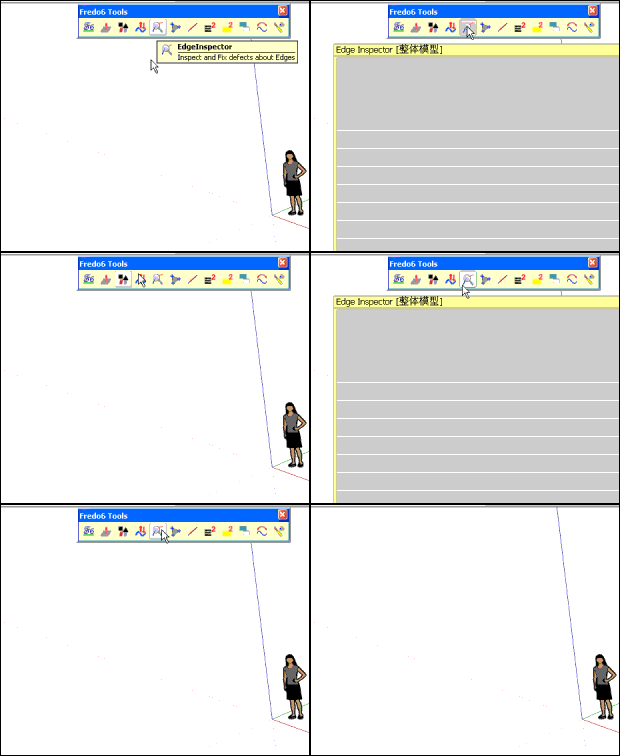
              Thanks for signaling. This is actually a bug concerning Curvizard, not FredoTools.

              I fixed it and republished as Curvizard 1.7b.

              Fredo
              1 條回覆 最後回覆 回覆 引用 0
              • guanjinG 離線
                guanjin
                最後由 編輯

                @fredo6 said:

                @dedmin

                Thanks for signaling. This is actually a bug concerning Curvizard, not FredoTools.

                I fixed it and republished as Curvizard 1.7b.

                Fredo

                111111111111111111111111111111111.gif

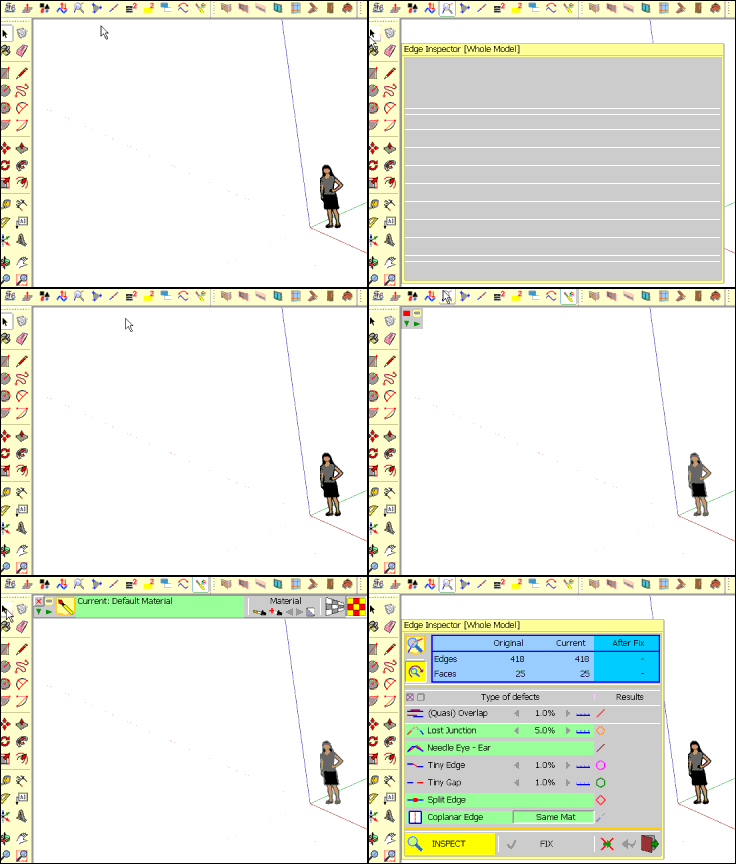
                The latest version, the pop-up dialog box displays a blank。

                Be sure to activate the other tools, and then activate it to appear.
                Earlier versions without problems

                I come from China, is to learn

                1 條回覆 最後回覆 回覆 引用 0
                • fredo6F 離線
                  fredo6
                  最後由 編輯

                  guanjin,

                  This may be related to the Chinese translation. Do you get the error if you switch to English?
                  Also, could you check if there is no error displayed in the Ruby console

                  Fredo

                  1 條回覆 最後回覆 回覆 引用 0
                  • guanjinG 離線
                    guanjin
                    最後由 編輯

                    @fredo6 said:

                    guanjin,

                    This may be related to the Chinese translation. Do you get the error if you switch to English?
                    Also, could you check if there is no error displayed in the Ruby console

                    Fredo

                    Also, like switching to English,The same problem。

                    After activation texture tool display properly activated, see the movie.
                    wenti9999999999999999999999999999.gif

                    I come from China, is to learn

                    1 條回覆 最後回覆 回覆 引用 0
                    • Fcharly24hF 離線
                      Fcharly24h
                      最後由 編輯

                      On SU 2014 Make the tool bar don't ok for:
                      Fredo tools
                      curvizard

                      Thanks.

                      Fcharly24h
                      Mon site: Fcharly24h.perso.sfr.fr

                      1 條回覆 最後回覆 回覆 引用 0
                      • cottyC 離線
                        cotty
                        最後由 編輯

                        @unknownuser said:

                        On SU 2014 Make the tool bar don't ok for:
                        Fredo tools
                        curvizard

                        Thanks.

                        Why not?

                        my SketchUp gallery

                        1 條回覆 最後回覆 回覆 引用 0
                        • B 離線
                          babak
                          最後由 編輯

                          @cotty said:

                          @unknownuser said:

                          On SU 2014 Make the tool bar don't ok for:
                          Fredo tools
                          curvizard

                          Thanks.

                          Why not?

                          I think what Fcharly24H means is that the tool palette doesn't appear everytime you click on Fredo's toolbars icons with sketchup 2014.

                          For me it happens very often with thrupaint. When I click on the icon, it only triggers sketchup native paint bucket and if I zoom in and out while clicking on and off the tool palette might appears but not necessary.

                          I haven't noticed any problem with other tools though.

                          Thank you Fredo06 for your plugins ! 😛

                          1 條回覆 最後回覆 回覆 引用 0
                          • Fcharly24hF 離線
                            Fcharly24h
                            最後由 編輯

                            I don't know!
                            I no problem in verification update, no problem with other plugin of Fredo6

                            in C:\Users\Fcharly24h\AppData\Roaming\SketchUp\SketchUp 2014\SketchUp\Plugins
                            I have:
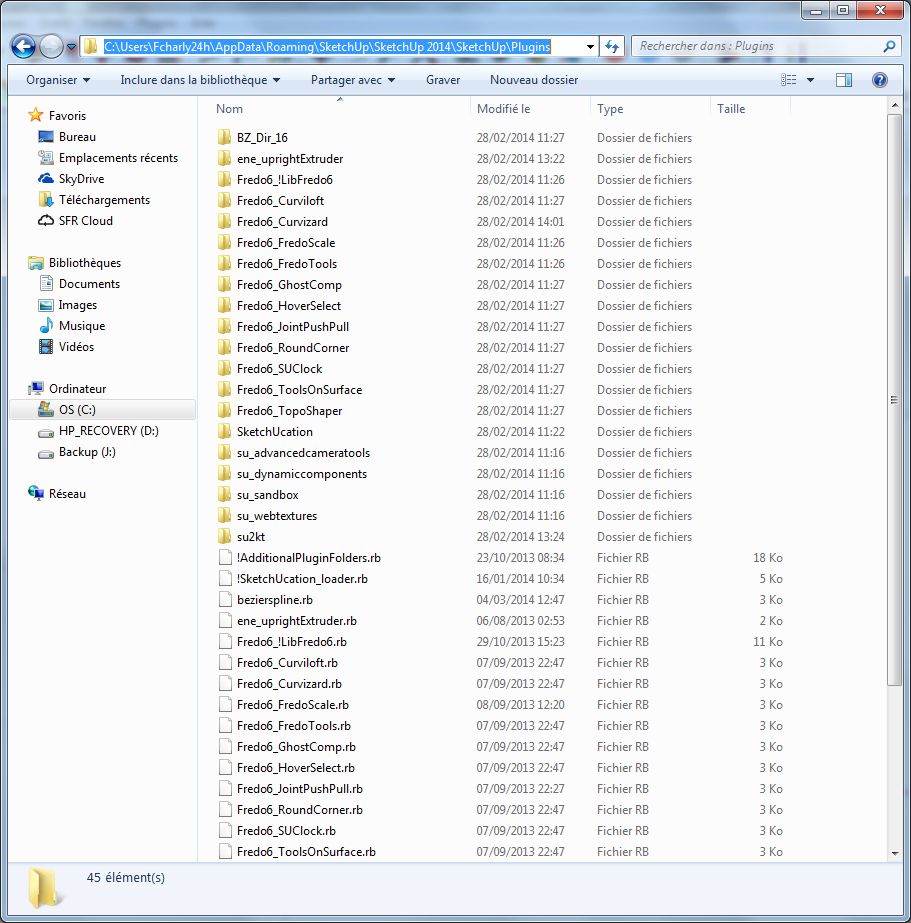
                            new location plugin in Su 2014 Make
                            Icon tool bar ok

                            in SU make 2014 no icon bar for:
                            Fredo tools
                            curvizard

                            in SU make 2013 ok
                            Icon tool bar Su Make 2013 ok

                            Fcharly24h
                            Mon site: Fcharly24h.perso.sfr.fr

                            1 條回覆 最後回覆 回覆 引用 0
                            • D 離線
                              dedmin
                              最後由 編輯

                              Object disappears when hitting Esc two times while using ThruPaint
                              SU 2014 Pro, Win 7 64bit SP1 Ultimate

                              Video_2014-03-26_132637.wmv

                              1 條回覆 最後回覆 回覆 引用 0
                              • fredo6F 離線
                                fredo6
                                最後由 編輯

                                @dedmin said:

                                Object disappears when hitting Esc two times while using ThruPaint
                                SU 2014 Pro, Win 7 64bit SP1 Ultimate

                                [attachment=0:3relfv60]<!-- ia0 -->Video_2014-03-26_132637.wmv<!-- ia0 -->[/attachment:3relfv60]

                                Escape performs an Undo. So this may be related to making sure it does not go to far back in the Undo stack. I'll check this problem.

                                Fredo

                                1 條回覆 最後回覆 回覆 引用 0
                                • D 離線
                                  dedmin
                                  最後由 編輯

                                  See the video.
                                  Video_2014-03-26_151418.wmv

                                  1 條回覆 最後回覆 回覆 引用 0
                                  • fredo6F 離線
                                    fredo6
                                    最後由 編輯

                                    That's a consequence of enabling 'Auto-Exit' when there is a pre-selection (which is not the default).

                                    Maybe I will use this fast-mode only for Make Curve and Explode Curve, and ignore it for other Tools.

                                    Fredo

                                    1 條回覆 最後回覆 回覆 引用 0
                                    • fredo6F 離線
                                      fredo6
                                      最後由 編輯

                                      There must be a bug somewhere, but in general, painting boxes correctly in continuity on all its faces is very tricky.

                                      Trying with your model, I noticed the flipping and I'll have a look at it.

                                      What I suggest is that you just paint the last face directly, instead of extending it from adjacent faces.

                                      Fredo

                                      1 條回覆 最後回覆 回覆 引用 0
                                      • fredo6F 離線
                                        fredo6
                                        最後由 編輯

                                        NEW RELEASE: FredoTools v1.8c - 17 Apr 14

                                        FredoTools 1.8c is a release for MoveAlong v1.0.

                                        See main post of this thread for Download.

                                        Fredo

                                        1 條回覆 最後回覆 回覆 引用 0
                                        • KrisidiousK 離線
                                          Krisidious
                                          最後由 編輯

                                          You soooo rock...

                                          By: Kristoff Rand
                                          Home DesignerUnique House Plans

                                          1 條回覆 最後回覆 回覆 引用 0
                                          • B 離線
                                            Ben Ritter
                                            最後由 編輯

                                            Thank you again.😄

                                            1 條回覆 最後回覆 回覆 引用 0
                                            • 1
                                            • 2
                                            • 20
                                            • 21
                                            • 22
                                            • 23
                                            • 24
                                            • 24 / 24
                                            • 第一個貼文
                                              最後的貼文
                                            Buy SketchPlus
                                            Buy SUbD
                                            Buy WrapR
                                            Buy eBook
                                            Buy Modelur
                                            Buy Vertex Tools
                                            Buy SketchCuisine
                                            Buy FormFonts

                                            Advertisement