sketchucation logo sketchucation
    • 登入
    Oops, your profile's looking a bit empty! To help us tailor your experience, please fill in key details like your SketchUp version, skill level, operating system, and more. Update and save your info on your profile page today!
    ⚠️ Important | Libfredo 15.6b introduces important bugfixes for Fredo's Extensions Update

    [Tutorial] SketchUp Ruby C Extension

    已排程 已置頂 已鎖定 已移動 Developers' Forum
    176 貼文 16 Posters 29.4k 瀏覽 16 Watching
    正在載入更多貼文
    • 從舊到新
    • 從新到舊
    • 最多點贊
    回覆
    • 在新貼文中回覆
    登入後回覆
    此主題已被刪除。只有擁有主題管理權限的使用者可以查看。
    • thomthomT 離線
      thomthom
      最後由 編輯

      Current WIP
      https://bitbucket.org/thomthom/sketchup-ruby-c-extension

      Working OSX and Windows "Hello World" example.


      This question comes up from time to time, how to compile a Ruby C Extension that works for SketchUp.

      Following tutorials for standard Ruby will not work for SketchUp without modifications. It would be nice if we could properly document this.

      For OSX I think I have all the info, thanks to AdamB that explained that it needed to be compiled into a flat namespace: http://forums.sketchucation.com/viewtopic.php?f=180&t=28673&start=0#p249370
      However, would be nice if anyone knew how to generate a make file with the correct flags so one does not have to edit it manually every time - like I do... 😕 😳 )

      For Windows it's even more to be done. TBD helped me out here with his Pelles C project. However, I was unable to create and set up a project for compilation myself and I have no idea what is needed to make it compile correctly. I'd like to learn this.

      One thing is that the C Extension under windows requires you to install a standard ruby installation and modify config.h to bypass a MSC check. (Or does anyone have a solution that doesn't require this?)

      I see Dana is using a make file that seem to be used on both platforms: https://github.com/danawoodman/google-sketchup-file-downloader/blob/master/src/CMakeLists.txt

      However, that project doesn't work in SketchUp yet.

      So, the short story is, can we (the devs here) put together a step by step tutorial on how to compile a SketchUp Ruby C Extension for OSX and Windows?
      (I can write it up, but I need someone to provide with the technical and explains how and why.)

      Thomas Thomassen — SketchUp Monkey & Coding addict
      List of my plugins and link to the CookieWare fund

      1 條回覆 最後回覆 回覆 引用 0
      • tbdT 離線
        tbd
        最後由 編輯

        can you fork https://github.com/TBD/OpenSUP/tree/master/SUExt and send a pull request for the OSX version ?

        will try to make a step by step page for compiling on PellesC (I will not install VStudio on virtual machine 😉

        SketchUp Ruby Consultant | Podium 1.x developer
        http://plugins.ro

        1 條回覆 最後回覆 回覆 引用 0
        • thomthomT 離線
          thomthom
          最後由 編輯

          @unknownuser said:

          send a pull request for the OSX version ?

          There is an OSX version? I'm not sure what you mean about sending a pull request... 😳

          What would be nice is along with the tutorial we could set up the framework for making and compiling on both platforms with minimum mount of per-platform files. If possible?

          Thomas Thomassen — SketchUp Monkey & Coding addict
          List of my plugins and link to the CookieWare fund

          1 條回覆 最後回覆 回覆 引用 0
          • thomthomT 離線
            thomthom
            最後由 編輯

            I clicked Fork when I was under SUExt - and it forked the whole repository. I guess there is no way to fork a part of a repository... ?

            Thomas Thomassen — SketchUp Monkey & Coding addict
            List of my plugins and link to the CookieWare fund

            1 條回覆 最後回覆 回覆 引用 0
            • thomthomT 離線
              thomthom
              最後由 編輯

              Clicking "Pull Request" and I get a message:

              "Oops! The TBD:master branch is already up-to-date with thomthom:master — maybe you want to try something else?"

              ....I should stop clicking now... 😳

              Thomas Thomassen — SketchUp Monkey & Coding addict
              List of my plugins and link to the CookieWare fund

              1 條回覆 最後回覆 回覆 引用 0
              • tbdT 離線
                tbd
                最後由 編輯

                fork - it creates a duplicate of the entire project in your account. you can change only in one subdirectory if you want.
                pull request - you make the changes in your forked project and send a pull request so I can integrate your changes

                you need to add some changes to send a pull request to me first.

                SketchUp Ruby Consultant | Podium 1.x developer
                http://plugins.ro

                1 條回覆 最後回覆 回覆 引用 0
                • thomthomT 離線
                  thomthom
                  最後由 編輯

                  Right. Should I leave the other folders alone?

                  Just thinking it might be nice with a repo just for C Extension - nothing else. Just to keep it clean and simple. ❓

                  Thomas Thomassen — SketchUp Monkey & Coding addict
                  List of my plugins and link to the CookieWare fund

                  1 條回覆 最後回覆 回覆 引用 0
                  • tbdT 離線
                    tbd
                    最後由 編輯

                    https://github.com/sketchucation is ready to accept projects 😉

                    SketchUp Ruby Consultant | Podium 1.x developer
                    http://plugins.ro

                    1 條回覆 最後回覆 回覆 引用 0
                    • thomthomT 離線
                      thomthom
                      最後由 編輯

                      @unknownuser said:

                      https://github.com/sketchucation is ready to accept projects 😉

                      Right'o. So can we create an "SketchUp Ruby C Extension" project? Then start adding stuff.

                      Thomas Thomassen — SketchUp Monkey & Coding addict
                      List of my plugins and link to the CookieWare fund

                      1 條回覆 最後回覆 回覆 引用 0
                      • tbdT 離線
                        tbd
                        最後由 編輯

                        pull requests away - https://github.com/sketchucation/suext 😉

                        SketchUp Ruby Consultant | Podium 1.x developer
                        http://plugins.ro

                        1 條回覆 最後回覆 回覆 引用 0
                        • thomthomT 離線
                          thomthom
                          最後由 編輯

                          I just got a very simple Hello World example working under OSX. Will create another example with some basic Ruby object interactions and expand a little on my comments. Then I will upload it to a repository. Think I'll focus on the step by step for OSX first to get the structure up. Then Windows - seem to be a bit more tweaking to get that working.

                          Thomas Thomassen — SketchUp Monkey & Coding addict
                          List of my plugins and link to the CookieWare fund

                          1 條回覆 最後回覆 回覆 引用 0
                          • Chris FullmerC 離線
                            Chris Fullmer
                            最後由 編輯

                            This sounds great Thom and TBD and everyone one else who gets involved. I keep being afraid that I might need to learn some of this for my upcoming work.

                            Chris

                            Lately you've been tan, suspicious for the winter.
                            All my Plugins I've written

                            1 條回覆 最後回覆 回覆 引用 0
                            • thomthomT 離線
                              thomthom
                              最後由 編輯

                              What you got cooking?

                              Thomas Thomassen — SketchUp Monkey & Coding addict
                              List of my plugins and link to the CookieWare fund

                              1 條回覆 最後回覆 回覆 引用 0
                              • thomthomT 離線
                                thomthom
                                最後由 編輯

                                Right - attempting to build on Windows.

                                I have Visual C++ Express 201 installed and I'm trying to build using nmake. Getting some errors:
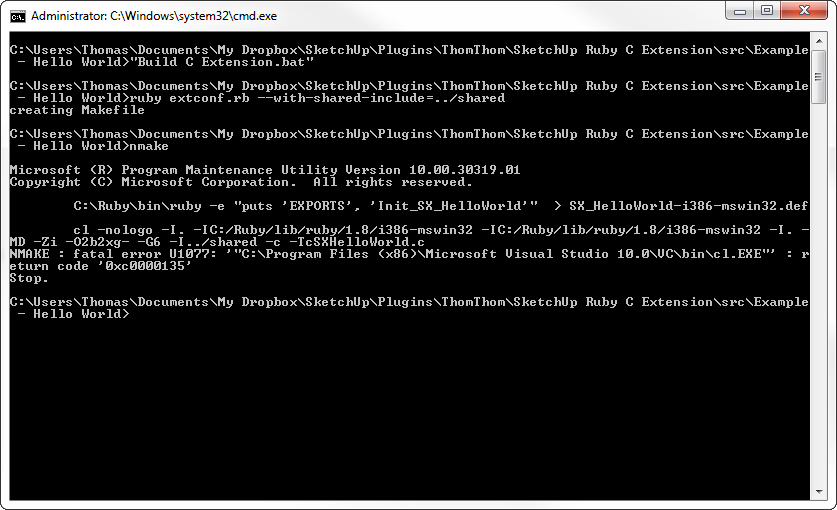
                                Build Error.png

                                I'm not sure what that means. Though I have a suspicion I need to specify the path to where windows.h is located... Though I don't know where to do so...

                                Thomas Thomassen — SketchUp Monkey & Coding addict
                                List of my plugins and link to the CookieWare fund

                                1 條回覆 最後回覆 回覆 引用 0
                                • thomthomT 離線
                                  thomthom
                                  最後由 編輯

                                  Uploaded my WIP at: https://bitbucket.org/thomthom/sketchup-ruby-c-extension/

                                  Working on OSX 10.5.

                                  Thomas Thomassen — SketchUp Monkey & Coding addict
                                  List of my plugins and link to the CookieWare fund

                                  1 條回覆 最後回覆 回覆 引用 0
                                  • thomthomT 離線
                                    thomthom
                                    最後由 編輯

                                    Note for self: http://blogs.law.harvard.edu/hoanga/2006/12/14/getting-a-ruby-c-extension-to-compile-on-windows/

                                    Thomas Thomassen — SketchUp Monkey & Coding addict
                                    List of my plugins and link to the CookieWare fund

                                    1 條回覆 最後回覆 回覆 引用 0
                                    • thomthomT 離線
                                      thomthom
                                      最後由 編輯

                                      Think I got one step further. This thread mentions that vcvars32.bat needs to be run from the prompt: http://social.msdn.microsoft.com/Forums/en-US/Vsexpressvc/thread/325b5459-c469-40d0-bf6d-e3356a2f14cd/

                                      And this (http://stackoverflow.com/questions/6622869/problem-with-nmake)

                                      So after I did that I got a different error. Missing crt file...
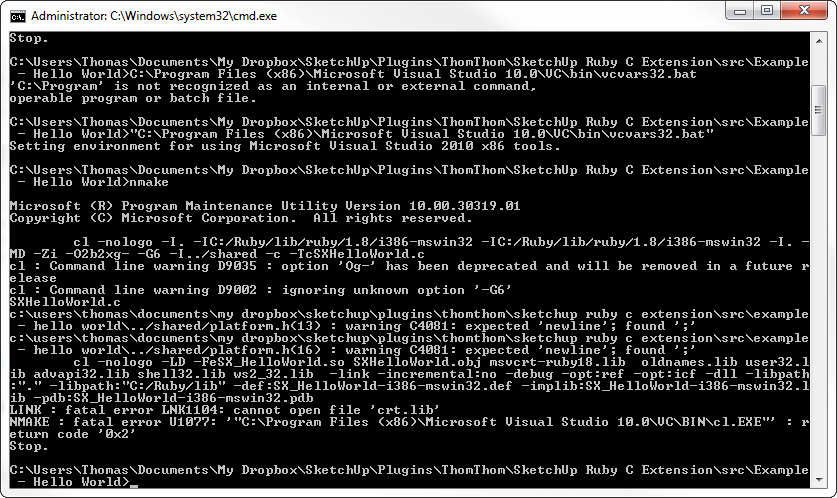

                                      Build Error 02.png

                                      Thomas Thomassen — SketchUp Monkey & Coding addict
                                      List of my plugins and link to the CookieWare fund

                                      1 條回覆 最後回覆 回覆 引用 0
                                      • thomthomT 離線
                                        thomthom
                                        最後由 編輯

                                        ( Apologies for those with the know-how - I will be posting lots of silly stuff as I work through this. Posting to make a record of what I am doing. "Thinking out loud". )

                                        Thomas Thomassen — SketchUp Monkey & Coding addict
                                        List of my plugins and link to the CookieWare fund

                                        1 條回覆 最後回覆 回覆 引用 0
                                        • thomthomT 離線
                                          thomthom
                                          最後由 編輯

                                          Got it working!

                                          Uncommented a #pragma comment(lib, "crt.lib"); I had. TBD's SUExt project had a reference to it. Which is what I based my project on. Seeing how it also referred to #pragma comment(lib, "msvcrt-ruby18.lib"); I just tried to see what happened if I removed the ref to crt.lib. Everything worked fine after that point.

                                          Now I wonder what the other lines do:

                                          #pragma comment(lib, "kernel32.lib") #pragma comment(lib, "gdi32.lib") #pragma comment(lib, "user32.lib") #pragma comment(lib, "shell32.lib")

                                          I'm looking at this tutorial: http://blogs.law.harvard.edu/hoanga/2006/12/14/getting-a-ruby-c-extension-to-compile-on-windows/
                                          It made no reference to any of this. ( what is it? Is it really required? )

                                          I'm guessing #include <windows.h> is required though.

                                          Thomas Thomassen — SketchUp Monkey & Coding addict
                                          List of my plugins and link to the CookieWare fund

                                          1 條回覆 最後回覆 回覆 引用 0
                                          • thomthomT 離線
                                            thomthom
                                            最後由 編輯

                                            Now... I'd like to find a way to make any output from extconf.rb and make/nmake put everything is a separate directory - for each platform.

                                            Thomas Thomassen — SketchUp Monkey & Coding addict
                                            List of my plugins and link to the CookieWare fund

                                            1 條回覆 最後回覆 回覆 引用 0
                                            • 1
                                            • 2
                                            • 3
                                            • 4
                                            • 5
                                            • 8
                                            • 9
                                            • 1 / 9
                                            • 第一個貼文
                                              最後的貼文
                                            Buy SketchPlus
                                            Buy SUbD
                                            Buy WrapR
                                            Buy eBook
                                            Buy Modelur
                                            Buy Vertex Tools
                                            Buy SketchCuisine
                                            Buy FormFonts

                                            Advertisement
