Line quality when exporting
-
Without seeing what you've got for exports now, it's a little difficult to tell you exactly what to do. The minimum line width from SketchUp is 1 pixel. If you have Profiles enabled and at something wider than 1 you'll get thick lines around the edges. If you export your JPG or PNG at some larger size, you can resize the image in your favorite image editor which will result in the lines appearing thinner. Even though you may want a 3000 pixel wide image, you might export at 6000 and then resize later.
If you went to pro you could gain some export options and might find you can get better line width control that way.
You can take advantage of scenes to set the camera back to some known starting point if you want. You could also create scenes to cover smaller sections of the model if you wish.
As to rendering, there are quite a number of renderers out there. I have decent luck with Kerkythea but I don't do very much rendering.
-
I don't have the free version on my system at the moment, so can't check if the image export is any different from the Pro version. But if they are the same, there is no reason why you should not be able to export a decent resolution bitmap with thin lines. When exporting, click the Options tab in the bottom right and then uncheck the Use View Size box on the options screen. You should then be able to export an image up to 9999 pixels wide...which is pretty darn big, even at 300 dpi. A large image will export far faster if you uncheck the AntiAlias box also...you get a better result by exporting at a higher-res than necessary, then resampling down in a decent image editor...which will antialias anyway.
-
The image export options (and possibilities) are the same in the pro and free versions (have been since v.6 - before that, in the free version you could only export at screen resolution).
With the pro version however, you have the option to export in many vector formats (including 2D dwg/dxf) as well as you get LayOut which may even eliminate the need to use Illustrator t all but in any case, you can then export your LayOut view-ports in vector or hybrid mode to dwg/dxf as well as pdf.
After getting a little familiar with SketchUp first, I would download the trial version of pro (actually the pro version) which will allow 8 working hours to experiment with these export options and the use of LayOut.
-
Thanks for the excellent help... I had overlooked the Styles options as well. There I found the default line setting which eliminates those sketchy corner accents... I also unchecked profiles. If I can import line to Illustator to eliminate the jaggies I will be in happy to pay for the full version.. I didn't see the trial option at the website, I'll look again.. In any case, huge breakthrough for my workflow, thanks again.. nice forum
-
There's no explicit "trial" - just download the Pro version and start using it. Concentrate on these things to save your 8 hours of trial period. Also, don't forget to try LayOut. As I said, maybe you could spare a whole step of exporting and using Illustrator (although I do not know what you are using it for exactly).
Both from SU Pro and LayOut you can export vector based formats which obviously do not have any "jagginess".
-
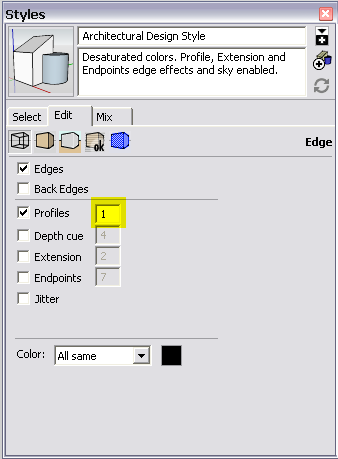
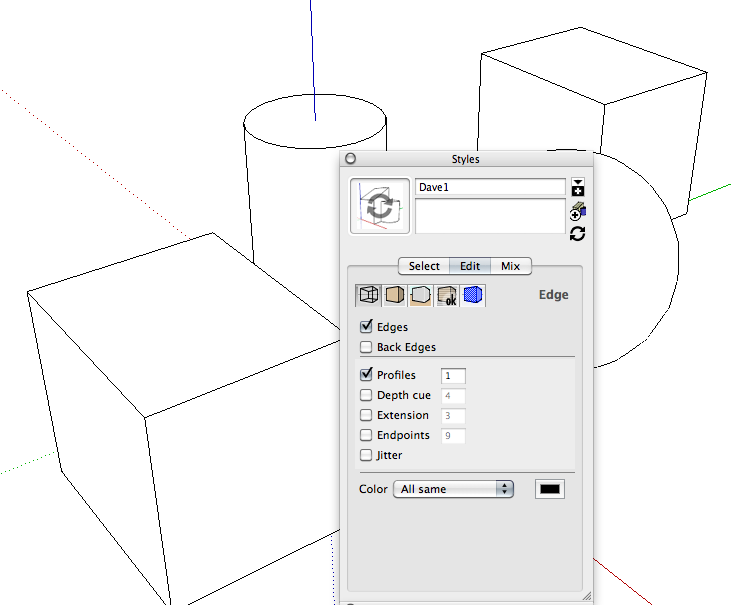
FYI, you may want to leave Profiles turned on and set it to 1 instead of turning it off. I think you can see why from these two images..

Profiles turned on.

Profiles turned off -
Dave, I don't see any value options for profiles... just checked or unchecked...thx
-
I know some things on the Mac are a bit different but there certainly has to be something like this
-
I can't locate that window, and it 10.7 isn't supported yet...
-
It should be under the Window menu > Styles > In model (that small house icon) > Edit > Edge settings. I am sure Mac users can also set profile thickness.
-
It looks like this on my Mac but I have 10.6.



Hello! It looks like you're interested in this conversation, but you don't have an account yet.
Getting fed up of having to scroll through the same posts each visit? When you register for an account, you'll always come back to exactly where you were before, and choose to be notified of new replies (either via email, or push notification). You'll also be able to save bookmarks and upvote posts to show your appreciation to other community members.
With your input, this post could be even better 💗
Register Login


Advertisement