sketchucation logo sketchucation
    • Login
    Oops, your profile's looking a bit empty! To help us tailor your experience, please fill in key details like your SketchUp version, skill level, operating system, and more. Update and save your info on your profile page today!
    ⚠️ Update | Sketchucation Tools 5.0.8 released with licensing improvements and bugfixes Download

    [Plugin] Bolt Maker (Final Update 7-Feb-2012)

    Scheduled Pinned Locked Moved Plugins
    101 Posts 31 Posters 93.5k Views 31 Watching
    Loading More Posts
    • Oldest to Newest
    • Newest to Oldest
    • Most Votes
    Reply
    • Reply as topic
    Log in to reply
    This topic has been deleted. Only users with topic management privileges can see it.
    • EscapeArtistE
      EscapeArtist
      last edited by

      Very nice plugin. Thank you!

      1 Reply Last reply
      Reply Quote 0
      • K
        ksor
        last edited by

        @sdmitch said:

        OOPS!!!! Sorry Bolt Maker fans. Dispite what I thought was adaquate testing, I found a problem while playing around with the plugin this morning. It has been corrected and a new copy posted.

        Hi younger brother !

        You say it's the file is updated but where is the updated file placed ?

        Best regards
        KSor, Denmark
        Skype: keldsor

        1 Reply Last reply
        Reply Quote 0
        • TIGT
          TIG Moderator
          last edited by

          Most logical authors put the current file download-link on the first post in the tool's thread.
          So look there.

          It's quite easy to add a link to that very page in the post announcing the update - see most of my scripts' threads...

          TIG

          1 Reply Last reply
          Reply Quote 0
          • K
            ksor
            last edited by

            @tig said:

            Most logical authors put the current file download-link on the first post in the tool's thread.
            So look there.

            It's quite easy to add a link to that very page in the post announcing the update - see most of my scripts' threads...

            I allready HAVE that file - so it's OK !

            But normaly you can't place a new posting as the first posting i a thread - right ?

            You have to EDIT the first post

            Best regards
            KSor, Denmark
            Skype: keldsor

            1 Reply Last reply
            Reply Quote 0
            • TIGT
              TIG Moderator
              last edited by

              Correct - the author owns the first post [usually where the first download link as given]... so he can edit that post later if the script is updated.
              So if the file changes he updates the script on the first page and the thread's title to suit.
              The Plugins Index 'sniffer-dog' spots titles starting with [Plugin] and also notices any changes to them for version/date etc so the index is auto-updated...

              TIG

              1 Reply Last reply
              Reply Quote 0
              • guanjinG
                guanjin
                last edited by

                @bmike said:

                very nice...
                just tested it and it will come in handy for my timber to steel connections.

                i did notice that if bolt 2 components together, it will update all components in the model with the holes, regardless of if those components were part of the bolt assembly. small niggle, and something i can work around, for sure.

                nice work!

                Too strong

                I come from China, is to learn

                1 Reply Last reply
                Reply Quote 0
                • guanjinG
                  guanjin
                  last edited by

                  luoluo.gif

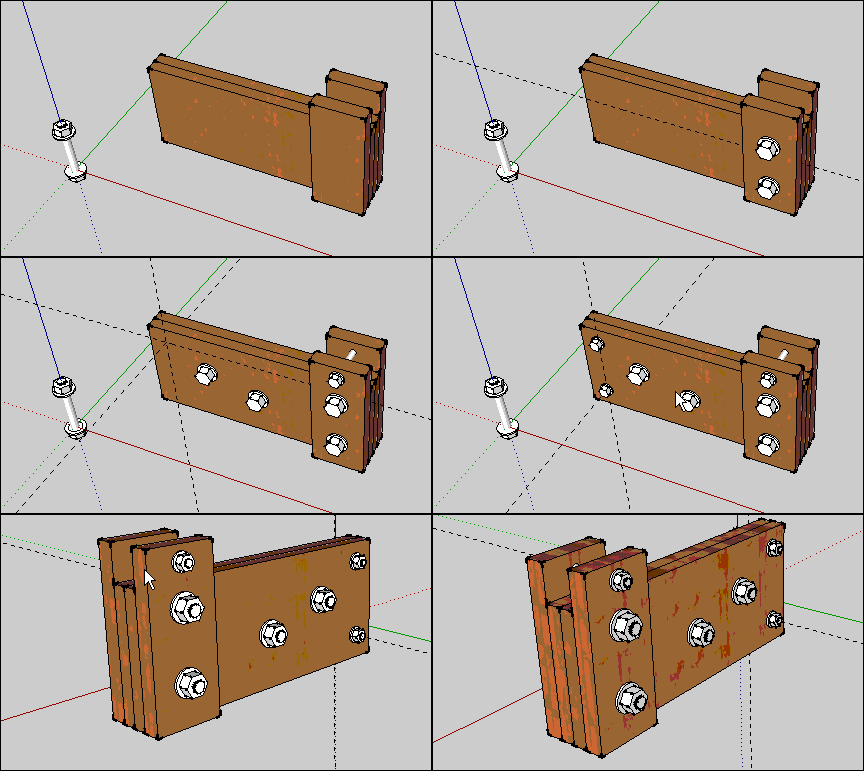
                  First select line prompt
                  Edge does not belong to the selected Surface
                  Too strong

                  I come from China, is to learn

                  1 Reply Last reply
                  Reply Quote 0
                  • guanjinG
                    guanjin
                    last edited by

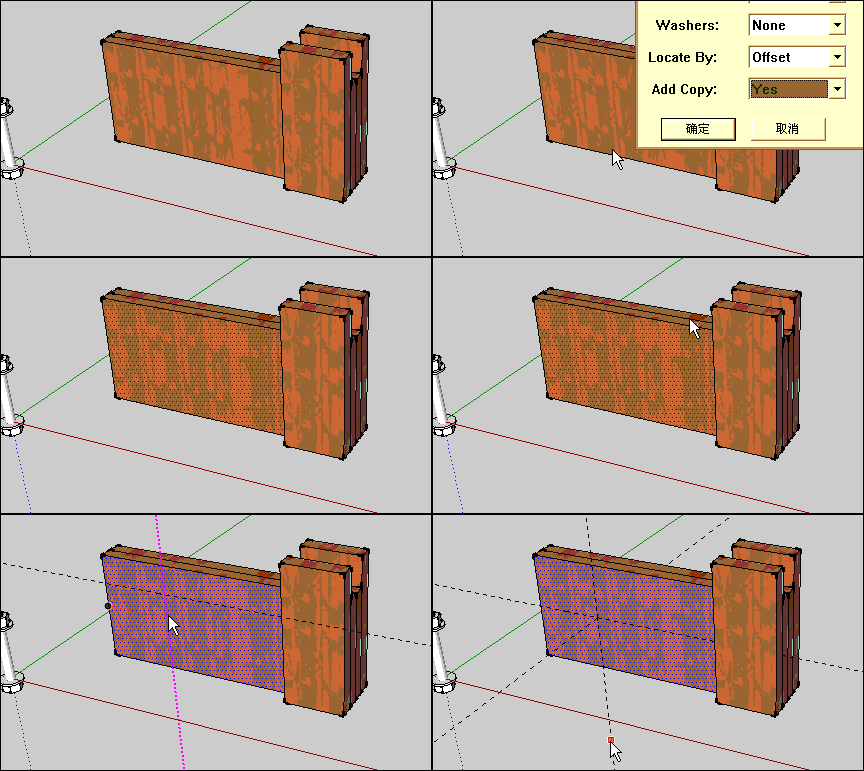
                    First select line prompt
                    Edge does not belong to the selected Surface
                    tishiiiii.gif

                    I come from China, is to learn

                    1 Reply Last reply
                    Reply Quote 0
                    • sdmitchS
                      sdmitch
                      last edited by

                      If you would care to attach the model to your post, I will try to determine what the problem is.

                      If an inference has been established to an edge on another face, that can confuse things and cause this error because the inferenced point is what you get and not the point you think you are pointing at.

                      Nothing is worthless, it can always be used as a bad example.

                      http://sdmitch.blogspot.com/

                      1 Reply Last reply
                      Reply Quote 0
                      • guanjinG
                        guanjin
                        last edited by

                        @sdmitch said:

                        If you would care to attach the model to your post, I will try to determine what the problem is.

                        If an inference has been established to an edge on another face, that can confuse things and cause this error because the inferenced point is what you get and not the point you think you are pointing at.

                        Thank you:sdmitch

                        无标题.skp

                        I come from China, is to learn

                        1 Reply Last reply
                        Reply Quote 0
                        • sdmitchS
                          sdmitch
                          last edited by

                          juanjin,

                          I didn't have any problem with your model. It has to be a odd coincidence that you were getting the error message. Although it is not required that all entities be components or groups, I would highly recommend it so that the plugin can better identify the selected face.

                          Nothing is worthless, it can always be used as a bad example.

                          http://sdmitch.blogspot.com/

                          1 Reply Last reply
                          Reply Quote 0
                          • guanjinG
                            guanjin
                            last edited by

                            @sdmitch said:

                            juanjin,

                            I didn't have any problem with your model. It has to be a odd coincidence that you were getting the error message. Although it is not required that all entities be components or groups, I would highly recommend it so that the plugin can better identify the selected face.

                            Thank you:
                            sdmitch
                            But does not affect the use, multi-select time

                            I come from China, is to learn

                            1 Reply Last reply
                            Reply Quote 0
                            • J
                              jumpjack
                              last edited by

                              This plugin looks interesting, but my english is poor and terms used to describe how a bolt is built are hard to understand...
                              An animated GIF like above one, but showing how to PROPERLY use the plugin, inserted into first post, would be very good.
                              Additionally, I read in first posts about reversed faces in the bolt: I don't know if this bug has been fixed as it is not important in virtual world... but 3 years after creation of this plugin we have now 3d printers, which complain about inverted faces! A bolt with inverted faces cannot be printed, because it appears as a hole not surrounded by any material (i.e., impossible object).

                              1 Reply Last reply
                              Reply Quote 0
                              • sdmitchS
                                sdmitch
                                last edited by

                                Have you viewed the tutorial on my blog?

                                Nothing is worthless, it can always be used as a bad example.

                                http://sdmitch.blogspot.com/

                                1 Reply Last reply
                                Reply Quote 0
                                • bmikeB
                                  bmike
                                  last edited by

                                  @sdmitch said:

                                  Of course that's the nature of components. Editing one changes all. Before using Bolt Maker, right click on each and choose "Make Unique". Groups don't have that problem.

                                  agreed.

                                  wonder if there is code that can make only the components selected when running the plugin unique, or have them downgrade to groups...

                                  but, nice work.

                                  mike beganyi design + consulting llc

                                  1 Reply Last reply
                                  Reply Quote 0
                                  • D
                                    dammerel
                                    last edited by

                                    Great plugin but how easy would it be to include an option to add a washer under the nut ?

                                    Andrew

                                    1 Reply Last reply
                                    Reply Quote 0
                                    • sdmitchS
                                      sdmitch
                                      last edited by

                                      @dammerel said:

                                      Great plugin but how easy would it be to include an option to add a washer under the nut ?

                                      Andrew

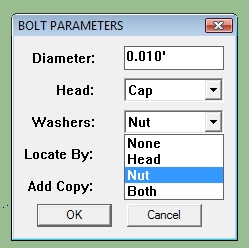
                                      That option already exists.bolt parameters.jpg

                                      Nothing is worthless, it can always be used as a bad example.

                                      http://sdmitch.blogspot.com/

                                      1 Reply Last reply
                                      Reply Quote 0
                                      • J
                                        jumpjack
                                        last edited by

                                        Is this plugin supposed to create 3d-printable bolts? I only get plain cylinders with DRAWN threads!
                                        And, by the way, reversed faces prevent a model from being printable.

                                        1 Reply Last reply
                                        Reply Quote 0
                                        • sdmitchS
                                          sdmitch
                                          last edited by

                                          @jumpjack said:

                                          Is this plugin supposed to create 3d-printable bolts? I only get plain cylinders with DRAWN threads!
                                          And, by the way, reversed faces prevent a model from being printable.

                                          No. They are for visual effect only.

                                          Nothing is worthless, it can always be used as a bad example.

                                          http://sdmitch.blogspot.com/

                                          1 Reply Last reply
                                          Reply Quote 0
                                          • J
                                            jumpjack
                                            last edited by

                                            Would it be possible to build a plugin based on this sketchup template?
                                            http://woodwork.ars-informatica.ca/sketchup.php?model=spiral_threaded_bolt

                                            1 Reply Last reply
                                            Reply Quote 0

                                            Hello! It looks like you're interested in this conversation, but you don't have an account yet.

                                            Getting fed up of having to scroll through the same posts each visit? When you register for an account, you'll always come back to exactly where you were before, and choose to be notified of new replies (either via email, or push notification). You'll also be able to save bookmarks and upvote posts to show your appreciation to other community members.

                                            With your input, this post could be even better 💗

                                            Register Login
                                            • 1
                                            • 2
                                            • 3
                                            • 4
                                            • 5
                                            • 6
                                            • 1 / 6
                                            • First post
                                              Last post
                                            Buy SketchPlus
                                            Buy SUbD
                                            Buy WrapR
                                            Buy eBook
                                            Buy Modelur
                                            Buy Vertex Tools
                                            Buy SketchCuisine
                                            Buy FormFonts

                                            Advertisement