sketchucation logo sketchucation
    • Login
    Oops, your profile's looking a bit empty! To help us tailor your experience, please fill in key details like your SketchUp version, skill level, operating system, and more. Update and save your info on your profile page today!
    ⚠️ Update | Sketchucation Tools 5.0.8 released with licensing improvements and bugfixes Download

    [Plugin] Bolt Maker (Final Update 7-Feb-2012)

    Scheduled Pinned Locked Moved Plugins
    101 Posts 31 Posters 93.5k Views 31 Watching
    Loading More Posts
    • Oldest to Newest
    • Newest to Oldest
    • Most Votes
    Reply
    • Reply as topic
    Log in to reply
    This topic has been deleted. Only users with topic management privileges can see it.
    • P
      Pants
      last edited by

      @sdmitch said:

      The file you downloaded, I assume from the Plugin Store, should have been a .rbz file ...

      b-b-b-but... I got it from your first post, which lists it as an .rb :
      ATTACHMENTS
      Bolt MakerXII.rb
      Bolt Maker XII - The final edition
      (22.16 KiB) Downloaded 1165 times

      I'm an infrequent user of SU so maybe that's why I never even though to go to the store this time - found your plugin by googling "sketchup bolt plugin" - which of course doesn't necessarily take one to the store, and in my case, brought me to this thread.

      ANYWAY - Since I last posted, I downloaded a trial SU2015, copied over most extensions (err...that is, once I found the new plugins folder), including the aforementioned .rb, and indeed, it works...at least once, that is. Thanks for the prods and nudges.

      --Dave

      1 Reply Last reply
      Reply Quote 0
      • sdmitchS
        sdmitch
        last edited by

        OK. I didn't know that link was still there. Glad to hear that it works in 2015.

        Nothing is worthless, it can always be used as a bad example.

        http://sdmitch.blogspot.com/

        1 Reply Last reply
        Reply Quote 0
        • TIGT
          TIG Moderator
          last edited by

          Always get the RBZ version of any Plugin from the PluginStore [almost all Plugins in the forum have PluginStore listings] - the Plugin has probably been updated - especially with the advent of the newer Ruby and methods with >=v2014.
          For this specific Plugin it's http://sketchucation.com/pluginstore?pln=Bolt_Maker

          The .RB attached to the first posts of a Plugin's thread is now often out of date, it should be removed by the OP and replaced with a link to the equivalent PluginStore's entry [so it's always linked to the latest version] - but sometimes this gets overlooked...

          TIG

          1 Reply Last reply
          Reply Quote 0
          • P
            Ptownkid
            last edited by

            I can't get this to work for some reason. I select the parameters and click OK and then it just goes back to being an arrow and does not allow me to pick a point.

            1 Reply Last reply
            Reply Quote 0
            • F
              fotisk
              last edited by

              Hi, i cant use the " Bolt Maker " because it is not Signed.
              how can i fix this?

              Thank you.

              1 Reply Last reply
              Reply Quote 0
              • TIGT
                TIG Moderator
                last edited by

                @fotisk said:

                Hi, i cant use the " Bolt Maker " because it is not Signed.
                how can i fix this?

                Thank you.
                You can install and use any plugin/extension, but you must have your Extension Manager > Loading policy set to be 'Unrestricted'
                Then when you restart SketchUp it should still work.
                Of course some older code might not work in newer versions of SketchUp... but at least you can try it...

                TIG

                1 Reply Last reply
                Reply Quote 0
                • N
                  Nick9548
                  last edited by

                  HI,

                  I just used the bolt maker to put a bolt through a 'board' (made by push/pulling a rectangle and making it component #1) and then wanted to use solid tools to subtract the bolt to leave a hole where it went through but I got a message that one of the objects was either locked or not a solid. I notice the entity information for the bolt says 'component' not 'solid group'. How can I make the bolt a 'solid group'?

                  1 Reply Last reply
                  Reply Quote 0
                  • Dave RD
                    Dave R
                    last edited by

                    The bolts that this extension makes is not solid because of the edges it creates to represent threads.
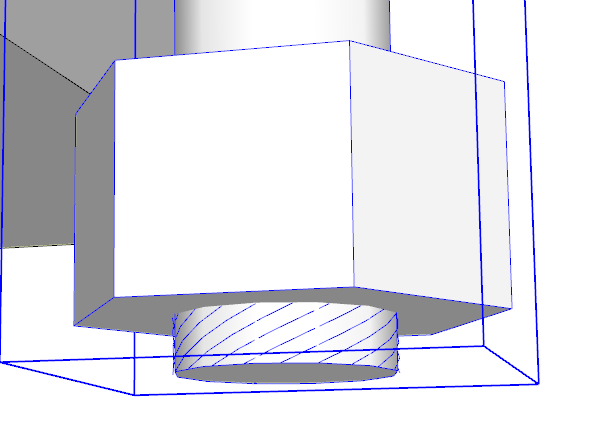
                    Screenshot - 10_14_2019 , 6_27_26 AM.png

                    You can edit the component to remove them or use an extension like Thom Thom's Solid Tools2 or TIG's Solid SOlver to fix it quickly.

                    The Bolt Maker extension is designed to create the hole automatically if you put it in ungrouped geometry. You could open the component for editing before placing the bolt.

                    Etaoin Shrdlu

                    %

                    (THERE'S NO PLACE LIKE)

                    G28 X0.0 Y0.0 Z0.0

                    M30

                    %

                    1 Reply Last reply
                    Reply Quote 0
                    • G
                      Geraldes
                      last edited by

                      I installed it in SketchUp 2026, but when I select a face it displays "edge not part of selected group". Does this plugin work in SketchUp 2026 or 2025?

                      1 Reply Last reply
                      Reply Quote 0
                      • Dave RD
                        Dave R
                        last edited by

                        It works fine in SU2026 for me. The box is a component in this case.
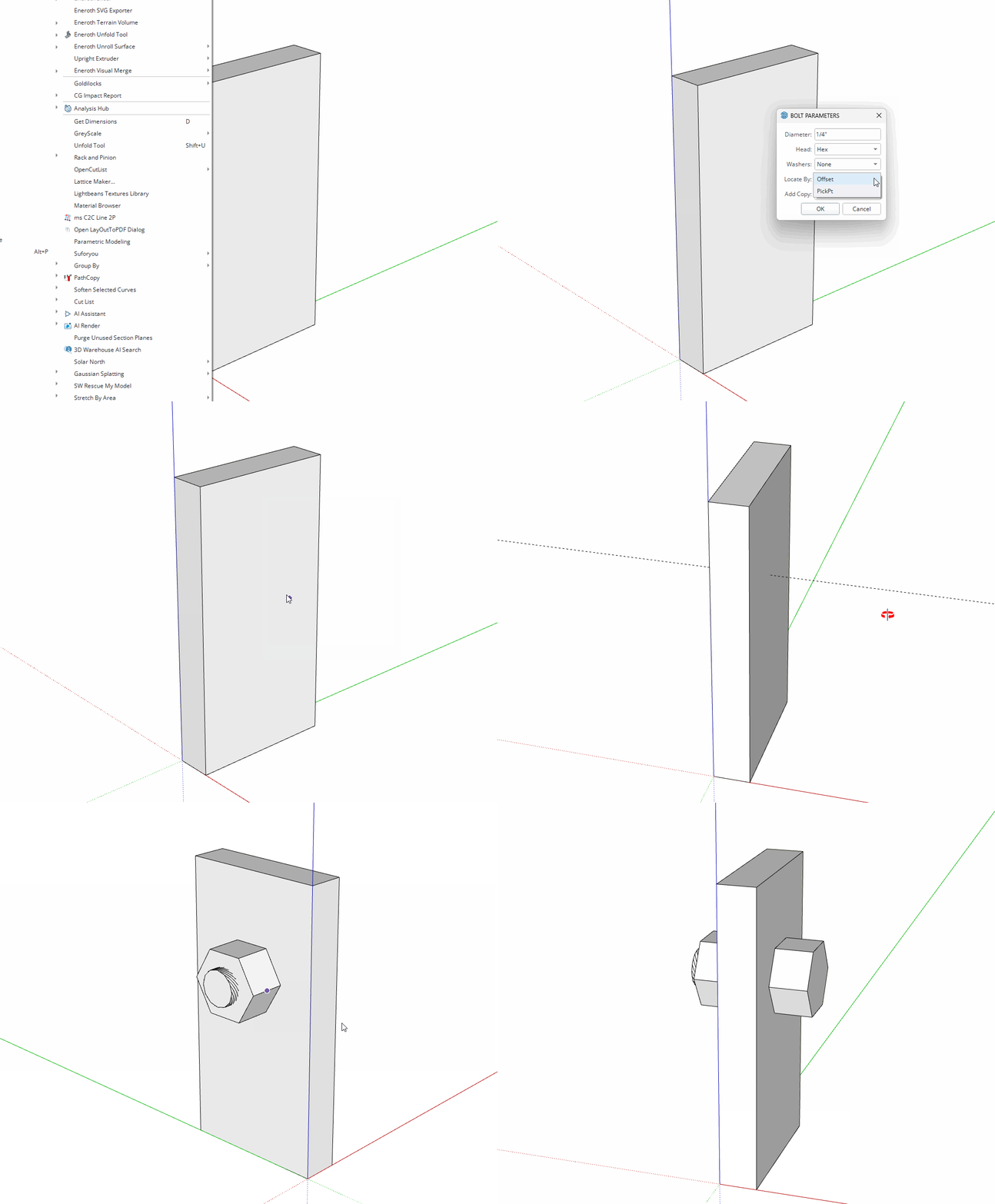
                        BM.gif

                        Etaoin Shrdlu

                        %

                        (THERE'S NO PLACE LIKE)

                        G28 X0.0 Y0.0 Z0.0

                        M30

                        %

                        1 Reply Last reply
                        Reply Quote 0

                        Hello! It looks like you're interested in this conversation, but you don't have an account yet.

                        Getting fed up of having to scroll through the same posts each visit? When you register for an account, you'll always come back to exactly where you were before, and choose to be notified of new replies (either via email, or push notification). You'll also be able to save bookmarks and upvote posts to show your appreciation to other community members.

                        With your input, this post could be even better 💗

                        Register Login
                        • 1
                        • 2
                        • 3
                        • 4
                        • 5
                        • 6
                        • 2 / 6
                        • First post
                          Last post
                        Buy SketchPlus
                        Buy SUbD
                        Buy WrapR
                        Buy eBook
                        Buy Modelur
                        Buy Vertex Tools
                        Buy SketchCuisine
                        Buy FormFonts

                        Advertisement


