sketchucation logo sketchucation
    • Login
    Oops, your profile's looking a bit empty! To help us tailor your experience, please fill in key details like your SketchUp version, skill level, operating system, and more. Update and save your info on your profile page today!
    Mac User? | Join the Rayscaper Beta for Mac Learn More

    [Plugin] Follow Me Helix (Updated 06-Jan-2012)

    Scheduled Pinned Locked Moved Plugins
    45 Posts 17 Posters 38.2k Views 17 Watching
    Loading More Posts
    • Oldest to Newest
    • Newest to Oldest
    • Most Votes
    Reply
    • Reply as topic
    Log in to reply
    This topic has been deleted. Only users with topic management privileges can see it.
    • J
      jdadesignstudio
      last edited by

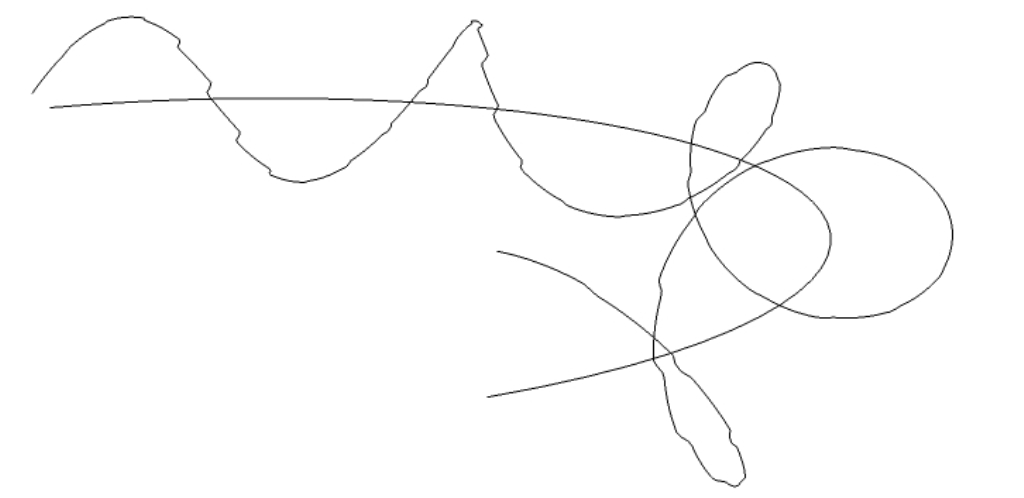
      Not sure if im missing something obvious, but mine are coming out very choppy...:

      helix test.jpg

      1 Reply Last reply
      Reply Quote 0
      • sdmitchS
        sdmitch
        last edited by

        @jdadesignstudio said:

        Not sure if im missing something obvious, but mine are coming out very choppy...:

        It is usually a function of the linear increment entered and the length of the segments in the path. The increment entered is to long in comparison with the segments of the path in your case.

        Nothing is worthless, it can always be used as a bad example.

        http://sdmitch.blogspot.com/

        1 Reply Last reply
        Reply Quote 0
        • J
          jdadesignstudio
          last edited by

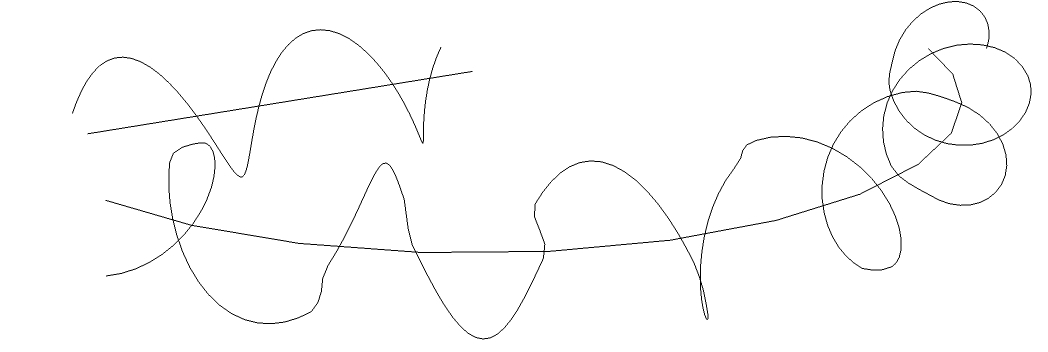
          Hmm...still having issues. Take a look at the images below-the line and arc both had the same parameters plugged into the helix plugin. I also tried changing the number of segments in the arc (to change the length of the segments) anywhere from 2 segments up to 92 segments. It seems where 2 line segments intersect, it creates a crooked piece...Let me know what you think.
          Thanks,
          Jon

          helix test2.jpg


          helix test3.jpg

          1 Reply Last reply
          Reply Quote 0
          • sdmitchS
            sdmitch
            last edited by

            @jdadesignstudio said:

            Hmm...still having issues. Take a look at the images below-the line and arc both had the same parameters plugged into the helix plugin. I also tried changing the number of segments in the arc (to change the length of the segments) anywhere from 2 segments up to 92 segments. It seems where 2 line segments intersect, it creates a crooked piece...Let me know what you think.
            Thanks,
            Jon
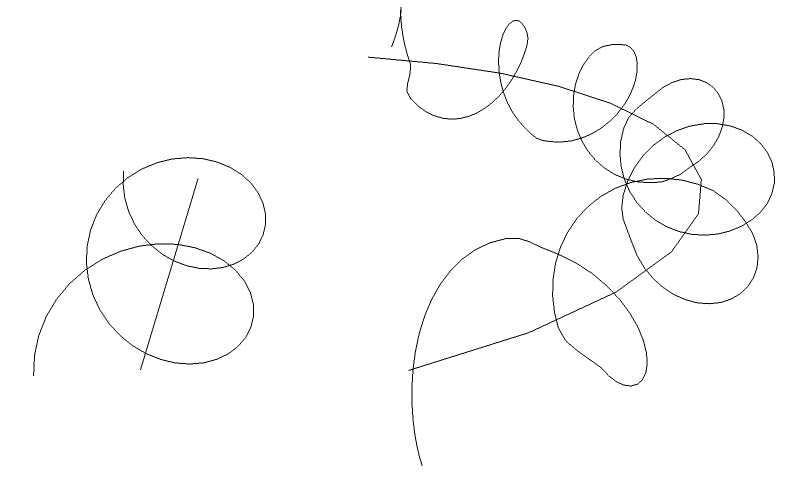
            Yes that happens because the linear increment starts on one segment and ends on the next one.
            Again, the linear increment you are using is to long for the curve you are trying to follow. Sometimes the curve and what you want just doesn't work.

            Nothing is worthless, it can always be used as a bad example.

            http://sdmitch.blogspot.com/

            1 Reply Last reply
            Reply Quote 0
            • sdmitchS
              sdmitch
              last edited by

              Jon, After further testing, it looks like my last "improvement" wasn't an improvement at all so I have re-posted the privious version. I haven't been able to eliminate the "kinks" yet but it is still something that I am thinking about and have a few more ideas to try.

              Nothing is worthless, it can always be used as a bad example.

              http://sdmitch.blogspot.com/

              1 Reply Last reply
              Reply Quote 0
              • J
                jdadesignstudio
                last edited by

                @sdmitch said:

                Jon, After further testing, it looks like my last "improvement" wasn't an improvement at all so I have re-posted the privious version. I haven't been able to eliminate the "kinks" yet but it is still something that I am thinking about and have a few more ideas to try.

                Sounds good, thanks Sam! Its a really cool plugin, in the past I have used the draw curves plugin for helixes, but this plugin gives you some more control over the helix, in addition to the follow me feature.

                1 Reply Last reply
                Reply Quote 0
                • M
                  mattarth
                  last edited by

                  This is great for making a helix, thank you.

                  Does anyone know of a way to make a helix with a radius that is a function of the distance along the original curve? I would like to draw a barrel spring (http://www.google.co.uk/search?q=barrel+spring&hl=en) but I don't know how to make it in sketchup. The radius would be something like r=x*(1-x)+1 where x is distance along the curve. Alternatively I could calculate a list of coordinates myself and input them; is there a way to do that in sketchup?

                  Thanks in advance,
                  Matt

                  1 Reply Last reply
                  Reply Quote 0
                  • C
                    crazac
                    last edited by

                    Yea, thanks for this, it's an awesome plug.

                    I do have a question tho, I can only seem to make it revolve in one direction. Putting negative numbers in the fields produces the beach ball of death and a force quit. I've also tried adjusting the path direction to no avail. Is there a way to make the helix revolve in the opposite direction?

                    1 Reply Last reply
                    Reply Quote 0
                    • sdmitchS
                      sdmitch
                      last edited by

                      No there is currently no way to make it go the other way. I will take a look and see what I can do.

                      Nothing is worthless, it can always be used as a bad example.

                      http://sdmitch.blogspot.com/

                      1 Reply Last reply
                      Reply Quote 0
                      • mitcorbM
                        mitcorb
                        last edited by

                        In the meantime you could use Flip Along or Mirror.rb?

                        I take the slow, deliberate approach in my aimless wandering.

                        1 Reply Last reply
                        Reply Quote 0
                        • soloS
                          solo
                          last edited by

                          I don't see the point to reversing this, it's follow the line right?

                          http://www.solos-art.com

                          If you see a toilet in your dreams do not use it.

                          1 Reply Last reply
                          Reply Quote 0
                          • Dave RD
                            Dave R
                            last edited by

                            @mattarth said:

                            I would like to draw a barrel spring.

                            Thanks in advance,
                            Matt

                            Matt, how accurate does your barrel spring need to be? Would this one play for you?


                            http://farm7.static.flickr.com/6106/6211771064_a30af04cce.jpg

                            This was easy enough with Draw Helix and Follow Me. I didn't bother with the ends but they would be trivial, too.

                            Etaoin Shrdlu

                            %

                            (THERE'S NO PLACE LIKE)

                            G28 X0.0 Y0.0 Z0.0

                            M30

                            %

                            1 Reply Last reply
                            Reply Quote 0
                            • C
                              crazac
                              last edited by

                              @sdmitch said:

                              No there is currently no way to make it go the other way. I will take a look and see what I can do.

                              Thanks sdmitch, that would be great!. I really appreciate this plugin. I didn't have much hope when i started this project until i found it. 👍

                              @mitcorb said:

                              In the meantime you could use Flip Along or Mirror.rb?

                              mitcorb, thanks for the heads up. The Mirror is handy, but isn't producing the result i'm after. The helix needs to be inverted...

                              1 Reply Last reply
                              Reply Quote 0
                              • sdmitchS
                                sdmitch
                                last edited by

                                In case you missed it, I posted an updated version yesterday that, if negative angular increment is entered, reverses the direction of the helix.

                                Nothing is worthless, it can always be used as a bad example.

                                http://sdmitch.blogspot.com/

                                1 Reply Last reply
                                Reply Quote 0
                                • C
                                  crazac
                                  last edited by

                                  @sdmitch said:

                                  In case you missed it, I posted an updated version yesterday that, if negative angular increment is entered, reverses the direction of the helix.

                                  AWESOME!, I did miss it, it works great! Thanks a lot, I really appreciate it...

                                  1 Reply Last reply
                                  Reply Quote 0
                                  • M
                                    mattarth
                                    last edited by

                                    @dave r said:

                                    @mattarth said:

                                    I would like to draw a barrel spring.

                                    Thanks in advance,
                                    Matt

                                    Matt, how accurate does your barrel spring need to be? Would this one play for you?


                                    http://farm7.static.flickr.com/6106/6211771064_a30af04cce.jpg

                                    This was easy enough with Draw Helix and Follow Me. I didn't bother with the ends but they would be trivial, too.

                                    This is great, DrawHelix is exactly what I needed to know, thank you.

                                    I've since tried to make it using a spiral road intersected with a barrel shape:
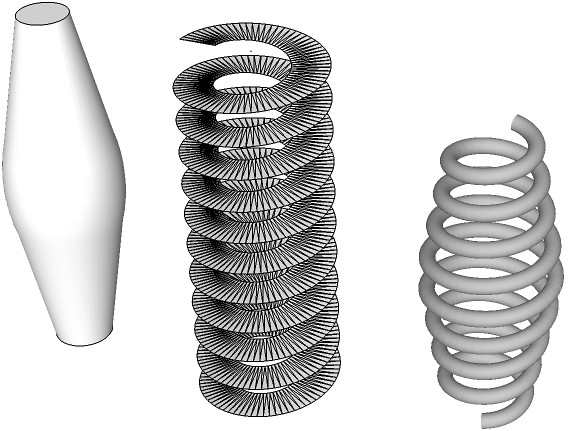
                                    http://farm7.static.flickr.com/6050/6217456920_0416623e75_z_d.jpg

                                    but it wouldn't follow the whole curve, only the upper or lower half (I was getting the "this does not appear to be a valid path" error when I tried to follow the curve as a whole).

                                    1 Reply Last reply
                                    Reply Quote 0
                                    • Dave RD
                                      Dave R
                                      last edited by

                                      Matt, I used Draw helix to draw three different helices. All three have the same pitch. The first was the bottom, straight helix for 5 turns (because that was the default number when the plugin launched) and it got copied up for the top straight section. The second helix tapers from the first helix's radius out to the larger radius. I copied and flipped the copy to make the top taper as well. That one also has 5 turns. Then there's a three-turn straight helix for the center part of the spring.

                                      All these helices are created as groups which I exploded. Then I welded them together to make them easier to select as a path for Follow Me. It's an instant spring but it doesn't take that long to do. I definitely make a component of the spring so I could easily reuse it.

                                      Etaoin Shrdlu

                                      %

                                      (THERE'S NO PLACE LIKE)

                                      G28 X0.0 Y0.0 Z0.0

                                      M30

                                      %

                                      1 Reply Last reply
                                      Reply Quote 0
                                      • M
                                        mattarth
                                        last edited by

                                        Thanks Dave, I think I'll use your method from now on. It's the neatest way to make barrel springs.

                                        Although the intersection method would allow someone to make more interesting profiles if they needed to, if they could tolerate the time it takes for SketchUp to calculate the new path and then follow it 😄

                                        1 Reply Last reply
                                        Reply Quote 0
                                        • Dave RD
                                          Dave R
                                          last edited by

                                          You're welcome. I think it is useful to know both methods. Sometimes one will be more useful than the other. For example I used that method for drawing these ironwork baskets. I couldn't get the proper helix using the Draw Helix plugin. Tools on Surface is ideal for drawing the helix on the extruded shape.
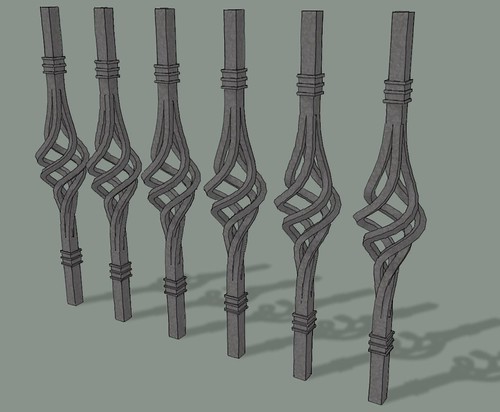

                                          http://farm7.static.flickr.com/6027/5970412478_9bb8eea837.jpg

                                          Etaoin Shrdlu

                                          %

                                          (THERE'S NO PLACE LIKE)

                                          G28 X0.0 Y0.0 Z0.0

                                          M30

                                          %

                                          1 Reply Last reply
                                          Reply Quote 0
                                          • 8
                                            8068
                                            last edited by

                                            Thank You!
                                            Really

                                            1 Reply Last reply
                                            Reply Quote 0

                                            Hello! It looks like you're interested in this conversation, but you don't have an account yet.

                                            Getting fed up of having to scroll through the same posts each visit? When you register for an account, you'll always come back to exactly where you were before, and choose to be notified of new replies (either via email, or push notification). You'll also be able to save bookmarks and upvote posts to show your appreciation to other community members.

                                            With your input, this post could be even better 💗

                                            Register Login
                                            • 1
                                            • 2
                                            • 3
                                            • 3 / 3
                                            • First post
                                              Last post
                                            Buy SketchPlus
                                            Buy SUbD
                                            Buy WrapR
                                            Buy eBook
                                            Buy Modelur
                                            Buy Vertex Tools
                                            Buy SketchCuisine
                                            Buy FormFonts

                                            Advertisement


