sketchucation logo sketchucation
    • 登入
    Oops, your profile's looking a bit empty! To help us tailor your experience, please fill in key details like your SketchUp version, skill level, operating system, and more. Update and save your info on your profile page today!
    🔌 Smart Spline | Fluid way to handle splines for furniture design and complex structures. Download

    How do I draw a table top with curved sides?

    已排程 已置頂 已鎖定 已移動 Woodworking
    22 貼文 9 Posters 3.6k 瀏覽 9 Watching
    正在載入更多貼文
    • 從舊到新
    • 從新到舊
    • 最多點贊
    回覆
    • 在新貼文中回覆
    登入後回覆
    此主題已被刪除。只有擁有主題管理權限的使用者可以查看。
    • J 離線
      jtpryan
      最後由 編輯

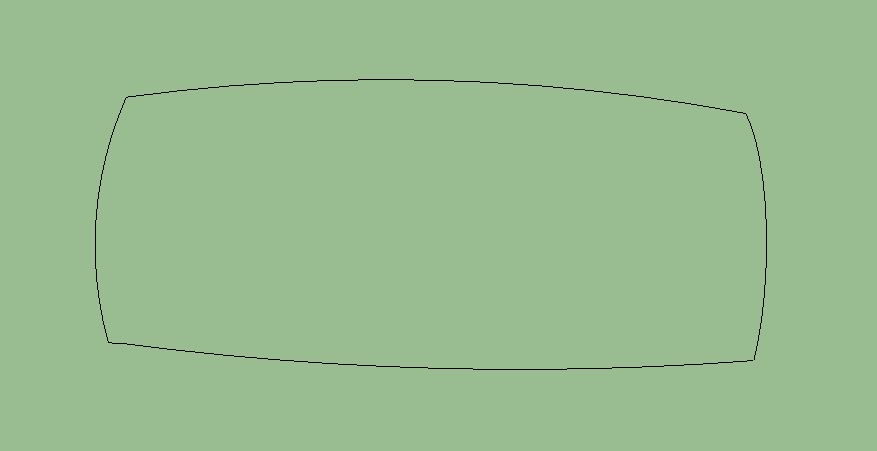
      I want to build a small end table like one I saw in a store. The top on this one had sides that had a very gently arc in them. I tried drawing an arc 16" long with a .5" bulge. Then I made 3 copies and arranged them in a square with the ends joined. But that was as far as I got. I couldn't make it into a solid that I could raise to 3/4".

      Am i going about this wrong? As I write this I wonder if I should create a rectangle and somehow use the follow me tool.

      I will also need to do curved legs. I attached a pic of what I'm after.

      Thanks,

      Jim
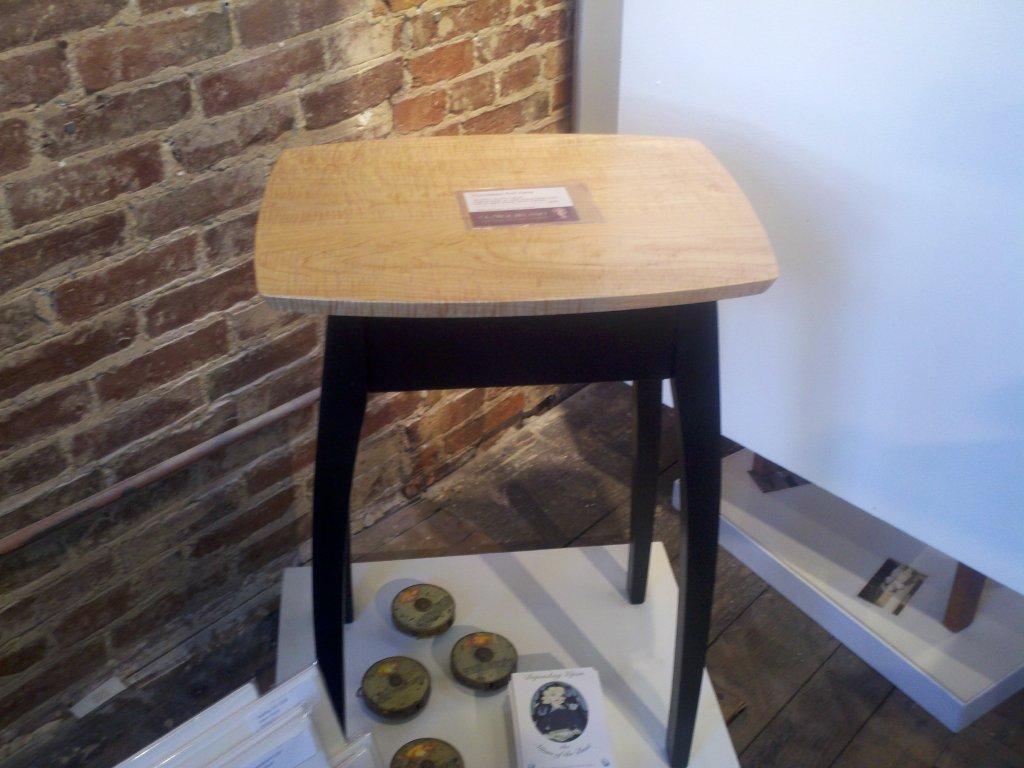

      small table.jpg

      1 條回覆 最後回覆 回覆 引用 0
      • numbthumbN 離線
        numbthumb
        最後由 編輯

        Hi,
        As for the top of the table, here´s an example - just an eyeballing: basic shape - delete unwanted lines - push/pull to desired heighttop.jpg
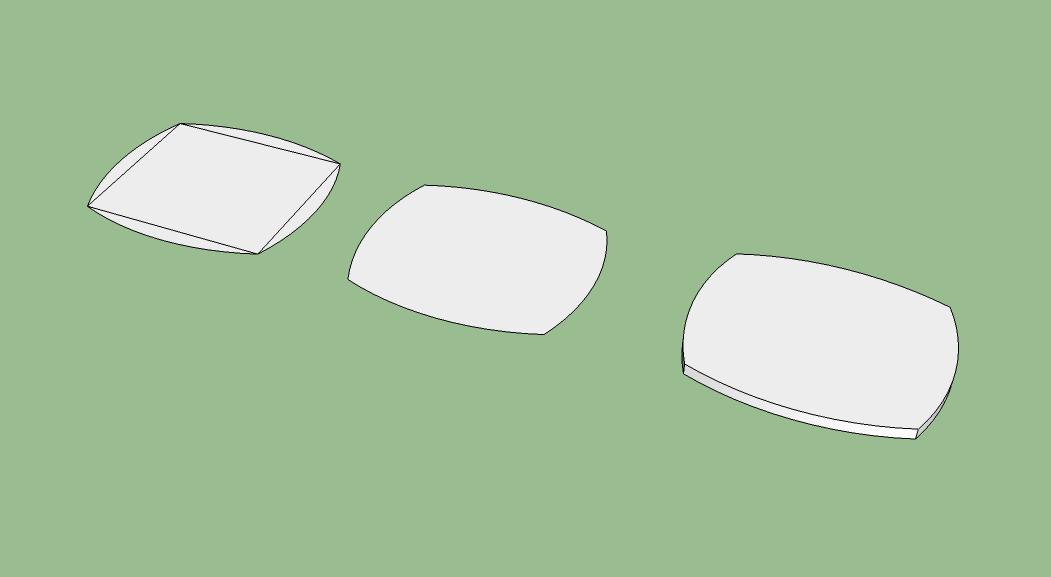
        Also, see this thread: http://forums.sketchucation.com/viewtopic.php?f=15&t=38995&p=344757&hilit=cabriole+leg#p344757 for some useful info on modeling a table leg.

        Comfortably numb...

        1 條回覆 最後回覆 回覆 引用 0
        • J 離線
          jtpryan
          最後由 編輯

          Thank you. OK, I tried this and ended up with the same problem. I drew the rectangle, then I drew the 4 arches. But when I delete the unwanted lines (the sides of the original rectangle, I end up with just the four arches and no face area inbetween..

          -Jim

          1 條回覆 最後回覆 回覆 引用 0
          • numbthumbN 離線
            numbthumb
            最後由 編輯

            See if a surface fills when any of these edges are redrawn. If not, one or more endpoints are not coplanar with the others.

            Comfortably numb...

            1 條回覆 最後回覆 回覆 引用 0
            • J 離線
              jtpryan
              最後由 編輯

              I think I am misunderstanding something basic. First I draw a 2d rectangle with the rectangle tool. Then, I take the arch tool and click on one corner of the rectangle, then I point to the other corner on the same side and click again. Then I slide to the middle and pull out the middle of the arch, type .5 and hit return. I do this on each side. Once done I then go to each side of the original rectangle and delete it. Now I have 4 arches, each touching the other at the ends. But nothing in the middle.

              Because they were drawn using the corners of the rectangle I have to believe they are on the same plane.

              -Jim

              1 條回覆 最後回覆 回覆 引用 0
              • J 離線
                jtpryan
                最後由 編輯

                Wow, never mind. I don't know what I was doing wrong. Maybe I wasn't truly on the corners, but I did it again and it worked. Go figure.

                Thank you.

                1 條回覆 最後回覆 回覆 引用 0
                • BoxB 離線
                  Box
                  最後由 編輯

                  Make sure you are drawing your arc flat. watch the inference colour of the arc tool, it should be red or green depending on the side you are working on and not BLUE or Black.

                  same shape from above and front, looks right from above but arc has gone in the blue direction.

                  Above.JPG


                  front.JPG

                  1 條回覆 最後回覆 回覆 引用 0
                  • TIGT 線上
                    TIG Moderator
                    最後由 編輯

                    Capture.PNG

                    TIG

                    1 條回覆 最後回覆 回覆 引用 0
                    • mitcorbM 離線
                      mitcorb
                      最後由 編輯

                      Of course, looking a little more closely at the photograph, there seems to be fillets in the range of 6mm or so at each "corner". All still achievable with nothing more than the rectangle and arc tools. Once achieved, you can then scale the bottom or top face about it's centroid to make the canted edge face.

                      I take the slow, deliberate approach in my aimless wandering.

                      1 條回覆 最後回覆 回覆 引用 0
                      • Dave RD 離線
                        Dave R
                        最後由 編輯

                        Once you get the top sorted out, the legs can be drawn like this:


                        http://farm7.static.flickr.com/6141/5978917785_93454ba2f3_z.jpg

                        From the left,

                        Draw the leg blank.

                        Draw the profile on the leg on one side. Copy the profile and rotate it 90 degrees for the other side. It's easier to leave the second profile away from the leg blank a little.

                        Use Push/Pull to eliminate the waste on one side.

                        Push the profiles of the waste side on the other one through.

                        Run Intersect and delete the waste.

                        Etaoin Shrdlu

                        %

                        (THERE'S NO PLACE LIKE)

                        G28 X0.0 Y0.0 Z0.0

                        M30

                        %

                        1 條回覆 最後回覆 回覆 引用 0
                        • J 離線
                          jtpryan
                          最後由 編輯

                          This is so frustrating. I am trying to do the leg and I got one side to do what I want but I can't get the other side.

                          In the three pictures I attached the one on the left is the original leg with an arc drawn from the middle of the bottom to 4" from the top. Then, in the second one I click and select the path. Then I grab the follow me tool and click on the area between the arc and the edge. The third pic is what I end up with.

                          I also tried the push pull tool, same results.

                          1 條回覆 最後回覆 回覆 引用 0
                          • numbthumbN 離線
                            numbthumb
                            最後由 編輯

                            @jtpryan said:

                            In the three pictures I attached

                            I see no pics 😕

                            Comfortably numb...

                            1 條回覆 最後回覆 回覆 引用 0
                            • Dave RD 離線
                              Dave R
                              最後由 編輯

                              @numbthumb said:

                              @jtpryan said:

                              In the three pictures I attached

                              I see no pics 😕

                              Me neither.

                              Instead of images, why don't you post the SKP file?

                              Etaoin Shrdlu

                              %

                              (THERE'S NO PLACE LIKE)

                              G28 X0.0 Y0.0 Z0.0

                              M30

                              %

                              1 條回覆 最後回覆 回覆 引用 0
                              • mitcorbM 離線
                                mitcorb
                                最後由 編輯

                                It may be that jtpryan is not familiar with the attachment process for images or files?

                                I take the slow, deliberate approach in my aimless wandering.

                                1 條回覆 最後回覆 回覆 引用 0
                                • J 離線
                                  jtpryan
                                  最後由 編輯

                                  Table with Curved sidesNuts, I could have sworn I posted the attachment. I't in Word, but I'll try and do a SKP.

                                  Ha! I never noticed the message saying it couldn't post .skb files...

                                  Anyway, the file is a mess, but you can see the leg with the curve. The other two in the background are just copies to fool with. I want to somehow push that curved area through. Sorry for all the confusion, I should know better.

                                  1 條回覆 最後回覆 回覆 引用 0
                                  • Dave RD 離線
                                    Dave R
                                    最後由 編輯

                                    It looks to me like you're almost there. You didn't move the second profile off the face of the leg like I demonstrated in my illustration. You could alternatively hit Ctrl after getting Push/Pull and push the face through. After that remember to select all of the leg and run Intersect>Intersect Selected. Then delete the unneeded geometry.

                                    Etaoin Shrdlu

                                    %

                                    (THERE'S NO PLACE LIKE)

                                    G28 X0.0 Y0.0 Z0.0

                                    M30

                                    %

                                    1 條回覆 最後回覆 回覆 引用 0
                                    • Dave RD 離線
                                      Dave R
                                      最後由 編輯

                                      I realize you're just learning how to draw the various parts of this table but when you get the hang of it, I would suggest that you make it part of your workflow to draw the parts where they will be in the final model instead of drawing them and then assembling the model. Drawing the parts in situ with reduce the possibility of errors and actually reduce the amount of work you need to do.

                                      Etaoin Shrdlu

                                      %

                                      (THERE'S NO PLACE LIKE)

                                      G28 X0.0 Y0.0 Z0.0

                                      M30

                                      %

                                      1 條回覆 最後回覆 回覆 引用 0
                                      • Dave RD 離線
                                        Dave R
                                        最後由 編輯

                                        Here's your table. I completed the leg using the method I showed above. since you didn't have a curve for the outside corner, I didn't draw one. I also move the table closer to the origin and moved it up so it is standing on the ground plane. You can hide the top and draw in the aprons and do whatever else you need to finish it. Note that the legs are instances of the same component. they have been flipped (mirrored) instead of rotated so corresponding faces are in the right place.


                                        Table w Curved Sides.skp

                                        Etaoin Shrdlu

                                        %

                                        (THERE'S NO PLACE LIKE)

                                        G28 X0.0 Y0.0 Z0.0

                                        M30

                                        %

                                        1 條回覆 最後回覆 回覆 引用 0
                                        • R 離線
                                          robinhood11
                                          最後由 編輯

                                          @dave r said:

                                          Once you get the top sorted out, the legs can be drawn like this:


                                          http://farm7.static.flickr.com/6141/5978917785_93454ba2f3_z.jpg

                                          From the left,

                                          Draw the leg blank.

                                          Draw the profile on the leg on one side. Copy the profile and rotate it 90 degrees for the other side. It's easier to leave the second profile away from the leg blank a little.

                                          Use Push/Pull to eliminate the waste on one side.

                                          Push the profiles of the waste side on the other one through.

                                          Run Intersect and delete the waste.

                                          Hi Dave!!
                                          I try to do the same, but i don't understand the final step of this, after intersect, how i can smooth the leg?
                                          Thanks!

                                          1 條回覆 最後回覆 回覆 引用 0
                                          • Dave RD 離線
                                            Dave R
                                            最後由 編輯

                                            I just held Ctrl while running the Eraser over the curve. It isn't really rounded; it just looks that way. You could actually round over the corner using Follow Me if it's important. Sometimes it's better to insinuate the softening than to actually draw it.


                                            Etaoin Shrdlu

                                            %

                                            (THERE'S NO PLACE LIKE)

                                            G28 X0.0 Y0.0 Z0.0

                                            M30

                                            %

                                            1 條回覆 最後回覆 回覆 引用 0
                                            • 1
                                            • 2
                                            • 1 / 2
                                            • 第一個貼文
                                              最後的貼文
                                            Buy SketchPlus
                                            Buy SUbD
                                            Buy WrapR
                                            Buy eBook
                                            Buy Modelur
                                            Buy Vertex Tools
                                            Buy SketchCuisine
                                            Buy FormFonts

                                            Advertisement