sketchucation logo sketchucation
    • 登入
    Oops, your profile's looking a bit empty! To help us tailor your experience, please fill in key details like your SketchUp version, skill level, operating system, and more. Update and save your info on your profile page today!
    🔌 Smart Spline | Fluid way to handle splines for furniture design and complex structures. Download

    [Plugin] KML Tools (2.0.0-beta) — updated 31.05.2013

    已排程 已置頂 已鎖定 已移動 Plugins
    137 貼文 49 Posters 132.3k 瀏覽 49 Watching
    正在載入更多貼文
    • 從舊到新
    • 從新到舊
    • 最多點贊
    回覆
    • 在新貼文中回覆
    登入後回覆
    此主題已被刪除。只有擁有主題管理權限的使用者可以查看。
    • C 離線
      cyb
      最後由 編輯

      The import hangs when connecting to some website. Is it a neccessary process?
      Could this part be eliminated?

      1 條回覆 最後回覆 回覆 引用 0
      • A 離線
        Aerilius
        最後由 編輯

        Hi,
        SketchUp does not import an elevation with its Add Location feature, that's why the plugin needs to get this from the GeoNames organisation.
        From where did you download the plugin? The current version on this website shouldn't have this issue anymore and should continue without elevation after some seconds. I would be curious to know if it's still not solved.

        1 條回覆 最後回覆 回覆 引用 0
        • C 離線
          cyb
          最後由 編輯

          Downloaded from this topic few days ago.
          Just tested. Stuck at:

          fetching Elevation data...
          from api.geonames.org

          1 條回覆 最後回覆 回覆 引用 0
          • A 離線
            Aerilius
            最後由 編輯

            I think I fixed it. Thanks for reporting.

            1 條回覆 最後回覆 回覆 引用 0
            • C 離線
              cyb
              最後由 編輯

              It works. Thanks.

              1 條回覆 最後回覆 回覆 引用 0
              • JClementsJ 離線
                JClements
                最後由 編輯

                What is supposed to occur when the Export KML option is used?

                I don't get a dialog of any sort or anything telling me if and where the KML is saved.

                Running SU8Pro, Windows7.

                John | Illustrator | Beaverton, Oregon

                1 條回覆 最後回覆 回覆 引用 0
                • TIGT 離線
                  TIG Moderator
                  最後由 編輯

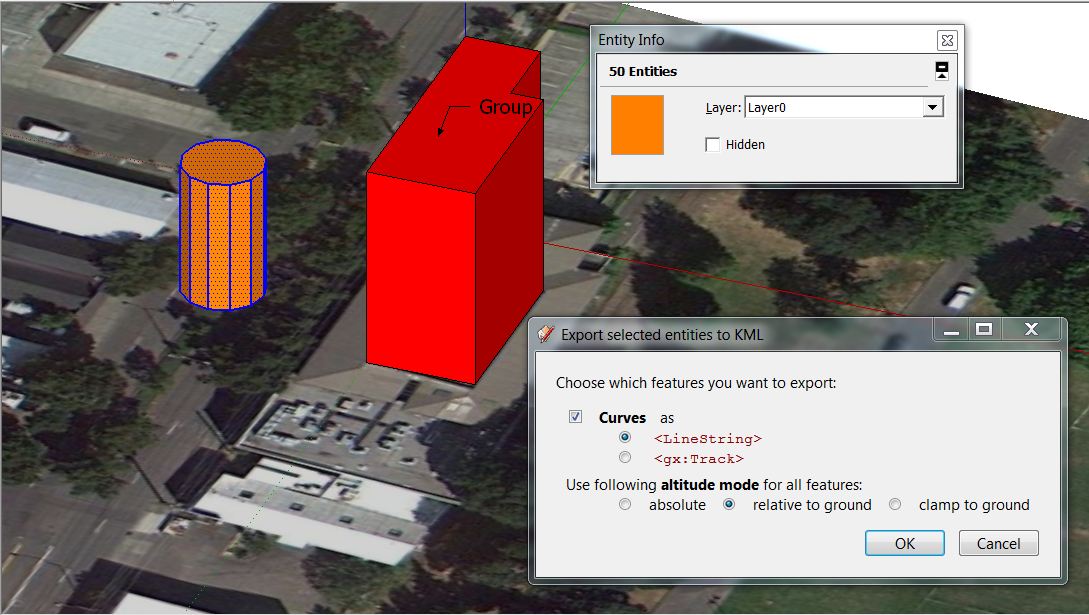
                  You should first get a webdialog with various options and when you 'ok' that you get a dialog to name/save the file to a folder...
                  Are there error messages in the open Ruby Console when you run the tool ?
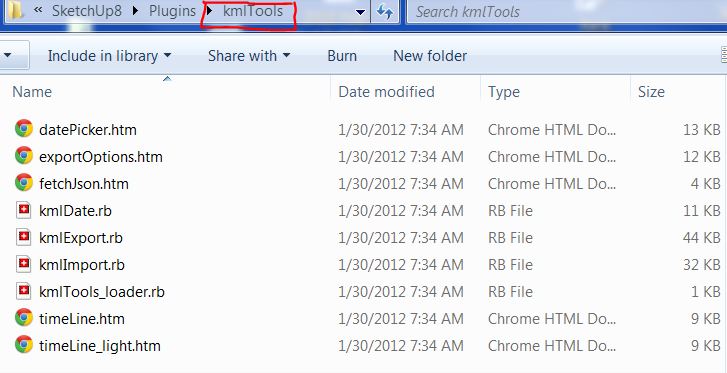
                  Does your kmlTools subfolder in Plugins look like this ?Capture.PNG
                  TIG

                  1 條回覆 最後回覆 回覆 引用 0
                  • JClementsJ 離線
                    JClements
                    最後由 編輯

                    I downloaded the current version of the script.

                    I had another rb file in the plugins folder. KML_Loader.

                    I removed it and I can now get a dialog to appeaer.

                    However, a dialog only appears if I select geometry of a non-group (see attached jpg).kml_test_screen_capture.JPG

                    John | Illustrator | Beaverton, Oregon

                    1 條回覆 最後回覆 回覆 引用 0
                    • JClementsJ 離線
                      JClements
                      最後由 編輯

                      my test file.


                      kml_test.skp

                      John | Illustrator | Beaverton, Oregon

                      1 條回覆 最後回覆 回覆 引用 0
                      • TIGT 離線
                        TIG Moderator
                        最後由 編輯

                        That's not right!
                        I get the full webdialog and I don't need to select anything at all...
                        Have you got ALL of the files in the subfolder that I showed in my screenshot ?
                        Have you got any copies of these files [or other 'kml' files] in the Plugins folder by mistake ? - if so remove them... There should only be 'kmlTools.rb' in Plugins.
                        It's an Extension does it appear in the Preferences dialog ?
                        😕

                        TIG

                        1 條回覆 最後回覆 回覆 引用 0
                        • JClementsJ 離線
                          JClements
                          最後由 編輯

                          I have the same configuration on my laptop and get the same result. And, yes, I do show KML Tools in my extensions listed and it is checked.

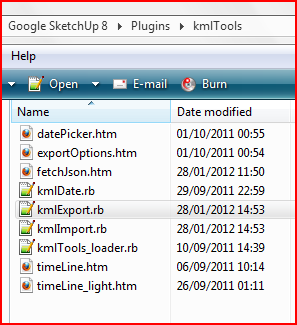
                          My KML Tools files:
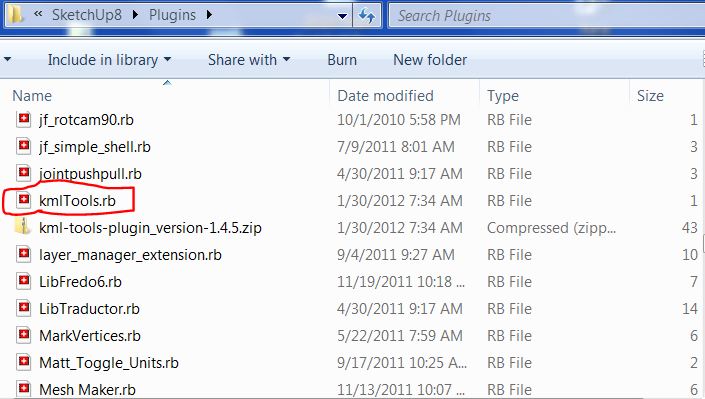
                          Plugins.JPG

                          KmlTools_Folder.JPG

                          John | Illustrator | Beaverton, Oregon

                          1 條回覆 最後回覆 回覆 引用 0
                          • TIGT 離線
                            TIG Moderator
                            最後由 編輯

                            Weird ?
                            I suggest you PM Aerilius... 😕

                            TIG

                            1 條回覆 最後回覆 回覆 引用 0
                            • JClementsJ 離線
                              JClements
                              最後由 編輯

                              In case anyone is interest there is plugin for ARC GIS that allows contours to be exported to a KML file.

                              The KML can be imported into GEarth. And, using KML Tools, imported into SU. The GIS plugin has some nice features such as adding text labels or text with leaders to the KML file which KML Tools handles just fine. The text info comes from the elevation name assigned to a contour group (which is a nice "welded" polyline). With this particular KML no effort was made to optimize the segmentation of the polyline contours.

                              It took less than 5 minutes to generate the terrain mesh using the Sandbox Tool with my Cor7 PC.

                              I posted this here because the old ARCgis plugin on the SketchUp site (http://sketchup.google.com/intl/en/download/plugins.html) no longer works with SU7 and SU8. There is a "multipatch" function/workflow in GIS but the files created are huge and usually crash SU when attempting to import or error out. With KML Tools, SU has now regained some of the ability to handle GIS output.

                              If anyone is interested, I will try to find out the specifics of the GIS plugin used to create this KML.


                              DuluthContours.kml

                              John | Illustrator | Beaverton, Oregon

                              1 條回覆 最後回覆 回覆 引用 0
                              • JClementsJ 離線
                                JClements
                                最後由 編輯

                                Follow Up:

                                I've had issues with the KMT Tool export functions. I finally, did a complete re-installation of SU8. Aside from the default plugin installation, only the KML Tools were installed.

                                I found that Groups were ignored, but Components were not ... provided they were preselected. However, the KML of a component export could not be imported nor opened in Google Earth (Pro).

                                If nothing is selected then the export dialog did not display.

                                The selection of loose geometry works, but when imported into Google Earth, edges could be misplaced. For example, a one leg of cube was tilted.
                                Cube KML created via KML_tools.jpg

                                John | Illustrator | Beaverton, Oregon

                                1 條回覆 最後回覆 回覆 引用 0
                                • A 離線
                                  Aerilius
                                  最後由 編輯

                                  The cause of the problem one rare occasions has been fixed. Generally groups should be exported and the export dialog should show now always.
                                  The export of ungrouped geometry is not intended. It is better to group an object so that the corresponding kml feature can be recognized.

                                  1 條回覆 最後回覆 回覆 引用 0
                                  • JClementsJ 離線
                                    JClements
                                    最後由 編輯

                                    Thanks for the update 1.4.7. Some problems still exist.

                                    Please use the attached .skp and export to kml.

                                    I think the following will ALWAYS FAIL to export correctly. Any geometry drawn off axis or rotated so that its edges are off axis will not export correctly.

                                    What does work now is making a group or a component of any geometry, then exporting the group or component. However, they too will fail if subsequently rotated. Scaling the component after creating it does not appear to adversely affect the component when exported.

                                    Regards, John

                                    KML test 3.skp

                                    John | Illustrator | Beaverton, Oregon

                                    1 條回覆 最後回覆 回覆 引用 0
                                    • A 離線
                                      Aerilius
                                      最後由 編輯

                                      Thanks for the test case. I fixed that components were exported with reversed tilt angle (Google Earth uses it in the opposite direction than SketchUp).

                                      Ungrouped geometry is NOT intended to be used for export (as written above).

                                      1 條回覆 最後回覆 回覆 引用 0
                                      • JClementsJ 離線
                                        JClements
                                        最後由 編輯

                                        And thank you one more time.

                                        John

                                        John | Illustrator | Beaverton, Oregon

                                        1 條回覆 最後回覆 回覆 引用 0
                                        • J 離線
                                          justin.kromer
                                          最後由 編輯

                                          I've had success importing certain kml files. Others not so much. The error i'm receiving in the ruby console is as follows:

                                          fetching elevation from url: http://api.geonames.org/astergdemJSON?formatted=true&lat=38.7126087917573&lng=-77.1426263045962&username=aerilius&style=full&callback=returnJson
                                          kmlImport.rb: geonames returned 38
                                          Error: #<NoMethodError: undefined method `+' for nil:NilClass>

                                          Any input would be helpful. Thanks

                                          1 條回覆 最後回覆 回覆 引用 0
                                          • A 離線
                                            Aerilius
                                            最後由 編輯

                                            Can you paste this in the Ruby Console before running the lugin again?

                                            $VERBOSE=true
                                            

                                            Then the error message will tell a bit more useful. Thanks!

                                            1 條回覆 最後回覆 回覆 引用 0
                                            • 1
                                            • 2
                                            • 3
                                            • 4
                                            • 5
                                            • 6
                                            • 7
                                            • 5 / 7
                                            • 第一個貼文
                                              最後的貼文
                                            Buy SketchPlus
                                            Buy SUbD
                                            Buy WrapR
                                            Buy eBook
                                            Buy Modelur
                                            Buy Vertex Tools
                                            Buy SketchCuisine
                                            Buy FormFonts

                                            Advertisement