sketchucation logo sketchucation
    • Login
    Oops, your profile's looking a bit empty! To help us tailor your experience, please fill in key details like your SketchUp version, skill level, operating system, and more. Update and save your info on your profile page today!
    Mac User? | Join the Rayscaper Beta for Mac Learn More

    [Plugin]T2H_BuildingStructureTools2.2.4 in20141207

    Scheduled Pinned Locked Moved Plugins
    337 Posts 108 Posters 544.9k Views 108 Watching
    Loading More Posts
    • Oldest to Newest
    • Newest to Oldest
    • Most Votes
    Reply
    • Reply as topic
    Log in to reply
    This topic has been deleted. Only users with topic management privileges can see it.
    • D
      DavidATCW
      last edited by

      Hi All,

      New the SU but finding it very useful.

      Thanks to Tak2hta for the BST plugin. I looks realy good.

      I'm using SU8 Pro on Window 7 OS.

      In the PlugIns menu under building structure tool I don't seem to have the 'Add New Profile'. The tutorial video seems to indicate it should be there??

      Appreciate any help.

      Thanks

      1 Reply Last reply
      Reply Quote 0
      • T
        tak2hata
        last edited by

        Hi,
        I update this in Sep 05,2012.
        Bugfix about extending to face with selecting single bst entity.

        Hi,Sumaster.
        Adding toolbar like previous version has not done well yet.
        I gave priority to correction of a bug and update.
        wait while.

        Hi,david.
        "Add new profile" was disable since version1.0.
        Because the adding to CSV with ruby script has problem.
        The text code is defferent between languages.
        So the character peculiar in the language included in csv will be modified strange when ruby overwrite the csv file.
        Please edit CSV file with application like Excel or open office calc.

        Thanks.


        by TAK2HATA

        1 Reply Last reply
        Reply Quote 0
        • D
          DavidATCW
          last edited by

          Hi TAK2HTA,

          Thanks for the reply.

          I presume modifying CSV file allows new sizes for existing profile to be added. This is not what I want to do.

          Like CTMan I would like to add new profile shape for beams, similar to CTMan's PFC profiles. Instrucion on how to this would be apprecated. We need to be able to customise to get the most out of this realy useful plugin.

          Thanks

          1 Reply Last reply
          Reply Quote 0
          • beginnerB
            beginner
            last edited by

            Hi Guys,
            I would like to draw your attention to the 'shapes' in tak2hata's plugin - look at the Class SHAPE and the profiles defined as *.SKP files.

            You can draw any complex shape as long is contained within single face - sample below.
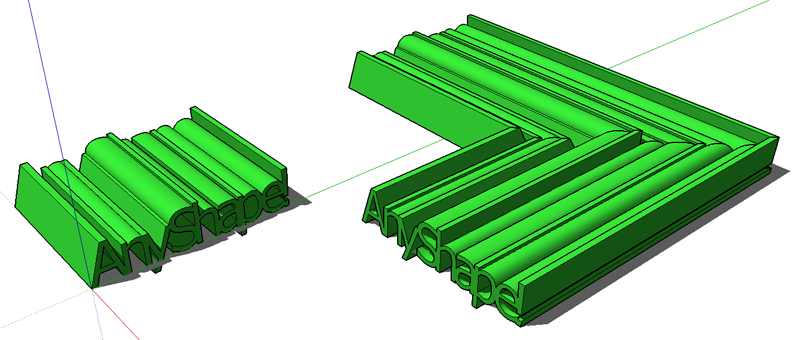

            20120905-Tak2HataShapes.png

            Regards, SU 'beginner'

            1 Reply Last reply
            Reply Quote 0
            • sumasterS
              sumaster
              last edited by

              @tak2hata said:

              Hi,Sumaster.
              Adding toolbar like previous version has not done well yet.
              I gave priority to correction of a bug and update.
              wait while.

              Hi Tak2hata,

              wow nice update . . . . πŸ‘

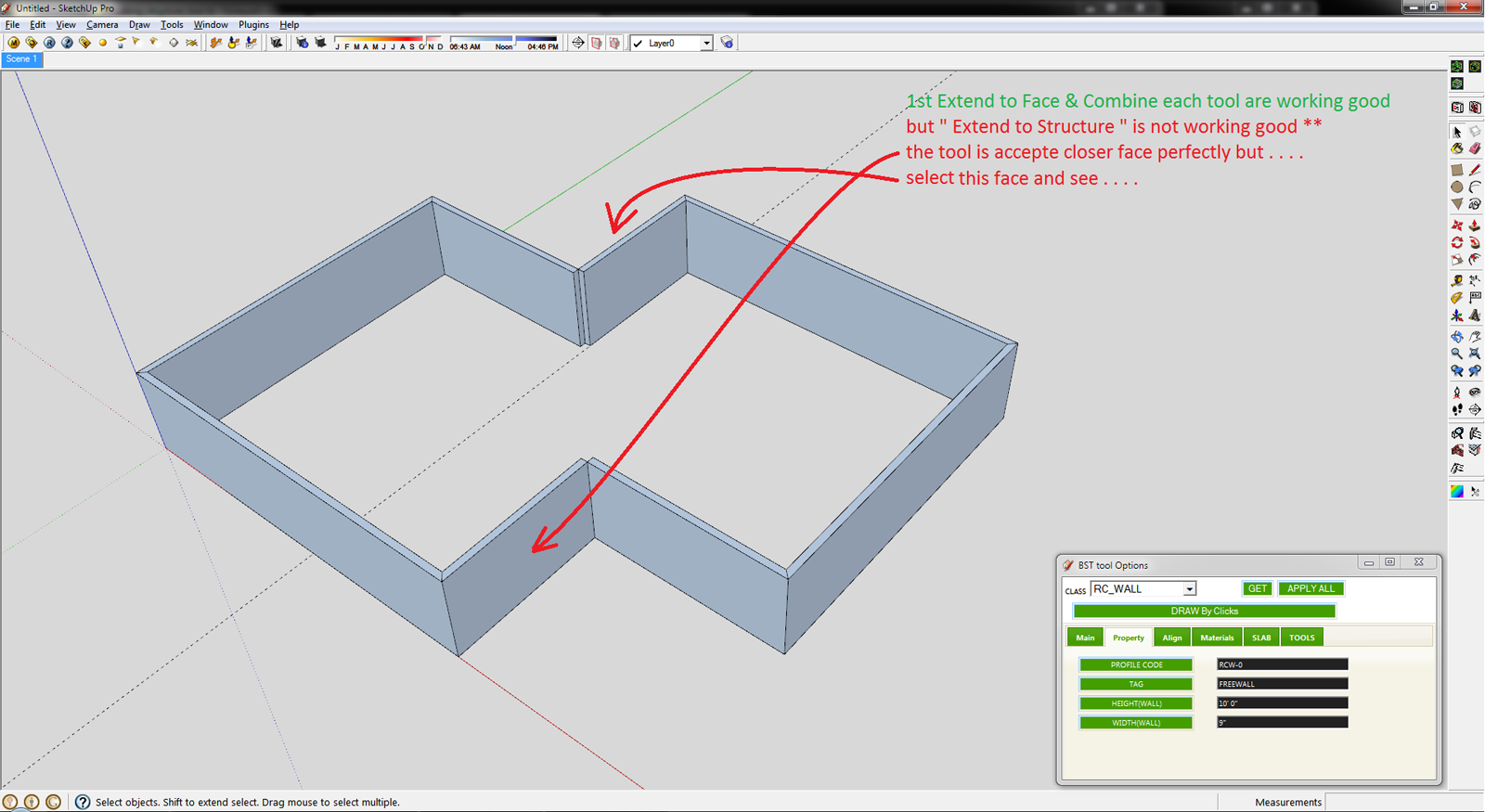
              Extend to Face tool is working perfectly . . . . but
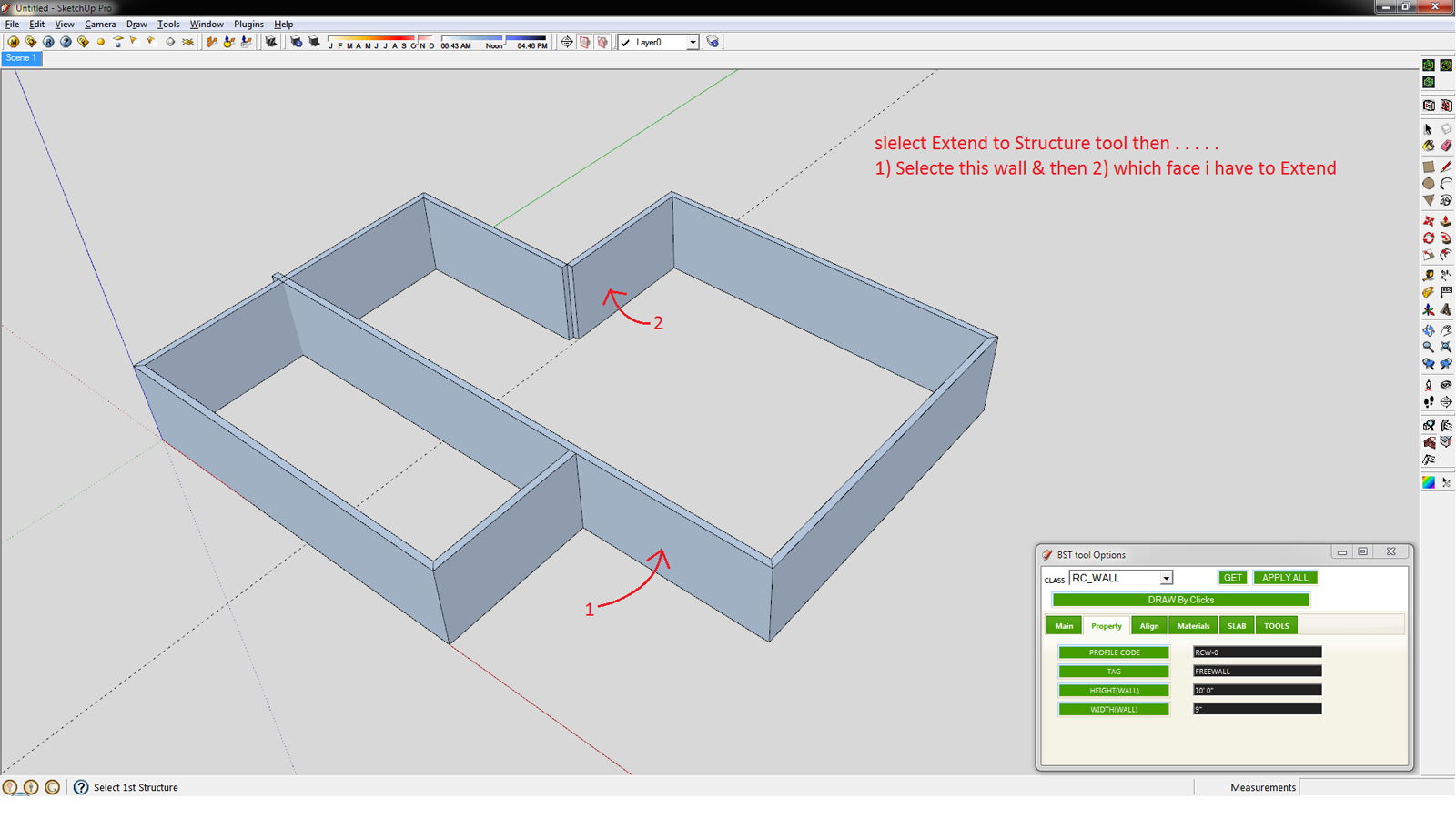
              Extend to Structure is not working properly . . .

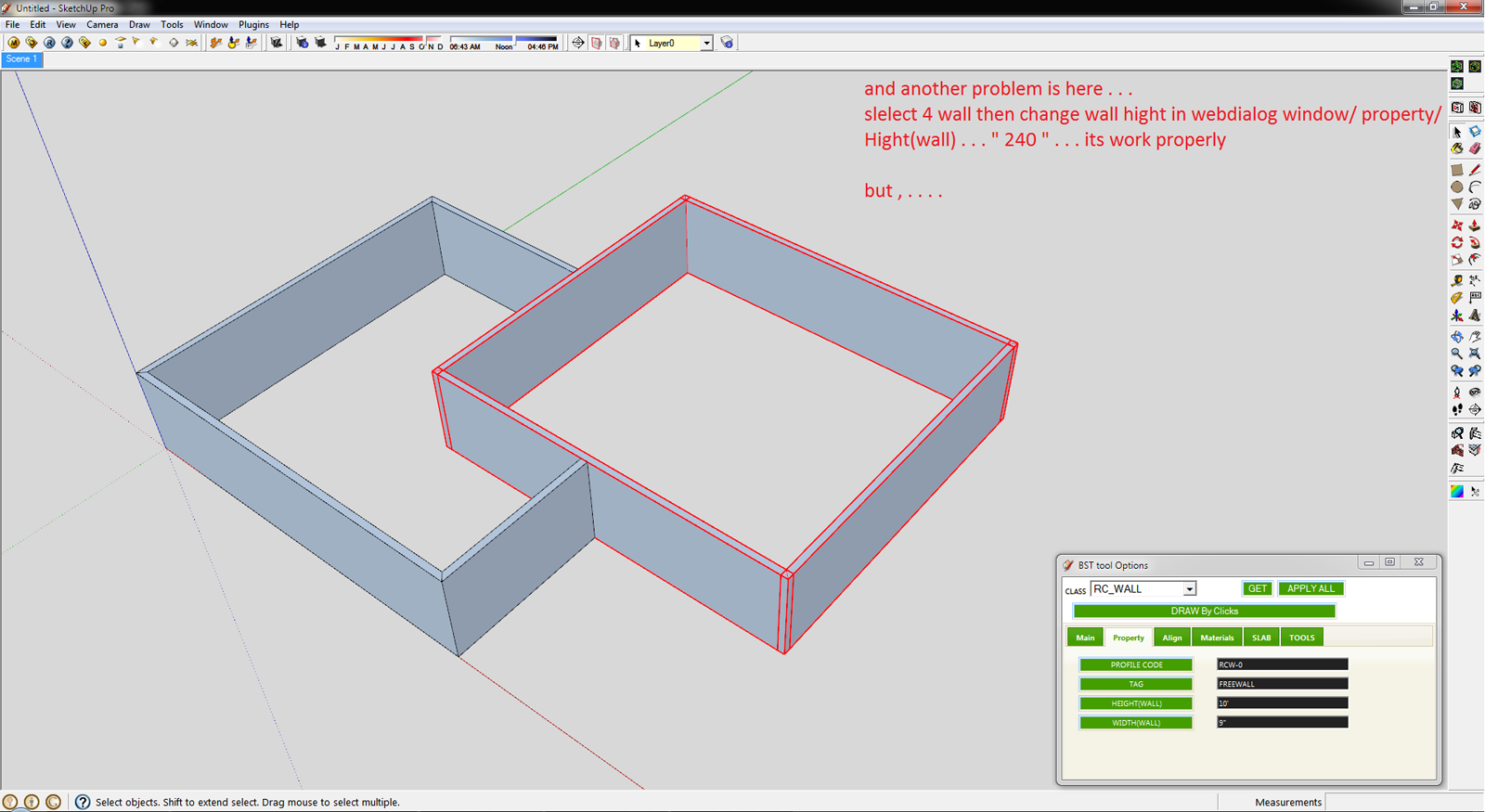
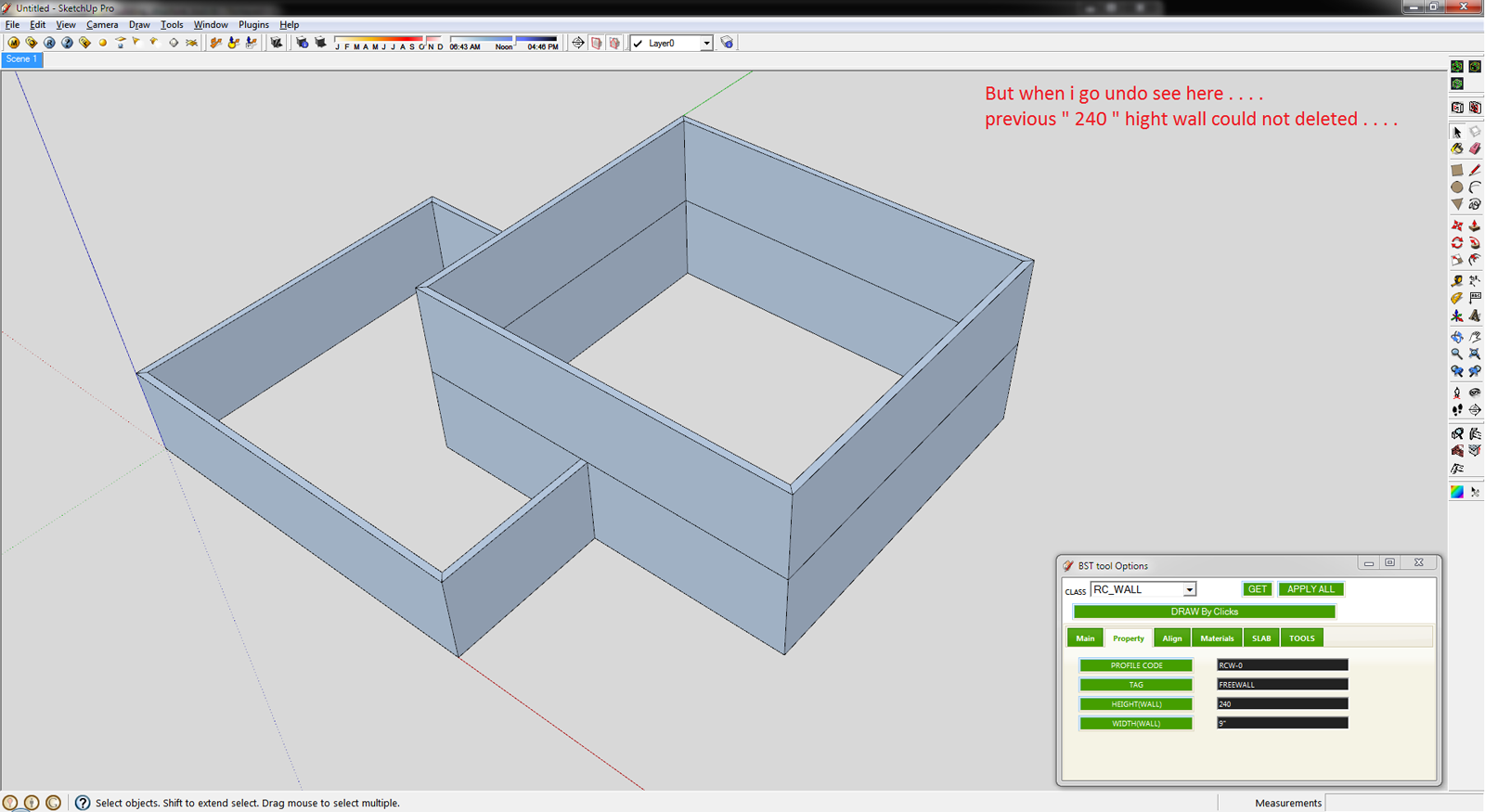
              CHK

              1.png

              2.png

              3.png

              4.png

              5.png

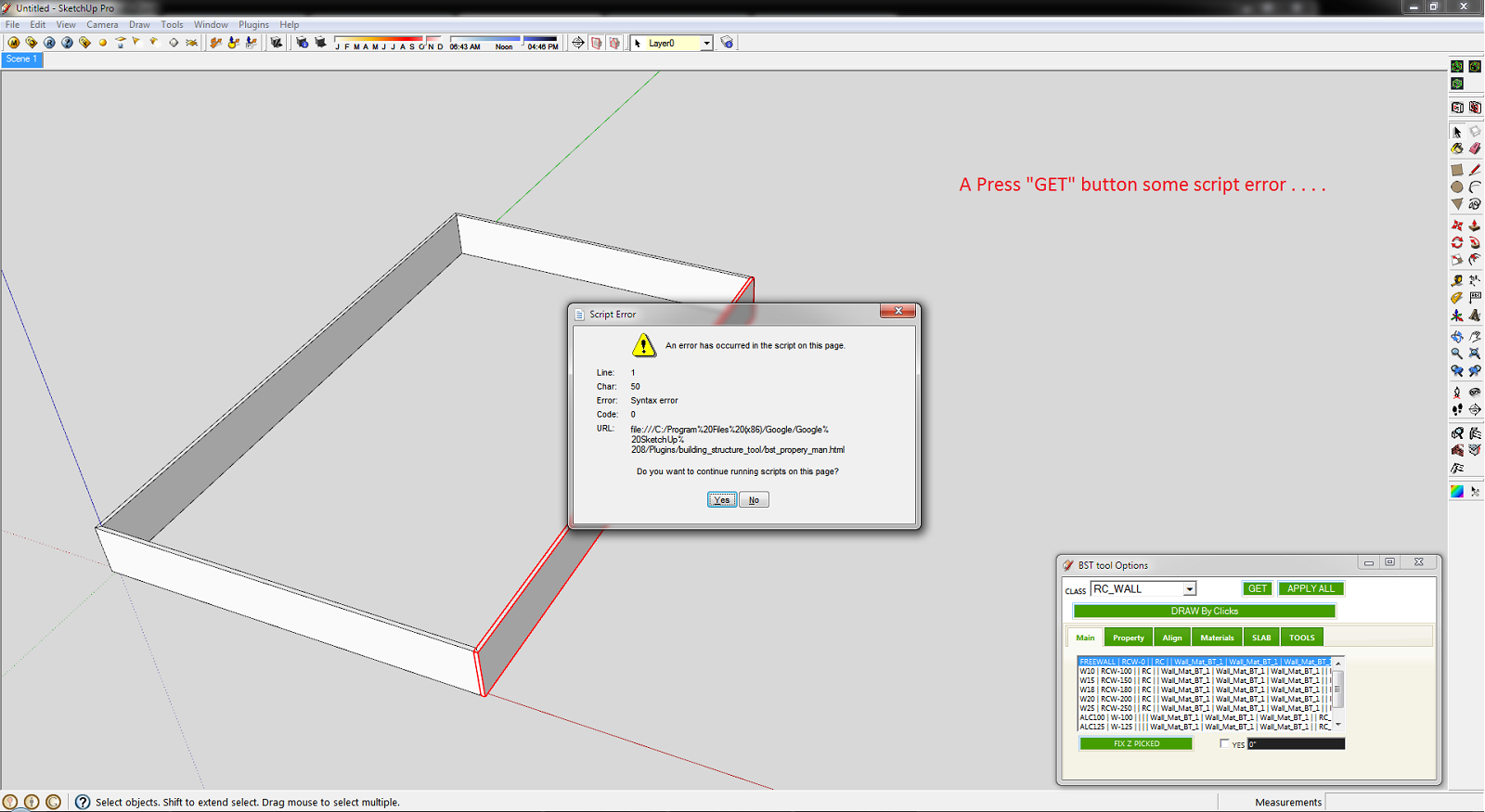
              I add some items in plugin menu . . . πŸ˜‰
              please add all previous item in plugin menu

              
              tst_main_menu = UI.menu("Plugins").add_submenu("#{langconv( 'BS Tool - 1.0' )}")
              tst_main_menu.add_item("#{langconv('>> Extend to Face')}") { Sketchup.active_model.select_tool TST1_class_extend_face.new( false ) }
              tst_main_menu.add_item("#{langconv('>> Extend to Structure')}") { Sketchup.active_model.select_tool TST1_class_extend_str.new }
              tst_main_menu.add_item("#{langconv('>> Growup to Face')}") { Sketchup.active_model.select_tool TST1_class_grow_face.new( false ) }
              tst_main_menu.add_item("#{langconv('>> Combine Each')}") { Sketchup.active_model.select_tool TST1_class_chamfer.new }
              tst_main_menu.add_separator
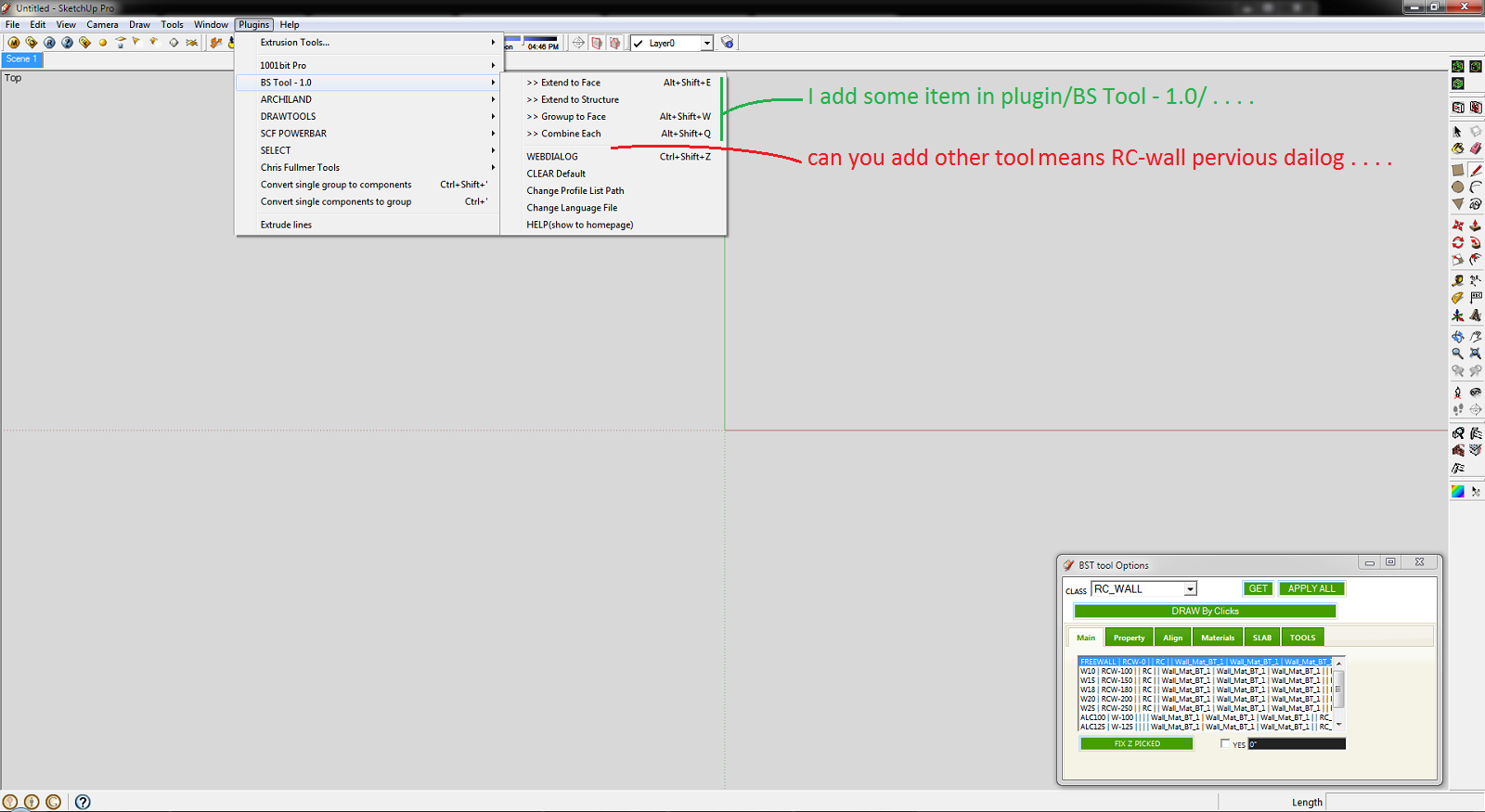


              6.png

              And thank you so much for this plugin . . . . πŸ˜„
              i use your plugin daily . . . .
              its save my basic modeling time . . . too good . . . .

              Thank you,
              SUmaster

              1 Reply Last reply
              Reply Quote 0
              • V
                victor hugo
                last edited by

                Does anyone know where to find more RC_WALL options for the BST, when I installed it (which is very useful BTW) it only shows 4 options?

                Thanks.

                1 Reply Last reply
                Reply Quote 0
                • C
                  CTMan
                  last edited by

                  @tak2hata said:

                  Hi,CTman.
                  You are welcome!
                  If you upload the PFC profile file here , I will create link to your post in top of thread.
                  Your PFC profile file will help users of BST!

                  Hello Tak2hata - please find attached csv file for British Steel Beams and Columns

                  Hi,Sumaster.
                  I also checked the bug.
                  I will fix the problem within several days.
                  And I will update here.

                  Thanks.


                  British Steel Beams and Columns

                  1 Reply Last reply
                  Reply Quote 0
                  • T
                    tak2hata
                    last edited by

                    Hi,CTMan.
                    I add link to your reply in the top of thread.
                    Thanks a lot for uploading your profile list of UK STEEL.

                    Channel([) have tapered flanges when the schema is like "[-100x50x5x7.5x8x4"
                    Channel([) have not tapered flanges when the schema is like "[-100x50x5x7.5"
                    So If you want to not tapered flange Channel,the schema is like "[-AxBxCxD".

                    Hi,sumaster.
                    "Extend to structure" tool works extending the structure to the other structure.not to face.
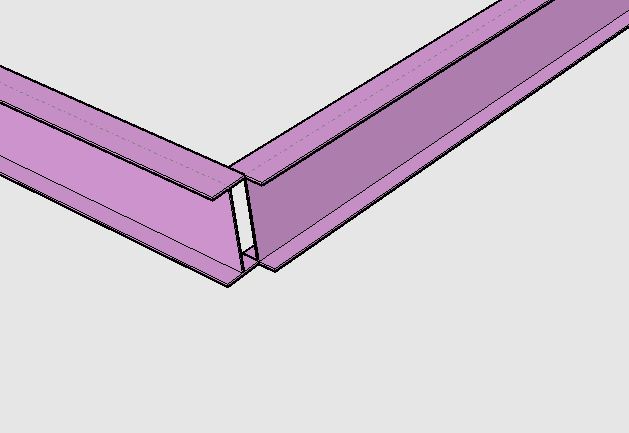
                    extending to structure.
                    Using "Extending to Face" to extend like this picture takes time and effort.
                    So "Extend to Structure" exists for that purpose.

                    I see the "undo" problem.
                    I will fix it few days.

                    Thanks.


                    by TAK2HATA

                    1 Reply Last reply
                    Reply Quote 0
                    • sumasterS
                      sumaster
                      last edited by

                      @tak2hata said:

                      Hi,CTMan.
                      I add link to your reply in the top of thread.
                      Thanks a lot for uploading your profile list of UK STEEL.

                      Channel([) have tapered flanges when the schema is like "[-100x50x5x7.5x8x4"
                      Channel([) have not tapered flanges when the schema is like "[-100x50x5x7.5"
                      So If you want to not tapered flange Channel,the schema is like "[-AxBxCxD".

                      Hi,sumaster.
                      "Extend to structure" tool works extending the structure to the other structure.not to face.
                      [attachment=0:165mbbk2]<!-- ia0 -->extending_to_structure.JPG<!-- ia0 -->[/attachment:165mbbk2]
                      Using "Extending to Face" to extend like this picture takes time and effort.
                      So "Extend to Structure" exists for that purpose.

                      I see the "undo" problem.
                      I will fix it few days.

                      Thanks.

                      yes

                      and another problem facing here . . .
                      i upgrade your new version but when i OPEN my OLD version file means (i was working your old BS tool) and exend to face and other 3 tools are not working good . . .

                      Pleas CHK

                      Thank you,
                      SUmaster

                      1 Reply Last reply
                      Reply Quote 0
                      • T
                        tak2hata
                        last edited by

                        @sumaster said:

                        yes

                        and another problem facing here . . .
                        i upgrade your new version but when i OPEN my OLD version file means (i was working your old BS tool) and exend to face and other 3 tools are not working good . . .

                        Pleas CHK

                        Hi,Please upload your data include problems.
                        The part to limit the problem entities.


                        by TAK2HATA

                        1 Reply Last reply
                        Reply Quote 0
                        • sumasterS
                          sumaster
                          last edited by

                          @tak2hata said:

                          @sumaster said:

                          yes

                          and another problem facing here . . .
                          i upgrade your new version but when i OPEN my OLD version file means (i was working your old BS tool) and exend to face and other 3 tools are not working good . . .

                          Pleas CHK

                          Hi,Please upload your data include problems.
                          The part to limit the problem entities.

                          Yes . . .

                          Please CHK the Compound wall . .

                          Sept11 2012 _3 (For Tak2hata) .skp

                          Thank you,
                          SUmaster

                          1 Reply Last reply
                          Reply Quote 0
                          • T
                            tak2hata
                            last edited by

                            Hi,All.
                            I update to version1.2. in Sep17,2012.
                            v1.2:2012.09.17:
                            Bugs? fixed.and Improves.
                            #Fix:Undo when Multi(Extend/Chamfer/Grow).
                            #Fix:Undo when change properties of many entities.
                            #Fix:(Extend/Chamfer/Grow) Structure entity which have devided side by user.
                            #Improve about create slab.

                            Hi,Sumaster.
                            In your file ,there was no compound wall.
                            But the wall's edge was cutted by your manipulation.It do not good for "Extend tool" in previous version.
                            It was improved in this ver.

                            Thanks.


                            by TAK2HATA

                            1 Reply Last reply
                            Reply Quote 0
                            • sumasterS
                              sumaster
                              last edited by

                              @tak2hata said:

                              Hi,All.
                              I update to version1.2. in Sep17,2012.
                              v1.2:2012.09.17:
                              Bugs? fixed.and Improves.
                              #Fix:Undo when Multi(Extend/Chamfer/Grow).
                              #Fix:Undo when change properties of many entities.
                              #Fix:(Extend/Chamfer/Grow) Structure entity which have devided side by user.
                              #Improve about create slab.

                              Thanks.

                              Hi Tak2hata

                              Thanks you πŸ‘ πŸ˜‰
                              And I'm CHKing Now

                              @tak2hata said:

                              Hi,Sumaster.
                              In your file ,there was no compound wall.
                              But the wall's edge was cutted by your manipulation.It do not good for "Extend tool" in previous version.
                              It was improved in this ver.

                              Thanks.

                              Oh. . . .

                              and here the new tool get random color
                              how i fix the color means ( Walls get White, Steel Member get Medium Red, . . etc )

                              Thank you,
                              SUmaster

                              1 Reply Last reply
                              Reply Quote 0
                              • T
                                tak2hata
                                last edited by

                                Hi,all.
                                I attach CTMan's UK Steel pflist file on top of this thread.

                                It will helps Building structure tool users.

                                Thanks.


                                by TAK2HATA

                                1 Reply Last reply
                                Reply Quote 0
                                • S
                                  SUFractal
                                  last edited by

                                  I just upgraded to the latest version, but am no longer able to access "steel columns" in the North American List? Other elements appear to work fine.

                                  1 Reply Last reply
                                  Reply Quote 0
                                  • T
                                    tak2hata
                                    last edited by

                                    @sufractal said:

                                    I just upgraded to the latest version, but am no longer able to access "steel columns" in the North American List? Other elements appear to work fine.

                                    Hi,Sufractal.
                                    In my enviroment,"Steel Column" shown from "North American pflist" no problem.
                                    Check the line include "##" in the csv file, If you edited it.
                                    "##STEEL_COLUMN" is needed.

                                    so, send to me your profile list or upload here it.
                                    and I will look it.

                                    Thanks.


                                    by TAK2HATA

                                    1 Reply Last reply
                                    Reply Quote 0
                                    • sumasterS
                                      sumaster
                                      last edited by

                                      HI ,

                                      How i fix the color of BST wall . . . ?

                                      now its get random color . . .

                                      Thank you,
                                      SUmaster

                                      1 Reply Last reply
                                      Reply Quote 0
                                      • S
                                        SUFractal
                                        last edited by

                                        @tak2hata said:

                                        @sufractal said:

                                        I just upgraded to the latest version, but am no longer able to access "steel columns" in the North American List? Other elements appear to work fine.

                                        Hi,Sufractal.
                                        In my enviroment,"Steel Column" shown from "North American pflist" no problem.
                                        Check the line include "##" in the csv file, If you edited it.
                                        "##STEEL_COLUMN" is needed.

                                        so, send to me your profile list or upload here it.
                                        and I will look it.

                                        Thanks.

                                        i believe I used the correct text in the file?
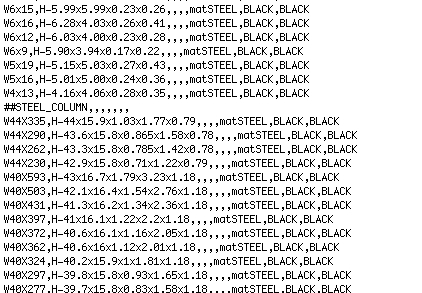

                                        North american.jpg

                                        1 Reply Last reply
                                        Reply Quote 0
                                        • T
                                          tak2hata
                                          last edited by

                                          @sufractal said:

                                          @tak2hata said:

                                          @sufractal said:

                                          I just upgraded to the latest version, but am no longer able to access "steel columns" in the North American List? Other elements appear to work fine.

                                          Hi,Sufractal.
                                          In my enviroment,"Steel Column" shown from "North American pflist" no problem.
                                          Check the line include "##" in the csv file, If you edited it.
                                          "##STEEL_COLUMN" is needed.

                                          so, send to me your profile list or upload here it.
                                          and I will look it.

                                          Thanks.

                                          i believe I used the correct text in the file?

                                          Hi,
                                          I tested it working fine.
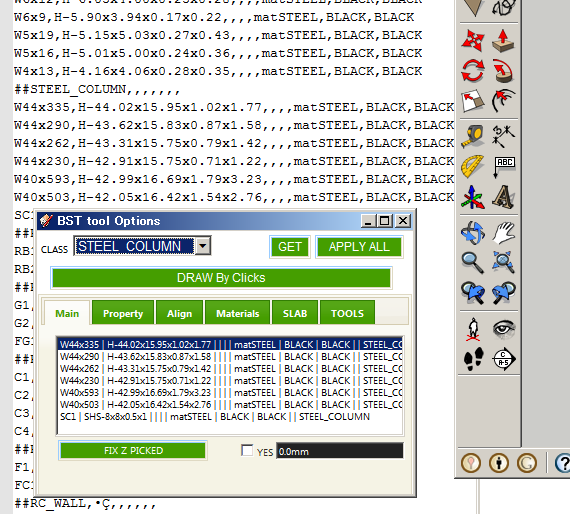
                                          Steel Column shown fine.
                                          I judge that it is fine by looking only that picture.
                                          The last advice I say is "Change Profile list path" and select it again.

                                          The information about this problem is too small.
                                          Is there anyone had same problem?
                                          and please reply here.

                                          Thanks.


                                          by TAK2HATA

                                          1 Reply Last reply
                                          Reply Quote 0
                                          • H
                                            hygicell
                                            last edited by

                                            excellent tool, but not (yet) working for me:
                                            I cannot find an installation manual
                                            nor a user manual
                                            and where do I put the .csv files?
                                            please help
                                            Frank

                                            1 Reply Last reply
                                            Reply Quote 0

                                            Hello! It looks like you're interested in this conversation, but you don't have an account yet.

                                            Getting fed up of having to scroll through the same posts each visit? When you register for an account, you'll always come back to exactly where you were before, and choose to be notified of new replies (either via email, or push notification). You'll also be able to save bookmarks and upvote posts to show your appreciation to other community members.

                                            With your input, this post could be even better πŸ’—

                                            Register Login
                                            • 1
                                            • 2
                                            • 8
                                            • 9
                                            • 10
                                            • 11
                                            • 12
                                            • 16
                                            • 17
                                            • 10 / 17
                                            • First post
                                              Last post
                                            Buy SketchPlus
                                            Buy SUbD
                                            Buy WrapR
                                            Buy eBook
                                            Buy Modelur
                                            Buy Vertex Tools
                                            Buy SketchCuisine
                                            Buy FormFonts

                                            Advertisement