sketchucation logo sketchucation
    • 登入
    Oops, your profile's looking a bit empty! To help us tailor your experience, please fill in key details like your SketchUp version, skill level, operating system, and more. Update and save your info on your profile page today!
    🔌 Smart Spline | Fluid way to handle splines for furniture design and complex structures. Download

    Double Line 2 (dline.rb update)

    已排程 已置頂 已鎖定 已移動 Plugins
    52 貼文 15 Posters 17.9k 瀏覽 15 Watching
    正在載入更多貼文
    • 從舊到新
    • 從新到舊
    • 最多點贊
    回覆
    • 在新貼文中回覆
    登入後回覆
    此主題已被刪除。只有擁有主題管理權限的使用者可以查看。
    • H 離線
      hebeijianke
      最後由 編輯

      @didier bur said:

      Hi,

      The trick is to press the TAB key anytime you want to set new parameters for your "walls". It's an enhancement by J. Foltz but I forgot to display it in the status bar.
      I've published a patch for dline2 on SU8 here: http://rhin.crai.archi.fr/rld/plugin_details.php?id=804

      Regards,
      [attachment=0:3j3upq39]<!-- ia0 -->dline2.jpeg<!-- ia0 -->[/attachment:3j3upq39]

      It is not work
      undefined method `file_loaded?' for main:Object

      1 條回覆 最後回覆 回覆 引用 0
      • Didier BurD 離線
        Didier Bur
        最後由 編輯

        Hi,
        Don't know why it doesn't work on your side.
        Workaround: open dline2.rb in a text editor, replace the four last lines with these:

        #Menu
        #if( not file_loaded?("dline2.rb"))
            UI.menu("Draw").add_item("Double Line") { Sketchup.active_model.select_tool(Bur;;Dline_Tool.new) }
        #end
        #file_loaded("dline2.rb")
        

        DB

        1 條回覆 最後回覆 回覆 引用 0
        • thomthomT 離線
          thomthom
          最後由 編輯

          @hebeijianke said:

          It is not work
          undefined method `file_loaded?' for main:Object

          @didier bur said:

          Hi,
          Don't know why it doesn't work on your side.
          Workaround: open dline2.rb in a text editor, replace the four last lines with these:

          Because the plugin doesn't require sketchup.rb - which is required for file_loaded? to work.
          Other users probably had plugins that loaded before this plugin that required the file and therefore the bug has not been noticed.

          Thomas Thomassen — SketchUp Monkey & Coding addict
          List of my plugins and link to the CookieWare fund

          1 條回覆 最後回覆 回覆 引用 0
          • Didier BurD 離線
            Didier Bur
            最後由 編輯

            Thanks TT, I was not aware of that. It is fixed (at least on RLD because I cannot edit Jim's post 😉).

            DB

            1 條回覆 最後回覆 回覆 引用 0
            • D 離線
              dmorong
              最後由 編輯

              This plugin does not show up on my mac version. No load error, no selection in the menu.
              I have tried it in both plugin folders
              Any suggestions?

              Thanks

              David

              Macbook Pro 16" (M1)
              Mac 12.1
              Sketchup 22.0.353

              1 條回覆 最後回覆 回覆 引用 0
              • Didier BurD 離線
                Didier Bur
                最後由 編輯

                Hi,
                @Mac users: please help dmorong if you can, because the script works here on Mac 😒

                DB

                1 條回覆 最後回覆 回覆 引用 0
                • D 離線
                  dmorong
                  最後由 編輯

                  Thanks for the confirmation, I had not looked in the Draw Menu, just in plugins and tools. So on a Mac it loads in the Draw Menu, which certainly makes sense.
                  The info on the Ruby Depot says it will load in the Tools Menu.

                  Macbook Pro 16" (M1)
                  Mac 12.1
                  Sketchup 22.0.353

                  1 條回覆 最後回覆 回覆 引用 0
                  • EdsonE 離線
                    Edson
                    最後由 編輯

                    sorry, jim and didier,

                    as far as I am concerned, dline2 on mac is hardly an improvement over dline. I get no dialog and the tool behaves oddly. see below: a z-shaped wall ends up like two triangles. going back to dline. thanks anyway.
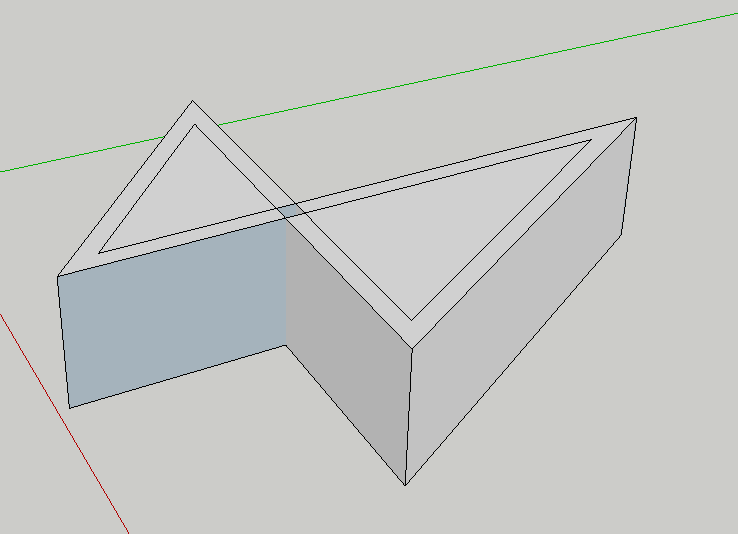
                    Screen shot 2011-05-08 at 9.30.28 AM.png

                    edson mahfuz, architect| porto alegre • brasil
                    http://www.mahfuz.arq.br

                    1 條回覆 最後回覆 回覆 引用 0
                    • D 離線
                      dmorong
                      最後由 編輯

                      I also tried it out, once I found it, and the tab key does not invoke the options palette, so there is no way to adjust the parameters. A well designed double line tool, like the one in Bonzai, would be really useful in my field. (design for film and stage)

                      Macbook Pro 16" (M1)
                      Mac 12.1
                      Sketchup 22.0.353

                      1 條回覆 最後回覆 回覆 引用 0
                      • EdsonE 離線
                        Edson
                        最後由 編輯

                        @dmorong said:

                        I also tried it out, once I found it, and the tab key does not invoke the options palette, so there is no way to adjust the parameters. A well designed double line tool, like the one in Bonzai, would be really useful in my field. (design for film and stage)

                        two suggestions: the old dline and the wall tool in 1001bit tools, a fine set of plugins.

                        edson mahfuz, architect| porto alegre • brasil
                        http://www.mahfuz.arq.br

                        1 條回覆 最後回覆 回覆 引用 0
                        • S 離線
                          SIVA SUNDAR
                          最後由 編輯

                          Hii Everybody can u make tutorials of this topics ................ 😄

                          1 條回覆 最後回覆 回覆 引用 0
                          • A 離線
                            awadrummer
                            最後由 編輯

                            Is this still available anywhere? The download link no longer works. I like the dline2.rb that I got from http://rhin.crai.archi.fr/rld/plugin_details.php?id=804, but haven't figured out a way to change the default values. I like the idea of it storing the last values used.

                            Thank you!

                            Chris B.

                            1 條回覆 最後回覆 回覆 引用 0
                            • G 離線
                              Gábor
                              最後由 編輯

                              @awadrummer said:

                              Is this still available anywhere?

                              Is the one at the plugin store working for you?
                              https://sketchucation.com/pluginstore?pln=dline2

                              1 條回覆 最後回覆 回覆 引用 0
                              • A 離線
                                awadrummer
                                最後由 編輯

                                Sorry for the delayed response. I don't receive notifications I guess when someone replies to my comments. Thank you Gábor, I got it working.

                                1 條回覆 最後回覆 回覆 引用 0
                                • D 離線
                                  dtrarch
                                  最後由 編輯

                                  Didier dline v6 or 2?
                                  The draw function does not terminate with either double click or esc.
                                  esc just erases the line drawn when clicked
                                  Bug Splats often on exit too.
                                  Tested on SU2014 pro and SU2018 pro.
                                  Works on select with any line or path ??

                                  Good and needed fcn and a fix please.

                                  dtr

                                  1 條回覆 最後回覆 回覆 引用 0
                                  • D 離線
                                    dtrarch
                                    最後由 編輯

                                    How about a version for SU2018 Pro ?
                                    This will only work for select and bug splats sometimes too.
                                    Thanks for any help.
                                    dtr

                                    1 條回覆 最後回覆 回覆 引用 0
                                    • Didier BurD 離線
                                      Didier Bur
                                      最後由 編輯

                                      Hi,
                                      It works like a charm on SU2018 and SU 2019.
                                      When you encounter error(s), open the ruby console, copy-paste the output and send them to me by PM.
                                      Regards,

                                      DB

                                      1 條回覆 最後回覆 回覆 引用 0
                                      • D 離線
                                        dtrarch
                                        最後由 編輯

                                        Hi Didier
                                        I went to PM you and could not find a way to send to you so here it is.
                                        Hi Didier
                                        Really good of you to be of help
                                        I have had no error messages, just function failure.
                                        Draw double line fails to stay when using a double click or esc to terminate.
                                        bug splat just exits SU and ask for a report.
                                        To where ??
                                        my dlin2 is dated 2/2/15
                                        size 1,118
                                        I do have a ruby console plugin but not sure of just what to do with it.
                                        dline is a possible way to create reveals on non solid.
                                        Even FormZ had this fcn way back when it had a hardware dongle.
                                        Many thanks for all your super works way back in the beginning of time.
                                        my regards
                                        Dave

                                        1 條回覆 最後回覆 回覆 引用 0
                                        • 1
                                        • 2
                                        • 3
                                        • 3 / 3
                                        • 第一個貼文
                                          最後的貼文
                                        Buy SketchPlus
                                        Buy SUbD
                                        Buy WrapR
                                        Buy eBook
                                        Buy Modelur
                                        Buy Vertex Tools
                                        Buy SketchCuisine
                                        Buy FormFonts

                                        Advertisement