sketchucation logo sketchucation
    • Login
    Oops, your profile's looking a bit empty! To help us tailor your experience, please fill in key details like your SketchUp version, skill level, operating system, and more. Update and save your info on your profile page today!
    ⚠️ Update | Sketchucation Tools 5.0.8 released with licensing improvements and bugfixes Download

    Resetting bounding box to match world axis

    Scheduled Pinned Locked Moved Developers' Forum
    12 Posts 4 Posters 5.9k Views 4 Watching
    Loading More Posts
    • Oldest to Newest
    • Newest to Oldest
    • Most Votes
    Reply
    • Reply as topic
    Log in to reply
    This topic has been deleted. Only users with topic management privileges can see it.
    • honoluludesktopH
      honoluludesktop
      last edited by

      I recall now, you helped me with this before:

      comp.definition.entities.transform_entities(comp.transformation.invert!,comp.definition.entities.to_a)

      Didn't know that there might be a difference between bb, and what is shown.

      1 Reply Last reply
      Reply Quote 0
      • thomthomT
        thomthom
        last edited by

        @chris fullmer said:

        The bounding box that is returned by SU is different than the one that is shown inside of sketchup when you select the component (if I recall correctly).

        You need to get the bounds of the definition - then transform that by the instance transformation.

        @honoluludesktop said:

        comp.definition.entities.transform_entities(comp.transformation.invert!,comp.definition.entities.to_a)

        That would reset scaling and translation as well.

        @honoluludesktop said:

        Didn't know that there might be a difference between bb, and what is shown.

        If you get the bounds of an instance the bb will be oriented to the model or world axis.

        Thomas Thomassen — SketchUp Monkey & Coding addict
        List of my plugins and link to the CookieWare fund

        1 Reply Last reply
        Reply Quote 0
        • thomthomT
          thomthom
          last edited by

          @honoluludesktop said:

          The dashed line is the bbox.
          The blue lines is the previous bbox?
          [attachment=1:lqggpjwr]<!-- ia1 -->Temp00.png<!-- ia1 -->[/attachment:lqggpjwr]
          [attachment=0:lqggpjwr]<!-- ia0 -->Temp01.png<!-- ia0 -->[/attachment:lqggpjwr]

          The dashed lines is the Boundingbox you get when you query the instance for it's boundingbox.
          But the blue lines are the actual boundingbox, it's derived from the boundingbox of the definition transformed by the instance transformation.

          Thomas Thomassen — SketchUp Monkey & Coding addict
          List of my plugins and link to the CookieWare fund

          1 Reply Last reply
          Reply Quote 0
          • honoluludesktopH
            honoluludesktop
            last edited by

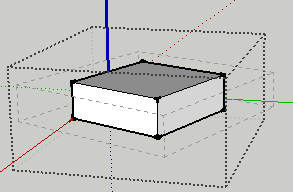
            The dashed line is the bbox. It's always aligned to the world axis. The blue lines is the bbox when the component is created.
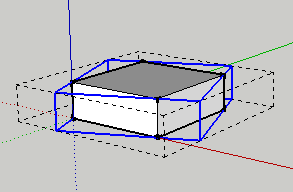
            Temp00.png
            Temp01.png

            1 Reply Last reply
            Reply Quote 0
            • honoluludesktopH
              honoluludesktop
              last edited by

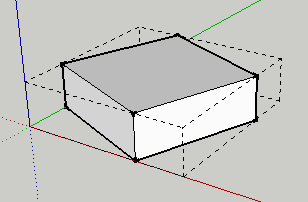
              I changed the code from bbox=e.bounds to bbox=e.definition.bounds, and got this:
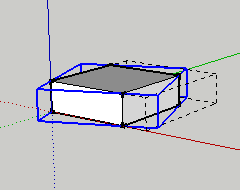
              Temp02.png

              1 Reply Last reply
              Reply Quote 0
              • thomthomT
                thomthom
                last edited by

                Nearly there. Take the points from the boundingbox's corners and transform them by the instance's transformation.

                Thomas Thomassen — SketchUp Monkey & Coding addict
                List of my plugins and link to the CookieWare fund

                1 Reply Last reply
                Reply Quote 0
                • honoluludesktopH
                  honoluludesktop
                  last edited by

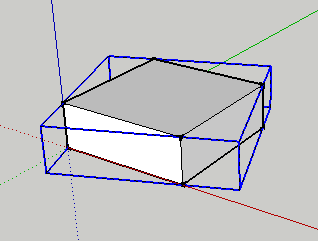
                  OK, before I go there, I aligned the bbox with the world axis and got this:
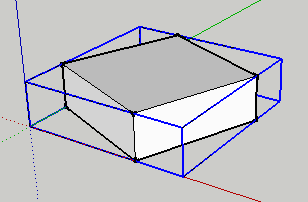
                  Temp04.png
                  Temp03.png

                  1 Reply Last reply
                  Reply Quote 0
                  • thomthomT
                    thomthom
                    last edited by

                    That's because the instance boundingbox will be oriented to the world axis. Whenever the instance is rotated of axis from this you will get a deviance.

                    I almost forgotten - I got a plugin that draws the selection boundingbox of instances: http://forums.sketchucation.com/viewtopic.php?f=323&t=29377

                    Thomas Thomassen — SketchUp Monkey & Coding addict
                    List of my plugins and link to the CookieWare fund

                    1 Reply Last reply
                    Reply Quote 0
                    • honoluludesktopH
                      honoluludesktop
                      last edited by

                      OK done. Where cl is a array of clines, entities.transform_entities(e.transformation,cl.to_a) transforms them into the bbox outline.
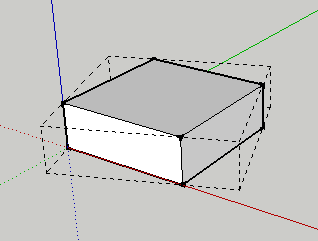
                      Temp01.png
                      Temp00.png
                      Thanks.

                      1 Reply Last reply
                      Reply Quote 0
                      • N
                        nickdk
                        last edited by

                        Interesting topic,

                        This this knowledge end up in a plug-in? I'm looking for a way to reset the bounding boxes of 'rotate multiple' components 😄

                        1 Reply Last reply
                        Reply Quote 0

                        Hello! It looks like you're interested in this conversation, but you don't have an account yet.

                        Getting fed up of having to scroll through the same posts each visit? When you register for an account, you'll always come back to exactly where you were before, and choose to be notified of new replies (either via email, or push notification). You'll also be able to save bookmarks and upvote posts to show your appreciation to other community members.

                        With your input, this post could be even better 💗

                        Register Login
                        • 1 / 1
                        • First post
                          Last post
                        Buy SketchPlus
                        Buy SUbD
                        Buy WrapR
                        Buy eBook
                        Buy Modelur
                        Buy Vertex Tools
                        Buy SketchCuisine
                        Buy FormFonts

                        Advertisement