Surface terrain to a "level" terrain
-
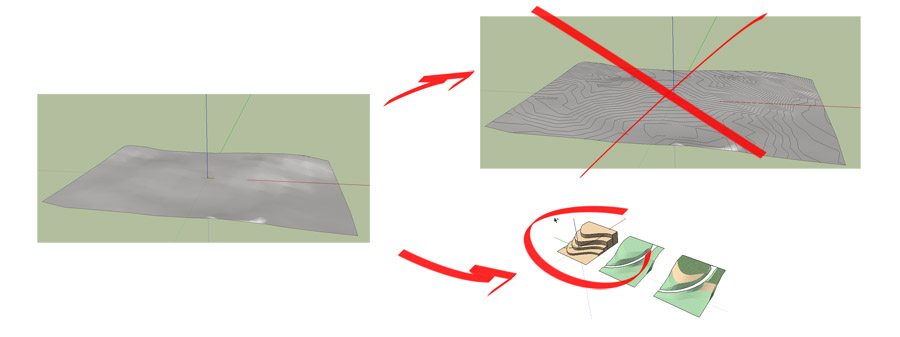
ok, for the first you have to excuse me for not finding the correct word for what im looking after. Because of that im gonna attach a picture that i hope can explain what im after.
I have a surface and i want to convert it to a "leveled" terrain - like the old school models made by hand.
I know that you can insert plans and so on to make the heightdifferent visible... but thats not what im looking for - i want the terrain to be like stairs...
-
After a few minutes of head scratching i got!!!
What you have to do is flatten the contours then create faces for them the use the push pull tool the bring them the the required height.
Its a long a boring process if you have loads of contours.
-
I would take the contour lines and Drape them onto a flat surface of the same width. Then run Make Faces plugin and as Toby said, manually lift each section to height.
-
aks a ruby script request
existing Colors by Slope, Z by colors, it's just the inverse
(better if you have yet a color plane level! ) -
Not sure, but this might help you. I think that you may have to rotate your model before slicing, as a quick read is that it slices in the x, z plane.




Hello! It looks like you're interested in this conversation, but you don't have an account yet.
Getting fed up of having to scroll through the same posts each visit? When you register for an account, you'll always come back to exactly where you were before, and choose to be notified of new replies (either via email, or push notification). You'll also be able to save bookmarks and upvote posts to show your appreciation to other community members.
With your input, this post could be even better 💗
Register Login


Advertisement