A few more Layout observations
-
I wish we could control the dimension line distance from the object to the start of the line. In my opinion, it is too far away, and I would like to be able to make them touch and set that as the default behavior.
I need hatchings! And as part of the need to hatch, it would be great if I could hatch straight over the model, without tracing the lines first. For example, I draw my stud walls in SU and I place a line on the top of the wall for the sides of all the windows. This way, In top view in Layout, I have all the window information already represented. If Layout could treat all of these as the faces they are in SU and allow me to apply textures/colors to them with one click, like texturing in SU, then that would be awesome.
I wish I could move elements and then copy or fill in with copies like it works in SU. Pick a line, move it, and then either type 5x or /5, just like in SU would be very handy.
I wish I could lock individual things on the page, and not just have the Layers lockable. A right click and lock, just like in SU.
I wish that we could make text fields and Layout geometry into SU like components so one edit could change multiple fields. Let's say I have labeled a bunch of posts as 7x7 and then there is a field change to 6x6. Sure would be nice to only have to change one instead of all of them individually.
How about a few scrapbook tables, for things like window schedules, for example?
As my file gets bigger, I am experiencing lagging and hanging while zooming, or moving geometry, or editing text. A few seconds every so often starts to add up, especially when I have a fast as heck computer that almost never hangs on anything.
It seems like Layout forgets to snap to dimension strings if you stop in the middle of dimensioning and then return to it later.
That's all that come to mind at the moment. Thanks for listening.
-
@unknownuser said:
I wish we could control the dimension line distance from the object to the start of the line. In my opinion, it is too far away, and I would like to be able to make them touch and set that as the default behavior.
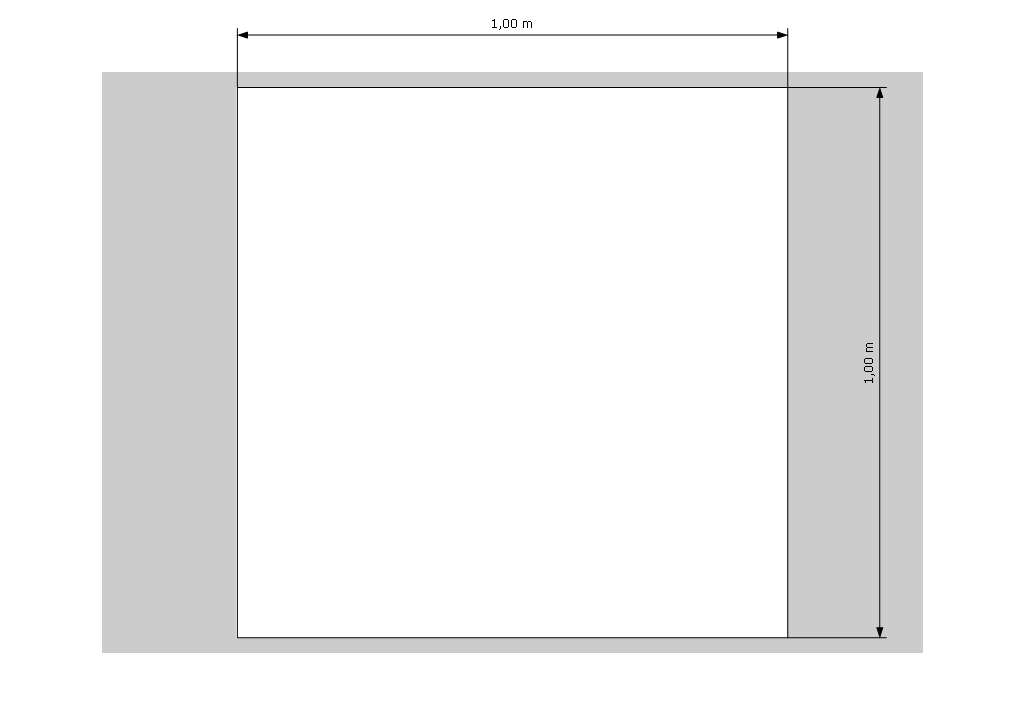
Something like this?
-
Yes, just like that. How do you set that as the dimension default?
To get that look, I have been placing the dimension and then using the move tool to stretch the legs until they contact the geometry.
Hopefully, I have just missed a setting somewhere.
-
That's how I did it, too. Then you just sample this "style"and can apply it to other dimensions, too. And throughout that session even newly added dimensions remain this way.
-
Not sure what you mean by sample the style and apply to other dimensions.
And nothing I have done has made a new dimension maintain this look.
Thanks
-
One-shot sample (see shortcuts) - select your dimension, type "s", sample another line / dimension / shape, and you pick up that style. After you sample, the defaults for the dimension tool should be set to your new style.
b
-
That is a pretty sweet function; thanks for clarifying.
What about hatchings? To my mind, that is the biggest difference between LO output and Autcad output. My foundation plan would be a lot less confusing if I could hatch the stem walls.
I know I could chase around the foundation making a polygon that i could lightly fill with grey, but that isn't the same thing at all.
-
Some people have created hatching using a SketchUp model with clipping mask in LayOut.
b
-
Thanks for that tip, Barry, but that is more of a work around than an efficient work flow solution, IMO.
I wish I could select a face, with LO, and apply a hatch pattern to it, especially nice if LO shipped with a library of hatches as well as a way to create our own, kind of like style builder.
-
When I "Move" the legs of a dimension, I lose the correct "scale". It gives the page scale instead of using the scale factor. If I undo the move, I get it back.
Don't you get that? -
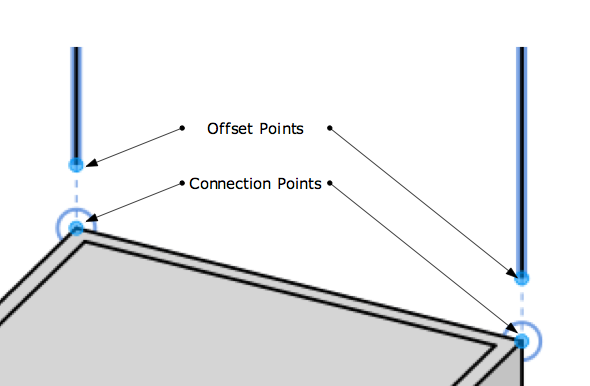
BTW - I e-mailed Susan and I think we got this straightened out. For everyone, Dimensions in LO 3 have an attachment point and an offset point. In LO 2.1, they only had an attachment point. This was a feature added from customer feedback about being able to control the distance between where the dimension was attached and where the line actually started. We had a hack in 2.1 where you could set an offset point size to do this, but it wasn't very elegant.
b
[img]pts[/img]
-
Barry, I apologize. I forgot that I had posted here and I really should have come back and shared the information you provided. Oversight. So sorry.
-
I totally agree with line dimension control. I have a lot of problems with that, even when I'm just creating a model. It does seems to long. The scrapbook schedule does seem like a good idea, but I think you can already do something like that? I think it's somewhere under View.
-
@unknownuser said:
That is a pretty sweet function; thanks for clarifying.
What about hatchings? To my mind, that is the biggest difference between LO output and Autcad output. My foundation plan would be a lot less confusing if I could hatch the stem walls.
I know I could chase around the foundation making a polygon that i could lightly fill with grey, but that isn't the same thing at all.
Mate another simple workaround for hatching.
- In layout create your own hatch pattern using the line tool,
- Export this page as PNG file so the background is alpha,
- Import this to your later LO docs or add to scrapbook and create clipping mask to mask out!
It would be a great addition IF layout could clip it's own objects ie: A clipping mask could clip an "in document" created hatch - not a perfect senario but pretty darn close!
-
Thanks for the great tip, Richard; it is much appreciated!
Hopefully, that makes things a bit easier, though a ton of hatching patterns installed with LO would be great, too.


Hello! It looks like you're interested in this conversation, but you don't have an account yet.
Getting fed up of having to scroll through the same posts each visit? When you register for an account, you'll always come back to exactly where you were before, and choose to be notified of new replies (either via email, or push notification). You'll also be able to save bookmarks and upvote posts to show your appreciation to other community members.
With your input, this post could be even better 💗
Register Login


Advertisement