sketchucation logo sketchucation
    • 登入
    Oops, your profile's looking a bit empty! To help us tailor your experience, please fill in key details like your SketchUp version, skill level, operating system, and more. Update and save your info on your profile page today!
    ⚠️ Important | Libfredo 15.6b introduces important bugfixes for Fredo's Extensions Update

    [code] Win32 Moving/Showing/Hiding Toolbars and Dialogs

    已排程 已置頂 已鎖定 已移動 Developers' Forum
    91 貼文 8 Posters 17.2k 瀏覽 8 Watching
    正在載入更多貼文
    • 從舊到新
    • 從新到舊
    • 最多點贊
    回覆
    • 在新貼文中回覆
    登入後回覆
    此主題已被刪除。只有擁有主題管理權限的使用者可以查看。
    • thomthomT 離線
      thomthom
      最後由 編輯

      I do have an experimental hack to catch all menus, commands and toolbar items that's created. I hope to tind time soon to put together a basic version of a plugin that let you quickly search and filter out available commands.

      Thomas Thomassen — SketchUp Monkey & Coding addict
      List of my plugins and link to the CookieWare fund

      1 條回覆 最後回覆 回覆 引用 0
      • Dan RathbunD 離線
        Dan Rathbun
        最後由 編輯

        @thomthom said:

        @honoluludesktop said:

        but will the result permit toolbars to unfold perpendicular to the edge of a sketchup window like the menus do?

        You mean toolbars where you click on a button and it displays a dropdown list of more buttons?

        These are called "Flyout Toolbars" and have been a part of the AutoCAD GUI since at least R13 (circa 1994) and perhaps even R12 in Win16 mode.

        This is one of the things on my to do list for Win32 Sketchup.

        I'm not here much anymore.

        1 條回覆 最後回覆 回覆 引用 0
        • thomthomT 離線
          thomthom
          最後由 編輯

          @thomthom said:

          Just came across a nice API call that will be useful for creating webdialog toolbars:
          http://social.msdn.microsoft.com/forums/en/csharpgeneral/thread/e7fef568-2c0b-41eb-9785-304f84d03819/#bf79c87e-ef49-456f-a485-aa767d841d20

          One can use WS_EX_NOACTIVATE to prevent a window from catching focus - but from what I understand it'll still allow interaction events. I'll try it out as soon as I get home.

          Just had a go at this. I could not get a webdialog to not get any focus when I set WS_EX_NOACTIVATE - but I could make a Notepad window to change. I don't understand why.
          When I check the EX_STYLES of the webdialog the WS_EX_NOACTIVATE bits appear to be set.

          ❓ ❓

          Thomas Thomassen — SketchUp Monkey & Coding addict
          List of my plugins and link to the CookieWare fund

          1 條回覆 最後回覆 回覆 引用 0
          • Dan RathbunD 離線
            Dan Rathbun
            最後由 編輯

            WebDialogs are child windows of the SU app window.

            The Notepad window is a toplevel window.

            I'm not here much anymore.

            1 條回覆 最後回覆 回覆 引用 0
            • thomthomT 離線
              thomthom
              最後由 編輯

              Does that matter?
              Floating toolbars are also child of the SU window...

              Thomas Thomassen — SketchUp Monkey & Coding addict
              List of my plugins and link to the CookieWare fund

              1 條回覆 最後回覆 回覆 引用 0
              • thomthomT 離線
                thomthom
                最後由 編輯

                Sidenote: Win32 - Get SketchUp Window Handle

                Thomas Thomassen — SketchUp Monkey & Coding addict
                List of my plugins and link to the CookieWare fund

                1 條回覆 最後回覆 回覆 引用 0
                • Dan RathbunD 離線
                  Dan Rathbun
                  最後由 編輯

                  @thomthom said:

                  Does that matter?

                  Well.. you you didnt understand why...
                  I propose the flag acts differently for child windows versus toplevel windows.

                  .. it's the only difference I can see at first glance.

                  I'm not here much anymore.

                  1 條回覆 最後回覆 回覆 引用 0
                  • thomthomT 離線
                    thomthom
                    最後由 編輯

                    Yea, I was looking at that myself, but when comparing to the floating toolbars I could not see any significant difference. But I'm not that familiar with Win32 API.

                    Thomas Thomassen — SketchUp Monkey & Coding addict
                    List of my plugins and link to the CookieWare fund

                    1 條回覆 最後回覆 回覆 引用 0
                    • D 離線
                      driven
                      最後由 編輯

                      @thomthom said:

                      One can use WS_EX_NOACTIVATE to prevent a window from catching focus - but from what I understand it'll still allow interaction events. I'll try it out as soon as I get home.

                      hi Thomas,

                      been trying to make a 'nice' Mac toolbar in a WebDialog, and discovered that if you hold down the cmd key (i.e. before clicking the tool icon) you don't move focus and the tool (and cursor image) is there immediately on mouse-out.
                      This is one click LESS than on a standard mac SU toolbar icons as I don't have to click back into the model space to activate the cursor.... (command clicking SU toolbar icons does the same thing, as well)
                      so, question is, do you have a snippet that will send a cmd_key_down on mouse-over of the WD?

                      john

                      learn from the mistakes of others, you may not live long enough to make them all yourself...

                      1 條回覆 最後回覆 回覆 引用 0
                      • thomthomT 離線
                        thomthom
                        最後由 編輯

                        @driven said:

                        been trying to make a 'nice' Mac toolbar in a WebDialog, and discovered that if you hold down the cmd key (i.e. before clicking the tool icon) you don't move focus and the tool (and cursor image) is there immediately on mouse-out.
                        This is one click LESS than on a standard mac SU toolbar icons as I don't have to click back into the model space to activate the cursor....

                        Are you saying that clicking a native toolbar button in SU steals focus from the main window? (I need to unpack my Mac from my moving-boxes to have a look at this.)

                        @driven said:

                        so, question is, do you have a snippet that will send a cmd_key_down on mouse-over of the WD?

                        I've never developed for OSX - so this is unknown territory for me. But will you even be able to receive mouse events if the window haven't got focus?

                        Thomas Thomassen — SketchUp Monkey & Coding addict
                        List of my plugins and link to the CookieWare fund

                        1 條回覆 最後回覆 回覆 引用 0
                        • D 離線
                          driven
                          最後由 編輯

                          @thomthom said:

                          @driven said:

                          Are you saying that clicking a native toolbar button in SU steals focus from the main window? (I need to unpack my Mac from my moving-boxes to have a look at this.)

                          NO, sorry, I just rechecked, I've got 'standard' icons in WebDialogs that I'm doing tests with, they behave the same as 'ruby' icons in the same WD...

                          standard toolbars DO NOT highlight the box or such, and DO an instant tool-change,

                          unlike

                          the standard WD which requires
                          1st click on dialog to highlight/focus box
                          2nd click on icon to select manipulation tools or send action direct (undo, redo, etc...)
                          3rd click on drawing space to reveal cursor (and select first point) if manipulation tool

                          unless
                          you hold down the cmd key before clicking....

                          the WebDialog then behalves the same as 'standard' toolbar, and you can also change tabs, access drop-down menus, select tools etc... all without drawing focus away from drawing window... but you have to hold the cmd key the whole time...

                          if the web dialog sent a function call to hold the cmd key down on mouse-over, then you'd have a useful tool window...

                          hope that clarifies what I'm asking/saying/thinking.....

                          clear as mud

                          john

                          learn from the mistakes of others, you may not live long enough to make them all yourself...

                          1 條回覆 最後回覆 回覆 引用 0
                          • thomthomT 離線
                            thomthom
                            最後由 編輯

                            Understood.

                            This OSX behaviour of dealing with windows is causing my little greys to twitch in pain - my BezierSurface plugin was suppose to use WebDialog toolbars and windows extensively. Now I need to find a way to handle this or scrap the UI (which I've written a great part of the framework of already and find a new solution.)

                            I've been searching for ways to manipulate windows under OSX like one can do under Windows with the Win32 API - but I never find anything. 😞

                            Thomas Thomassen — SketchUp Monkey & Coding addict
                            List of my plugins and link to the CookieWare fund

                            1 條回覆 最後回覆 回覆 引用 0
                            • D 離線
                              driven
                              最後由 編輯

                              @thomthom said:

                              I've been searching for ways to manipulate windows under OSX like one can do under Windows with the Win32 API - but I never find anything. 😞

                              Thom,

                              I just did a scan of the different windows used in SU, what features do you want enabled/disabled in your WebDialogs?

                              I'm having a look at UI.Browser.app to see if I can use that to tweak SU windows...

                              john
                              UI reports

                              learn from the mistakes of others, you may not live long enough to make them all yourself...

                              1 條回覆 最後回覆 回覆 引用 0
                              • thomthomT 離線
                                thomthom
                                最後由 編輯

                                @driven said:

                                I just did a scan of the different windows used in SU, what features do you want enabled/disabled in your WebDialogs?

                                What I would like to be able to do is:

                                1. Change the window frame style to toolwindow
                                2. Allow the user to only click once to activate the UI elements in the webdialog (as oppose to click to give focus, click again to activate UI element)
                                3. Be able to activate by click the UI elements in the webdialog without taking focus from the SU window.

                                Thomas Thomassen — SketchUp Monkey & Coding addict
                                List of my plugins and link to the CookieWare fund

                                1 條回覆 最後回覆 回覆 引用 0
                                • thomthomT 離線
                                  thomthom
                                  最後由 編輯

                                  @driven said:

                                  [attachment=0:4644llpu]<!-- ia0 -->reports_Mac_SU_UI-Elements.zip<!-- ia0 -->[/attachment:4644llpu]

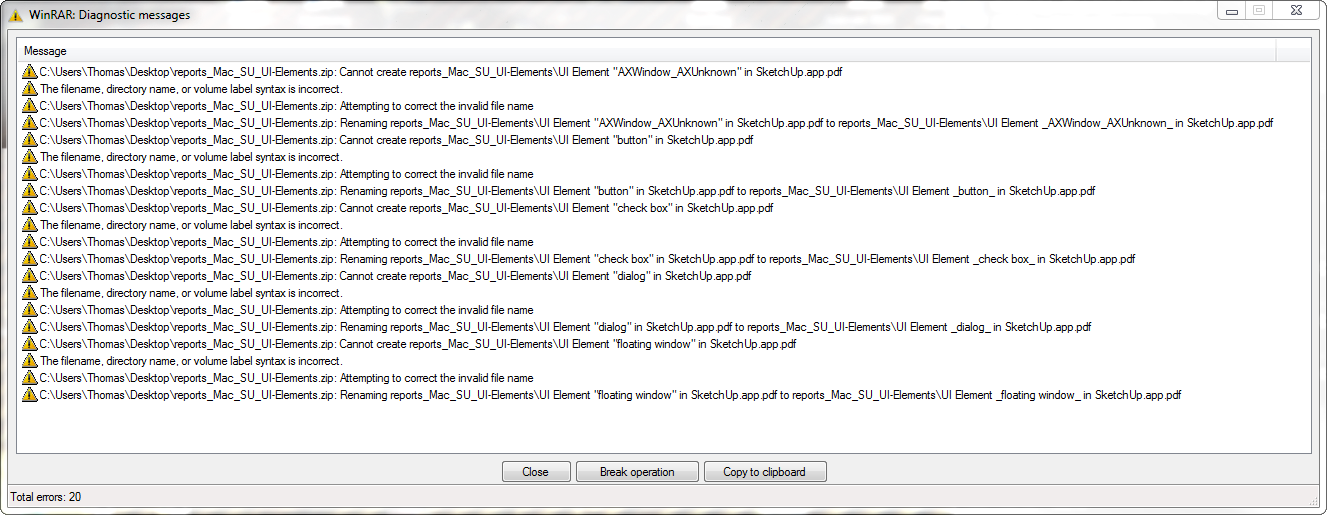
                                  I get errors when I try to unzip that file. Both Windows and WinRar reports errors.

                                  Thomas Thomassen — SketchUp Monkey & Coding addict
                                  List of my plugins and link to the CookieWare fund

                                  1 條回覆 最後回覆 回覆 引用 0
                                  • D 離線
                                    driven
                                    最後由 編輯

                                    @thomthom said:

                                    1 Change the window frame style to toolwindow]

                                    you can see in the reports that there's more than one version of 'toolwindow'

                                    @thomthom said:

                                    2 Allow the user to only click once to activate the UI elements in the webdialog (as oppose to click to give focus, click again to activate UI element)

                                    some of the native toolwindows require this, sometimes??? model info for example

                                    @thomthom said:

                                    3 Be able to activate by click the UI elements in the webdialog without taking focus from the SU window.

                                    Can be achieved on all by holding down cmd key, so I'm looking for adding an applescript to do that on hover/mouseover

                                    try this zip...stuffit or I'll pm a link

                                    john

                                    learn from the mistakes of others, you may not live long enough to make them all yourself...

                                    1 條回覆 最後回覆 回覆 引用 0
                                    • thomthomT 離線
                                      thomthom
                                      最後由 編輯

                                      I still get errors.
                                      ExtractErrors.png

                                      Thomas Thomassen — SketchUp Monkey & Coding addict
                                      List of my plugins and link to the CookieWare fund

                                      1 條回覆 最後回覆 回覆 引用 0
                                      • thomthomT 離線
                                        thomthom
                                        最後由 編輯

                                        I think the files extracted after all, despite the errors.

                                        Thomas Thomassen — SketchUp Monkey & Coding addict
                                        List of my plugins and link to the CookieWare fund

                                        1 條回覆 最後回覆 回覆 引用 0
                                        • D 離線
                                          driven
                                          最後由 編輯

                                          @thomthom said:

                                          I think the files extracted after all, despite the errors.

                                          so you have them? do they make sense...

                                          I did some more and now I'm trying to work out if I can make changes...

                                          I've got apple script launching things from inside SU so now I need to see if it can modify window element attributes or something...

                                          learn from the mistakes of others, you may not live long enough to make them all yourself...

                                          1 條回覆 最後回覆 回覆 引用 0
                                          • thomthomT 離線
                                            thomthom
                                            最後由 編輯

                                            I'm not entirely sure I know what I'm looking at. Where does this data come from?

                                            Thomas Thomassen — SketchUp Monkey & Coding addict
                                            List of my plugins and link to the CookieWare fund

                                            1 條回覆 最後回覆 回覆 引用 0
                                            • 1
                                            • 2
                                            • 3
                                            • 4
                                            • 5
                                            • 1 / 5
                                            • 第一個貼文
                                              最後的貼文
                                            Buy SketchPlus
                                            Buy SUbD
                                            Buy WrapR
                                            Buy eBook
                                            Buy Modelur
                                            Buy Vertex Tools
                                            Buy SketchCuisine
                                            Buy FormFonts

                                            Advertisement