Materials vs. Entities in model (screenshot)
-
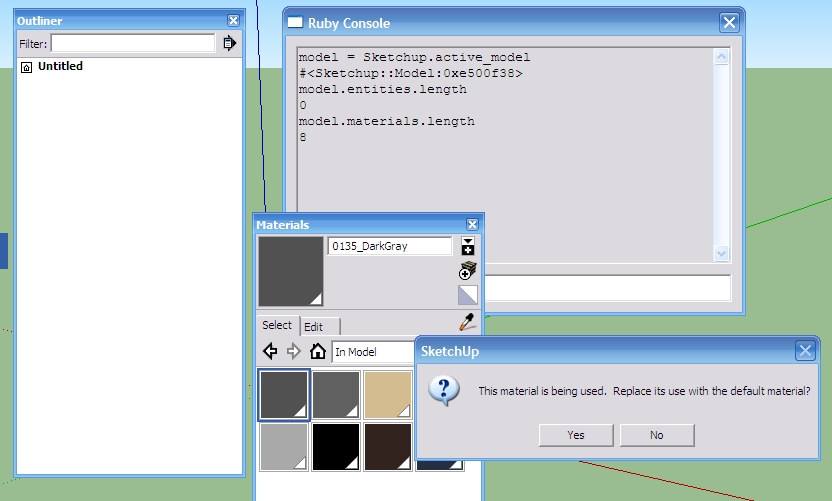
Can someone explain this screenshot to me? I tried to delete one of those 8 Materials. Where are these materials being used? I even killed Susan...
So how do I get a list of all Materials on existing Entities? Must I loop through model.entities?
-
You deleted her but never 'purged' the scene, Purging will remove materials.
-
@solo said:
You deleted her but never 'purged' the scene, Purging will remove materials.
+1
Open your component Browser and look at the "in model" tab. It will show that there is still at least 1 component in the model. It is not being drawn anywhere in the model, but it still has a component definition saved in the model, so the model still considers the colors as being used.
Chris
-
Note:
model.materials.lengthalso include materials which Image element uses.Say you have 2 materials listed in SU's material browser:
Material1
Material2
And you also have one Image element in the model.Then
model.materials.lengthwill report3.Even more:
Sketchup.active_model.materials.each { |m| puts m.display_name } Material1 Material2Notice it only lists the two material visible in the material editor.
This on the other hand:
(0...Sketchup.active_model.materials.length).each { |i| puts Sketchup.active_model.materials[i].display_name } Material1 Material2 Image1Now you get full access to all the material - even the ones that belong to Image elements.
Be careful! I've had models where image materials has been applied to other geometry - which has lead to problems as you can't select or interact with the material in the Material Browser. So in most cases you want to iterate using.each.To get a count of just the materials available in the material browser:
m_count = 0 Sketchup.active_model.materials.each { m_count += 1 } -
Cool... except that I purged and there is still one material left - "0135_DarkGray". What's up now?
-
@draftomatic said:
Cool... except that I purged and there is still one material left - "0135_DarkGray". What's up now?
You have it selected. The currently active material will not be purged. Select the default material before you purge.
-
@thomthom said:
You have it selected. The currently active material will not be purged. Select the default material before you purge.
I see... is there a way to find/change the currently active material thru Ruby?
-
Sketchup.active_model.materials.current = nil -
material.currentis not in the API docs. Do we have that in the thread of things for Scott to fix? -
Sorry, it's
model.materials.current -
 Sorry, I could have checked that....
 -
@chris fullmer said:
material.currentis not in the API docs. Do we have that in the thread of things for Scott to fix?Is that being checked by Scott still?
I'm a bit confused if we're supposed to comment in the API docs... -
There is a reported difference between
materials.currenton PC and MAC.
On a PC it's the currently selected material
On a MAC it's the last used material and this ignores what might now be selected IF it's never been used...




Hello! It looks like you're interested in this conversation, but you don't have an account yet.
Getting fed up of having to scroll through the same posts each visit? When you register for an account, you'll always come back to exactly where you were before, and choose to be notified of new replies (either via email, or push notification). You'll also be able to save bookmarks and upvote posts to show your appreciation to other community members.
With your input, this post could be even better 💗
Register Login


Advertisement