The new Render[In] plugin
-
I've got some details on pricing. Stephene Desmuile has advise the following,
**Hi all SketchUp users !!
We understand that the selling price is an important criteria for your choice.
But the Render[in] price is not defined yet...
but we can give you an indication... it will not exceed $200**Seems reasonable enough to me!
Mike
-
Ivanscotti, those are excellent images for sales brochures from my point of view. Building companies are often not too worried about absolute realism, but rather about making things look attractive, dreamy, Utopian.
-
@ecuadorian said:
Ivanscotti, those are excellent images for sales brochures from my point of view. Building companies are often not too worried about absolute realism, but rather about making things look attractive, dreamy, Utopian.
You're right, these images were actually designed with exactly this purpose.
However I think we can achieve much better results about realism even than this, with this engine.
Keep in mind that these are only the first testing and that this is a beta version, with many small problems to solve.
-
Render[In] has released a new Beta today with improvements asked for in the forum.
@unknownuser said:
Release summary:
Get view size - Now you can automatically get the SketchUp Window size in the Render[in] parameters.
Stop Rendering - You can now stop the rendering anytime.
Smoothing geometry - No more problems with smoothing!
QuickTime - We need QuickTime for several reasons with Render[in]; now we check at startup that QuickTime is installed.
Create light - The issues concerning complex geometry creating light have been corrected.
Memory leaks - We have corrected some memory leaks, we keep checking.Regards, Ross
-
does anyone else have problems getting it installed or to work properly?
i have installed it and i have Quiktime, but when i open Sketchup i dont get the request for a serial number, all that appears is a little box saying Could Not Load "Plugins\Renderin\Renderin.dll".
any input?
-
New Beta better.
Faster and pretty much per ATL render quality.
Slick presets and just enough to do a Q&D output.
Works OK with SU 8 Pro.
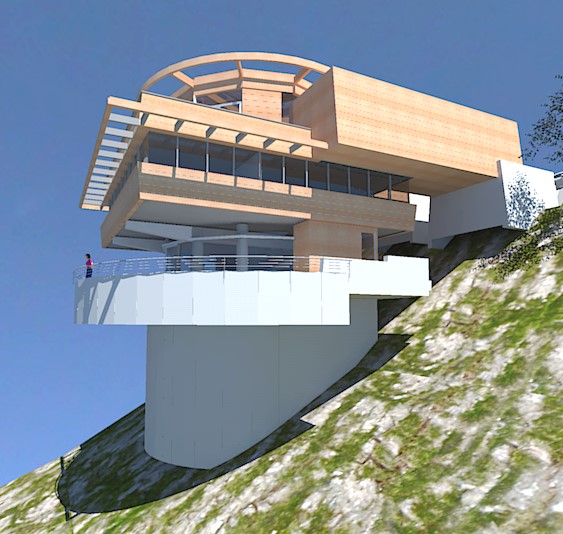
Typ radiosity output and a little flat and plastic IMO.While a fine artist like Ross will always get the best out of an app for my eye the KT engine (Twilight too) still wins for exterior renders.
Faster too (photon map + AA)
A couple of renders of a project model that i use to compare outputs.Just for info.
dtr
![RENDER[I]](/uploads/imported_attachments/0cPw_RENDERINTESTRI.jpg "RENDER[I]")
-
I have installed this and when I launch it I get this error
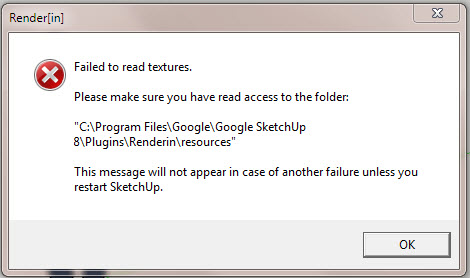
It does not stop Render[in] working but I'm sure it will cause me issues.
I posted the problem on their forum, but so far no response.
Has anyone else experienced this - or know how to resolve it.
-
Do what it says... find the 'Renderin' folder inside Plugins and change its 'properties' - access rights, so you can read/write it, and its contents and sub-folders etc...
-
Thanks Tig.
I had already checked the permissions for the Renderin folder and sub-folders, and checked again after your response - they all have at least read/write permissions for all users - hence my confusion.
-
Do you have any 'textures' in that folder ?
Perhaps the error is occurring because it's finding 'none' ?? -
Yes - render[in] installed various files in the directory including the icons for the gui (which show in SU) and a couple of textures.




Advertisement