sketchucation logo sketchucation
    • Login
    Oops, your profile's looking a bit empty! To help us tailor your experience, please fill in key details like your SketchUp version, skill level, operating system, and more. Update and save your info on your profile page today!
    Mac User? | Join the Rayscaper Beta for Mac Learn More

    [Plugin] Raytracer

    Scheduled Pinned Locked Moved Plugins
    60 Posts 18 Posters 69.3k Views 18 Watching
    Loading More Posts
    • Oldest to Newest
    • Newest to Oldest
    • Most Votes
    Reply
    • Reply as topic
    Log in to reply
    This topic has been deleted. Only users with topic management privileges can see it.
    • BoxB
      Box
      last edited by

      I used the plugin "Throw to".


      Throw.JPG


      Throw toSU8.skp

      1 Reply Last reply
      Reply Quote 0
      • A
        AcesHigh
        last edited by

        Thank you Box. Any slight idea why Raytracer, Drop At Intersection, etc, are not working?

        1 Reply Last reply
        Reply Quote 0
        • BoxB
          Box
          last edited by

          Sorry, I don't know the ins and outs of either plugin. Which is why I went for throw to. I can look tomorrow if nobody else does.

          1 Reply Last reply
          Reply Quote 0
          • tt_suT
            tt_su
            last edited by

            It appear to be because the ray traced hit the component it tried to drop. Apparently I forgot to make it ignore itself. If I moved the axis to the bottom of the component it worked fine.

            1 Reply Last reply
            Reply Quote 0
            • tt_suT
              tt_su
              last edited by

              Filed issue: https://bitbucket.org/thomthom/raytracer/issue/1/ignore-the-components-being-dropped

              1 Reply Last reply
              Reply Quote 0
              • A
                AcesHigh
                last edited by

                I see. Thanks ThomThom, for looking at the issue.

                1 Reply Last reply
                Reply Quote 0
                • M
                  mlefevre
                  last edited by

                  @tt_su said:

                  No idea without test screenshots or preferable a test model.

                  I can send you a screenshot, but basically I'm having the same issue as one of the prior post with the car crashes.

                  1 Reply Last reply
                  Reply Quote 0
                  • tt_suT
                    tt_su
                    last edited by

                    @mlefevre said:

                    I can send you a screenshot, but basically I'm having the same issue as one of the prior post with the car crashes.

                    SketchUp crashes?
                    What version of SketchUp are you using (full exact version please) and what OS?
                    Got a sample model and step by step description of what you do to reproduce it?

                    1 Reply Last reply
                    Reply Quote 0
                    • D
                      DCorral
                      last edited by

                      I'm new on sketchup and seem to not understand this plugin. I did a toposurface and modeled all the constructions on a big area. Now im trying to drop the components (i'm guessing it's going to be a lot of work but I'm fine with that) and I can't seem to be able to drop them into the terrain... They keep floating.. want to try raytracing but i dont understand that function.

                      Could you help me? Thanks a lot.

                      1 Reply Last reply
                      Reply Quote 0
                      • P
                        Panga
                        last edited by

                        DCorral,

                        One thing you have to verify is the position of your axes inside the component. The origin of axes must be at the bottom of the geometry in order that the drop works.

                        Hope it helps.

                        Regards.

                        1 Reply Last reply
                        Reply Quote 0
                        • pilouP
                          pilou
                          last edited by

                          Always cool! 😄

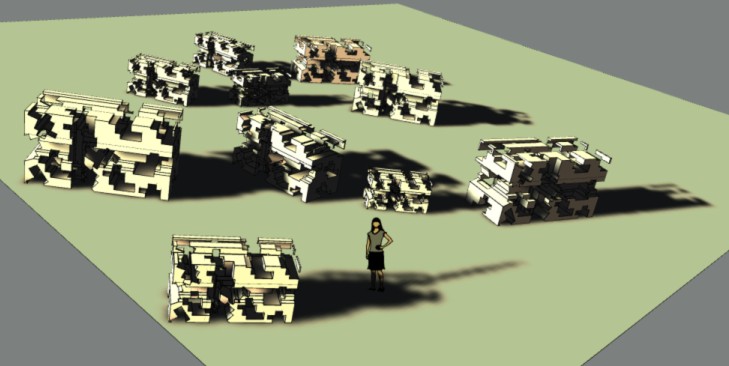
                          drop.jpg

                          Frenchy Pilou
                          Is beautiful that please without concept!
                          My Little site :)

                          1 Reply Last reply
                          Reply Quote 0
                          • E
                            eph
                            last edited by

                            Hey Thomthom,
                            Spraycan crashes my SU every time I use it.. 😐
                            I'm on OS X 10.9.5, latest SU 2014.

                            Really easy to reproduce: open a new SKP (I work in mm or cm), draw a rectangle on the ground plane, select the default component ("Sophie") and spray her on the surface (radius 250 cm). Crashes every time... Of course it also happens in more complicated models.

                            Could you please check / fix?
                            Thanks in advance!!

                            1 Reply Last reply
                            Reply Quote 0
                            • tt_suT
                              tt_su
                              last edited by

                              Hm..
                              Did you submit the BugSplats?
                              If you did, did you enter any info in the description or name that I can use to look it up? If you didn't, can you submit one and add some info I can use to look it up in the database?

                              1 Reply Last reply
                              Reply Quote 0
                              • E
                                eph
                                last edited by

                                @tt_su said:

                                Hm..
                                Did you submit the BugSplats?
                                If you did, did you enter any info in the description or name that I can use to look it up? If you didn't, can you submit one and add some info I can use to look it up in the database?

                                Hey Thomthom, just did. Mentionned Raytracer in the description, filed under the name "eph".
                                Thanks for the quick reaction 😄

                                1 Reply Last reply
                                Reply Quote 0
                                • tt_suT
                                  tt_su
                                  last edited by

                                  Found it! I'll inspect. Thanks.

                                  1 Reply Last reply
                                  Reply Quote 0
                                  • tt_suT
                                    tt_su
                                    last edited by

                                    By the way, what version of Raytracer and TT_Lib do you have installed? (Can you verify with full version numbers reported under Preferences > Extensions please?)

                                    1 Reply Last reply
                                    Reply Quote 0
                                    • E
                                      eph
                                      last edited by

                                      Up to date on the Sketchucation Plugin Store:
                                      TTLib2 v2.9.13, Raytracer v1.3.0.

                                      1 Reply Last reply
                                      Reply Quote 0
                                      • tt_suT
                                        tt_su
                                        last edited by

                                        @duanekemp said:

                                        Is there a possibility that Drop Components by Bounds may not be working in SU2015?

                                        It's working. If you have problems, please post a sample model.

                                        1 Reply Last reply
                                        Reply Quote 0
                                        • duanekempD
                                          duanekemp
                                          last edited by

                                          Is there a possibility that Drop Components by Bounds may not be working in SU2015?

                                          Duane Kemp

                                          Kemp Productions
                                          Puidoux, Switzerland
                                          Gallery:
                                          https://duanekemp.artstation.com/

                                          1 Reply Last reply
                                          Reply Quote 0
                                          • duanekempD
                                            duanekemp
                                            last edited by

                                            ok... I discovered my issue with the Drop Components by Bounds . The proxies I was dropping were overlapping. By editing the proxy to a small square (since discovering that a single line won't smart drop), all proxies dropped in the vertical and correctly against the face's plane. Once dropped, edit the proxy again to it's original size... and voila... it worked. Took some time to get to this point... but... now, the work around for grass group proxies worked.

                                            I love this (even though it takes a step or two for overlapping groups) for dropping a single object where it needs to be. Car dropping is with ease as well as other non overlapping instances.

                                            Congratulations and THANK YOU!

                                            Thomas, You rock!

                                            Duane Kemp

                                            Kemp Productions
                                            Puidoux, Switzerland
                                            Gallery:
                                            https://duanekemp.artstation.com/

                                            1 Reply Last reply
                                            Reply Quote 0

                                            Hello! It looks like you're interested in this conversation, but you don't have an account yet.

                                            Getting fed up of having to scroll through the same posts each visit? When you register for an account, you'll always come back to exactly where you were before, and choose to be notified of new replies (either via email, or push notification). You'll also be able to save bookmarks and upvote posts to show your appreciation to other community members.

                                            With your input, this post could be even better 💗

                                            Register Login
                                            • 1
                                            • 2
                                            • 3
                                            • 2 / 3
                                            • First post
                                              Last post
                                            Buy SketchPlus
                                            Buy SUbD
                                            Buy WrapR
                                            Buy eBook
                                            Buy Modelur
                                            Buy Vertex Tools
                                            Buy SketchCuisine
                                            Buy FormFonts

                                            Advertisement