[Plugin] Component Comparison
-
Experimental Alpha Version
Use with own risk - backup/save before using!This plugin is in very early experimental development. Lots of debug menus.
Overview
Compares components for geometric similarities - replaces the instances of similar definitions to use the same definition.Access
Plugins -> Similar ObjectsUsage
Select nothing to compare all definitions.Select a bunch of instances to compare only their definitions against the rest.
Caveats
Comparison is currently strictly geometric - material and layer comparison is currently not done. (Event face direction or position is not compared.)With my test models (one attached) objects that appeared similar where not within SU's tolerance of 0.001 inch. I added a debug menu to adjust it. In the attached test model I had to set the tolerance to 0.002 to be able to make it replace all.
I would appreciate it someone with better know-how of float point tolerances could comment on the code. If there are places where I can reduce precision loss in my code. (it might be that the geometry from Revit simply has too much deviance - but I'm not sure.)
NOTE: In the test model, the third window from the top left looks similar to some of the others, but it doesn't have the same number of faces. So this window should be ignored. It simply IS different.
NOTE:
Inspect Comparison (Debug)will colour some of the edges of the definitions you inspect.Todo
- Recursive comparison of sub-instances
- Support mirrored objects
- Support groups - Done!
- Option to compare face normals - Done!
- Option to compare entity visibility
- Option to compare layers - Done!
- Option to compare materials - Done!
- Option to compare UV mapping

SketchUp Plugins | PluginStore | SketchUcation
SketchUp Plugin and Extension Store by SketchUcation provides free downloads of hundreds of SketchUp extensions and plugins
(sketchucation.com)
Footprint
<Sketchup>/Plugins/
+-
tt_cc.rb
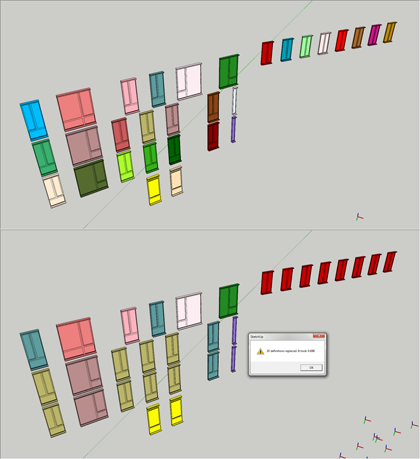
-
brilliant, Thomthom!
I will try it out as soon as possible. have been waiting for a long time for this.
eventually an option to even take the scaling of components into account would be perfect.
and the next step might even enable group comparisson... -
alright, I got to playing with the plugin for a bit. first of all, let me say that it worked brilliantly, never making a wrong decision (admittedly on rather simple test components with no more than a few dozen edges). I was also impressed with it's speed. even the comparisson of a selection of almost 4.000 copies of 6 equal but unique components took less than a third of a second.
I found out some odd behaviors though...
Once there are nested components in a model, there are two bugs I repeatedly encounter:
When nothing is selected (therefore the plugin is supposed to inspect all entities) the plugin only changes the components within other components (nested ones). Single components are being ignored.
If you do select them however, components will be replaced, no matter if they are single entities or nested within other components (even in 2nd or 3rd level). Note however, that it is always only the innermost components that are being inspected.The report message, stating how many definitions have been replaced and how long that took, isn’t showing up.
As soon as I delete the nested components, single components are being changed again, as expected, even while not being selected. Also does the report message show up again.I also observed, that components, containing other grouped objects (whether groups or components), will not be changed, even if the objects they contain are equal. This might be a goal for future versions of this plugin, don't you think?

all in all, Thomthom, this is a great start for a plugin that many people (especially those who import objects, e.g. trees) have been waiting for - one that will enable us to save huge ammounts of time and produce far cleaner models. well done, mate!
-
Ah, yea - I've not tested nested groups. And after posting the plugin I'd already found some bugs in the way it iterated the selection.
It does not matter so much how many instance you have, it's the definitions that are processed. So if your 4000 copies where unique I'd spend some time processing.
-
@plot-paris said:
it worked brilliantly, never making a wrong decision (admittedly on rather simple test components with no more than a few dozen edges).
Actually, the fewer the faces and edges, the harder it can be to determine if a component is similar or not! Its easy to determine if two very detailed components - maybe like high poly faces - are different than each other. But it can be VERY tricky to determine if two boxes are supposed to be the same root component or not.
So its encouraging to hear it worked on fairly simple components in my mind!
Way cool Thom!
Chris
-
The posted version will be confused by two boxes with the same dimmension, but where one lack a face. The one I got now compares these - so even that isn't any problem.
What I do seem to have problems with is face normals - checking if the normals are facing the same direction. I think I'm running into some precision problems... -
well, great news. i imported an xfrog 3ds young birch tree and after quite some time spent converting raw geometry to components, i have made every leaf the same component. your plugin worked extremely fast despite there being about 8000 leaf component instances. for whatever reason, it missed several hundred unique leaf comps, but identifying them in outliner and running the comp comparison in two smaller batches resolved the issue.
i was also unable to run the comparison on leaf components nested in the 'sub-groups' that are default with xfrog trees. exploding the groups and using free comps, worked as expected though.
tried to convert branch and root components to the same, but no luck. the branches appear visually to have the same structure, but even with a tolerance of 500" no luck. they are quite complex meshes as you know.
pre-comparison SKP file was 102Mb. post-comparison SKP file is 45.7Mb, 8048 comp instances, 11 comp definitions. amazing!
THANK YOU, thomthom.
-
@autarchos said:
for whatever reason, it missed several hundred unique leaf comps, but identifying them in outliner and running the comp comparison in two smaller batches resolved the issue.
That reason is me. A bug.
well, at least this related to one of the bugs I found. -
A small update - 0.2.0a.
It still doesn't handle sub-groups/components. Coming soon. -
great great plugin
questions...
i work with xfrog trees, when i insert the tree in sketchup an i explode it, the leaves are individual faces, but not groups or components.
its posible to use your plugin in this case, how???
thanks an sorry for my english
greetings from spain -
You manage to explode X-Frog trees??
When I try that SU sit sinks into a bog of eternal unresponsiveness and I never had the patience to wait for it to complete.You would need each leaf to be a group or component. Chris got a plugin that groups loose geometry: http://forums.sketchucation.com/viewtopic.php?t=16154
However, when I tried that on a X-Frog tree it took ages - and again I could not bother to wait for it to complete. You might have more luck than I though. -
thanks for your link
you can reduce the xfrog tree all you want with a very good definition. you can do this by two ways:
-reducing in 3dsmax by the option Modifiers Multires after selects all geometry
-and you can open the xfrog 3.5 and CHANGE the tree (not crunch) reducing the trunk scale, the number of branches, crockedness, growth scale, etc..
its simple and when you imports in sketchup explodes very well (10 minutes). the very best xfrog have finally in sketchup less than 20 mb. -
@guaucorreo said:
-and you can open the xfrog 3.5 and CHANGE the tree (not crunch) reducing the trunk scale, the number of branches, crockedness, growth scale, etc..
Oh - So not using the detail slider? (I've just tried that, and it eventual makes the trunk flat)
You got some screens of how you managed to process your X-Frog trees? And some stats? -
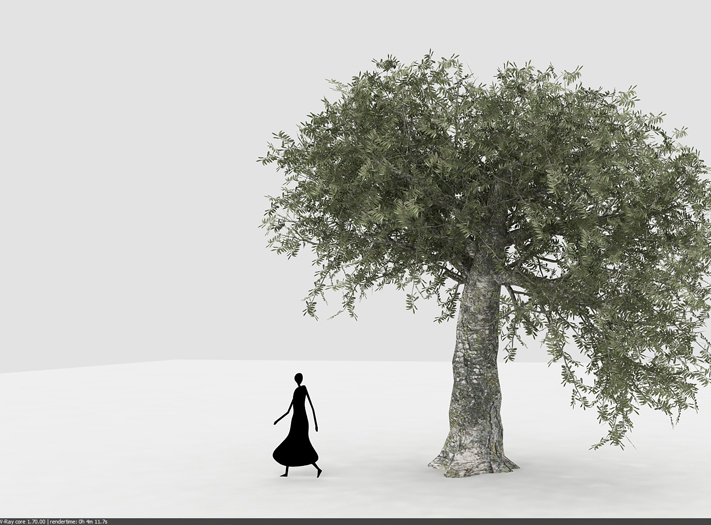
its an example, the olive of the mediterranean with a lot of modifications
-
I don't see any image.
-
you can use the detail slider a bit, but be carefoul with the third branches
(and of course in xfrog 3.5 you can reduce the section of this objetcs, trunks, branches, (a circle of 12 lines you can reduce manually to 6,etcc)
-
I really need to have a proper look at the X-Frog app. Got any good resource links?
Maybe we could start a X-Frog thread to collect tips and tricks for X-Frog in SU? -
the manual XFROG REFERENCE of the xfrog 3.5 explain in detail all the process to modify a tree
i am going to work with the link you bring me to make all the leaves individual groups and then apply your plugin similar objects.
this saturday i ve got a lot of workthanksss
pedro barrera from valencia, spain -
I'm not sure if CC will work on the X-Frog trees, since I've not gotten around to test it. (I'm not sure if the leafs are identical geometry...)
And remember that it doesn't deal with sub-groups/components yet. -
the leaves are identical geometry - just a simple rectangle. at least with the models i have. i converted the leaves of a young birch to identical components with matt666's component/groups plugin: http://forums.sketchucation.com/viewtopic.php?t=17590
it is quite slow, the plugin and the process - took me several hours: select 200-300 leaves at a time, select faces only with thomthom's selection tools, use matt666's plug to convert entities to components, and then run component comp to make them all the same. don't explode the leaf groups until you've converted them all to components, then it takes only seconds.





Advertisement