sketchucation logo sketchucation
    • 登入
    Oops, your profile's looking a bit empty! To help us tailor your experience, please fill in key details like your SketchUp version, skill level, operating system, and more. Update and save your info on your profile page today!
    🔌 Smart Spline | Fluid way to handle splines for furniture design and complex structures. Download

    Revit to SketchUp [Rant]

    已排程 已置頂 已鎖定 已移動 Extensions & Applications Discussions
    extensions
    22 貼文 8 Posters 6.1k 瀏覽 8 Watching
    正在載入更多貼文
    • 從舊到新
    • 從新到舊
    • 最多點贊
    回覆
    • 在新貼文中回覆
    登入後回覆
    此主題已被刪除。只有擁有主題管理權限的使用者可以查看。
    • boofredlayB 離線
      boofredlay
      最後由 編輯

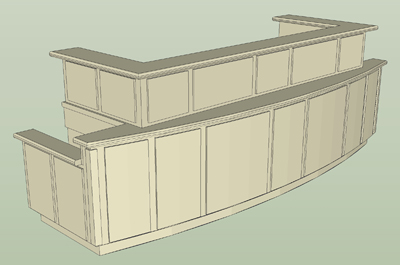
      Sucks big time.... I am just saying...

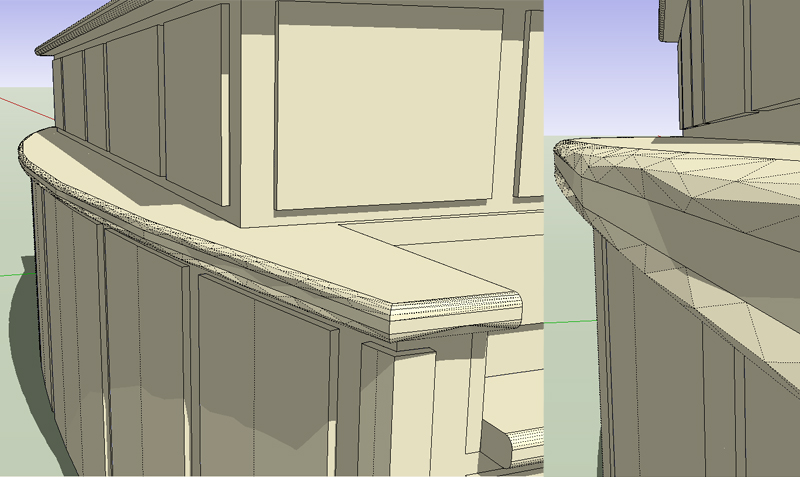
      And yes, I understand it is a Revit problem not SU. I built this in Revit then exported as a dwg and brought into SU. Not only the obvious but there are so many other issues wrong with this model it is just sad.

      I need this model in Revit so I built it in Revit.
      I was just going to "play with it" in SketchUp. It is not an issue, I am just ranting.

      Counters2.jpg


      Counters copy.jpg

      http://www.coroflot.com/boofredlay

      1 條回覆 最後回覆 回覆 引用 0
      • soloS 離線
        solo
        最後由 編輯

        Time for a relook at 'Autodeath' 😉

        http://www.solos-art.com

        If you see a toilet in your dreams do not use it.

        1 條回覆 最後回覆 回覆 引用 0
        • bmikeB 離線
          bmike
          最後由 編輯

          not just revit, but from what i know, autocad architecture does silly things too... splits up surfaces, triangulates all over the place, etc. etc.

          🤢

          mike beganyi design + consulting llc

          1 條回覆 最後回覆 回覆 引用 0
          • thomthomT 離線
            thomthom
            最後由 編輯

            Yea - I've seen that too. You get cylindrical columns from Revit that's been faceted into thousands small triangles. STupid thing.
            Though, this does not happen with all the file format you export to.
            What did you use? .3ds or .dwg?

            Thomas Thomassen — SketchUp Monkey & Coding addict
            List of my plugins and link to the CookieWare fund

            1 條回覆 最後回覆 回覆 引用 0
            • honoluludesktopH 離線
              honoluludesktop
              最後由 編輯

              Boo, not a Revit user, but would it be incorrect to say that Revit selected the kind of surface to use in order to optimize the performance of its model? The straight bull nose is optimally constructed with rectangular faces, while the arced bull nose is best suited for a triangular mesh? That being the case, perhaps its SU lack of tools to work with mesh that is the problem.

              Again I demonstrate my ignorance with this speculative post:-) Sigh.... I better go and find a hobby.

              1 條回覆 最後回覆 回覆 引用 0
              • thomthomT 離線
                thomthom
                最後由 編輯

                No - it does not optimize. A cylinder is not optimized by thousands of triangulation.

                Thomas Thomassen — SketchUp Monkey & Coding addict
                List of my plugins and link to the CookieWare fund

                1 條回覆 最後回覆 回覆 引用 0
                • honoluludesktopH 離線
                  honoluludesktop
                  最後由 編輯

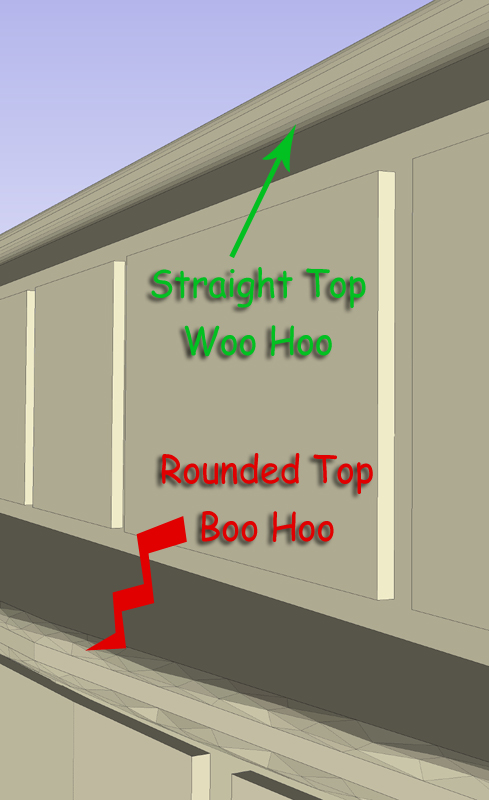
                  But Boo's triangulated mesh is not a straight cylinder (the one at the top of the case), it is the curved bull nose below the stright one.

                  http://forums.sketchucation.com/download/file.php?id=52631

                  1 條回覆 最後回覆 回覆 引用 0
                  • bmikeB 離線
                    bmike
                    最後由 編輯

                    @thomthom said:

                    Yea - I've seen that too. You get cylindrical columns from Revit that's been faceted into thousands small triangles. STupid thing.
                    Though, this does not happen with all the file format you export to.
                    What did you use? .3ds or .dwg?

                    been using dwg... maybe i should try .3ds?

                    then there is an issue with the windows / doors / etc. needing multiple steps to turn them into 'solids' for them to come into skup so i can see them. i've often rebuilt things from scratch so i get clean surfaces to work with.

                    mike beganyi design + consulting llc

                    1 條回覆 最後回覆 回覆 引用 0
                    • thomthomT 離線
                      thomthom
                      最後由 編輯

                      @bmike said:

                      then there is an issue with the windows / doors / etc. needing multiple steps to turn them into 'solids' for them to come into skup so i can see them. i've often rebuilt things from scratch so i get clean surfaces to work with.

                      Ditto.
                      Another issue is that I often find that models that comes from Revit has small accuracy problems. tiny fraction off axis.
                      Or dividing a face with he line tool and I get double set with faces on top of each other.

                      Thomas Thomassen — SketchUp Monkey & Coding addict
                      List of my plugins and link to the CookieWare fund

                      1 條回覆 最後回覆 回覆 引用 0
                      • bmikeB 離線
                        bmike
                        最後由 編輯

                        @thomthom said:

                        @bmike said:

                        then there is an issue with the windows / doors / etc. needing multiple steps to turn them into 'solids' for them to come into skup so i can see them. i've often rebuilt things from scratch so i get clean surfaces to work with.

                        Ditto.
                        Another issue is that I often find that models that comes from Revit has small accuracy problems. tiny fraction off axis.
                        Or dividing a face with he line tool and I get double set with faces on top of each other.

                        same here! the off axis is a head scratcher - especially when a component is created out of 'solid' or a block. usually i'm just using this for 'presentation' and to work out kinks that are easier to model / discuss / show in sketchup - but it is a pain.

                        we are trying to write a script to automate turning 'solids' into true solids. it will run in our 3rd party timber overlay... initial results look promising.

                        mike beganyi design + consulting llc

                        1 條回覆 最後回覆 回覆 引用 0
                        • boofredlayB 離線
                          boofredlay
                          最後由 編輯

                          @honoluludesktop said:

                          Boo, not a Revit user, but would it be incorrect to say that Revit selected the kind of surface to use in order to optimize the performance of its model? The straight bull nose is optimally constructed with rectangular faces, while the arced bull nose is best suited for a triangular mesh? That being the case, perhaps its SU lack of tools to work with mesh that is the problem.

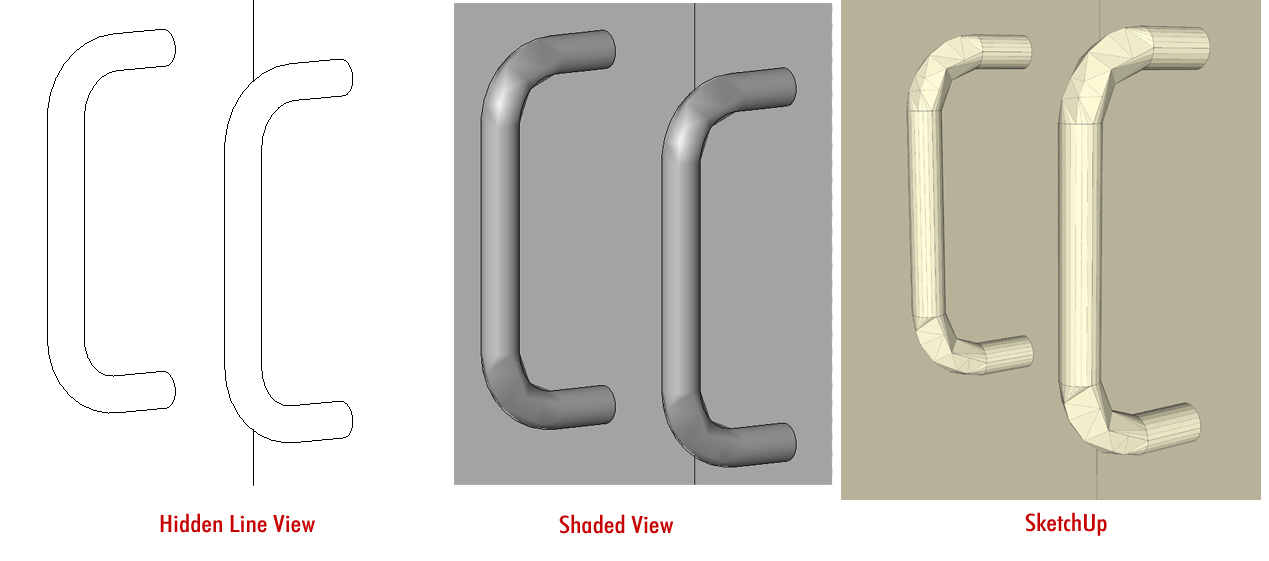
                          I can see what you are saying but see this drawer pull for example. There is no reason for this IMO. The first two are Revit views. The problem is obviously on Revit's side, not SU. Hidden line view looks like it should but once you go to shaded view you can see the problem.
                          Counters.jpg

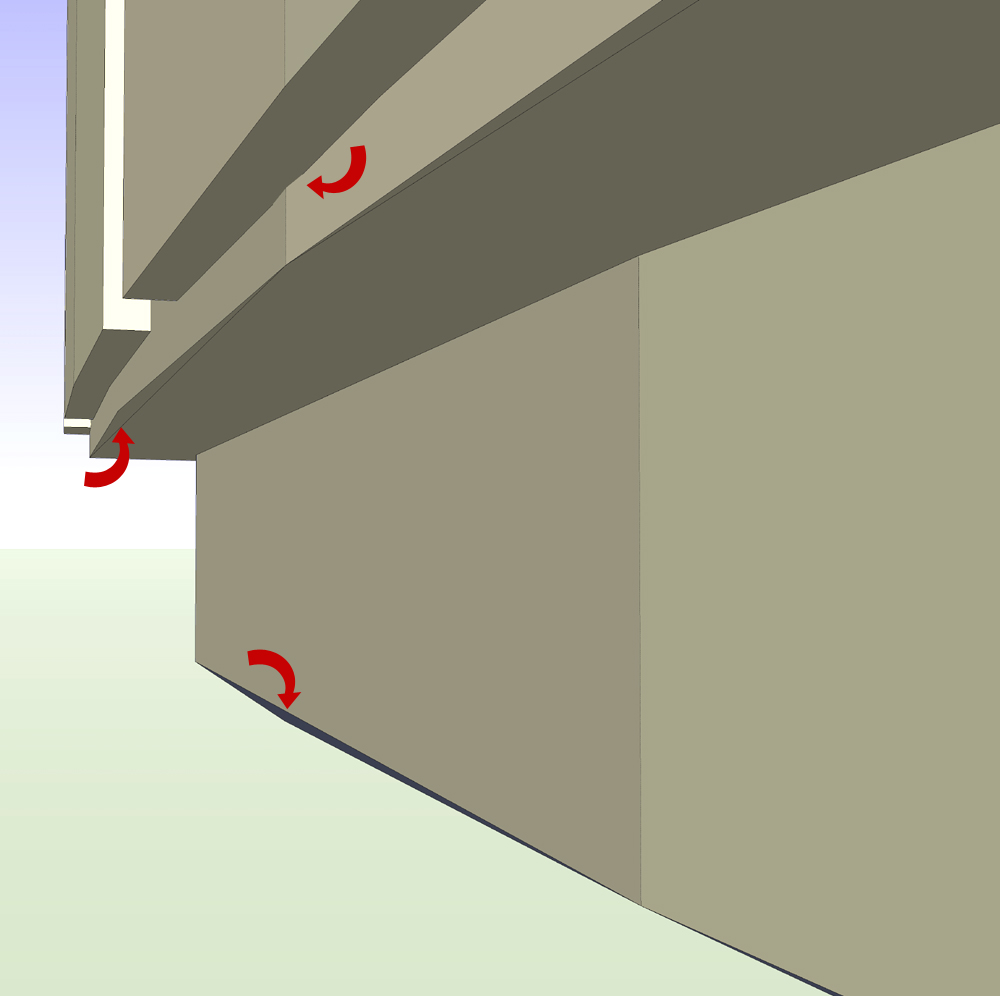
                          Or these problems. Why the extra triangulated faces at the bottom of the arc?
                          Counters3.jpg

                          @thomthom said:

                          What did you use? .3ds or .dwg?

                          I used .dwg
                          Correct me if I am wrong but I don't see an option to export .3ds from Revit. I am using Revit 2011.
                          The only formats I see available are .dwg, .dxf, .dgn, .SAT and .FBX

                          And one last thing. This counter was made in separate sections. Every panel is a separate extrusion yet when brought into SU most everything is exploded. Frustrating.

                          http://www.coroflot.com/boofredlay

                          1 條回覆 最後回覆 回覆 引用 0
                          • thomthomT 離線
                            thomthom
                            最後由 編輯

                            I have tried with .FBX - and then used Autodesk's FBX converter to convert to .3ds.

                            Thomas Thomassen — SketchUp Monkey & Coding addict
                            List of my plugins and link to the CookieWare fund

                            1 條回覆 最後回覆 回覆 引用 0
                            • boofredlayB 離線
                              boofredlay
                              最後由 編輯

                              Does it work any better?

                              http://www.coroflot.com/boofredlay

                              1 條回覆 最後回覆 回覆 引用 0
                              • thomthomT 離線
                                thomthom
                                最後由 編輯

                                FBX will preserve materials - while DWG will have none. But DWG preserve components better.
                                I made a crude script that iterated the model and applied some basic materials to DWG imports from revit - does most of the work.

                                Thomas Thomassen — SketchUp Monkey & Coding addict
                                List of my plugins and link to the CookieWare fund

                                1 條回覆 最後回覆 回覆 引用 0
                                • honoluludesktopH 離線
                                  honoluludesktop
                                  最後由 編輯

                                  Hmmm........ So the problem is apparent in revit. Sort of like SU's default number of edges in a circle. At least SU provides the user the option to change the number of edges. Well hope you fellows can find a acceptable solution.

                                  1 條回覆 最後回覆 回覆 引用 0
                                  • AdamBA 離線
                                    AdamB
                                    最後由 編輯

                                    It would be trivial to write a Ruby that welded coplanar triangles back into polygons.

                                    Or is this something different?

                                    Adam

                                    Developer of LightUp Click for website

                                    1 條回覆 最後回覆 回覆 引用 0
                                    • boofredlayB 離線
                                      boofredlay
                                      最後由 編輯

                                      That is the problem Adam, they are not coplanar. See image.
                                      I have also attached the main curved part of the counter for review. The geometry is simply a mess.

                                      Retail Counter Part.skp


                                      Counters6.jpg

                                      http://www.coroflot.com/boofredlay

                                      1 條回覆 最後回覆 回覆 引用 0
                                      • AdamBA 離線
                                        AdamB
                                        最後由 編輯

                                        I think I can see what is happening. Revit is trying to coalesce triangles. You can see this from your pic.
                                        I think what is happening is the tolerances for flatness are being confused the scale of the curvature. Imagine a single triangle. Is has 3 edge neighbours which are potential candidate for merging. If the curve is sufficiently small scale then Revit could mistaken choose a neighbour on the curve rather than the triangle that completes a Quad ..again and again.

                                        So see if there is a tolerance for flatness/planarity that can be tweaked. You could also try doing a scale up of your model in Revit before export to workaround any hardwired tolerances in the exporter.

                                        Adam

                                        Developer of LightUp Click for website

                                        1 條回覆 最後回覆 回覆 引用 0
                                        • boofredlayB 離線
                                          boofredlay
                                          最後由 編輯

                                          Ah, I see where you are coming from now. I will try to remember to have a look this week for a tolerance.

                                          http://www.coroflot.com/boofredlay

                                          1 條回覆 最後回覆 回覆 引用 0
                                          • AnssiA 離線
                                            Anssi
                                            最後由 編輯

                                            Is there a difference between exporting the model from Revit as a polymesh or ACIS solids? I must try myself, but I am just trying to learn Revit and haven't made anything spectacular to play with yet.

                                            Anssi

                                            securi adversus homines, securi adversus deos rem difficillimam adsecuti sunt, ut illis ne voto quidem opus esset

                                            1 條回覆 最後回覆 回覆 引用 0
                                            • 1
                                            • 2
                                            • 2 / 2
                                            • 第一個貼文
                                              最後的貼文
                                            Buy SketchPlus
                                            Buy SUbD
                                            Buy WrapR
                                            Buy eBook
                                            Buy Modelur
                                            Buy Vertex Tools
                                            Buy SketchCuisine
                                            Buy FormFonts

                                            Advertisement