sketchucation logo sketchucation
    • Login
    Oops, your profile's looking a bit empty! To help us tailor your experience, please fill in key details like your SketchUp version, skill level, operating system, and more. Update and save your info on your profile page today!
    Mac User? | Join the Rayscaper Beta for Mac Learn More

    [Plugin] $ Copy Brick (Updated 5/04/11)

    Scheduled Pinned Locked Moved Plugins
    64 Posts 22 Posters 78.5k Views 22 Watching
    Loading More Posts
    • Oldest to Newest
    • Newest to Oldest
    • Most Votes
    Reply
    • Reply as topic
    Log in to reply
    This topic has been deleted. Only users with topic management privileges can see it.
    • D
      Daniel S
      last edited by

      Sahi, Thank you for the quick update.

      It works very well.

      But there is a small cosmetic bug... look at the wireframe using groups.

      In this .gif I show that using components looks well and groups not:
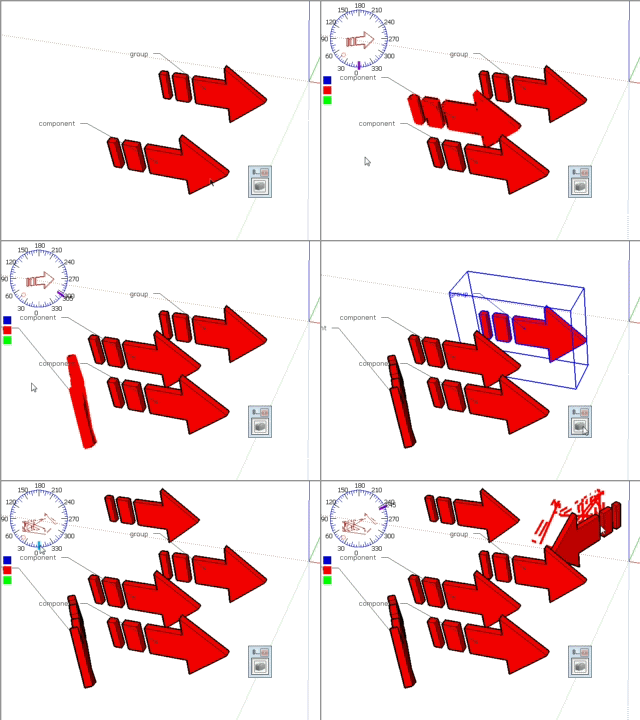
      wireframe.gif
      This happens with simple boxes too.

      Daniel S

      1 Reply Last reply
      Reply Quote 0
      • S
        sahi
        last edited by

        @daniel s said:

        But there is a small cosmetic bug... look at the wireframe using groups.

        In this .gif I show that using components looks well and groups not:

        Fixed
        Upgrade plugins First Message Brick_4.zip

        1 Reply Last reply
        Reply Quote 0
        • S
          sahi
          last edited by

          @xrok1 said:

          thats cool! but where's the brick part of the plugin? ๐Ÿ˜„

          Yes
          I'm working on it

          1 Reply Last reply
          Reply Quote 0
          • kenK
            ken
            last edited by

            This program shut my Sketchup down without a error. Stops every time I pick the icon.

            However, thanks for the plugin, I know you will get it working.

            Ken

            Fight like your the third monkey on Noah's Ark gangway.

            1 Reply Last reply
            Reply Quote 0
            • S
              sahi
              last edited by

              @unknownuser said:

              This program shut my Sketchup down without a error. Stops every time I pick the icon.

              However, thanks for the plugin, I know you will get it working.

              Ken

              Double Click = Exit

              1 Reply Last reply
              Reply Quote 0
              • boofredlayB
                boofredlay
                last edited by

                Ooo, nice.

                http://www.coroflot.com/boofredlay

                1 Reply Last reply
                Reply Quote 0
                • X
                  xrok1
                  last edited by

                  @sahi said:

                  @xrok1 said:

                  thats cool! but where's the brick part of the plugin? ๐Ÿ˜„

                  Yes
                  I'm working on it

                  ๐Ÿ˜„

                  โ€œThere are three classes of people: those who see. Those who see when they are shown. Those who do not see.โ€

                  http://www.Twilightrender.com try it!

                  1 Reply Last reply
                  Reply Quote 0
                  • D
                    Daniel S
                    last edited by

                    Sahi, thanks again...
                    I was trying your plugin... and discover a new issue.. but this one is very important
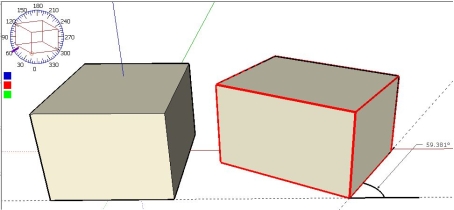
                    I put 60ยบ in the protractor but the result is 59,38ยบ for example.
                    issue.jpg
                    If I put 30ยบ the result is similar, but not 30ยฐ.
                    Perhaps the problem is with my units... I attach a .skp file.

                    Daniel S


                    issue.skp

                    1 Reply Last reply
                    Reply Quote 0
                    • S
                      sahi
                      last edited by

                      @daniel s said:

                      Sahi, thanks again...
                      I was trying your plugin... and discover a new issue.. but this one is very important
                      I put 60ยบ in the protractor but the result is 59,38ยบ for example.

                      Fixed
                      Upgrade plugins First Message Brick_6.zip

                      1 Reply Last reply
                      Reply Quote 0
                      • T
                        tomislavm
                        last edited by

                        Thanks!

                        1 Reply Last reply
                        Reply Quote 0
                        • urgenU
                          urgen
                          last edited by

                          Ooo very useful! ๐ŸŽ‰ thanks! ๐Ÿ‘

                          --pupil forever...------

                          1 Reply Last reply
                          Reply Quote 0
                          • S
                            sahi
                            last edited by

                            Upgrade plugins First Message Brick_7.zip
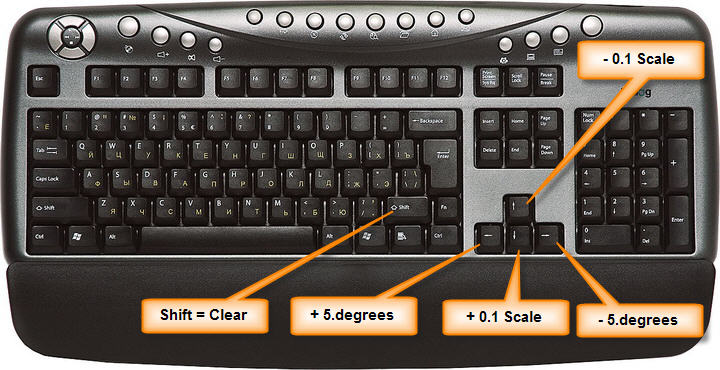
                            klafa-7.jpg

                            1 Reply Last reply
                            Reply Quote 0
                            • S
                              sahi
                              last edited by

                              Upgrade plugins First Message Brick_8.zip
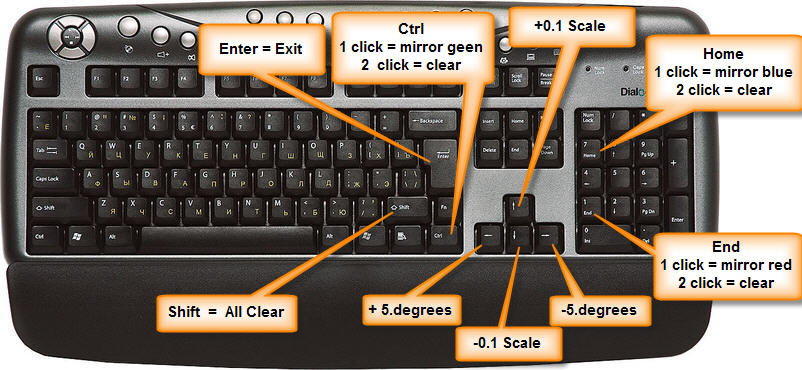
                              klafa-8.jpg

                              1 Reply Last reply
                              Reply Quote 0
                              • utilerU
                                utiler
                                last edited by

                                @daniel s said:

                                Thank you Sahi!!!

                                A great plugin!!!
                                http://www.sketchup8.com.ar/2010/08/copy-brick-plugin.html

                                Daniel S

                                Off topic:

                                Daniel, I've had a look at your blog, follwoing it now!!! Just curious, why Sketchup8.com.ar? WHat happens when V8.0 is out and V9.0 is next? ๐Ÿ˜‰

                                Just Curious...

                                1 Reply Last reply
                                Reply Quote 0
                                • D
                                  Daniel S
                                  last edited by

                                  @utiler said:

                                  Off topic:

                                  Daniel, I've had a look at your blog, follwoing it now!!! Just curious, why Sketchup8.com.ar? WHat happens when V8.0 is out and V9.0 is next? ๐Ÿ˜‰

                                  The domain names in Argentina are .com.ar
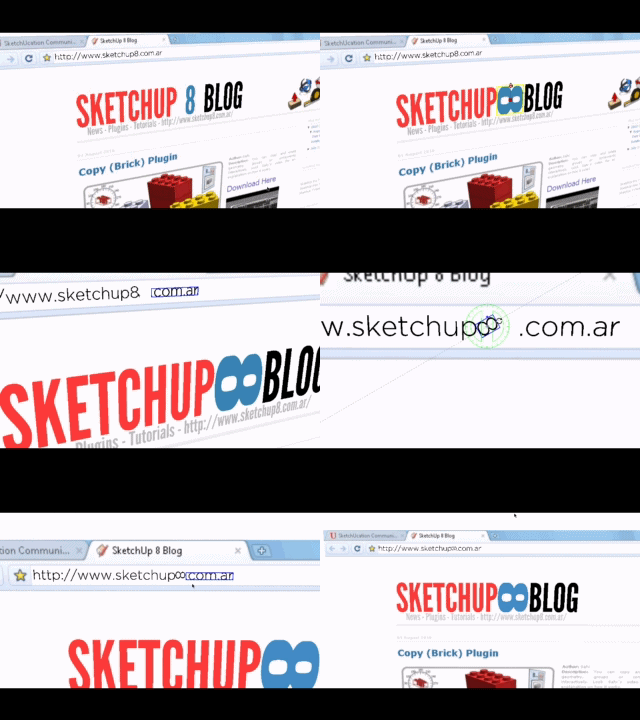
                                  And the 8 will be changed for โˆž using the future SU 9.0 technology:
                                  sketchup8.com.ar.gif ๐Ÿ˜› ๐Ÿ˜› ๐Ÿ˜›

                                  Daniel S

                                  1 Reply Last reply
                                  Reply Quote 0
                                  • utilerU
                                    utiler
                                    last edited by

                                    Clever boy! look forward to following.... ๐Ÿ‘

                                    Just Curious...

                                    1 Reply Last reply
                                    Reply Quote 0
                                    • N
                                      njh
                                      last edited by

                                      Hi Sahi / Guys,

                                      Just downloaded the plugin and I'm VERY VERY impressed but I have a question as a mac user with an apple full size USB keyboard.

                                      The arrow keys work fine for rotation and scale and the ctrl key works fine for the mirror on (red?) axis but my keyboard doesn't have the second functions shown on the numeric keypad (home etc) so I can't seem to mirror along the other two axis.

                                      Sorry if this has already been explained earlier in the post or if I'm just being a bit dim and don't know how to use an apple keyboard properly!


                                      Hope someone can help.

                                      Cheers

                                      NJH

                                      1 Reply Last reply
                                      Reply Quote 0
                                      • N
                                        njh
                                        last edited by

                                        Hi Sahi,

                                        Fast comeback!

                                        Just downloaded the "brick 9" update and now the ctrl key does nothing. Was that the plan?

                                        The mirror buttons at the top of the screen work but the object goes off screen during the mirror process so it is not as intuitive to use and not as obvious to see what what is happening to the object during the mirror.

                                        Using the keyboard shortcut (even though I could only get one working) was much easier to get the desired result.

                                        Cheers

                                        NJH

                                        1 Reply Last reply
                                        Reply Quote 0
                                        • S
                                          sahi
                                          last edited by

                                          @njh said:

                                          Using the keyboard shortcut (even though I could only get one working) was much easier to get the desired result.

                                          What are the keys you are free ????
                                          What are the keys create one??

                                          1 Reply Last reply
                                          Reply Quote 0
                                          • S
                                            sahi
                                            last edited by

                                            @njh said:

                                            Hi Sahi / Guys,

                                            Just downloaded the plugin and I'm VERY VERY impressed but I have a question as a mac user with an apple full size USB keyboard.

                                            The arrow keys work fine for rotation and scale and the ctrl key works fine for the mirror on (red?) axis but my keyboard doesn't have the second functions shown on the numeric keypad (home etc) so I can't seem to mirror along the other two axis.

                                            Sorry if this has already been explained earlier in the post or if I'm just being a bit dim and don't know how to use an apple keyboard properly!

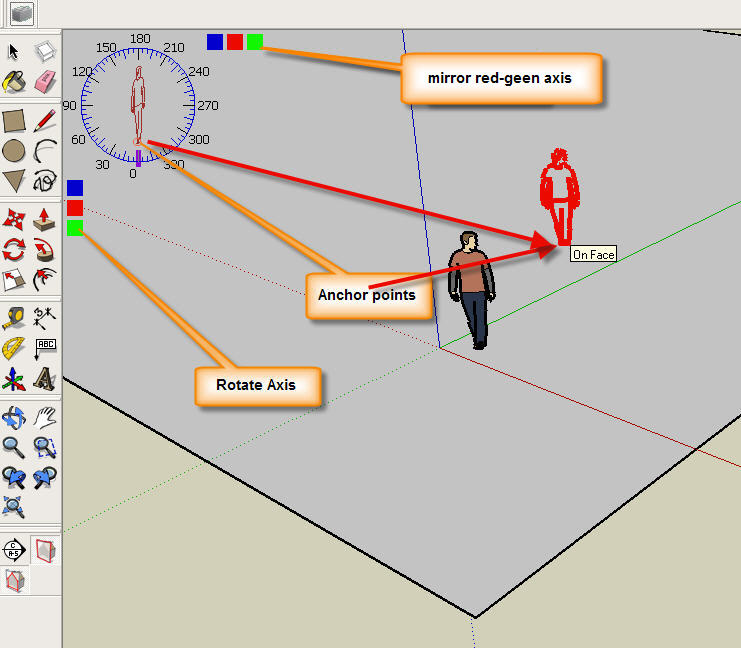
                                            points.jpg
                                            test

                                            1 Reply Last reply
                                            Reply Quote 0

                                            Hello! It looks like you're interested in this conversation, but you don't have an account yet.

                                            Getting fed up of having to scroll through the same posts each visit? When you register for an account, you'll always come back to exactly where you were before, and choose to be notified of new replies (either via email, or push notification). You'll also be able to save bookmarks and upvote posts to show your appreciation to other community members.

                                            With your input, this post could be even better ๐Ÿ’—

                                            Register Login
                                            • 1
                                            • 2
                                            • 3
                                            • 4
                                            • 2 / 4
                                            • First post
                                              Last post
                                            Buy SketchPlus
                                            Buy SUbD
                                            Buy WrapR
                                            Buy eBook
                                            Buy Modelur
                                            Buy Vertex Tools
                                            Buy SketchCuisine
                                            Buy FormFonts

                                            Advertisement