sketchucation logo sketchucation
    • Login
    Oops, your profile's looking a bit empty! To help us tailor your experience, please fill in key details like your SketchUp version, skill level, operating system, and more. Update and save your info on your profile page today!
    ⚠️ Update | Sketchucation Tools 5.0.8 released with licensing improvements and bugfixes Download

    Extrude Request

    Scheduled Pinned Locked Moved SketchUp Discussions
    sketchup
    23 Posts 5 Posters 2.0k Views 5 Watching
    Loading More Posts
    • Oldest to Newest
    • Newest to Oldest
    • Most Votes
    Reply
    • Reply as topic
    Log in to reply
    This topic has been deleted. Only users with topic management privileges can see it.
    • GaieusG
      Gaieus
      last edited by

      It does not matter - just get the files into the plugins folder somehow.

      What I mean is that when unzipping a bunch of files, Windows tents to create them a subdirectory. Do not let it do this; move all the contents (subfolders and rb files) straight under Plugins.

      If it does not work, make a screenshot of your plugins folder and attach here.

      Gai...

      1 Reply Last reply
      Reply Quote 0
      • thomthomT
        thomthom
        last edited by

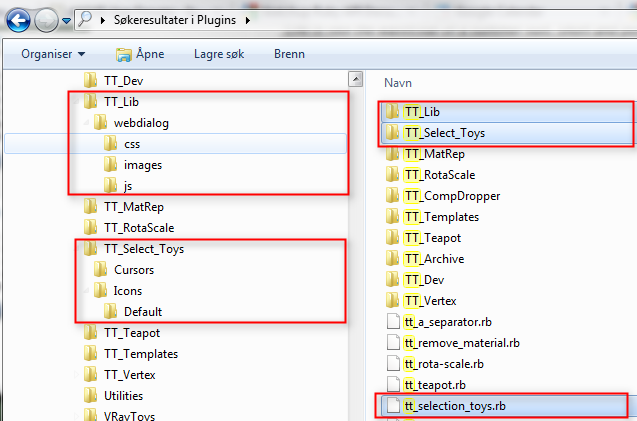
        These are the files and the folder structure that you should have in your plugins folder:
        folder_struct.png

        Thomas Thomassen — SketchUp Monkey & Coding addict
        List of my plugins and link to the CookieWare fund

        1 Reply Last reply
        Reply Quote 0
        • C
          CodyV1
          last edited by

          I tried taking a screen shot using the default Windows way, but when I go to take it into paint to save it, I get "YOU'VE BEEN HIT WITH THE". So I'm scanning it with McCaffe. But anyway, my plugins folder has the folders thomthom specified.

          Be There

          http://www.facebook.com/#!/profile.php?id=100000814922209

          1 Reply Last reply
          Reply Quote 0
          • thomthomT
            thomthom
            last edited by

            @codyv1 said:

            I can't open it in SU. I have both of the files in the Plugins folder

            No menus under Tools?
            No error messages?

            Thomas Thomassen — SketchUp Monkey & Coding addict
            List of my plugins and link to the CookieWare fund

            1 Reply Last reply
            Reply Quote 0
            • GaieusG
              Gaieus
              last edited by

              Forget Windows Paint and similar pains. Get something easy-to-use, free, 3rd party sw like Gadwin PrinScreen or similar.


              As for the files being in the right location and STILL not working, I am stumped.

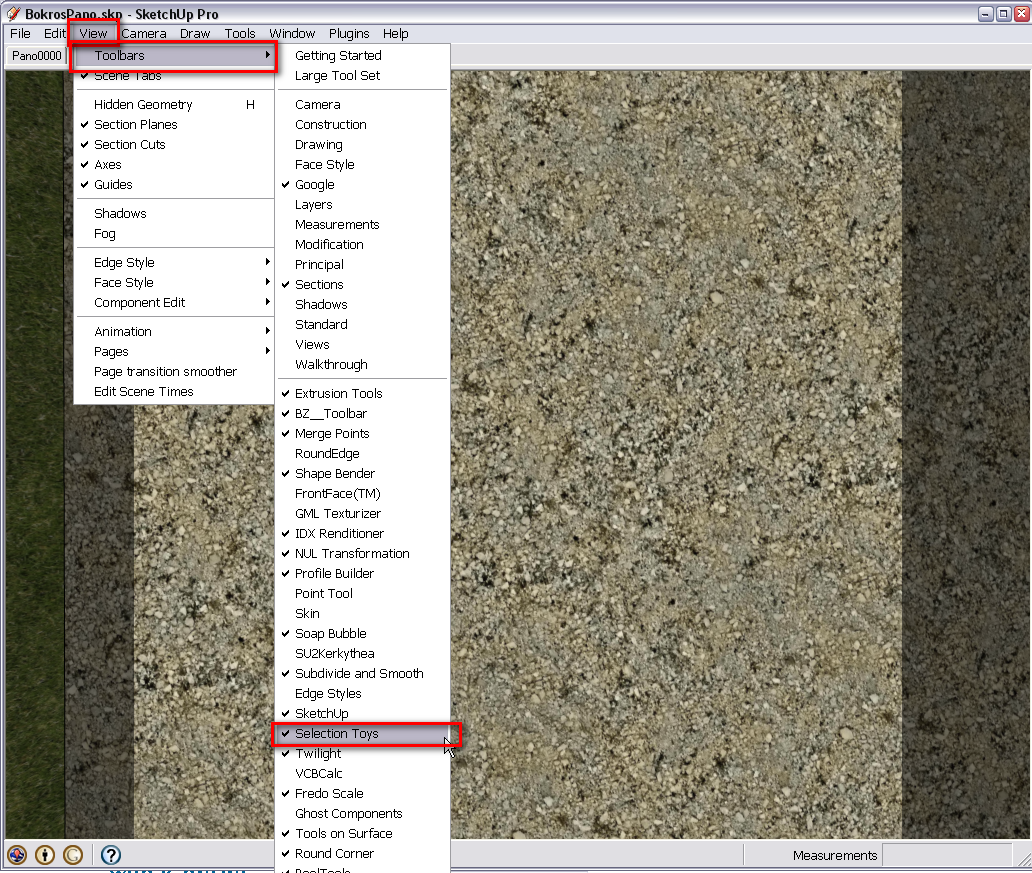
              Did you activate the toolbar from View > Toolbars?

              Gai...

              1 Reply Last reply
              Reply Quote 0
              • C
                CodyV1
                last edited by

                It's nice to know even MY technical hickups can blunder even you.
                I went through the toolbars and didn't find Toy Selection anywhere.

                Be There

                http://www.facebook.com/#!/profile.php?id=100000814922209

                1 Reply Last reply
                Reply Quote 0
                • GaieusG
                  Gaieus
                  last edited by

                  It must be some installation error then. I have Selection Toys (not Toy Selections however) in my toolbar

                  ST.png

                  Gai...

                  1 Reply Last reply
                  Reply Quote 0
                  • thomthomT
                    thomthom
                    last edited by

                    Hang on - are we talking about only the item in the Toolbar list?

                    In Selection Toys you must enable the toolbar under Selection Toy's preferences. This is to prevent Toolbar Shuffle.

                    You should see a "Selection Toys" menu under Tools and extra context menu items. - Do you see these?

                    Thomas Thomassen — SketchUp Monkey & Coding addict
                    List of my plugins and link to the CookieWare fund

                    1 Reply Last reply
                    Reply Quote 0
                    • Jean LemireJ
                      Jean Lemire
                      last edited by

                      Hi folks.

                      See this SU file for ideas.


                      Stadium.zip

                      Jean (Johnny) Lemire from Repentigny, Quebec, Canada.

                      1 Reply Last reply
                      Reply Quote 0
                      • C
                        CodyV1
                        last edited by

                        No, I don't see it

                        Be There

                        http://www.facebook.com/#!/profile.php?id=100000814922209

                        1 Reply Last reply
                        Reply Quote 0
                        • C
                          CodyV1
                          last edited by

                          Hi Jean,
                          Thanks for the model, but I'm afraid I've gotten to far in the model to go back and change the seating. I've gotten the seating done by just offsetting the bottom of the racing surface to the back of the building's rim. Plus, I have a road leading in and out of the track area so that cars and other vehicles can enter. I will gladly put you under the contributers for the track when I upload it to the warehouse.


                          Be There

                          http://www.facebook.com/#!/profile.php?id=100000814922209

                          1 Reply Last reply
                          Reply Quote 0

                          Hello! It looks like you're interested in this conversation, but you don't have an account yet.

                          Getting fed up of having to scroll through the same posts each visit? When you register for an account, you'll always come back to exactly where you were before, and choose to be notified of new replies (either via email, or push notification). You'll also be able to save bookmarks and upvote posts to show your appreciation to other community members.

                          With your input, this post could be even better 💗

                          Register Login
                          • 1
                          • 2
                          • 2 / 2
                          • First post
                            Last post
                          Buy SketchPlus
                          Buy SUbD
                          Buy WrapR
                          Buy eBook
                          Buy Modelur
                          Buy Vertex Tools
                          Buy SketchCuisine
                          Buy FormFonts

                          Advertisement