Scrapbooks
-
hello everybody!
I have sketchup pro 7 on windows. I tried to use layout 2.1 and i had a surprise! I haven't scrapbooks dialog box!!! when i try to select it in window there isn't scrapbooks!
really sorry for my english but is it normal? -
Wow, that's weird. Try View->Restore Default Workspace and see if it returns.
b
-
I found my problem!
When i open c:/programfiles/google/sketchup7/layout/
there isn't scrapebooks file! how is it possible?
I add a scrapebooks file and find a .layout file... that works! but where can i found all the components for layout? -
Hi Sylvain,
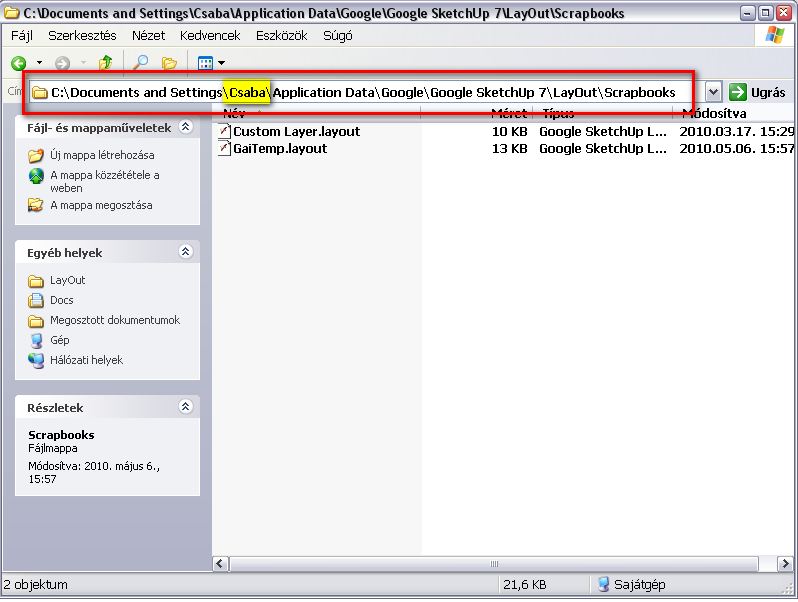
See this screenshot of my own PC (XP). The highlighted yellow "Csaba" is my own username on this machine; you should substitute it with your own on yours.
These are simple *.layout files and you can practically copy anything there.
-
Thank you but i haven't this file!

-
Hm. These are generated automatically when you install SU. Maybe a reinstall would help? BTW what version of SU 7 do you have? 7.0 or 7.1?
(And of course, LO only comes with SU Pro - I guess you have that).
-
Yes i have SU pro 7.1!
a friend gave me the .layout file and that works... strang! thank you for your help -
You also can take a search fpr scrapebooks. In the German Version there is a de file which does'nt include these files.
But the original path contains the scrapebook so we only have to set the right path. Maybe it is the same with you.


Hello! It looks like you're interested in this conversation, but you don't have an account yet.
Getting fed up of having to scroll through the same posts each visit? When you register for an account, you'll always come back to exactly where you were before, and choose to be notified of new replies (either via email, or push notification). You'll also be able to save bookmarks and upvote posts to show your appreciation to other community members.
With your input, this post could be even better 💗
Register Login


Advertisement