Sketchup.send_action arguments: Mac vs PC
-
@unknownuser said:
(http://groups.google.com/group/sketchupruby/tree/browse_frm/thread/92997374d3b27253/c20239069310f1fa?rnum)":1jz3lpx6] But it brings up this question -
"showRubyPanel:" vs. CMD_RUBY_CONSOLE
Dan or anyone - is there a preference?
The preference will always be that which IS cross-platform, and will likely be so in the future.
CMD_RUBY_CONSOLE is nothing more than a constant, that on the PC, points to the Integer object 21478.
But these integer arguments only work on the PC.
I have asked these question before, and did not get an answer:
[Actually my question was in regard to ALL of the constants.](1) Are the constants cross-platform (ie: does CMD_RUBY_CONSOLE constant exist on the Mac?)
(2) If so, what value is the constant CMD_RUBY_CONSOLE pointing at on the Mac ?
It seems that the string argument "showRubyPanel:" (and all of the other string arguments for Sketchup.send_action,) ARE cross-platform.
So we might stick with those, until someone answers the question of Mac constants.
_ -
A la Jim
(Object.constants.grep /CMD/).sort
["CMD_ARC", "CMD_CAMERA_UNDO", "CMD_CIRCLE", "CMD_COPY", "CMD_CUT", "CMD_DELETE", "CMD_DIMENSION", "CMD_DISPLAY_FOV", "CMD_DOLLY", "CMD_DRAWCUTS", "CMD_DRAWOUTLINES", "CMD_ERASE", "CMD_EXTRUDE", "CMD_FREEHAND", "CMD_HIDDENLINE", "CMD_LINE", "CMD_MAKE_COMPONENT", "CMD_MEASURE", "CMD_MOVE", "CMD_Mover", "CMD_NEW", "CMD_OFFSET", "CMD_OPEN", "CMD_ORBIT", "CMD_PAGE_DELETE", "CMD_PAGE_NEW", "CMD_PAGE_NEXT", "CMD_PAGE_PREVIOUS", "CMD_PAGE_UPDATE", "CMD_PAINT", "CMD_PAN", "CMD_PASTE", "CMD_POLYGON", "CMD_POSITION_CAMERA", "CMD_PRINT", "CMD_PROTRACTOR", "CMD_PUSHPULL", "CMD_RECTANGLE", "CMD_REDO", "CMD_ROTATE", "CMD_RUBY_CONSOLE", "CMD_SAVE", "CMD_SCALE", "CMD_SECTION", "CMD_SELECT", "CMD_SELECTION_ZOOM_EXT", "CMD_SHADED", "CMD_SHOWGUIDES", "CMD_SHOWHIDDEN", "CMD_SKETCHAXES", "CMD_SKETCHCS", "CMD_TEXT", "CMD_TEXTURED", "CMD_TRANSPARENT", "CMD_UNDO", "CMD_VIEW_BACK", "CMD_VIEW_BOTTOM", "CMD_VIEW_FRONT", "CMD_VIEW_ISO", "CMD_VIEW_LEFT", "CMD_VIEW_PERSPECTIVE", "CMD_VIEW_RIGHT", "CMD_VIEW_TOP", "CMD_WALK", "CMD_WIREFRAME", "CMD_ZOOM", "CMD_ZOOM_EXTENTS", "CMD_ZOOM_WINDOW"]and these are effectively the same as the
send_action's
-
Guys.. I can do that on Windows as well. Both you guys have WIN systems?
(a) I know the constants DO exist on Windows SU.
(b) I know the constants point to Integer object(s) on Windows.The questions relate to the Mac.
Let me restate the questions:(1) Are the constants cross-platform (ie: do they exist on the Mac?)
(2) If so, what value (or types,) do the constant(s) point at on the Mac ?
-
Sorry Dan, that screenshot was from my Mac. I haven't had a chance to actually see if they work.
-
Firstly Thanks!
@jim said:
Sorry Dan, that screenshot was from my Mac.
OK, so answer to question (1) is:
They DO exist on the SU Mac edition.@jim said:
I haven't had a chance to actually see if they work.
We need to know if they do.
I find it strange that (on the Mac,) CMD_RUBY_CONSOLE returns the Integer 21478. These integer arguments (according to the API,) are only supposed to work on the PC edition.How about a little test scriplet:
module SUAPI

  def self.list_commands
    cmds = (Object.constants.grep /CMD/).sort
    plat = ( RUBY_PLATFORM =~ /(mswin|mingw)/i ? 'Windows' ; 'Mac' )
    txt = "\n Sketchup Command Constants for #{plat} Platform\n"
    txt << "-------------------------------------------------\n"
    cmds.each {|e|
      val = eval(e)
      txt << " %-22s = " % e << "#{val.to_s}  (#{val.class.to_s})\n"
    }
    txt << "\n\n"
    return txt
  end #method

end #module
The block of text returned can be sent to a file, or to a webdialog, or even a multiline messagebox:
UI.messagebox( SUAPI.list_commands, MB_MULTILINE, 'Command Constants' )
although it doesn't look so good when not in a fixed-width font. -
New Question: Cut, Copy and Paste
We have standard Windows integer commands for these:
%(#BF0000)[CMD_CUT
CMD_COPY
CMD_PASTE]What are the Mac equivalents ??
... do these work as Sketchup.send_action() arguments?
%(#BF0000)["cut:"
"copy:"
"paste:"] -
this what you need?
Sketchup Command Constants for Mac Platform
%(#004080)[CMD_ARC = 21065 (Fixnum)
CMD_CAMERA_UNDO = 10529 (Fixnum)
CMD_CIRCLE = 21096 (Fixnum)
CMD_COPY = 57634 (Fixnum)
CMD_CUT = 57635 (Fixnum)
CMD_DELETE = 21021 (Fixnum)
CMD_DIMENSION = 21410 (Fixnum)
CMD_DISPLAY_FOV = 21494 (Fixnum)
CMD_DOLLY = 10523 (Fixnum)
CMD_DRAWCUTS = 21348 (Fixnum)
CMD_DRAWOUTLINES = 21347 (Fixnum)
CMD_ERASE = 21019 (Fixnum)
CMD_EXTRUDE = 21525 (Fixnum)
CMD_FREEHAND = 21031 (Fixnum)
CMD_HIDDENLINE = 10511 (Fixnum)
CMD_LINE = 21020 (Fixnum)
CMD_MAKE_COMPONENT = 21083 (Fixnum)
CMD_MEASURE = 21024 (Fixnum)
CMD_MOVE = 21048 (Fixnum)
CMD_NEW = 57600 (Fixnum)
CMD_OFFSET = 21100 (Fixnum)
CMD_OPEN = 57601 (Fixnum)
CMD_ORBIT = 10508 (Fixnum)
CMD_PAGE_DELETE = 21078 (Fixnum)
CMD_PAGE_NEW = 21067 (Fixnum)
CMD_PAGE_NEXT = 10535 (Fixnum)
CMD_PAGE_PREVIOUS = 10536 (Fixnum)
CMD_PAGE_UPDATE = 21068 (Fixnum)
CMD_PAINT = 21074 (Fixnum)
CMD_PAN = 10525 (Fixnum)
CMD_PASTE = 57637 (Fixnum)
CMD_POLYGON = 21095 (Fixnum)
CMD_POSITION_CAMERA = 21169 (Fixnum)
CMD_PRINT = 57607 (Fixnum)
CMD_PROTRACTOR = 21057 (Fixnum)
CMD_PUSHPULL = 21041 (Fixnum)
CMD_RECTANGLE = 21094 (Fixnum)
CMD_REDO = 57644 (Fixnum)
CMD_ROTATE = 21129 (Fixnum)
CMD_RUBY_CONSOLE = 21478 (Fixnum)
CMD_SAVE = 57603 (Fixnum)
CMD_SCALE = 21236 (Fixnum)
CMD_SECTION = 21337 (Fixnum)
CMD_SELECT = 21022 (Fixnum)
CMD_SELECTION_ZOOM_EXT = 21469 (Fixnum)
CMD_SHADED = 10512 (Fixnum)
CMD_SHOWGUIDES = 21980 (Fixnum)
CMD_SHOWHIDDEN = 21154 (Fixnum)
CMD_SKETCHAXES = 10522 (Fixnum)
CMD_SKETCHCS = 21126 (Fixnum)
CMD_TEXT = 21405 (Fixnum)
CMD_TEXTURED = 10539 (Fixnum)
CMD_TRANSPARENT = 10513 (Fixnum)
CMD_UNDO = 57643 (Fixnum)
CMD_VIEW_BACK = 10505 (Fixnum)
CMD_VIEW_BOTTOM = 10506 (Fixnum)
CMD_VIEW_FRONT = 10502 (Fixnum)
CMD_VIEW_ISO = 10507 (Fixnum)
CMD_VIEW_LEFT = 10504 (Fixnum)
CMD_VIEW_PERSPECTIVE = 10519 (Fixnum)
CMD_VIEW_RIGHT = 10503 (Fixnum)
CMD_VIEW_TOP = 10501 (Fixnum)
CMD_WALK = 10520 (Fixnum)
CMD_WIREFRAME = 10510 (Fixnum)
CMD_ZOOM = 10509 (Fixnum)
CMD_ZOOM_EXTENTS = 10527 (Fixnum)
CMD_ZOOM_WINDOW = 10526 (Fixnum)]john OSX 10.5.8
-
@dan rathbun said:
New Question: Cut, Copy and Paste
What are the Mac equivalents ??
... do these work as Sketchup.send_action() arguments?
%(#BF0000)["cut:"
"copy:"
"paste:"]I verified that the above strings work on Windows PC. (SU

And John verified that they work on the Mac.
So:
Sketchup.send_action("paste:") is cross-platform,
And:
Sketchup.send_action( CMD_PASTE ) is not.Unless Mac users reassign the constants, like:
CMD_PASTE = "paste:" -
SketchUp 7.1.6859
Mac OS X 10.4.11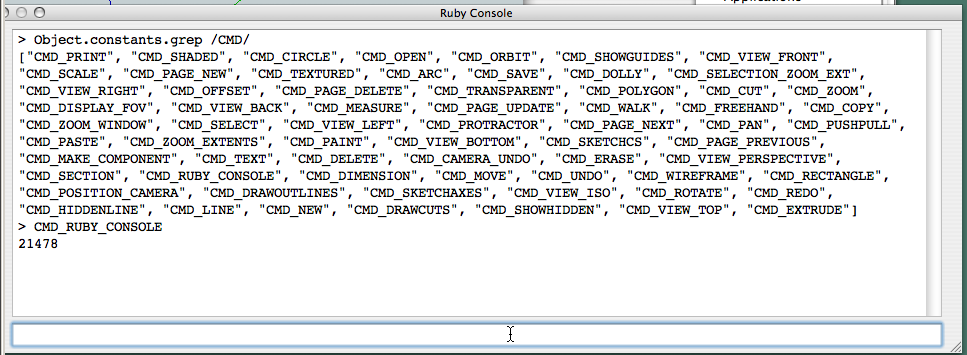
-
This is an old thread, but I'm adding a tip here that may be of help to other developers who may discover this info...
In an effort to create a toolbar button to show the "Entity Info" palette (there's a built-in button for Model Info, but oddly not for Entity Info), I couldn't find a method or action that worked on the Mac. There is a fixnum constant value for the PC, but these don't seem to work on the Mac, even after years of SketchUp evolution on the Mac. Then I stumbled on the get_shortcuts method...
Using the "Shortcuts" pane within the "Preferences" window, you can add a shortcut to the command for which you need the string constant, then using:
Sketchup.get_shortcuts.sort
...you can discover the string that can successfully be used with the Sketchup.send_action method. For example, I added the F2 key to "Window/Entity Info", and got the following output:
Sketchup.get_shortcuts.sort
["A\tselectSelectionTool:", "B\tselectPaintTool:", "C\tselectCircleTool:", "E\tselectEraseTool:", "F\tviewZoomExtents:", "F2\tentityProperties:", "G\tmakeGroup:", "H\tselectDollyTool:", "K\ttoggleDisplayBackEdges:", "L\tselectLineTool:", "O\tselectOrbitTool:", "P\tselectPushPullTool:", "R\tselectRotateTool:", "S\tselectScaleTool:", "T\tselectMeasureTool:", "V\tselectMoveTool:", "Z\tselectZoomTool:", "`\ttoggleHideRestOfModel:", "~\ttoggleHideSimilarComponents:", "⇧G\t/Edit/Context Menu Flyout/Explode"]In there, you'll see "F2\tentityProperties:", so the string constant is "entityProperties:".
Voila, a method to discover undocumented action strings.


Hello! It looks like you're interested in this conversation, but you don't have an account yet.
Getting fed up of having to scroll through the same posts each visit? When you register for an account, you'll always come back to exactly where you were before, and choose to be notified of new replies (either via email, or push notification). You'll also be able to save bookmarks and upvote posts to show your appreciation to other community members.
With your input, this post could be even better 💗
Register Login


Advertisement