Plugin Clear Out ...
-
Hi All
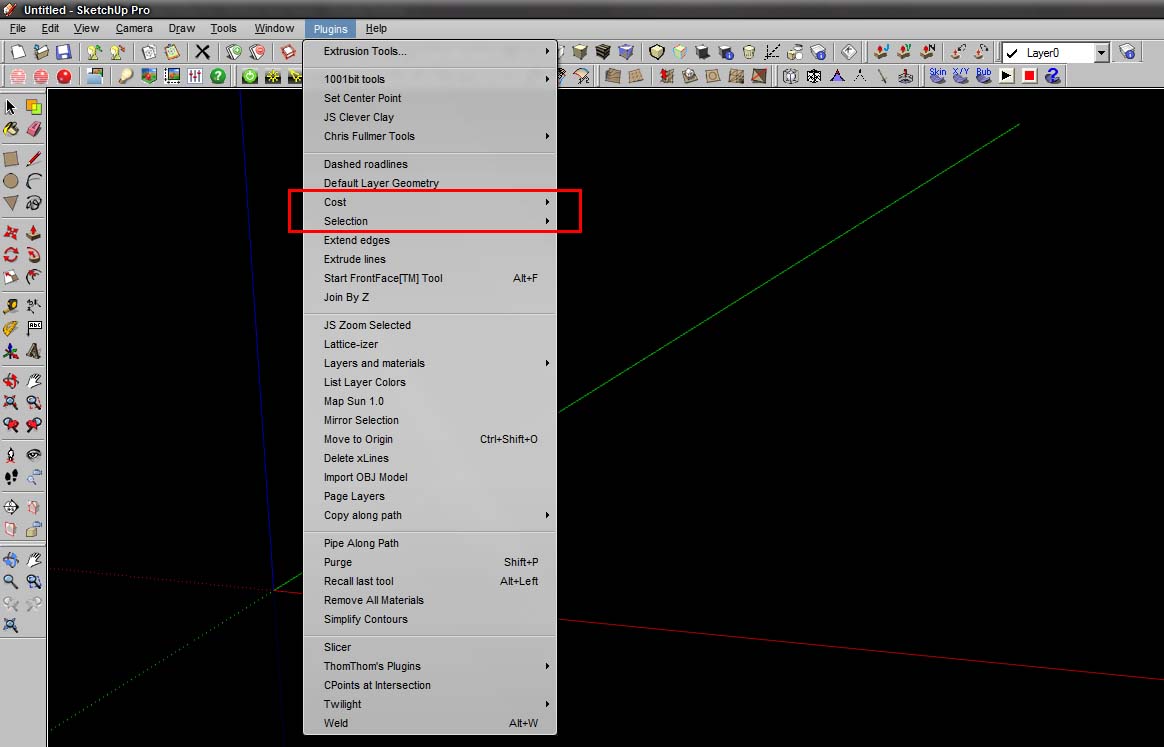
Im in the process of cleaning up my plugin stash ... how do i remove these two ... ?
Thanks
-
Both are in the C:\Program Files\Google\Google SketchUp 7\Plugins\Examples, if you have windows.
Cost is in the Attribute.rd and Selection.rb is there as a plugin.
Note, TIG gave me the following info. And the program works like a champ in finding plugins.
below from TIG
"The trick I use to find what is loading a particular menu is to look for the menu's text in all of the files in my Plugins folder/sub-folders - normal Vista Search doesn't look inside rb files [and encrypted rb or rbs aren't readable in any case...] but I use a copy of free 'baregrep.exe' and search the Plugins folder-path [copied as text], for *.rb files containing say 'Bevel' - it should then show the possible culprit file[s]..."
Note, I have re-installed all my plugin, and I have been very careful about just what I needed. If I don't use it, or have a need, it isn't installed.
I haven't had any problems with the graying out of the context menu since I have re-installed my plugins. Removing what I don't need.
Ken
-
@unknownuser said:
I haven't had any problems with the graying out of the context menu since I have re-installed my plugins. Removing what I don't need.
The disabled plugins is most likely one of Fredo's plugins. It has been resolved with updates. If experience that issue it's most likely due to an older version.


Hello! It looks like you're interested in this conversation, but you don't have an account yet.
Getting fed up of having to scroll through the same posts each visit? When you register for an account, you'll always come back to exactly where you were before, and choose to be notified of new replies (either via email, or push notification). You'll also be able to save bookmarks and upvote posts to show your appreciation to other community members.
With your input, this post could be even better 💗
Register Login


Advertisement