Remove extra faces
-
Sometimes when I import complex 3DS files, and fix them up in sketchup, some of the triangles have multiple faces for the same 3 edges. It is mostly seen when I try to soften/smooth out the surfaces and some triangle are discolored, or colored differently.
I sometimes need to delete the same face 5-6 times until I get to the last one, and then everything is fine.- what causes this?
- how could I avoid such situations?
- Is there a way to strip away all the unnecessary faces except of the ones that are supposed to be there?
- maybe a ruby could do the job?

Thanks -
@unknownuser said:
- what causes this?
Not sure. But I experience from time to time when I have geometry imported from other formats, DWG or 3DS, that when I split a face in two SU creates extra faces. I've reported this as a bug. I wonder if it's SU's problems with small fractional differences.
As for the discolouring - I'm guessing what you are referring to here, a screenshot would be nice - if you have soft+smooth edges connected to faces with normals that aren't in a uniform order you can get strange shading. The extra overlapping faces you describe might be causing it.@unknownuser said:
- how could I avoid such situations?
As for the weird shading - check the normals. Front side and back side of faces matter. Turn of materials and view with default material to quickly get an overview of the normals.
@unknownuser said:
- Is there a way to strip away all the unnecessary faces except of the ones that are supposed to be there?
- maybe a ruby could do the job?
http://forums.sketchucation.com/viewtopic.php?f=323&t=22920
I'm working on an improved version that also mends split co-liner edges (does what the repair_broken_edges.rb' plugin does. And I'm also writing a method to detect multiple faces for the same set of vertices. -
Thanks Thom,
What you described is the exact problem - when importing 3DS and DWGs the "discoloring" is caused by soft and smooth/hidden edges that aren't uniform because of the overlapping faces.
Your cleanup 2.0 (http://forums.sketchucation.com/viewtopic.php?f=323&t=22920) plugin definitely does the job for removing extra faces.
I don't have any examples at hand right now for overlapping faces on import, but rather an example for recreated overlapping faces with another plugin.
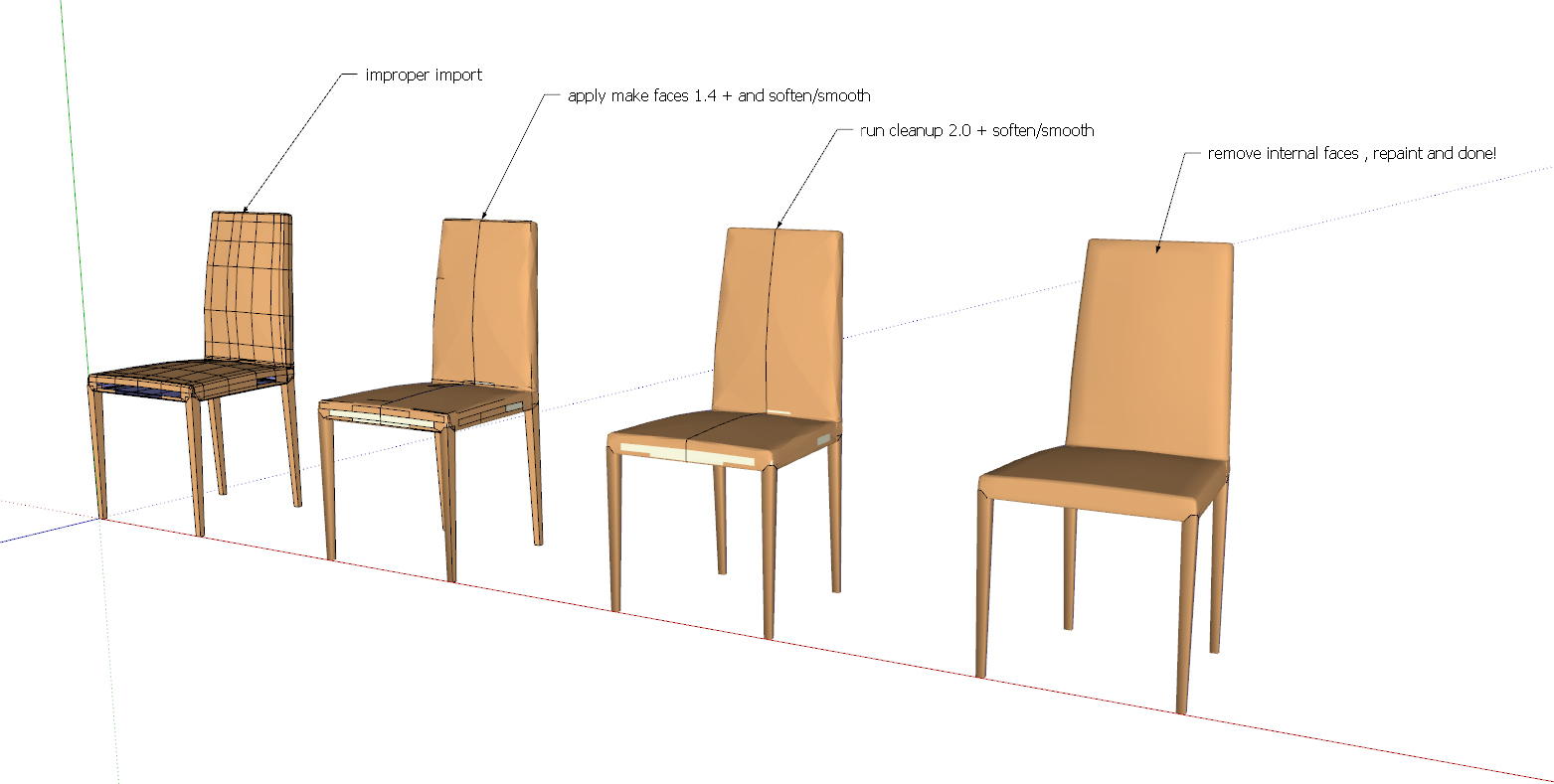
Here is an example of a simple (& not very pretty) chair that was imported improperly. running "make faces 1.4" (http://www.smustard.com/script/MakeFaces) closes the holes but creates some overlaps. using cleanup I remove the overlaps. manually remove internal faces, resmooth and repaint the surface and that's it. the chair is good to sit on, in no time.
wonderful!
-
This old one also

-
I imagined seeing a plugin that removes inner faces... and there it is!
Thanks Pilou!@unknownuser said:
This old one also
-
Regarding the extra faces after import to sketchup: Could this be a result of overlapping, or multiple instances of vectors with the same endpoints, but on different layers that were created in the cad program?




Hello! It looks like you're interested in this conversation, but you don't have an account yet.
Getting fed up of having to scroll through the same posts each visit? When you register for an account, you'll always come back to exactly where you were before, and choose to be notified of new replies (either via email, or push notification). You'll also be able to save bookmarks and upvote posts to show your appreciation to other community members.
With your input, this post could be even better 💗
Register Login


Advertisement