Zorro - How to section groups??
-
Hi everyone i'm using sketchup 7.1. Recently i downloaded the zorro plugin... It only sections loose geometry unfortunately. If I have a house model that has lots of groups and components .. how can i section that using zorro??
-
Have you got
Zorro 2?
http://forums.sketchucation.com/viewtopic.php?p=124862#p124862
It has a PDF guide that explains stuff quite clearly...
E.G. to cut groups/instances you use it holding down the Ctrl key...
It will also cut a model at a SectionPlane - so it can be used in conjunction with my SectionCutFace tool - there's a separate thread on that technique too...

-
Thanks TIG!!
 Actually I had zorro 1 installed.. Question..is it possible that for the components after using zorro... 2 different groups are made?? for example if there's a cube and i use zorro to make 1 section cut... then is it possible that 2 separate pieces of it will be formed??
 -
As I understand it [remember it's not my script] any 'cut' component is made_unique so there should be twp 'halves' with similar names ending in say #1 and #2 ?
If you don't want them as instances' select, explode and immediately 'group' - purge the model to remove unused guff... Remember to work on a copy ! -
@tig said:
any 'cut' component is made_unique so there should be twp 'halves' with similar names ending in say #1 and #2 ?
i don't get it. Are "groups" formed after slicing because im getting only loose geometry that's withing the group.. the screenshot wil make the thing clearer. I had 2 cuboids. Each one was a group.
Then I regrouped them to get a single set of two cubes.
Then I used zorro
I get the loose geometry in each of the cube.
 I suppose that I should get only two groups. One the upper half above the diagonal section line and 1 below it. I would get mad if i have to explode the whole model then group the necessary things all over again if the model is of a house or more complex..
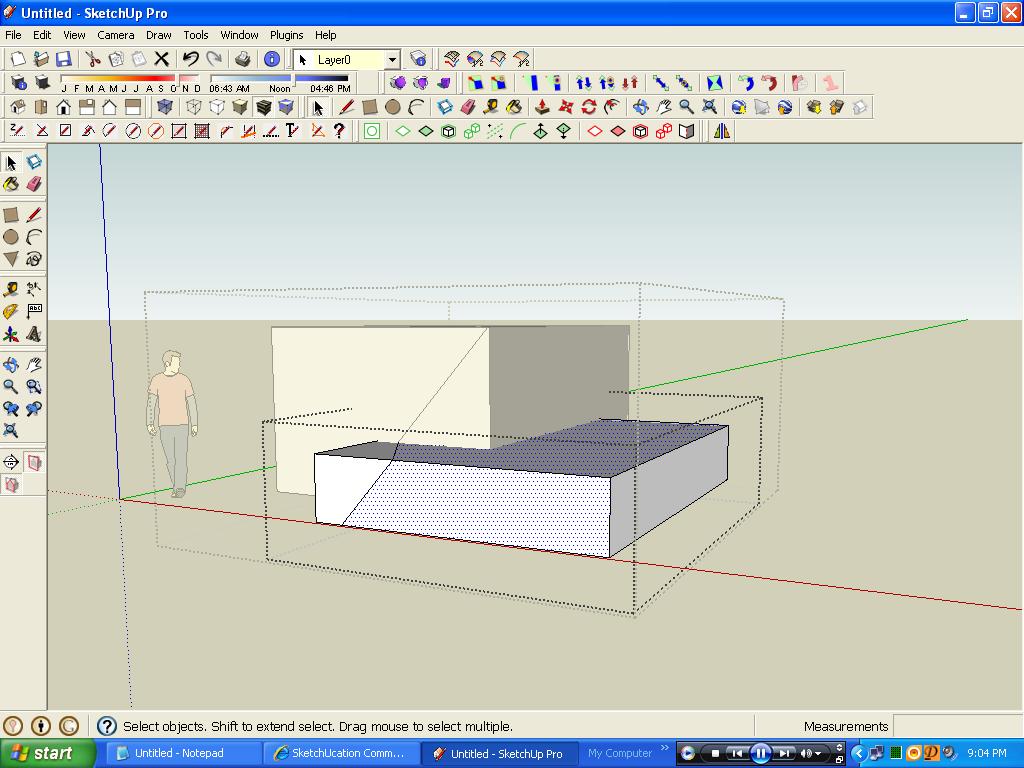
So should I get two groups.. each containing sliced up 2 cube sets?? or i'm doing the right way. ... only that the plugin doesn't offer that luxury??
-
The uniquefied cut component is renamed say #2 while others were #1 before ?
The cuts are made inside the component or group - it is not split in two it simply adds a dividing line and you erase the bits you don't want...
-
@tig said:
The uniquefied cut component is renamed say #2 while others were #1 before ?
The cuts are made inside the component or group - it is not split in two it simply adds a dividing line and you erase the bits you don't want...so 2 separate groups aren't formed??

Hello! It looks like you're interested in this conversation, but you don't have an account yet.
Getting fed up of having to scroll through the same posts each visit? When you register for an account, you'll always come back to exactly where you were before, and choose to be notified of new replies (either via email, or push notification). You'll also be able to save bookmarks and upvote posts to show your appreciation to other community members.
With your input, this post could be even better 💗
Register Login


Advertisement