sketchucation logo sketchucation
    • 登入
    Oops, your profile's looking a bit empty! To help us tailor your experience, please fill in key details like your SketchUp version, skill level, operating system, and more. Update and save your info on your profile page today!
    ⚠️ Important | Libfredo 15.8b introduces important bugfixes for Fredo's Extensions Update

    [Plugin] Andersen Window

    已排程 已置頂 已鎖定 已移動 Plugins
    31 貼文 18 Posters 38.6k 瀏覽 18 Watching
    正在載入更多貼文
    • 從舊到新
    • 從新到舊
    • 最多點贊
    回覆
    • 在新貼文中回覆
    登入後回覆
    此主題已被刪除。只有擁有主題管理權限的使用者可以查看。
    • J 離線
      jpalm32
      最後由 編輯

      Just found this on Anderson Window site. Sketchup plugin design any window and it creates a component.
      The detail of the window component is amazing.
      Can't believe I never heard of it.

      http://www.andersenwindows.com/servlet/Satellite/Architects/Page/Architects_Detail/1091556950140

      1 條回覆 最後回覆 回覆 引用 0
      • honoluludesktopH 離線
        honoluludesktop
        最後由 編輯

        Thanks for the link:-)

        1 條回覆 最後回覆 回覆 引用 0
        • E 離線
          errror404
          最後由 編輯

          can't believe nobody told me... 👊

          Downloading now

          1 條回覆 最後回覆 回覆 引用 0
          • KrisidiousK 離線
            Krisidious
            最後由 編輯

            not really a plugin as we describe them. but more a piece of support software.

            By: Kristoff Rand
            Home DesignerUnique House Plans

            1 條回覆 最後回覆 回覆 引用 0
            • gullfoG 離線
              gullfo
              最後由 編輯

              pretty nice tool. uses a plugin to connect to their modeling app and save it back as a component.
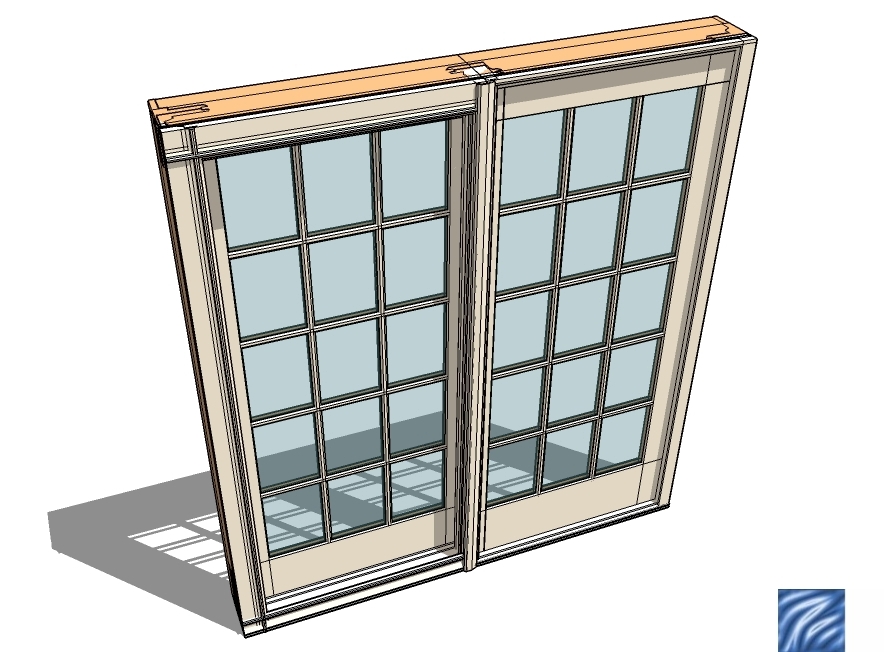

              door play.skp


              door play.jpg

              Glenn

              http://www.runnel.com

              1 條回覆 最後回覆 回覆 引用 0
              • KrisidiousK 離線
                Krisidious
                最後由 編輯

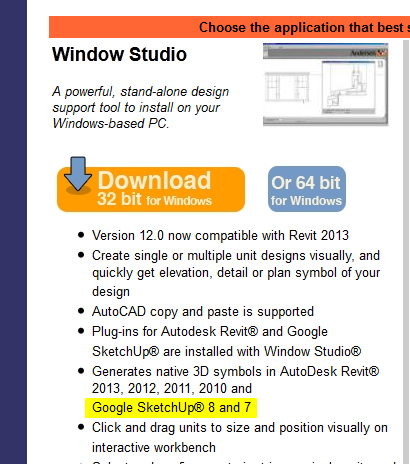
                what? I didn't see anything to do with sketchup? does the software itself save a SU file?

                ok I must be dense because I don't see anything about a component or SU anywhere...
                By: Kristoff Rand
                Home DesignerUnique House Plans

                1 條回覆 最後回覆 回覆 引用 0
                • thomthomT 離線
                  thomthom
                  最後由 編輯

                  @krisidious said:

                  what? I didn't see anything to do with sketchup? does the software itself save a SU file?

                  ok I must be dense because I don't see anything about a component or SU anywhere...

                  Windows Studio.png

                  Thomas Thomassen — SketchUp Monkey & Coding addict
                  List of my plugins and link to the CookieWare fund

                  1 條回覆 最後回覆 回覆 引用 0
                  • gullfoG 離線
                    gullfo
                    最後由 編輯

                    there is a sketchup -> plugins folder in the installed program directory, you copy the extension rb + the ini file to your SU plugins folder, and edit the ini file if you're not using the default path. when you open SU you have the 2 menu icons available in the Anderson menu (or via plugin list) to create or edit the objects. it then takes you to their modeling tool where you create the door or windows and save it back to SU. it's is then a component in SU. pretty nicely done actually. plus you can directly export from the tool to Revit or ACAD formats.

                    Glenn

                    http://www.runnel.com

                    1 條回覆 最後回覆 回覆 引用 0
                    • E 離線
                      errror404
                      最後由 編輯

                      I tried to install it in 3 different computers last night and I kept getting the same error...

                      error 2732.directory manager not initialized

                      (I'm tried in two windows 7 machines and one running XP )

                      Does anyone have an older version that I can try?

                      1 條回覆 最後回覆 回覆 引用 0
                      • pbacotP 離線
                        pbacot
                        最後由 編輯

                        Windows (PC) only, it seems 😠 The component looks very good.

                        Curious, is it over-heavy? I have tried some good looking door components only to find they gave unnecessary detail and polygons, not to mention layers and complication, to my models. Things like high-poly screws hidden inside hardware... 😒

                        I have also DL'd manufacturer components that are basically poorly made (for SU) and don't resemble the product. Easier to make your own.

                        MacOSX MojaveSketchUp Pro v19 Twilight v2 Thea v3 PowerCADD

                        1 條回覆 最後回覆 回覆 引用 0
                        • gullfoG 離線
                          gullfo
                          最後由 編輯

                          i agree, the components output are very detailed. i'd probably only use them on details and rendering models not general plans.

                          Glenn

                          http://www.runnel.com

                          1 條回覆 最後回覆 回覆 引用 0
                          • KrisidiousK 離線
                            Krisidious
                            最後由 編輯

                            ahhh thanks guys. I was feeling a bit stupid. thanks for walking me through it. they should really explain things more clearly. how did you ever find it?

                            By: Kristoff Rand
                            Home DesignerUnique House Plans

                            1 條回覆 最後回覆 回覆 引用 0
                            • J 離線
                              jpalm32
                              最後由 編輯

                              @krisidious said:

                              ahhh thanks guys. I was feeling a bit stupid. thanks for walking me through it. they should really explain things more clearly. how did you ever find it?

                              Got a news letter, went to the site and stumbled across it.
                              Why isn't it being promoted better? Don'r know.

                              1 條回覆 最後回覆 回覆 引用 0
                              • J 離線
                                jpalm32
                                最後由 編輯

                                With all due repect to those real plugin authors, someone needs to correct author of this plugin.
                                Some how I'm listed and given credit.
                                I just posted it.

                                1 條回覆 最後回覆 回覆 引用 0
                                • thomthomT 離線
                                  thomthom
                                  最後由 編輯

                                  @jpalm32 said:

                                  With all due repect to those real plugin authors, someone needs to correct author of this plugin.
                                  Some how I'm listed and given credit.
                                  I just posted it.

                                  You mean the plugin index - it's automatically generated by the poster of the thread.

                                  Thomas Thomassen — SketchUp Monkey & Coding addict
                                  List of my plugins and link to the CookieWare fund

                                  1 條回覆 最後回覆 回覆 引用 0
                                  • T 離線
                                    tomot
                                    最後由 編輯

                                    @gullfo said:

                                    i agree, the components output are very detailed. i'd probably only use them on details and rendering models not general plans.

                                    I support that argument, and add the following. In traditional contract documents you want to get the best price for your clients' windows. So its best not to include the name Anderson on your drawings, there are comparable other qualified window manufactures, that you want to get a bid from. Your better off using my window tools in the design stage, and leave
                                    the detailed profile drawings for the working drawing detail stage.

                                    [my plugins](http://thingsvirtual.blogspot.ca/)
                                    tomot

                                    1 條回覆 最後回覆 回覆 引用 0
                                    • I 離線
                                      Ivancho
                                      最後由 編輯

                                      Pretty awesome, Thanks 😄

                                      1 條回覆 最後回覆 回覆 引用 0
                                      • McGyverM 離線
                                        McGyver
                                        最後由 編輯

                                        Interesting... thanks for the heads-up.

                                        [Visit My ShareCG Freebie Gallery](http://www.ShareCG.com/pf/full_uploads.php?pf_user_name)

                                        1 條回覆 最後回覆 回覆 引用 0
                                        • N 離線
                                          nujak66
                                          最後由 編輯

                                          I quite like this Andersen window tool but....Does anyone know if there is a way to clean up (miter) the corners of the frame with this tool (or another quick plugin tool)? They don't seem to miter and look correct on there own.

                                          Thanks for the help.

                                          m.o.d.

                                          1 條回覆 最後回覆 回覆 引用 0
                                          • C 離線
                                            Chriso
                                            最後由 編輯

                                            Just ran across this post and wanted to share some info on how to reduce the extraneous lines in some of the Andersen dynamically generated windows. The Window Studio program creates virtual models that have all the detail you would want in 2D. They use that same engine to produce the geometry that goes into making the SKU component. And yes, sometimes there is just too much detail (especially in the corners of the sash frames).

                                            I found that I could edit the component and use the "Soften Edges" function to eliminate most of the lines. You end up with a really nice look too.

                                            I don't have screen caps and a full instruction doc, but here's how I did it

                                            1. Generate and place the window
                                            2. Select the unit and choose, "Edit Component"
                                            3. Use the Ctrl key and select all the frame elements
                                            4. R-Mouse click and choose "Soften/Smooth Edges"
                                            5. I run the slider until the lines in the corner of the frames goes away (near 100)
                                            6. For grilles, you need to select a grille member and choose "Edit Group"
                                            7. Then use the Ctrl and select each grille member (little tedious)
                                            8. When all selected, choose "Soften/Smooth Edges" and eliminate the lines (usually about 50)
                                            9. Sit back and see how cool your window looks
                                            10. Now do the interior, same procedure, if you need to

                                            WARNING!!!! These windows are dynamically generated, which means if you use their EDIT feature and make a change back in Window Studio, ALL YOUR CHANGES MADE IN SKU WILL DISAPPEAR. Smoothing the window is like the last thing you do once you have all the other decisions made.

                                            And the andersenwindows.com site was refreshed and this is how you download the program:

                                            1. From home page go to "For Professionals"
                                            2. From Professionals, click on "Window Studio and Windowsymbols for Revit and SketchUp...."
                                            3. Scroll down to Window Studio and click on "Get Window Studio for 32bit or 64 bit Windows PC"
                                            4. Fill out the form and get a download link

                                            Oh yeah, and it's free too!
                                            Enjoy

                                            1 條回覆 最後回覆 回覆 引用 0
                                            • 1
                                            • 2
                                            • 1 / 2
                                            • 第一個貼文
                                              最後的貼文
                                            Buy SketchPlus
                                            Buy SUbD
                                            Buy WrapR
                                            Buy eBook
                                            Buy Modelur
                                            Buy Vertex Tools
                                            Buy SketchCuisine
                                            Buy FormFonts

                                            Advertisement


