[Plugin] View Direction (1.0.0) — 13 March 2010
-
Access:
View -> View Direction[flash=600,338:5k1u441o]http://www.youtube.com/v/iYPkE9DZ8FM[/flash:5k1u441o]
Overview:
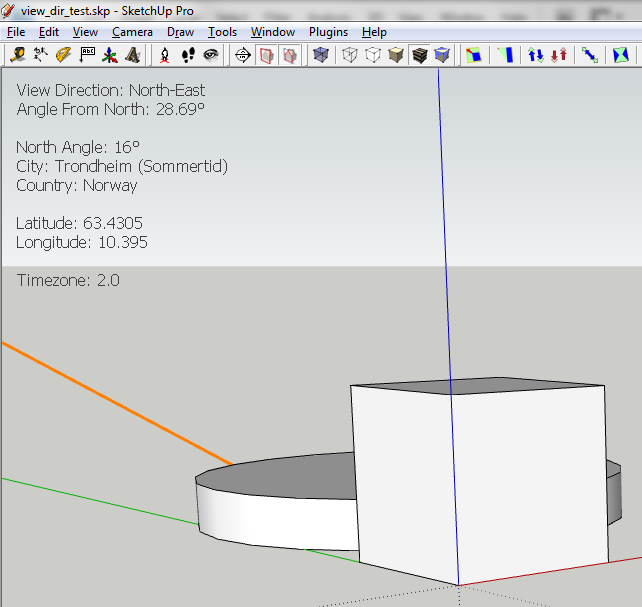
When activated it adds a note acting as a Head Up Display with location info about the model and the camera angle in relationship to the north angle. This HUD will update the info instantly as it changes."View Direction: North" means you are looking towards north.
To deactivate the HUD, either use the menu system or simply delete the note.
You can move the note around to your pleasing using the Move tool.
Compatible:
- SU7
- PC
Other versions and systems untested.
-
Looks very useful for all the obvious reasons. Well done, sir.
-
very nice. another script that should be part of SU to begin with. man i wish all you great script writters could get together and create a 3D program of your own, i just know it kick some serious a$$.

btw, whats the orange line in your image?
-
@xrok1 said:
btw, whats the orange line in your image?
The North angle. You turn it on from under
Model -> Location. -
I knew I needed but didn't expect to see.

Thanks
-
Cool plugin, Thomas.
Thanks!
_KN




Hello! It looks like you're interested in this conversation, but you don't have an account yet.
Getting fed up of having to scroll through the same posts each visit? When you register for an account, you'll always come back to exactly where you were before, and choose to be notified of new replies (either via email, or push notification). You'll also be able to save bookmarks and upvote posts to show your appreciation to other community members.
With your input, this post could be even better 💗
Register Login


Advertisement