SketchUp & Vray Expert needed
-
Hi,
OK, I'm here at gone 2.pm and and pulling out what little is left of my hair!
I am trying to add people and other items to my scene.
I have saved the PNGs and the corresponding alpha channel.
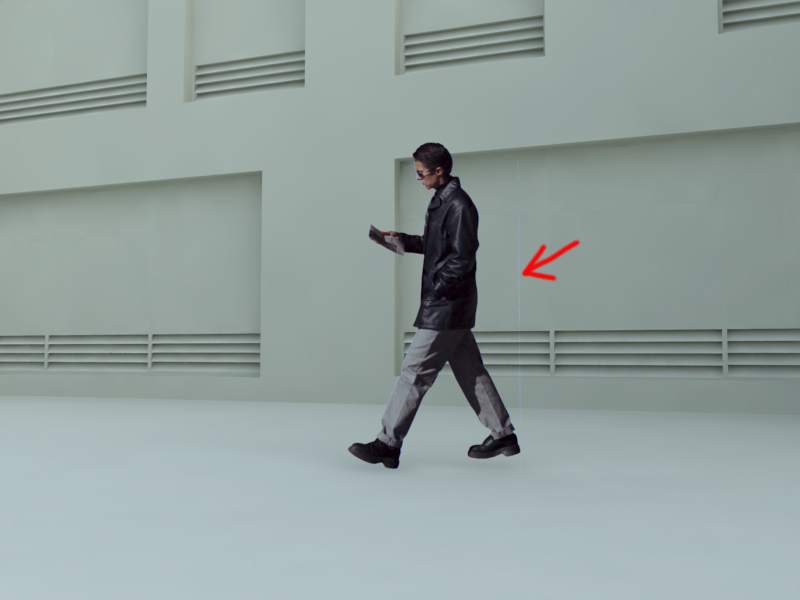
But when I render there is always a faint (blue?) line showing at the edges of the face I have textured.
I have checked them in Photoshop ensuring all the edges are transparent pixels.
I have tried moving the lines inward slightly to come in tight on the image.
Still no joy!I have attached an image so you can see what I am talking about.
Hope someone can help me.Thanks.
Albion Man
-
It is the transparent pixels themselves that's like that. Don't have a link at hand - but there is a trick to avoid that. (sorry - I go to run don't have time to explain. should be some thread in ASGVis forum.)
-
i suspect there are still black pixels left at the edges of your alpha channel. you can check it in your photo editing software.
-
Hi,
Sorry for the delay in replying I had to meet a deadline.
I gave up in the end and used the silhouette people provided in SketchUp.
Simply coloured them white with a 50% transparency setting.
It worked out quite well, but I still wasted a lot of time trying to find a solution to the annoying blue fringe of pixels that showed up.
As I said, I checked them in Photoshop ensuring all the edges are transparent pixels.If anyone can tell me how to solve this problem I would appreciate it.
I have attached another picture showing a man and tree with this annoying problem.
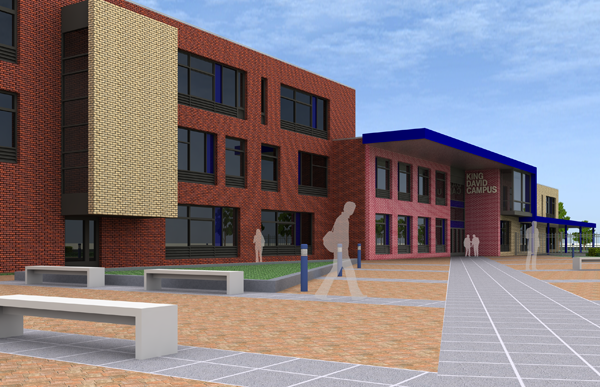
I have also attached another image showing the final image I was working on.Regards
Albion Man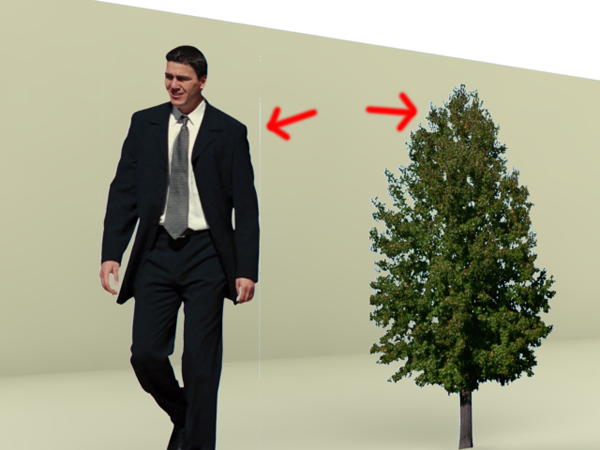
-
-
Hi thomthom,
Thanks for those links.
Nice to know there is a solution to this problem.I had a quick look at the ASGvis forums concerning some other topics.
Think I will stay away from the new updated version of Vray for a while.
Looks like they still have quite a few wrinkles to sort out.Are you an official beta tester?
What do you think of the new version?One other thing, I am looking for a good grass material for vray.
The type I am looking for is shown here:
http://forum.asgvis.com/index.php?topic=4567.0But the link is broken.
Do you have any idea where I can get it from?Sorry to pose these questions here but this forum is much more user friendly than the ASGvis one.
Thanks.
-
@albion man said:
Think I will stay away from the new updated version of Vray for a while.
Looks like they still have quite a few wrinkles to sort out.Are you an official beta tester?
What do you think of the new version?Yes - I've been a beta tester since the beta first started up.
There are some issues - yes. I had originally planned to stay with 1.05.30 until the patch came out, but I had a model at the office that took ages to parse with the old version - and the new parsed it so quickly that I risked it. So far it's been going fine with only minor hickups. I've been working with simple clean new scenes - not any existing ones - so that has probably made be avoid many of the issues.But this release is generally very good. When the patch comes out it'll be brilliant. V-Ray materials follow the Sketchup materials so we can copy between models and make components with V-Ray materials already set up. AO, render frame, IES and alpha channel support are great additions.
@unknownuser said:
There's lots of material under the Download section at ASGVis
There's lots of material under the Download section at ASGVis website.

Hello! It looks like you're interested in this conversation, but you don't have an account yet.
Getting fed up of having to scroll through the same posts each visit? When you register for an account, you'll always come back to exactly where you were before, and choose to be notified of new replies (either via email, or push notification). You'll also be able to save bookmarks and upvote posts to show your appreciation to other community members.
With your input, this post could be even better 💗
Register Login


Advertisement