[Plugin] Extrude Edges by Rails by Face
-
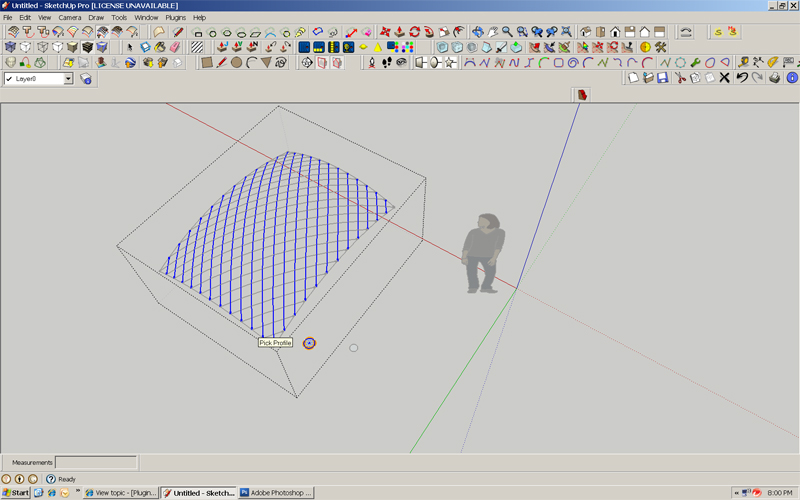
Ok, I'm inside a group of exploded rails with a circle and point. How do I select the rails after the command prompts to select them?
If i put them inside the group of exploded curves w the circle and point, it will break the perimeter curves in itty bitty lines and does not work.Thanks Tig! sorry for my density

-
You have the two sets of diagonal curves in separate groups [the curves should be exploded from their individual subgroups].
Process each set in turn.
You first add the circle and cpoint into the group [you are in the group-edit?].
Now Edit>SelectAll.
Everything inside the group is selected.
Now run EEbyFace, answer 'Yes' to continue when it tells you that the curves are 'in bits', and the circle is extruded along each curve.
Repeat for the other set of curves.
Do a similar operation of the profile/rail curves if you want edge tubes.
You CAN explode the groups etc together IF you want to, then select all and intersect together to form 'cuts' as the tubes pass through each other...
-
Thanks Tig, I got it! I was using the wrong command when I should have been using EEbyFace not faces not face and rail, but "extrude edges by face" . duh!

-
Please help!!! "Extrude Edges by Lines" does not work with edges and circles as the path. The Edge does not rotate at the center of the circle.

-
Devran
You seem to be using a different tool than the one for this forum - EEbyEdges doing what it does !
If you want to extrude a circle [with a face] along a path there's the built-in FollowMe, or perhaps FollowMeAndKeep, or my EEbyRailsByFace etc...
Please explain a bit more, and/or post a SKP...
-
Sorry You are right, I should have used "Extrude edges by rails Forum" I will Post it there again...
-
I have been looking for years for plugins to do the things like what you are doing TIG. You rock!!!!!! Thank you for all that you do!
-
Hello, I'm new here. I have been using that plugin for my own personal projects until at one point, I encounter a problem. I noticed this plugin can only work with any types of curves or arcs. But what about 2 curve/arcs and 2 straight that would get me what I wanted to build something like the waffle pattern.
good example is:
https://imgur.com/a/c6GTFmz@Tig, Can you improve the Extrude edges by rails by faces tool to have unlimit feature where i can use either straight line or arc/curve lines?
-
Just divide the straight lines into a few segments and weld them back together, then they will be seen as a 'curve'.
-
@box said:
Just divide the straight lines into a few segments and weld them back together, then they will be seen as a 'curve'.
Ah. that method worked.
I didn't think of that method where I can weld the straight line after being divided.
that was the last method I missed when I was having trouble with how to use the tool.
Thank you for helping me out and that solved my problem.
EDIT 1:
what Black arrows are pointing at is the rails (the straight lines) not being at the correct angle (referring to red line)
Is there a way I can fix this?




Advertisement